
Abstract
CyberJunkie started out as a junior QA Analyst at his friend’s startup. He called the CEO of the startup because he believed he had mistakenly downloaded something malicious. The CEO sought help from you, his friend in the cybersecurity field. You sent him a guide on collecting evidence from the machine using KAPE. Now you have been given the forensic image so you can analyze and help your friends, as they cannot afford to hire an MSSP.
The provided evidence consists out of an email (EML) and a disk image (VHDX)
Questions
Question 1
What is the Subject/topic of the Phishing email?
As the email is just a plain text file I can read the Subject: line directly (and it’s also the name of the file).
$ grep -P "^Subject:" Special\ Party\ Invitation\ from\ JANET\ CARNAHAN.eml
Subject: Special Party Invitation from JANET CARNAHAN
Special Party Invitation from JANET CARNAHAN
Question 2
What is the malicious URI that the malicious link redirected to?
Within the body of the email there’s HTML with the link in the <a> element. The whole text is encoded as quoted-printable1.
$ tail -n10 Special\ Party\ Invitation\ from\ JANET\ CARNAHAN.eml
Content-Type: text/html; charset="UTF-8"
Content-Transfer-Encoding: quoted-printable

<div dir=3D"ltr">Please find your exclusive invitation at the following <a =
href=3D"https://pomi.digital/premium?__cf_chl_tk=3D6SX3C1utT5mfbwmflZyMDU.W=
ICiyPkGsBkaOTitVBss-1772039836-1.0.1.1-JvMwxVsDmAF0zIVuaF0XNh73a8usyjzPeFDO=
JpaT4j8">link</a><br><br>We look forward to welcoming you at the=C2=A0event=
.<br><br>Regards<br>Janet</div>

--0000000000000e2a17064c33ec9d--
This is unfortunately just the initial link and the final location might differ. As this won’t be visible from the mail body alone, I mount the VHDX image. Windows makes this easy by just double-clicking the file and it gets mounted as new volume.
It contains the files retrieved by KAPE and I look for browser artifacts. The user cyberjunkie was using Edge and its History file can be found at %localappdata%\microsoft\edge\user data\default. Despite not having an extension it’s just SQLite3 database with several different tables.
All the visited URLs are captured in urls and there I can see the link from the email as well as the 5 redirects that followed until the user arrived on pomi.digital/premium/windows_download.php.
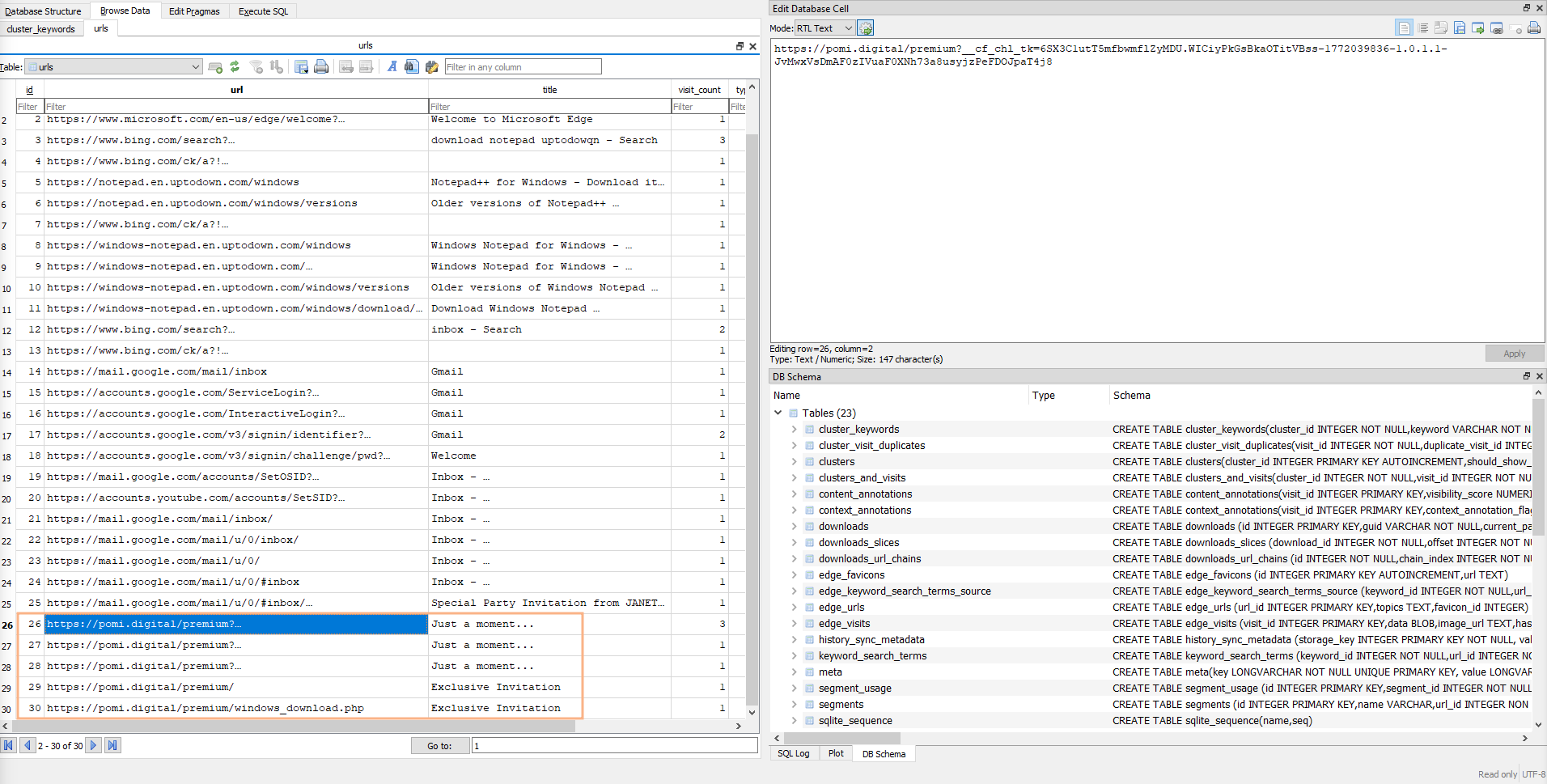
https://pomi.digital/premium/windows_download.php
Question 3
What is the name of the downloaded file?
Switching over to the downloads table I find a single entry. Based on the column tab_url a file was downloaded from the previously identified page as premium.exe to C:\Users\cyberjunkie\Downloads\.
premium.exe
Question 4
When was the downloaded file executed by the victim according to Amcache?
The Amcache.hve is located in C:\Windows\AppCompat\Programs and can be parsed with AmcacheParser. Doing so drops multiple CSV files with (more or less) interesting data to disk. Within _UnassociatedFileEntries there’s also a line for premium.exe with a Last Write timestamp.
2026-03-04 16:44:33
Question 5
What is the SHA256 hash of the malicious executable downloaded from the phishing Website?
Amcache.hve only contains SHA1 hashes, but with that I can look up the file on VirusTotal to also get its SHA256.
af240a2c2a4b42e3a130f47ccaab9aa2e20a1a586bc959ee9efd7475055ea7e3
Question 6
The user executed the file, but no invitation appeared or was found. They then used Microsoft Defender to scan the file. When was this scan initiated?
Windows Defender has its own log in C:\Windows\system32\winevt\logs. In the Windows Defender Operational file a 1000 is recorded when a new scan has been started2. Even though the log contains multiple such events, there’s only one from cyberjunkie.
2026-03-04 16:48:00
Question 7
The malware installed a Remote Monitoring and Management (RMM) tool as a backdoor for potential remote access. What was the service name?
Windows tracks new service installs with two event IDs, 4967 and 7045. Based on the execution timestamp, the entries in the System log can be narrowed to a single one where CentraStage was installed and points to C:\Program Files (x86)\CentraStage\CagService.exe.
CentraStage
Question 8
The malicious backdoor installation time stomped the RMM executables. What was the modified timestamp set to these executables?
The $MFT records several different timestamps for each file. For CagService.exe the Created time differs from 0x10 (Standard Information) and 0x30 (File Name). The former can be modified by a regular user and if its before the other it can be an indicator for timestomping.
2026-02-09 07:56:40
Question 9
What is the name of the company whose product is the RMM tool?
A simple search for CentraStage finds the vendor. This is also recorded in the SYSTEM hive within the service display name.
Datto
Question 10
Pivoting back to the malicious link, when was the domain registered?
Looking up the domain pomi.digital on VirusTotal provides the registration timestamp from the Registration Data (RDAP).
2026-02-20 01:06:05
Question 11
Utilizing threat intelligence sources, what is another name for the executable that was initially downloaded?
The report from Question 5 also lists other names for the same binary.
5bxrx.exe